

Transactions
Refunding Transactions
Send funds back to the source of a transaction.
In general, when you refund a transaction, Blnk reverses the money movement from the original - funds return from the destination balance to the source balance.
Blnk records the reversal as a new transaction; the original record is not modified. You can refund each original transaction only once. A second attempt returns 409 TXN_ALREADY_REFUNDED and does not move balances.
Which transactions can be refunded
Not every transaction can be refunded. Refund eligibility depends on the transaction’s status and the type of transaction you want to refund.
For inflight or split transactions, the ID you pass matters. Use the table below to understand which transaction ID to send and what Blnk does with it.
| Transaction ID | Refundable? | Notes |
|---|---|---|
APPLIED | Yes | The source and destination balances are reversed. |
INFLIGHT | Yes | Only if the inflight transaction has been committed or voided. |
QUEUED | Yes | Refunds all child APPLIED transactions linked to the queued parent. Use the meta_data.QUEUED_PARENT_TRANSACTION to refund. |
VOID | No | To refund a voided transaction, use its parent inflight transaction ID instead. |
SCHEDULED, REJECTED | No | Not refundable. |
Applying refunds
Using the API
Request a refund
Use the Refund transaction API and pass the transaction_id of the transaction you want to refund.
You can optionally set description and meta_data on the refund. Learn more.
By default, refunds are queued with skip_queue: false.
The initial response returns status: "QUEUED" and sets the refund reference to {original_txn_id}_refund.
When the queue processes the refund, Blnk creates the final applied transaction with the reference {original_txn_id}_refund_q, following the same _q convention used for other queued transactions.
curl -X POST "http://YOUR_BLNK_INSTANCE_URL/refund-transaction/{transaction_id}" \
  -H "X-blnk-key: <api-key>"
const response = await blnk.Transactions.refund(
'{transaction_id}',
);txn, _, _ := client.Transaction.Refund("{transaction_id}")response = blnk.transactions.refund(
"{transaction_id}",
)ApiResponse<JsonNode> response = blnk.transactions().refund("{transaction_id}");{
"amount": 50,
"amount_string": "50",
"precision": 100,
"precise_amount": 5000,
"transaction_id": "txn_af70986c-fbdc-450a-bf81-c1af034ce840",
"parent_transaction": "txn_b0468e80-5941-4ca8-b5d2-e44f4572926e",
"source": "bln_f76360da-68db-410d-8a8b-1d960e2a766f",
"destination": "bln_b1bd741e-eeb6-4dd4-a562-df35374bbaf9",
"reference": "txn_b0468e80-5941-4ca8-b5d2-e44f4572926e_refund",
"currency": "USD",
"description": "Card payment on Stripe",
"status": "QUEUED",
"allow_overdraft": false,
"inflight": false,
"created_at": "2024-11-26T09:33:35.265582042Z"
}To apply the refund immediately, set skip_queue: true in the request body.
curl -X POST "http://YOUR_BLNK_INSTANCE_URL/refund-transaction/{transaction_id}" \
  -H "X-blnk-key: <api-key>" \
  -H "Content-Type: application/json" \
  -d '{
    "skip_queue": true
  }'
const response = await blnk.Transactions.refund(
'{transaction_id}',
{ skip_queue: true },
);txn, _, _ := client.Transaction.Refund(
"{transaction_id}",
&blnkgo.RefundTransactionRequest{
SkipQueue: true,
},
)response = blnk.transactions.refund(
"{transaction_id}",
{"skip_queue": True},
)ApiResponse<JsonNode> response = blnk.transactions().refund(
"{transaction_id}",
RefundTransactionRequest.create()
.skipQueue(true));{
"amount": 50,
"amount_string": "50",
"precision": 100,
"precise_amount": 5000,
"transaction_id": "txn_4c8be5c7-7c40-493f-b4a1-c09fcf8e7e7b",
"parent_transaction": "txn_b0468e80-5941-4ca8-b5d2-e44f4572926e",
"source": "bln_f76360da-68db-410d-8a8b-1d960e2a766f",
"destination": "bln_b1bd741e-eeb6-4dd4-a562-df35374bbaf9",
"reference": "txn_b0468e80-5941-4ca8-b5d2-e44f4572926e_refund",
"currency": "USD",
"description": "Card payment on Stripe",
"status": "APPLIED",
"allow_overdraft": false,
"inflight": false,
"created_at": "2024-11-26T09:33:35.265582042Z"
}Using the Dashboard
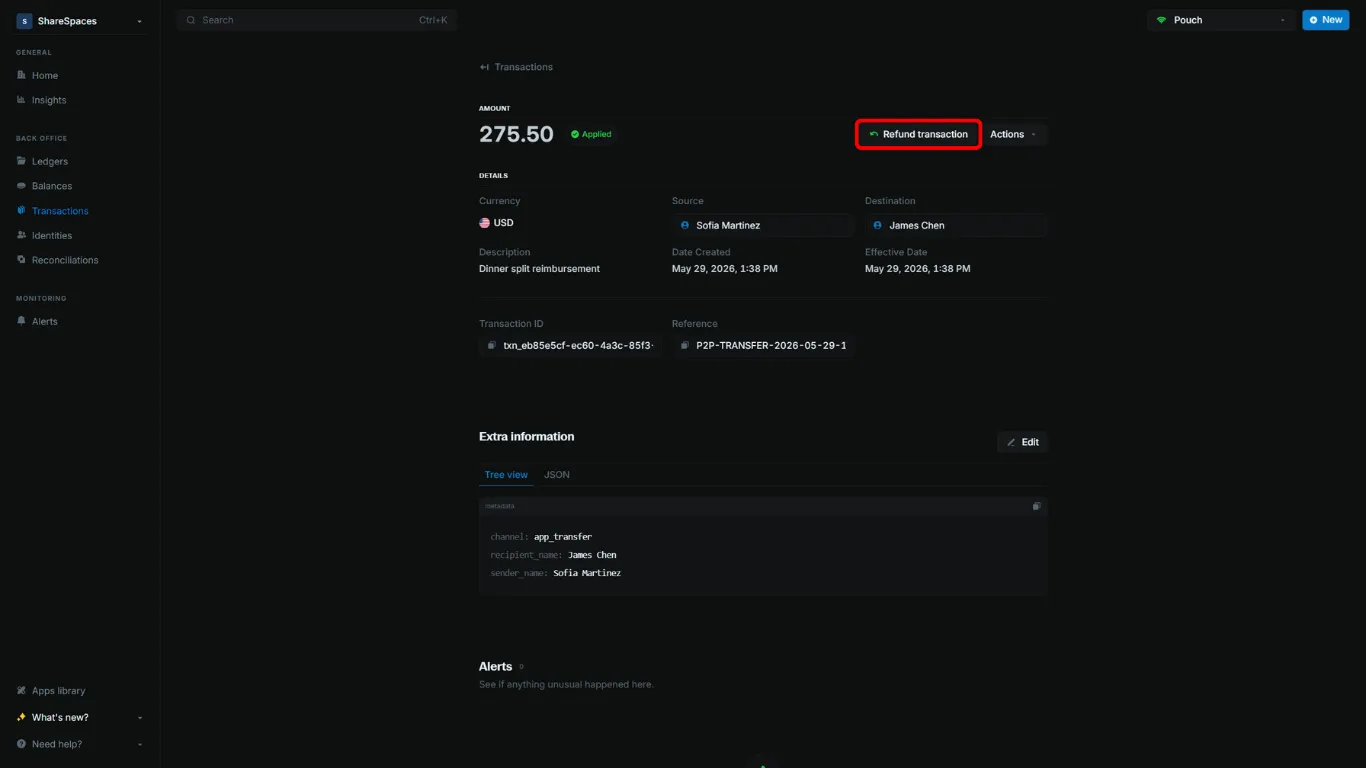
Refunding sends the funds back to the source and creates a linked refund record.
Open Refund transaction
Open the transaction, then click Refund transaction or press R.
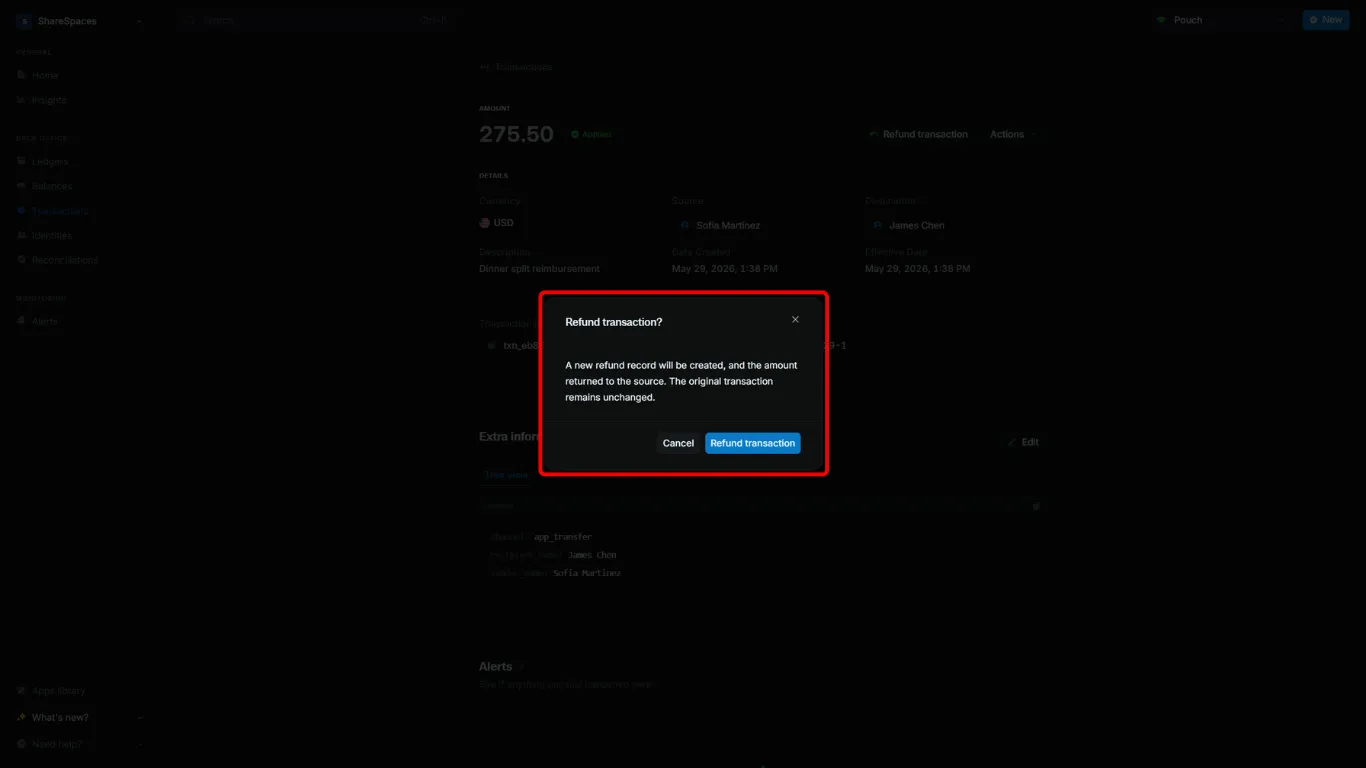
Confirm the refund
In the confirmation, click Refund transaction.
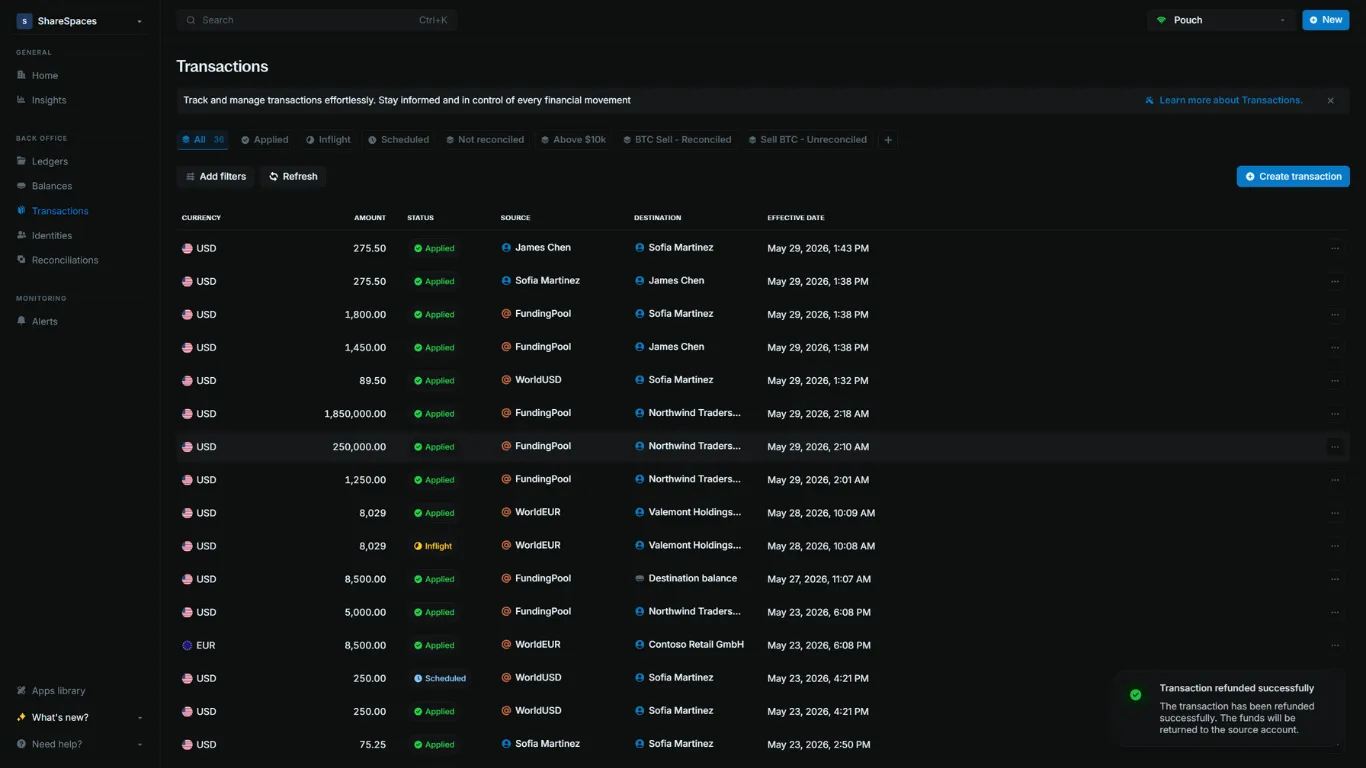
Read the result
A new linked refund record is created with status APPLIED.
Description and metadata
By default, a refund copies the original transaction’s description and meta_data. You can set these on the refund itself.
descriptionreplaces the inherited narration. An empty string is ignored.meta_datais merged onto the inherited metadata. Keys you send replace matching keys; other keys stay on the refund.- The original transaction is not modified.
curl -X POST "http://YOUR_BLNK_INSTANCE_URL/refund-transaction/{transaction_id}" \
  -H "X-blnk-key: <api-key>" \
  -H "Content-Type: application/json" \
  -d '{
    "description": "Refund for ticket #4821",
    "meta_data": {
      "type": "refund",
      "reason": "goodwill"
    }
  }'
If the original transaction has {"type": "deposit", "channel": "card"} and you send {"type": "refund", "reason": "goodwill"}, the refund stores:
{
  "type": "refund",
  "channel": "card",
  "reason": "goodwill"
}
Refunding inflight transactions
Only inflight transactions that have been committed or voided can be refunded. Active inflight holds cannot be refunded.
Always pass the original INFLIGHT transaction ID to the API, not the ID of its APPLIED or VOID child.
Pass the inflight transaction ID.
Blnk reverses the committed amount the same way it refunds a standard APPLIED transaction.
curl -X POST "http://YOUR_BLNK_INSTANCE_URL/refund-transaction/{inflight_transaction_id}" \
  -H "X-blnk-key: <api-key>"
const response = await blnk.Transactions.refund(
'{inflight_transaction_id}',
);txn, _, _ := client.Transaction.Refund("{inflight_transaction_id}")response = blnk.transactions.refund(
"{inflight_transaction_id}",
)ApiResponse<JsonNode> response = blnk.transactions().refund("{inflight_transaction_id}");Pass the inflight transaction ID. Do not pass the VOID child transaction ID.
Blnk restores the voided amount as a reverse-direction INFLIGHT hold instead of applying it immediately.
curl -X POST "http://YOUR_BLNK_INSTANCE_URL/refund-transaction/{inflight_transaction_id}" \
  -H "X-blnk-key: <api-key>"
const response = await blnk.Transactions.refund(
'{inflight_transaction_id}',
);txn, _, _ := client.Transaction.Refund("{inflight_transaction_id}")response = blnk.transactions.refund(
"{inflight_transaction_id}",
)ApiResponse<JsonNode> response = blnk.transactions().refund("{inflight_transaction_id}");Refunding split transactions
Use this flow when the original payment was a multiple sources or multiple destinations split.
Confirm the original used the queue
Refunding the entire split in one call only works when the original transaction request uses the queue (skip_queue: false).
When you submit the split, Blnk returns a queued parent response. Each child leg is recorded separately and linked through meta_data.QUEUED_PARENT_TRANSACTION:
{
  "precise_amount": 3000000,
  "amount": 30000,
  "amount_string": "30000",
  "precision": 100,
  "transaction_id": "txn_0b59f6e6-6c4a-4efa-915c-526f77ef61ab",
  "parent_transaction": "",
  "source": "bln_92e4b9b6-0b85-4ef4-87a2-682c31500d38",
  "reference": "ref_001adcfgf",
  "currency": "USD",
  "description": "Payment from Sarah",
  "status": "QUEUED",
  "skip_queue": false,
  "destinations": [
    {
      "identifier": "bln_f2073f6b-905a-4e3e-b5a2-8d1b3dc2fb7f",
      "distribution": "20%",
      "transaction_id": "txn_59347177-aa7e-d8ad-9f4f-d09628b32ec3"
    },
    {
      "identifier": "bln_64c50fb5-32d5-4f78-9f4a-e8b01aaf025d",
      "distribution": "10000",
      "transaction_id": "txn_7ddc8d4f-3b77-4b7d-a37f-240216ab074c"
    },
    {
      "identifier": "bln_7d98dfe9-5c3e-4c9b-b96a-65f6d9f7b89b",
      "distribution": "left",
      "transaction_id": "txn_5aad04dd-ed53-4f77-9f01-4916d31fac5f"
    }
  ],
  "created_at": "2025-09-18T01:26:30.648049042Z",
  "meta_data": {
    "QUEUED_PARENT_TRANSACTION": "txn_0b59f6e6-6c4a-4efa-915c-526f77ef61ab"
  }
}
Refund using the queued parent ID
Use the value in meta_data.QUEUED_PARENT_TRANSACTION as the ID to refund.
Keep skip_queue: false so all legs refund together.
curl -X POST "http://YOUR_BLNK_INSTANCE_URL/refund-transaction/{queued_parent_transaction_id}" \
  -H "X-blnk-key: <api-key>" \
  -H "Content-Type: application/json" \
  -d '{"skip_queue": false}'
const response = await blnk.Transactions.refund(
'{queued_parent_transaction_id}',
{ skip_queue: false },
);txn, _, _ := client.Transaction.Refund("{queued_parent_transaction_id}")response = blnk.transactions.refund(
"{queued_parent_transaction_id}",
{"skip_queue": False},
)ApiResponse<JsonNode> response = blnk.transactions().refund(
"{queued_parent_transaction_id}",
RefundTransactionRequest.create()
.skipQueue(false));Blnk refunds every APPLIED child from its destination back to its source. The response matches the shape in Applying refunds.
Error handling
Refunds that cannot be applied return 404 Not Found or 409 Conflict.
From 0.15.4, a second refund of the same transaction returns TXN_ALREADY_REFUNDED instead of GEN_CONFLICT, and does not reverse the original refund. When you refund a parent and some legs fail for mixed reasons, Blnk returns GEN_CONFLICT.
| Code | When it happens |
|---|---|
TXN_NOT_FOUND | No refundable transaction exists for the ID you sent. |
TXN_ALREADY_REFUNDED | The original transaction was already refunded. |
GEN_CONFLICT | A parent refund had mixed outcomes (some legs already refunded, others failed for a different reason). |
{
  "error": "transaction txn_626d9a16-0a34-43e4-9db4-0a4cf26ade7c has already been refunded",
  "error_detail": {
    "code": "TXN_ALREADY_REFUNDED",
    "message": "transaction txn_626d9a16-0a34-43e4-9db4-0a4cf26ade7c has already been refunded"
  }
}
To resolve the error:
| Code | What to do |
|---|---|
TXN_NOT_FOUND | Confirm the ID is the original APPLIED or queued parent, not a VOID child. |
TXN_ALREADY_REFUNDED | Treat the refund as complete. Do not retry. |
GEN_CONFLICT | Inspect the failed legs. Retry only legs that are still refundable. |
See API error codes for the full catalogue. If you upgrade from 0.15.3 or earlier, review the 0.15.4 migration guide.