

- Import into deployment: bring data from an external PostgreSQL database into Blnk Cloud
- Export from deployment: send data from Blnk Cloud to an external PostgreSQL database
Prerequisites
You need to ensure the following are online before to run a successful migration to Blnk Cloud:- An active running deployment on Blnk Cloud. If you don’t have one yet, See Managed instances.
-
Full connection URL of your external/self-hosted Postgres DB e.g.
How to run a migration
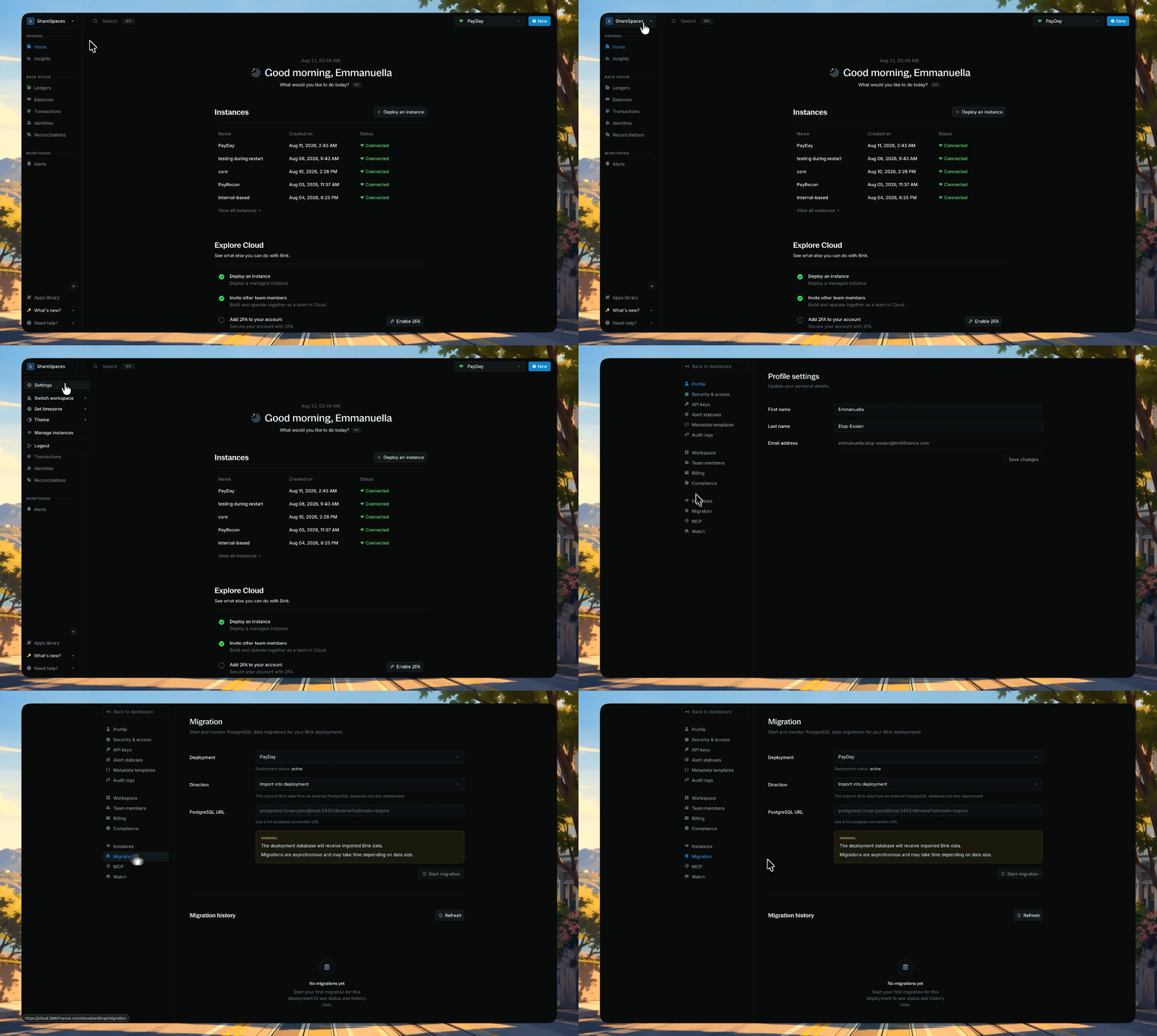
Go to Settings → Migration, select a deployment and direction, paste your PostgreSQL URL, then start the migration
- Go to Settings → Migration
- Select your deployment
-
Choose a direction:
- Import into deployment
- Export from deployment
- Paste your PostgreSQL URL
- Click Start migration and confirm
- Avoid making changes to your data during migration (to prevent conflicts)
pending > running > succeeded/failed).
After the migration
On your Cloud workspace:- Confirm that ledgers, balances, transactions, and identities look correct in the dashboard or your usual tools.
- Compare record counts or spot-check key data against the source database.
- Test your workflows on the new deployment to confirm that everything works great, before switching to production.