

Identities
PII Tokenisation in Blnk
Replace sensitive identity fields with tokens, and read the original values back.
PII tokenization replaces a sensitive identity field with a token. Blnk keeps the token on the identity, and returns the original value only when you detokenize that field.
Detokenize reads the value and does not write the original back onto the identity. Updating the identity or its metadata does not clear the tokenization record. A client cannot set or erase tokenized_fields.
Turn it on with a tokenization_secret that is exactly 32 bytes. See Server security.
Tokenizable fields
Identity JSON uses snake_case. Tokenize and detokenize use the PascalCase name. They are not interchangeable. first_name returns IDT_FIELD_NOT_TOKENIZABLE. FirstName is the name Blnk accepts.
| Identity JSON field | Tokenization name |
|---|---|
first_name | FirstName |
last_name | LastName |
other_names | OtherNames |
email_address | EmailAddress |
phone_number | PhoneNumber |
street | Street |
post_code | PostCode |
Use the PascalCase name in the URL and in the fields array. Blnk stores a format-preserving token in the field. The token starts with FPT: and keeps the shape of the original value, so an email still has an @ and a domain.
Tokenize one field
Call Tokenize field. The field must be in the table above, and it must not already be tokenized.
curl -X POST "http://localhost:5001/identities/{identity_id}/tokenize/EmailAddress" \
  -H "X-blnk-key: <api-key>"
const response = await blnk.Identity.tokenizeField(
'idt_3b63c8da-af29-4cc3-ad38-df17d87456e6',
'EmailAddress',
);tokenized, _, _ := client.Identity.TokenizeField(
"idt_3b63c8da-af29-4cc3-ad38-df17d87456e6",
string(blnkgo.TokenizableFieldEmailAddress),
)response = blnk.identity.tokenize_field(
"idt_3b63c8da-af29-4cc3-ad38-df17d87456e6",
"EmailAddress",
)ApiResponse<JsonNode> response = blnk.identity().tokenizeField(
"idt_3b63c8da-af29-4cc3-ad38-df17d87456e6",
"EmailAddress");| Field | Description | Required |
|---|---|---|
identity_id | Identity that holds the field. | Yes |
field | PascalCase field name, such as EmailAddress. | Yes |
{
  "message": "Field tokenized successfully"
}| Field | Description |
|---|---|
message | Confirms the field is now a token. |
Tokenize several fields
Using the API
Call Tokenize identity with at least one field. Blnk tokenizes them in order and stops on the first field that fails.
curl -X POST "http://localhost:5001/identities/{identity_id}/tokenize" \
  -H "X-blnk-key: <api-key>" \
  -H "Content-Type: application/json" \
  -d '{
    "fields": ["FirstName", "LastName", "EmailAddress", "PhoneNumber"]
  }'
const response = await blnk.Identity.tokenize(
'idt_3b63c8da-af29-4cc3-ad38-df17d87456e6',
{
fields: ['FirstName', 'LastName', 'EmailAddress', 'PhoneNumber'],
},
);tokenized, _, _ := client.Identity.Tokenize(
"idt_3b63c8da-af29-4cc3-ad38-df17d87456e6",
blnkgo.TokenizeRequest{
Fields: []blnkgo.TokenizableIdentityField{
blnkgo.TokenizableFieldFirstName,
blnkgo.TokenizableFieldLastName,
blnkgo.TokenizableFieldEmailAddress,
blnkgo.TokenizableFieldPhoneNumber,
},
},
)response = blnk.identity.tokenize(
"idt_3b63c8da-af29-4cc3-ad38-df17d87456e6",
{
"fields": ["FirstName", "LastName", "EmailAddress", "PhoneNumber"],
},
)ApiResponse<JsonNode> response = blnk.identity().tokenize(
"idt_3b63c8da-af29-4cc3-ad38-df17d87456e6",
TokenizeIdentityData.create()
.fields(List.of("FirstName", "LastName", "EmailAddress", "PhoneNumber")));| Field | Description | Required |
|---|---|---|
identity_id | Identity that holds the fields. | Yes |
fields | PascalCase names to tokenize. At least one. | Yes |
{
  "message": "Fields tokenized successfully"
}| Field | Description |
|---|---|
message | Confirms every field in the request is now a token. |
Using the Dashboard
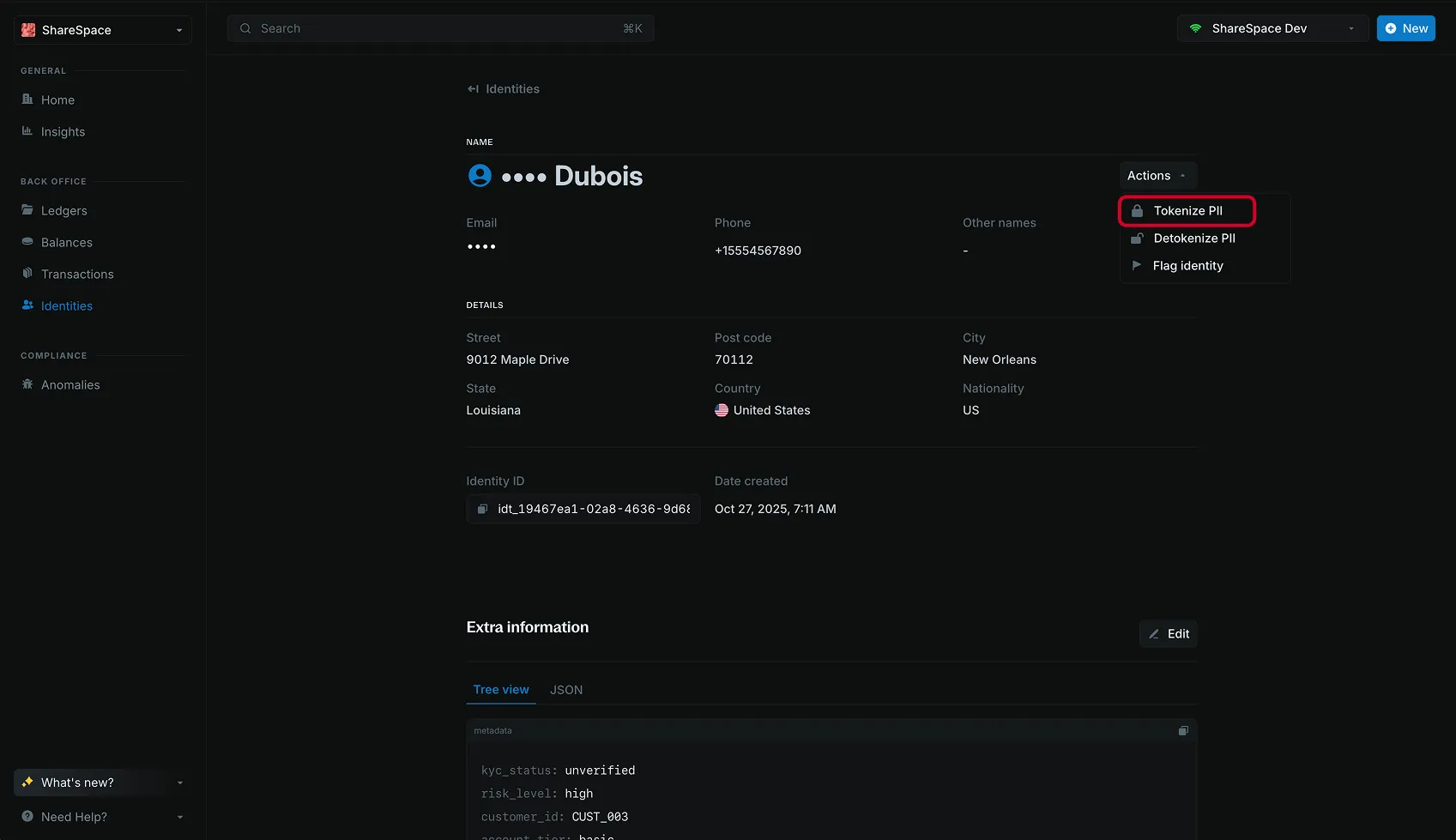
Open the identity, then click Actions in the top right.
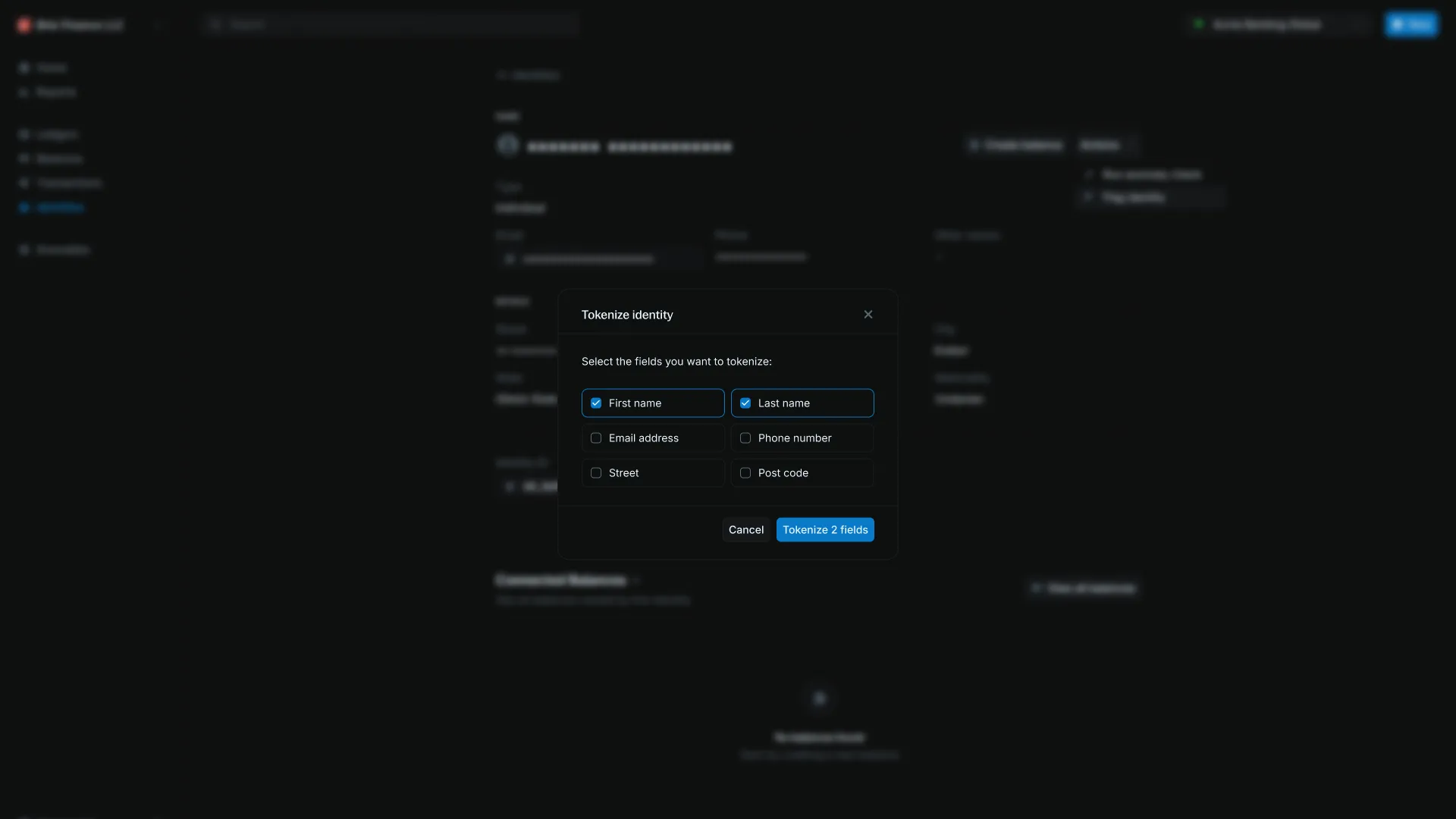
Tokenize fields
Select Tokenize. In the modal, choose the fields, then click Submit.
See which fields are tokenized
Call Get tokenized fields.
curl -X GET "http://localhost:5001/identities/{identity_id}/tokenized-fields" \
  -H "X-blnk-key: <api-key>"
const response = await blnk.Identity.getTokenizedFields(
'idt_3b63c8da-af29-4cc3-ad38-df17d87456e6',
);fields, _, _ := client.Identity.GetTokenizedFields(
"idt_3b63c8da-af29-4cc3-ad38-df17d87456e6",
)response = blnk.identity.get_tokenized_fields(
"idt_3b63c8da-af29-4cc3-ad38-df17d87456e6",
)ApiResponse<JsonNode> response = blnk.identity().getTokenizedFields(
"idt_3b63c8da-af29-4cc3-ad38-df17d87456e6");{
"tokenized_fields": ["FirstName", "LastName", "EmailAddress", "PhoneNumber"]
}| Field | Description |
|---|---|
tokenized_fields | PascalCase names that are tokenized on this identity. |
Read one field back
Call Detokenize field. The field must already be tokenized.
curl -X GET "http://localhost:5001/identities/{identity_id}/detokenize/EmailAddress" \
  -H "X-blnk-key: <api-key>"
const response = await blnk.Identity.detokenizeField(
'idt_3b63c8da-af29-4cc3-ad38-df17d87456e6',
'EmailAddress',
);detokenized, _, _ := client.Identity.DetokenizeField(
"idt_3b63c8da-af29-4cc3-ad38-df17d87456e6",
string(blnkgo.TokenizableFieldEmailAddress),
)response = blnk.identity.detokenize_field(
"idt_3b63c8da-af29-4cc3-ad38-df17d87456e6",
"EmailAddress",
)ApiResponse<JsonNode> response = blnk.identity().detokenizeField(
"idt_3b63c8da-af29-4cc3-ad38-df17d87456e6",
"EmailAddress");| Field | Description | Required |
|---|---|---|
identity_id | Identity that holds the token. | Yes |
field | PascalCase field name to read. | Yes |
{
  "field": "EmailAddress",
  "value": "[email protected]"
}| Field | Description |
|---|---|
field | PascalCase name you asked for. |
value | Original value. The identity still stores the token. |
Read several fields back
Using the API
Call Detokenize identity. The keys in the response are the names you sent. Omit fields, or send an empty array, to read every tokenized field.
curl -X POST "http://localhost:5001/identities/{identity_id}/detokenize" \
  -H "X-blnk-key: <api-key>" \
  -H "Content-Type: application/json" \
  -d '{
    "fields": ["FirstName", "LastName", "EmailAddress", "PhoneNumber"]
  }'
const response = await blnk.Identity.detokenize(
'idt_3b63c8da-af29-4cc3-ad38-df17d87456e6',
{
fields: ['FirstName', 'LastName', 'EmailAddress', 'PhoneNumber'],
},
);detokenized, _, _ := client.Identity.Detokenize(
"idt_3b63c8da-af29-4cc3-ad38-df17d87456e6",
blnkgo.DetokenizeRequest{
Fields: []blnkgo.TokenizableIdentityField{
blnkgo.TokenizableFieldFirstName,
blnkgo.TokenizableFieldLastName,
blnkgo.TokenizableFieldEmailAddress,
blnkgo.TokenizableFieldPhoneNumber,
},
},
)response = blnk.identity.detokenize(
"idt_3b63c8da-af29-4cc3-ad38-df17d87456e6",
{
"fields": ["FirstName", "LastName", "EmailAddress", "PhoneNumber"],
},
)ApiResponse<JsonNode> response = blnk.identity().detokenize(
"idt_3b63c8da-af29-4cc3-ad38-df17d87456e6",
DetokenizeIdentityData.create()
.fields(List.of("FirstName", "LastName", "EmailAddress", "PhoneNumber")));| Field | Description | Required |
|---|---|---|
identity_id | Identity that holds the tokens. | Yes |
fields | PascalCase names to read. Omit to read every tokenized field. | No |
{
  "fields": {
    "FirstName": "Alice",
    "LastName": "Smith",
    "EmailAddress": "[email protected]",
    "PhoneNumber": "+1234567890"
  }
}| Field | Description |
|---|---|
fields | Map of the names you sent to their original values. |
Using the Dashboard
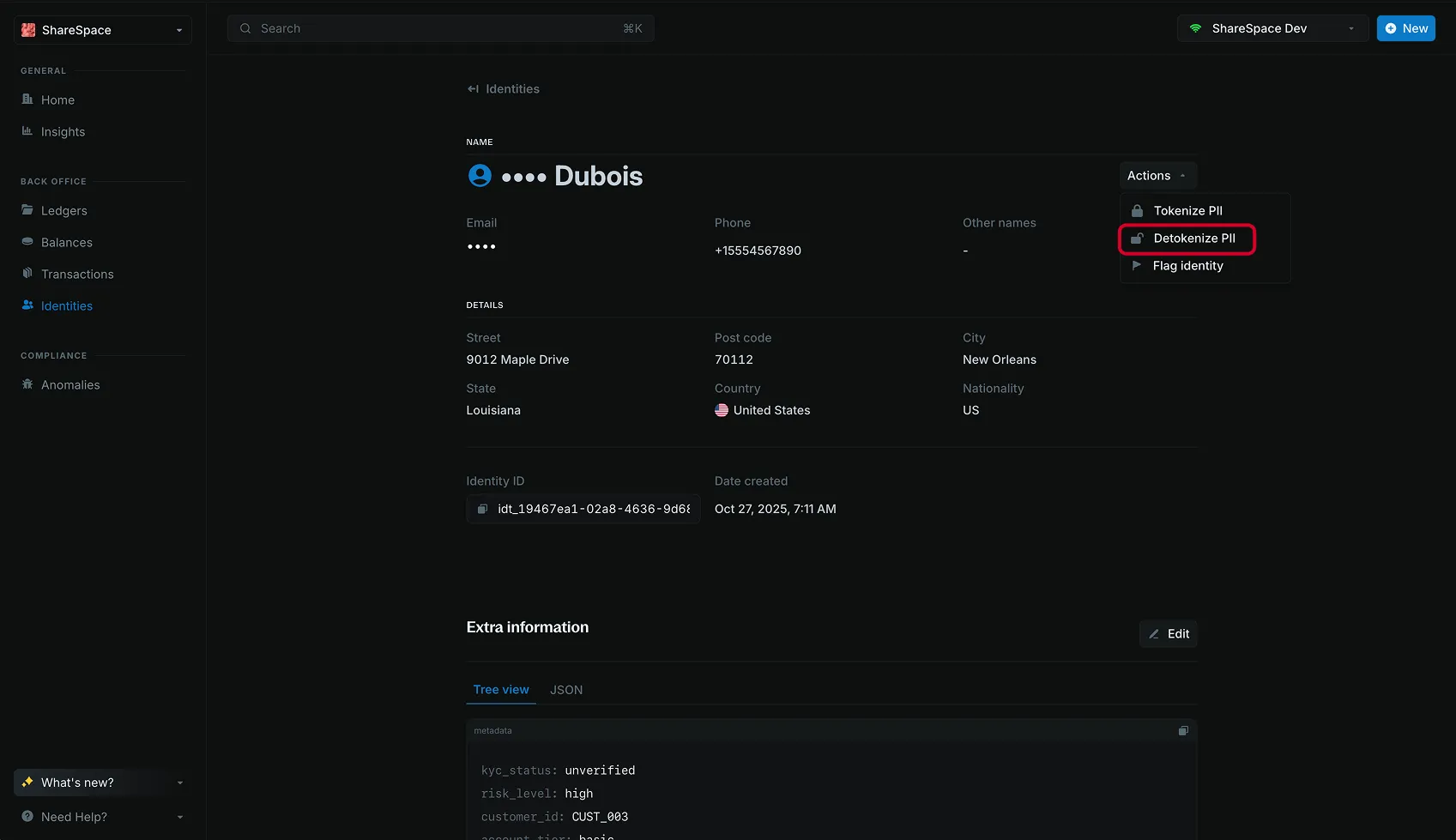
Open the identity, then click Actions in the top right.
Read the original values
Select Detokenize. The identity details show the original values for the tokenized fields. The stored values stay tokens.
Errors
| Code | When it happens |
|---|---|
IDT_FIELD_NOT_TOKENIZABLE | The name is not in the tokenizable set, or the casing is wrong. |
IDT_FIELD_ALREADY_TOKENIZED | You tokenize a field that is already a token. |
IDT_FIELD_NOT_TOKENIZED | You detokenize a field that is not a token. |
IDT_TOKENIZATION_DISABLED | tokenization_secret is missing or is not 32 bytes. |
{
  "error": "field first_name is not tokenizable",
  "error_detail": {
    "code": "IDT_FIELD_NOT_TOKENIZABLE",
    "message": "field first_name is not tokenizable"
  }
}| Code | What to do |
|---|---|
IDT_FIELD_NOT_TOKENIZABLE | Use the PascalCase name, such as /tokenize/FirstName. |
IDT_FIELD_ALREADY_TOKENIZED | Skip it, or detokenize first if you need the original value. |
IDT_FIELD_NOT_TOKENIZED | Tokenize the field before you detokenize it. |
IDT_TOKENIZATION_DISABLED | Set tokenization_secret to a 32-byte value and restart Core. |
For the full list, see API error codes.