

Transactions
Fund Lineage Tracking
See which provider's funds a debit came from.
Fund lineage lets you tag incoming funds into a balance and automatically track how those tagged funds are spent over time.
Once enabled, every subsequent debit records exactly which tagged funds it used and how much came from each tag. You do not need to manage this yourself. Blnk does it automatically.
This helps you answer questions like:
- Where did the funds in this balance come from?
- When you spend $X, which funding sources did it come from?
- How much of Provider A’s funds are still available vs already spent?
How to think about lineage
A normal balance tells you how much money you have. Lineage adds one extra dimension: what that money is made of. Think of a balance as having 2 layers:
- The balance total: This is what you already know.
- The composition of the balance: This is a breakdown of that total by tag (e.g.
stripe,paypal,treasury, etc.)
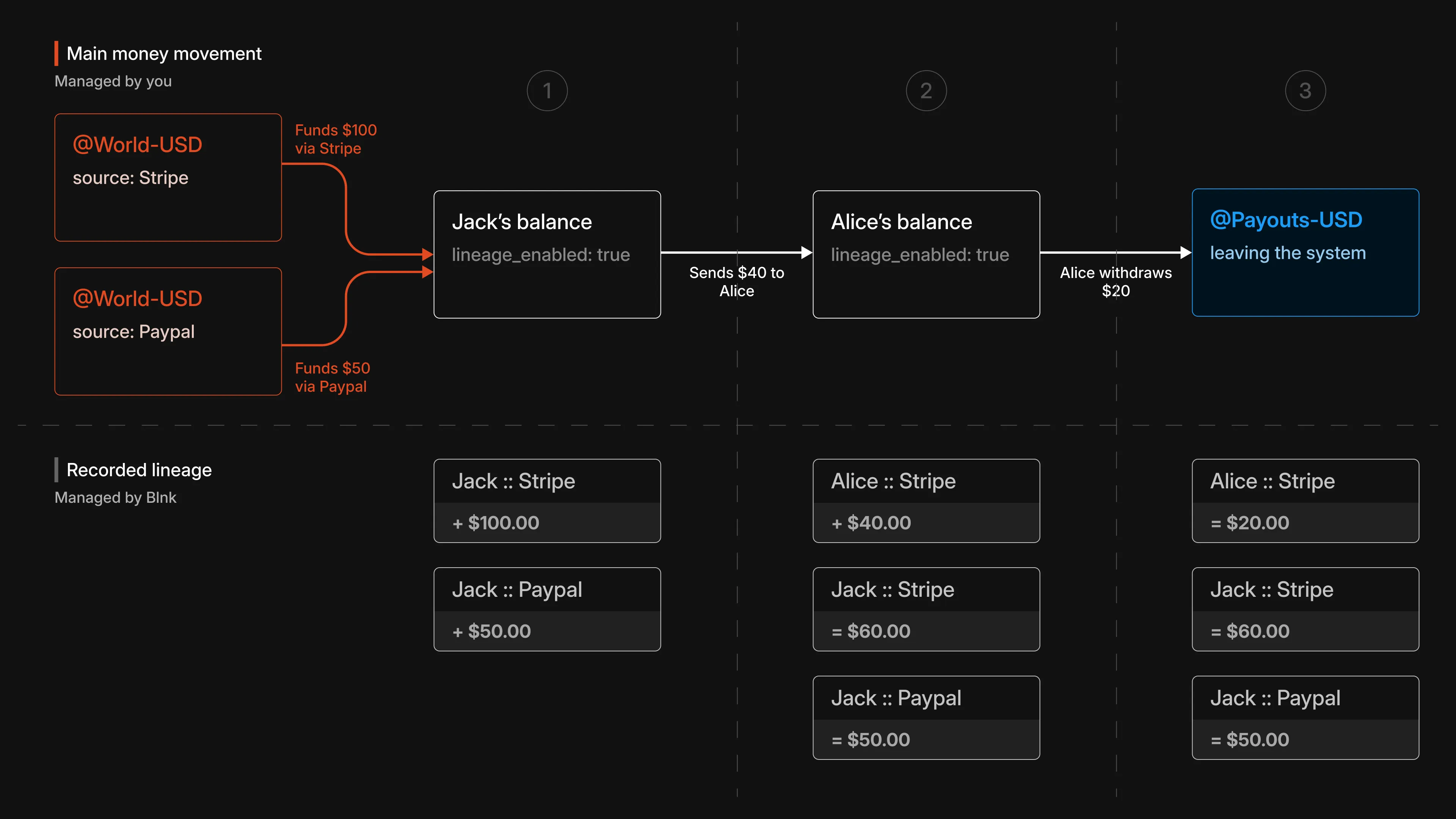
So instead of seeing only: Balance = $150, lineage shows you: Balance = $150 (stripe: $100, paypal: $50).
Example breakdown
Funds enter the system
Two credits are made into Jack’s balance:
- $100 from
stripe - $50 from
paypal
Jack’s total balance is $150. Because lineage is enabled on Jack’s balance, Blnk also records the composition of that balance internally: $100 from Stripe and $50 from PayPal.
Funds move between balances
Jack sends $40 to Alice. Based on the allocation strategy, Blnk:
- Selects which tagged funds to spend from
- Records how much of the $40 came from each tag.
- Applies the same tag to the funds received by Alice
In our example, the entire $40 is taken from Stripe, leaving:
- Jack with $60 from Stripe and $50 from PayPal
- Alice with $40 tagged as
Stripe
Funds leave the system
Alice withdraws $20 to payouts.
Blnk records that the $20 leaving the system came from Alice’s Stripe-tagged funds. Alice now has $20 remaining from Stripe.
What this tells us
With this, we can determine that:
- Out of the $100 that came in from Stripe, we now have only $80 total left in our system.
- Stripe should be used to process Alice’s payout, since her funds came from Stripe.
What changes with lineage enabled
Only one thing: Blnk starts recording fund composition automatically.
- When you credit a lineage-enabled balance, you attach a tag to that incoming money.
- When you debit the balance, Blnk decides which tagged funds were used and records the breakdown.
- When money moves to another lineage-enabled balance, the tag moves with it. Otherwise, lineage stops at that transfer.
Enable fund lineage
Fund lineage is enabled at the balance level. You need to first ensure that the balances you want to track have lineage enabled.
Using the API
Create a balance with lineage enabled
Blnk requires that the balance has an identity_id set to enable lineage tracking for a balance.
curl -X POST "http://localhost:5001/balances" \
  -H "X-blnk-key: <api-key>" \
  -H "Content-Type: application/json" \
  -d '{
    "ledger_id": "ldg_049495c6-356e-4ebc-a45e-60d1e1e16afb",
    "identity_id": "idt_4dd12897-f085-41f2-955f-790ed3c0a7fb",
    "currency": "USD",
    "track_fund_lineage": true,
    "allocation_strategy": "FIFO"
  }'
const response = await blnk.LedgerBalances.create({
ledger_id: 'ldg_049495c6-356e-4ebc-a45e-60d1e1e16afb',
identity_id: 'idt_4dd12897-f085-41f2-955f-790ed3c0a7fb',
currency: 'USD',
track_fund_lineage: true,
allocation_strategy: 'FIFO',
});balance, _, _ := client.LedgerBalance.Create(blnkgo.CreateLedgerBalanceRequest{
LedgerID: "ldg_049495c6-356e-4ebc-a45e-60d1e1e16afb",
IdentityID: "idt_4dd12897-f085-41f2-955f-790ed3c0a7fb",
Currency: "USD",
TrackFundLineage: true,
AllocationStrategy: blnkgo.AllocationStrategyFIFO,
})response = blnk.ledger_balances.create({
"ledger_id": "ldg_049495c6-356e-4ebc-a45e-60d1e1e16afb",
"identity_id": "idt_4dd12897-f085-41f2-955f-790ed3c0a7fb",
"currency": "USD",
"track_fund_lineage": True,
"allocation_strategy": "FIFO",
})ApiResponse<JsonNode> response = blnk.ledgerBalances().create(
CreateLedgerBalance.create()
.ledgerId("ldg_049495c6-356e-4ebc-a45e-60d1e1e16afb")
.identityId("idt_4dd12897-f085-41f2-955f-790ed3c0a7fb")
.currency("USD")
.trackFundLineage(true)
.allocationStrategy("FIFO"));Allocation strategy defines how Blnk will allocate the funds when you spend from the balance. Supported allocation strategies are:
FIFO: Spend oldest tagged funds first. This is the default strategy.LIFO: Spend newest tagged funds first.PROPORTIONAL: Spend proportionally across tags.
Tag incoming funds
To initialize lineage for incoming funds, you must include a lineage provider. To do this, set the meta_data.BLNK_LINEAGE_PROVIDER field to the provider you want to tag the funds with.
curl -X POST "http://localhost:5001/transactions" \
  -H "X-blnk-key: <api-key>" \
  -H "Content-Type: application/json" \
  -d '{
    "precise_amount": 10000,
    "precision": 100,
    "currency": "USD",
    "reference": "ref_f482a1b3-6c2d-4e89-a17b-3d5e8f2a1c94",
    "source": "@World",
    "destination": "bln_5ce86029-3c2e-4e2a-aae2-7fb931ca4c4f",
    "description": "Top up via card",
    "meta_data": {
      "BLNK_LINEAGE_PROVIDER": "stripe"
    }
  }'
const response = await blnk.Transactions.create({
precise_amount: 10000,
precision: 100,
currency: 'USD',
reference: 'ref_f482a1b3-6c2d-4e89-a17b-3d5e8f2a1c94',
source: '@World',
destination: 'bln_5ce86029-3c2e-4e2a-aae2-7fb931ca4c4f',
description: 'Top up via card',
meta_data: {
BLNK_LINEAGE_PROVIDER: 'stripe',
},
});transaction, _, _ := client.Transaction.Create(blnkgo.CreateTransactionRequest{
ParentTransaction: blnkgo.ParentTransaction{
PreciseAmount: 10000,
Precision: 100,
Currency: "USD",
Reference: "ref_f482a1b3-6c2d-4e89-a17b-3d5e8f2a1c94",
Source: "@World",
Destination: "bln_5ce86029-3c2e-4e2a-aae2-7fb931ca4c4f",
Description: "Top up via card",
MetaData: map[string]interface{}{
"BLNK_LINEAGE_PROVIDER": "stripe",
},
},
})response = blnk.transactions.create({
"precise_amount": 10000,
"precision": 100,
"currency": "USD",
"reference": "ref_f482a1b3-6c2d-4e89-a17b-3d5e8f2a1c94",
"source": "@World",
"destination": "bln_5ce86029-3c2e-4e2a-aae2-7fb931ca4c4f",
"description": "Top up via card",
"meta_data": {
"BLNK_LINEAGE_PROVIDER": "stripe",
},
})ApiResponse<JsonNode> response = blnk.transactions().create(
CreateTransactions.create()
.preciseAmount(10000)
.precision(100)
.currency("USD")
.reference("ref_f482a1b3-6c2d-4e89-a17b-3d5e8f2a1c94")
.source("@World")
.destination("bln_5ce86029-3c2e-4e2a-aae2-7fb931ca4c4f")
.description("Top up via card")
.metaData(Map.of("BLNK_LINEAGE_PROVIDER", "stripe")));This tells Blnk how to classify the incoming funds. No other configuration is needed.
Blnk tracks funds by auto-creating internal lineage balances derived from the provider and the destination identity.
Spend funds and see lineage tracked automatically
To spend from a lineage-enabled balance, you create a normal debit transaction. You don’t need to specify a provider on debits.
Blnk will:
- Select which tagged funds to spend from based on the allocation strategy
- Record the provider-level breakdown automatically
- Attach the breakdown to the transaction metadata under
BLNK_FUND_ALLOCATION
curl -X POST "http://localhost:5001/transactions" \
  -H "X-blnk-key: <api-key>" \
  -H "Content-Type: application/json" \
  -d '{
    "precise_amount": 2500,
    "precision": 100,
    "currency": "USD",
    "reference": "ref_c5d9e2a1-7b4f-4a3c-9e8d-1f6a2b4c8d30",
    "source": "bln_5ce86029-3c2e-4e2a-aae2-7fb931ca4c4f",
    "destination": "@MerchantSettlement",
    "description": "Purchase"
  }'
const response = await blnk.Transactions.create({
precise_amount: 2500,
precision: 100,
currency: 'USD',
reference: 'ref_c5d9e2a1-7b4f-4a3c-9e8d-1f6a2b4c8d30',
source: 'bln_5ce86029-3c2e-4e2a-aae2-7fb931ca4c4f',
destination: '@MerchantSettlement',
description: 'Purchase',
});transaction, _, _ := client.Transaction.Create(blnkgo.CreateTransactionRequest{
ParentTransaction: blnkgo.ParentTransaction{
PreciseAmount: 2500,
Precision: 100,
Currency: "USD",
Reference: "ref_c5d9e2a1-7b4f-4a3c-9e8d-1f6a2b4c8d30",
Source: "bln_5ce86029-3c2e-4e2a-aae2-7fb931ca4c4f",
Destination: "@MerchantSettlement",
Description: "Purchase",
},
})response = blnk.transactions.create({
"precise_amount": 2500,
"precision": 100,
"currency": "USD",
"reference": "ref_c5d9e2a1-7b4f-4a3c-9e8d-1f6a2b4c8d30",
"source": "bln_5ce86029-3c2e-4e2a-aae2-7fb931ca4c4f",
"destination": "@MerchantSettlement",
"description": "Purchase",
})ApiResponse<JsonNode> response = blnk.transactions().create(
CreateTransactions.create()
.preciseAmount(2500)
.precision(100)
.currency("USD")
.reference("ref_c5d9e2a1-7b4f-4a3c-9e8d-1f6a2b4c8d30")
.source("bln_5ce86029-3c2e-4e2a-aae2-7fb931ca4c4f")
.destination("@MerchantSettlement")
.description("Purchase"));You can then inspect the results using:
- Get transaction lineage (allocation + shadow transactions)
- Get balance lineage (provider breakdown on a balance)
Optional: Propagate lineage across balances
If the destination balance of a transaction also has track_fund_lineage: true enabled:
- Blnk will propagate lineage automatically
- The destination balance will also have its own shadow balances created automatically if it doesn’t already have them.
No additional steps are required.
Using the Dashboard
Set the lineage-enabled balance as the destination. Lineage tag appears after that.
Tag a credit
Open Create transaction. Set the lineage-enabled balance as the destination. Under Advanced options, turn on Lineage tag and enter a provider name, such as stripe or paypal.
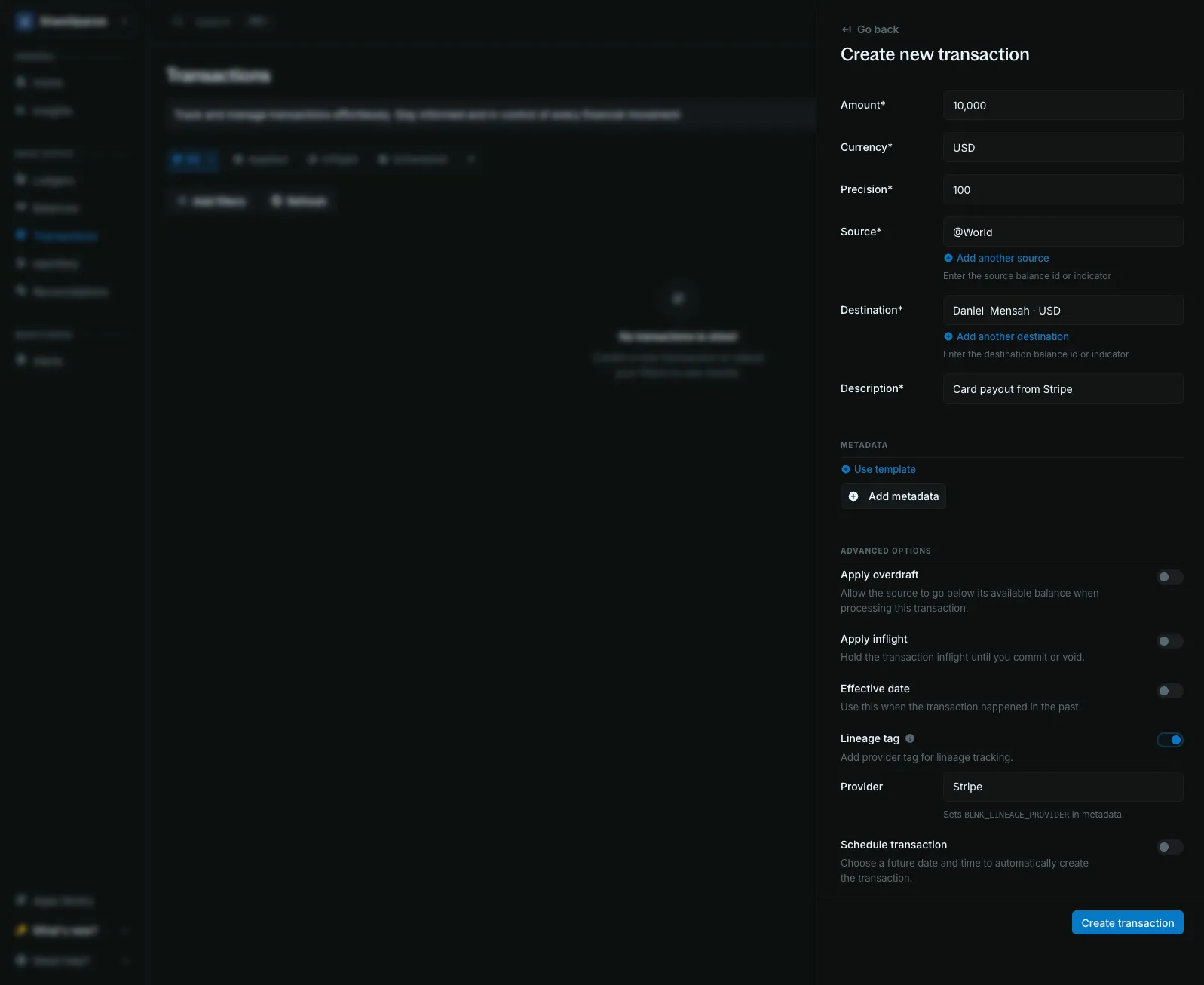
Click Create transaction. If you leave the tag off, the credit still posts and does not join lineage tracking.
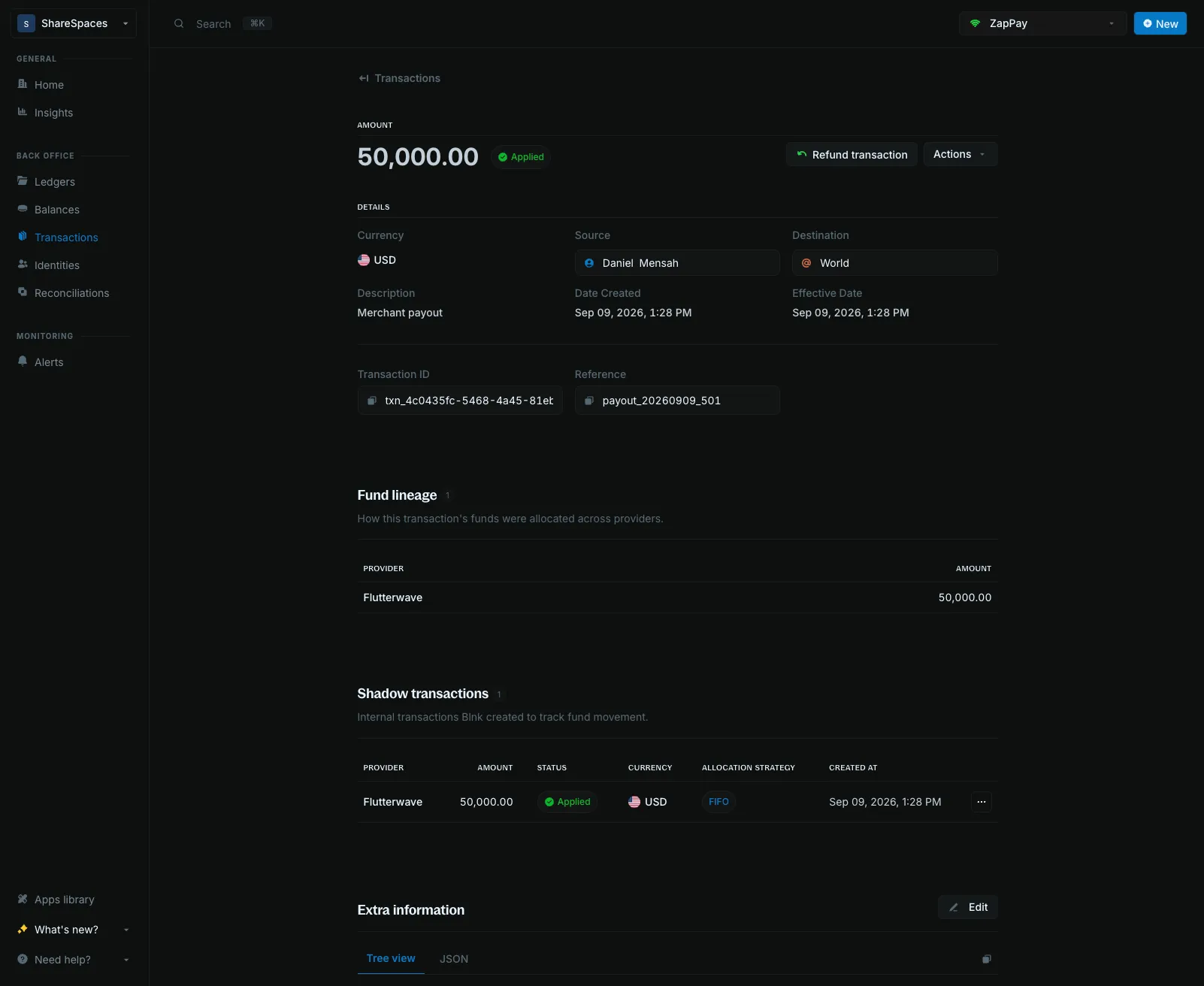
Read a debit
Spend from that balance with a normal transaction, and leave Lineage tag off. Open the debit. Fund lineage shows how much came from each provider. Shadow transactions lists the internal rows Blnk created.
How Blnk names internal lineage balances
When lineage is enabled, Blnk creates internal “shadow” and “aggregate” balances using indicator strings derived from the provider and the destination identity:
- Provider shadow balance:
@PROVIDER_IDENTITY_IDENTIFIER_lineage - Aggregate balance (all providers):
@IDENTITY_IDENTIFIER_lineage
For example: provider stripe + identity John Doe (identity_id: "idt_4dd12897-f085-41f2-955f-790ed3c0a7fb") becomes:
- Shadow balance:
@stripe_john_doe_idt_4dd1_lineage - Aggregate balance:
@john_doe_idt_4dd1_lineage
Query lineage
Once lineage is enabled, you can query it at two levels:
- Balance lineage to see what funds are available and spent per provider.
- Transaction lineage to see how a specific debit was allocated
Get balance lineage
Use this to see the current provider breakdown for a balance.
curl -X GET "http://localhost:5001/balances/bln_5ce86029-3c2e-4e2a-aae2-7fb931ca4c4f/lineage" \
  -H "X-blnk-key: <api-key>"
const response = await blnk.LedgerBalances.getLineage(
'bln_5ce86029-3c2e-4e2a-aae2-7fb931ca4c4f',
);lineage, _, _ := client.LedgerBalance.GetLineage(
"bln_5ce86029-3c2e-4e2a-aae2-7fb931ca4c4f",
)response = blnk.ledger_balances.get_lineage(
"bln_5ce86029-3c2e-4e2a-aae2-7fb931ca4c4f",
)ApiResponse<JsonNode> response = blnk.ledgerBalances().getLineage("bln_5ce86029-3c2e-4e2a-aae2-7fb931ca4c4f");This returns, per provider:
- how much is still available
- how much has already been spent
{
  "balance_id": "bln_5ce86029-3c2e-4e2a-aae2-7fb931ca4c4f",
  "aggregate_balance_id": "bln_a1b2c3d4-6e2d-4f89-a17b-3d5e8f2a1c94",
  "total_with_lineage": "7500",
  "providers": [
    {
      "provider": "stripe",
      "amount": "10000",
      "available": "7500",
      "spent": "2500",
      "shadow_balance_id": "bln_e92a1ba7-92c7-427c-8c8f-bfdca55c875d"
    }
  ]
}Get transaction lineage
Use this to see how a specific transaction was funded.
curl -X GET "http://localhost:5001/transactions/txn_8d2ce2f0-0d75-4a91-9d43-2ad2c2e6b9ad/lineage" \
  -H "X-blnk-key: <api-key>"
const response = await blnk.Transactions.getLineage(
'txn_8d2ce2f0-0d75-4a91-9d43-2ad2c2e6b9ad',
);lineage, _, _ := client.Transaction.GetLineage(
"txn_8d2ce2f0-0d75-4a91-9d43-2ad2c2e6b9ad",
)response = blnk.transactions.get_lineage(
"txn_8d2ce2f0-0d75-4a91-9d43-2ad2c2e6b9ad",
)ApiResponse<JsonNode> response = blnk.transactions().getLineage("txn_8d2ce2f0-0d75-4a91-9d43-2ad2c2e6b9ad");This is most useful for debits from lineage-enabled balances. It returns:
- the fund allocation (how much was taken from each provider)
- any internal shadow transactions created for lineage tracking
{
  "transaction_id": "txn_8d2ce2f0-0d75-4a91-9d43-2ad2c2e6b9ad",
  "fund_allocation": [
    {
      "provider": "stripe",
      "amount": "2500"
    }
  ],
  "shadow_transactions": [
    {
      "transaction_id": "txn_f482a1b3-6c2d-4e89-a17b-3d5e8f2a1c94",
      "reference": "ref_lineage_debit_001_release_stripe_0",
      "precise_amount": "2500",
      "currency": "USD"
    }
  ]
}