This guide walks you through installing the Blnk Go SDK, initializing the client, and creating your first transaction. By the end, you’ll have a working connection to Blnk and be ready to build financial products from your Go application.
1

Install the SDK

Create a Go project and install the SDK. v1.2.0 and later require Go 1.22 or later.
go mod init blnk-quickstart
go get github.com/blnkfinance/blnk-go
2

Client initialization

Parse your Blnk base URL and create a client. Pass a pointer to your API key when your instance requires authentication. The SDK sends it as the X-Blnk-Key header.Use nil when running locally without auth.
client.go
baseURL, _ := url.Parse("http://localhost:5001/")
apiKey := "your_api_key"
client := blnkgo.NewClient(
	baseURL,
	&apiKey,
	blnkgo.WithTimeout(10*time.Second),
	blnkgo.WithRetry(2),
)
3

Create a sample script

Create a main.go file as shown below to create your first transaction with the SDK.
Make sure you have a running Blnk Core instance. Set the URL and API key as environment variables when your instance requires authentication.
main.go
package main

import (
	"fmt"
	"net/url"
	"time"

	blnkgo "github.com/blnkfinance/blnk-go"
)

func main() {
	baseURL, _ := url.Parse("http://localhost:5001/")
	client := blnkgo.NewClient(baseURL, nil, blnkgo.WithTimeout(10*time.Second), blnkgo.WithRetry(2))

	transaction, resp, err := client.Transaction.Create(blnkgo.CreateTransactionRequest{
		ParentTransaction: blnkgo.ParentTransaction{
			PreciseAmount: 100000, Reference: "first_txn_001", Currency: "USD", Precision: 100,
			Source: "@FundingPool", Destination: "@MyBalance", Description: "My first Blnk transaction",
		},
		AllowOverdraft: true,
	})
	if err != nil {
		fmt.Printf("Error creating transaction: %v\n", err)
		return
	}

	fmt.Printf("Transaction ID: %s\n", transaction.TransactionID)
	fmt.Printf("Status: %s\n", transaction.Status)
	fmt.Printf("HTTP status: %d\n", resp.StatusCode)
}
4

Execute the script

Run the file.
go run main.go
You should get a response similar to this:
201 Created
{
  "amount": 1000,
  "precision": 100,
  "precise_amount": 100000,
  "transaction_id": "txn_8d2ce2f0-0d75-4a91-9d43-2ad2c2e6b9ad",
  "parent_transaction": "",
  "source": "bln_f344b673-e855-4bda-b769-3e94a02c1941",
  "destination": "bln_d5cbde84-d20a-485b-8ce8-6677d782c3a1",
  "reference": "first_txn_001",
  "currency": "USD",
  "description": "My first Blnk transaction",
  "status": "QUEUED",
  "allow_overdraft": true,
  "inflight": false,
  "created_at": "2024-11-26T09:33:35.265582042Z"
}
5

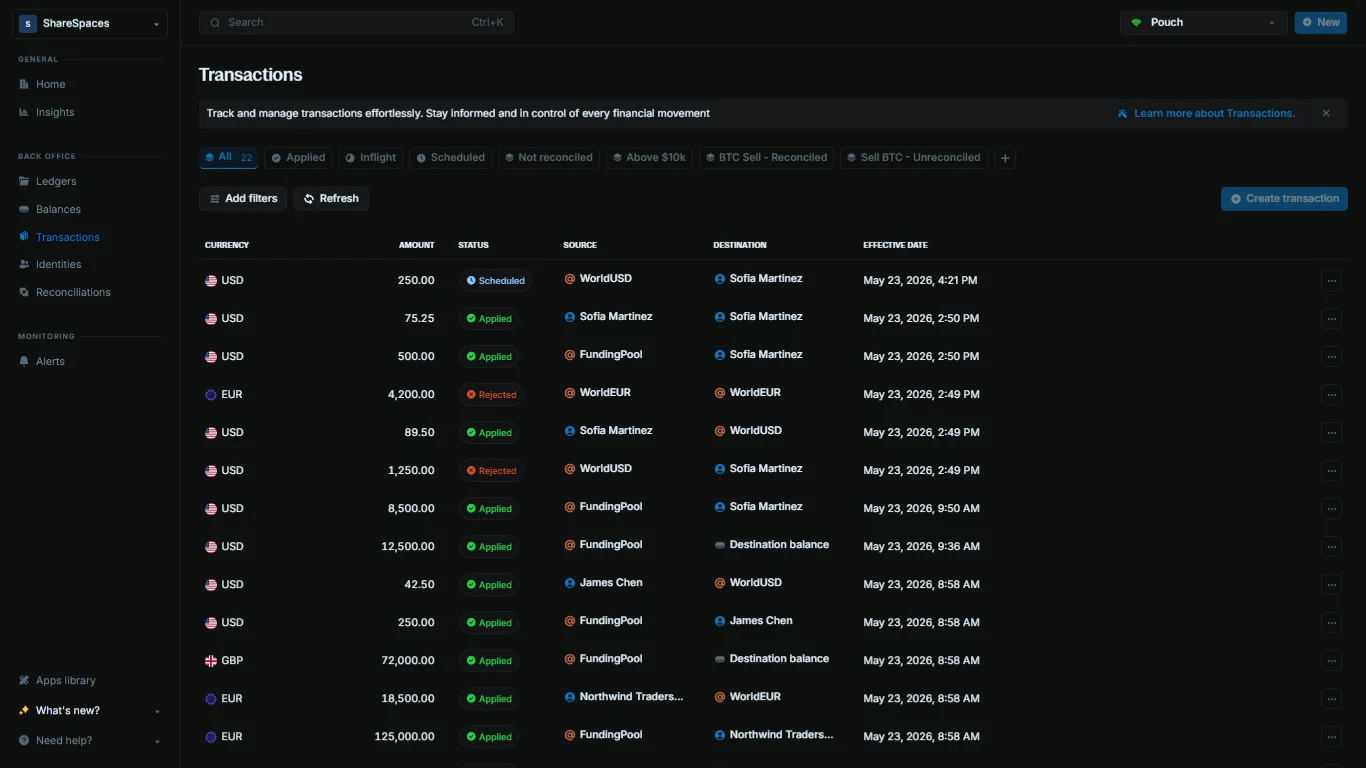
View the transaction

Confirm the transaction landed in your ledger.
  1. Open Transactions in the sidebar.
  2. Find your transaction by reference (first_txn_001) or by the transaction_id from the script output.
  3. Click the row to open the details and verify the amount, status, source, and destination.
Blnk Cloud Transactions table with reference, amount, status, source, and destination columns
If the transaction is missing, click Refresh on the table to pull the latest data from Core.

Using the SDK

Authentication, timeouts, retries, and logging.

Error handling

Three-value returns and Core error bodies.

Changelog

Go SDK releases and version history.

Need help?

We are very happy to help you make the most of Blnk, regardless of whether it is your first time or you are switching from another tool. To ask questions or discuss issues, please contact us or join our Discord community.