

Start here
Enterprise Core
Deploy the Enterprise version on infrastructure you host.
Enterprise Core adds enterprise modules on top of the open-source Core: role-based access, a SQL-based data lake, alerts, audit logs, MCP, agents, and a dashboard with an extensible UI.
Deploy open-source Core first with the open-source guide.
This page deploys the enterprise modules beside it and connects them to that Core. The full environment reference is in License configuration.
Deploy Enterprise
Get your license
Get your Enterprise license by contacting us.
Once your order is confirmed, you’ll receive an email with a base64 license key. Set it as ENTERPRISE_LICENSE_B64.
Create the database
In your managed Postgres, create a new database named blnk-cloud. Save the connection URL for ENTERPRISE_POSTGRES_URL.
CREATE DATABASE "blnk-cloud";Write the environment file
HOSTNAME=127.0.0.1
ENTERPRISE_POSTGRES_URL=postgres://user:password@host:5432/blnk-cloud?sslmode=require
ENTERPRISE_LICENSE_B64=your_base64_license_string
ENTERPRISE_SKIP_CORE=true
ENTERPRISE_AUTO_PROVISION=false
ENTERPRISE_PUBLIC_PORT=8080
ENTERPRISE_PUBLIC_URL=https://ledger.yourdomain.com
CORS_ORIGINS=http://localhost:8080,http://localhost:3001,https://ledger.yourdomain.com
BLNK_ENCRYPTION_KEY=your_secure_32_character_key
JWT_SECRET=your_long_random_secret| Variable | What to set |
|---|---|
HOSTNAME | 127.0.0.1, so health checks stay on the container loopback. |
ENTERPRISE_POSTGRES_URL | Connection string for the Postgres instance that holds blnk-cloud. |
ENTERPRISE_LICENSE_B64 | The base64 license key from sales. |
ENTERPRISE_AUTO_PROVISION | false, so Enterprise does not create a managed instance or bootstrap the query agent. |
ENTERPRISE_PUBLIC_PORT | Port this deployment listens on. The sample uses 8080. |
ENTERPRISE_PUBLIC_URL | Public URL of this deployment, including https://. |
CORS_ORIGINS | Browser origins allowed to call this deployment, with no spaces. Include ENTERPRISE_PUBLIC_URL. |
BLNK_ENCRYPTION_KEY | A secure random 32-character key. It encrypts values such as instance connection keys. |
JWT_SECRET | A long, secure random secret for authentication tokens. |
Start the enterprise modules
Map the host port to ENTERPRISE_PUBLIC_PORT. With the file above, that is 8080. If sales sent a different image name, use that tag instead.
docker run -d \
  --name blnk-enterprise \
  --env-file .env \
  -p 8080:8080 \
  ghcr.io/blnkfinance/blnk-enterprise:latest
The container name is blnk-enterprise, and the modules are available at ENTERPRISE_PUBLIC_URL.
Connect your Core
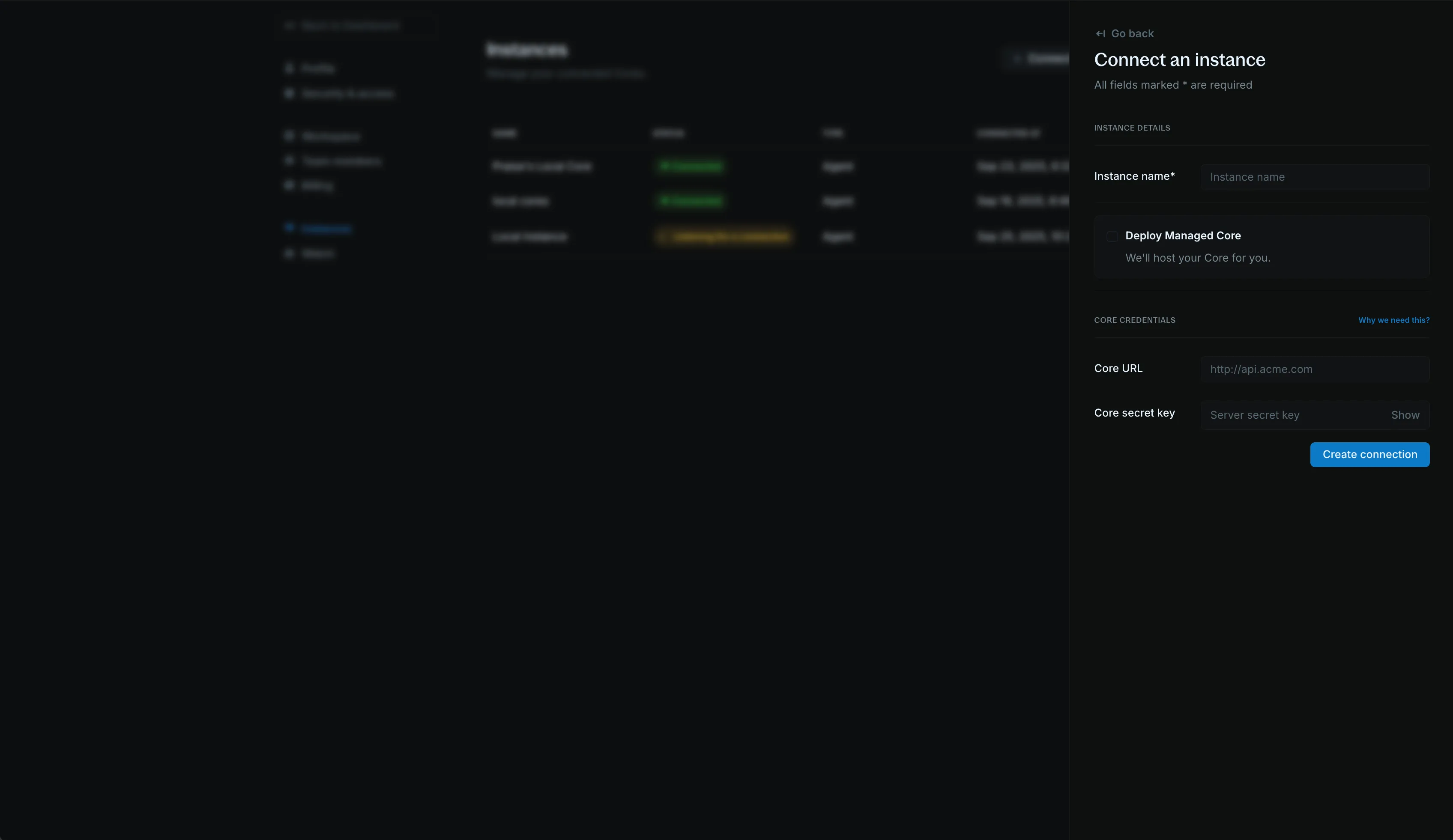
Open ENTERPRISE_PUBLIC_URL, sign up, and create the workspace. Then open Connect an instance and submit the Core you deployed.
- Instance name: a name for this Core
- Core URL: the URL of that Core
- Core secret key: the
secret_keyfrom the Core configuration
Click Create connection.
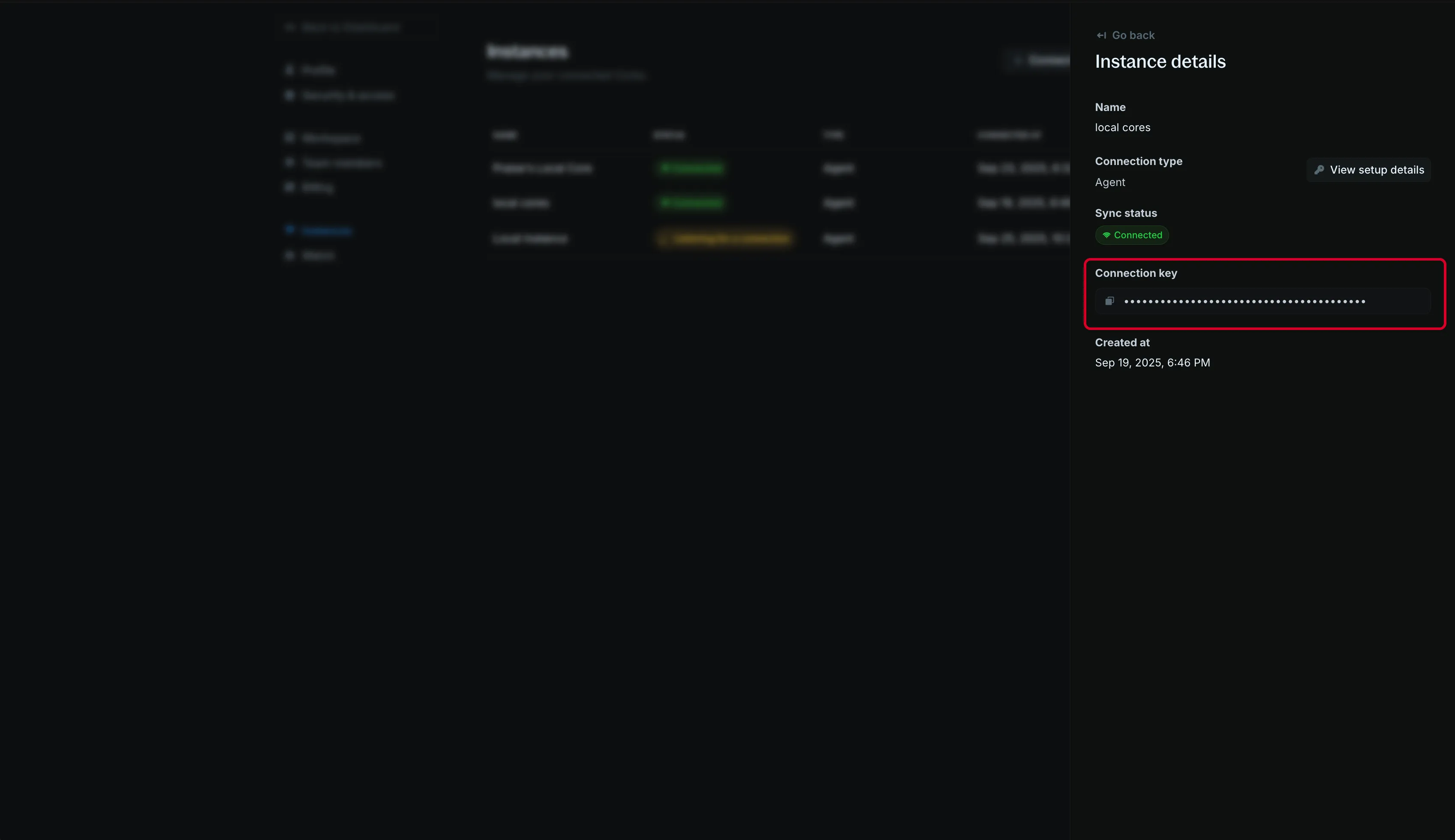
Copy the Connection key from the instance details.
Run the query agent
CONNECTION_URL is ENTERPRISE_PUBLIC_URL as a WebSocket URL with /ws/agent on the path. https:// becomes wss://, and http:// becomes ws://.
ENTERPRISE_PUBLIC_URL | CONNECTION_URL |
|---|---|
https://ledger.yourdomain.com | wss://ledger.yourdomain.com/ws/agent |
http://localhost:8080 | ws://localhost:8080/ws/agent |
docker run -d \
  -e DB_URL="postgres://username:password@host:5432/blnk?sslmode=require" \
  -e CONNECTION_KEY="sk_live_..." \
  -e CONNECTION_URL="wss://ledger.yourdomain.com/ws/agent" \
blnkfinance/query-agent:latest| Variable | What to set |
|---|---|
DB_URL | data_source.dns from the Core configuration. |
CONNECTION_KEY | The connection key you copied from the instance details. |
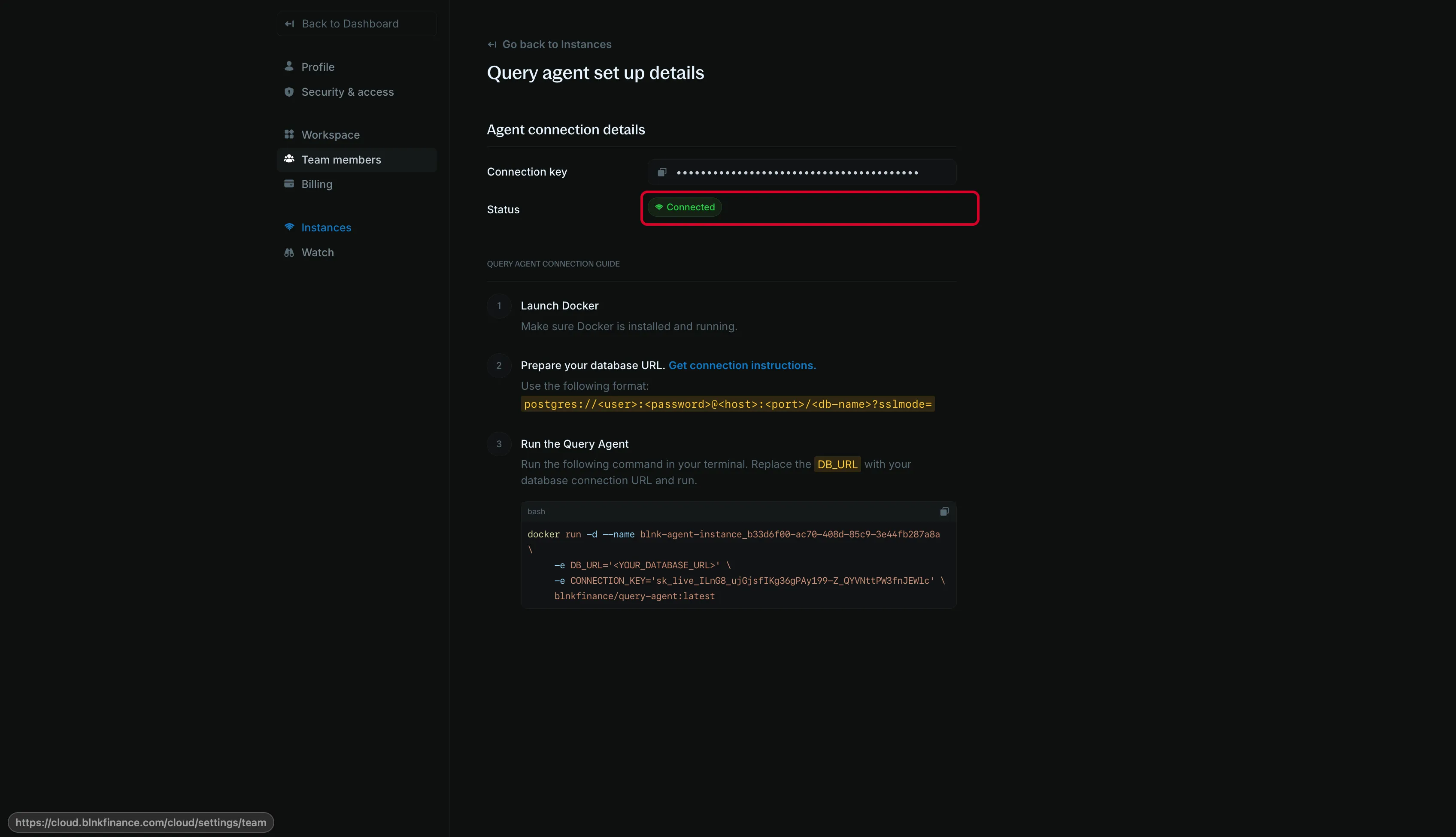
When the agent is running, the query agent setup would update to Connected.
FAQs
The enterprise container exits
docker logs blnk-enterprise prints the reason.
A license failure is logged as Server exited: verify enterprise license. Confirm ENTERPRISE_LICENSE_B64 is the base64 key from the email, with no spaces or line breaks.
The query agent does not show Connected
The agent logs Failed to create agent when DB_URL or CONNECTION_KEY is missing.
If CONNECTION_URL is empty, the agent connects to wss://api.cloud.blnkfinance.com/ws/agent instead of your deployment.
The agent is connected but ledger data is missing
DB_URL has to be the Core database, the same value as data_source.dns.
The blnk-cloud database on ENTERPRISE_POSTGRES_URL holds the enterprise modules, not the ledger.
Enterprise created an instance you did not add
Open the actions list on the instance Enterprise created and click Delete instance.