

Operating
Queue Monitoring
Configure and use the queue monitoring port for Blnk server metrics.
The queue monitoring port allows you to expose internal queue metrics and monitoring endpoints for your Blnk server. This is useful for operational dashboards, health checks, and integration with monitoring tools (such as Prometheus, Grafana, or custom dashboards).
Example configuration
{
  "queue": {
    "monitoring_port": "5004"
  }
}- Environment variable:
BLNK_QUEUE_MONITORING_PORT - Dashboard URL: Visit
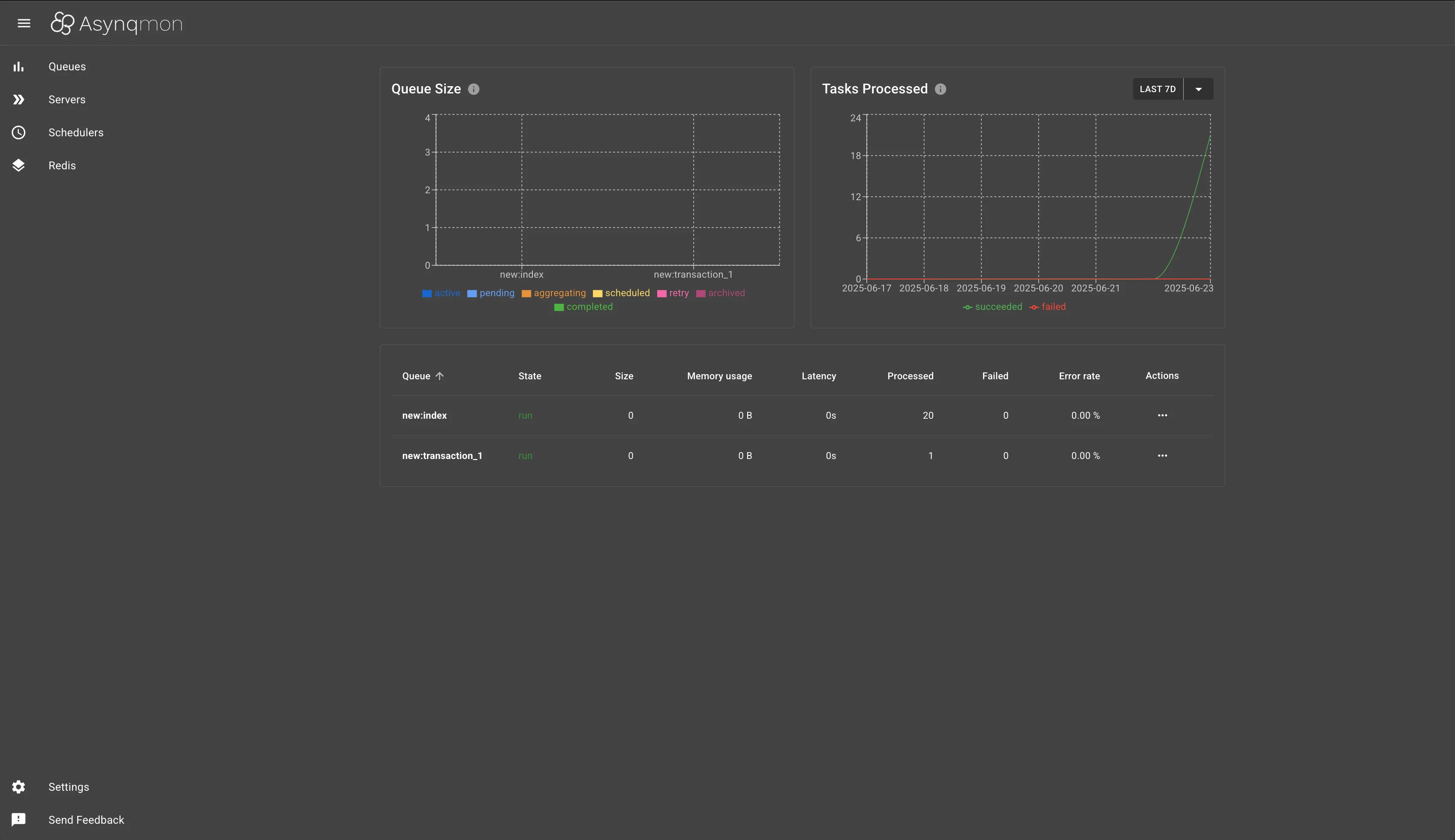
http://localhost:5004/monitoringin your browser to access the real-time monitoring dashboard.
Web Dashboard
The dashboard provides a visual overview of your queue system:
| Feature | Description |
|---|---|
| Queue Size | Visualizes the number of tasks in each queue, broken down by status (active, pending, aggregating, scheduled, retry, archived, completed). |
| Tasks Processed | Shows a graph of succeeded and failed tasks over time. |
| Queue Table | Lists all queues with their current state, size, memory usage, latency, processed/failed counts, and error rates. |
| Actions | Provides controls for queue management and inspection. |
This dashboard helps operators and developers monitor queue activity, track performance, and troubleshoot issues visually.