

Access control
Audit Logs
Review who did what in your workspace.
An audit log is one workspace action: who did it, when, and which resource they touched. Read those rows with List audit logs.
How a row is written
Blnk stores the row after the action succeeds. The actor is the user the credential belongs to.
A session, an API key, and an OAuth token each name that user. A key or token also stores its id on the row.
Who is recorded
Signed in to the ledger
A person signed in to the ledger acts with a session. Blnk stores that person on the row. Ledger changes are included, and so are actions such as an instance update, a deployment change, a domain verification, or an alert assignment.
Custom Apps
When someone installs, launches, uninstalls, or deletes a Custom App, the row names that person and stores the app. Opening the app is recorded as App Launched.
Calls the app makes after that use the install key. That key belongs to the person who installed the app, and Blnk stores the installer, the key id, and the app as acting_app.
Proxy
Send Core requests through the proxy with an API key or an OAuth token. Blnk stores the user on that credential, and the key or token id, on the row.
A request that goes straight to Core stays on Core. Blnk stores the proxy row when Core accepts the call.
What is logged
Creating, updating, retrieving, or deleting a ledger, balance, transaction, or identity is logged. Reconciliation, matching rules, deployments, instances, domains, alerts, and app install, launch, and uninstall are logged as well.
Blnk stores a successful proxy call. Filters and response fields are on List audit logs. This call returns the newest rows, and the key needs the audit:read scope:
curl -X GET "https://api.cloud.blnkfinance.com/audit/logs?page=1&page_size=20" \
  -H "X-blnk-key: CLOUD_API_KEY"
{
"data": [
{
"audit_log_id": "audit_f482a1b3-6c2d-4e89-a17b-3d5e8f2a1c94",
"action": "Deployment destroy initiated",
"performed_by_id": "user_01K4EX0BRXHNNGCRVT2TPNK07W",
"performed_by": "Alex Example",
"api_key_id": "apikey_6e6feddd-930b-4e38-8ba1-1a3eee659bb3",
"deployment_id": "deploy_c5d9e2a1-7b4f-4a3c-9e8d-1f6a2b4c8d30",
"created_at": "2026-09-11T09:28:16.864765Z"
},
{
"audit_log_id": "audit_845e6b1e-0463-4ce8-b858-2b3a398beff9",
"action": "App Launched",
"performed_by_id": "user_01K4EX0BRXHNNGCRVT2TPNK07W",
"performed_by": "Alex Example",
"instance_id": "instance_073f7ffe-9dfd-42ce-aa50-d1dca1788adc",
"app_id": "app_9a1c4e70-2b8d-4f61-8c3a-7e5d2b1f0a94",
"installed_app_id": "instapp_3d5e8f2a-1c94-4b7e-9a2c-6f481d0e3b17",
"app_name": "Fee Engine",
"acting_app": {
"app_id": "app_9a1c4e70-2b8d-4f61-8c3a-7e5d2b1f0a94",
"name": "Fee Engine",
"logo_url": "https://cdn.example.com/fee-engine.png",
"slug": "fee-engine",
"installed_app_id": "instapp_3d5e8f2a-1c94-4b7e-9a2c-6f481d0e3b17"
},
"created_at": "2026-09-10T21:56:12.112739Z"
}
],
"pagination": {
"current_page": 1,
"page_size": 20,
"total": 128
}
}In the dashboard
Open Settings > Audit logs to read the same activity. The table shows what happened, who did it, and when.
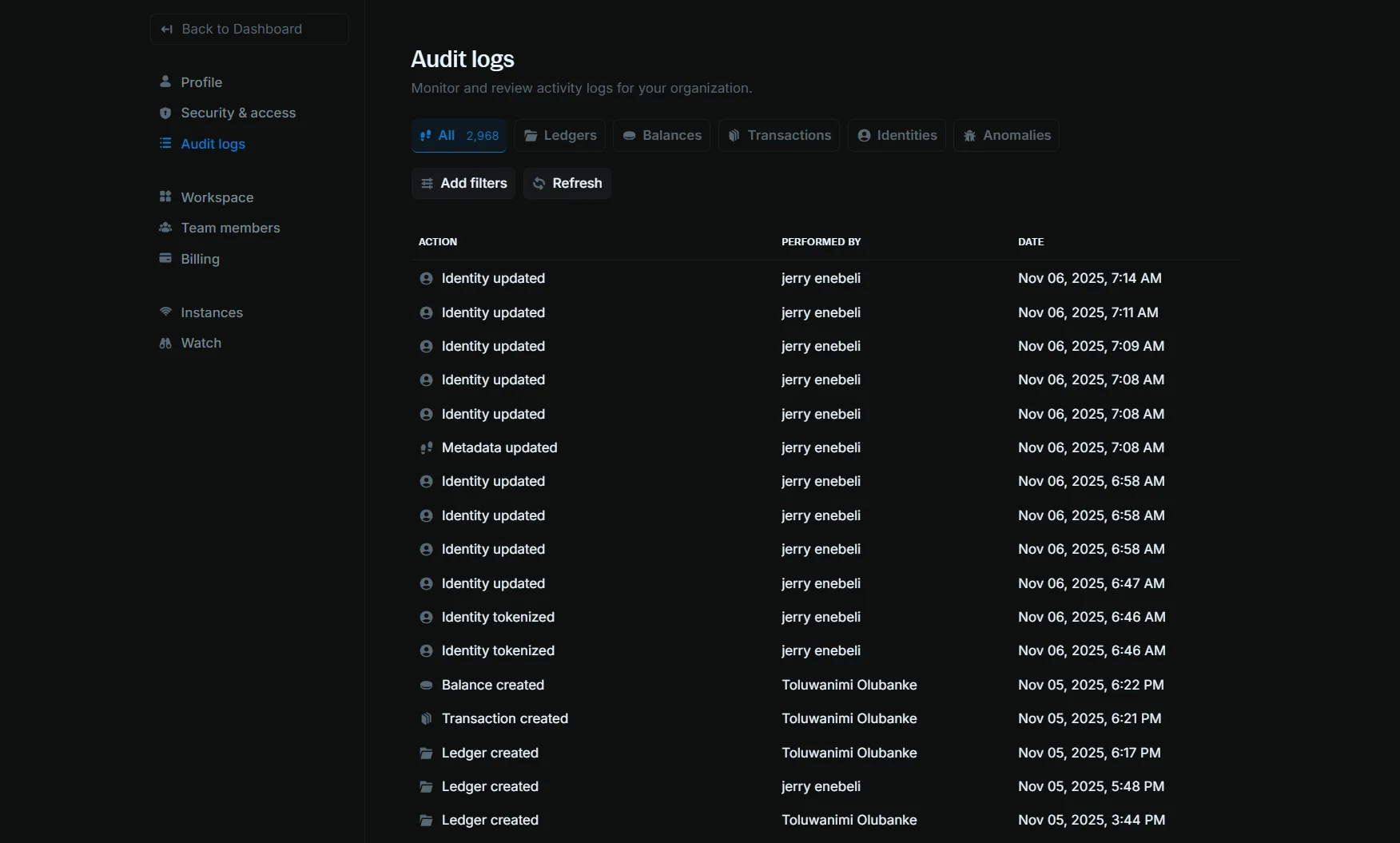
The columns are:
- Action: the activity, such as “Identity updated”, “Balance created”, or “Transaction created”
- Performed by: the person named on the row
- Date: when the action occurred
The cards across the top group the log:
- All: every activity in the workspace
- Ledgers: ledger creation and updates
- Balances: balance activity
- Transactions: transaction activity
- Identities: identity changes
- Reconciliations: reconciliation runs, matching rules, and uploaded external data
- Alerts: alert assignment and investigation
- Domains: domain verification and removal
- Apps: app install, launch, and uninstall
Add filters narrows the current card. Action, app name, and domain name can contain a pattern or match exactly. The other fields match exactly, and Performed by is a team member.
- Action
- Performed by
- Transaction ID
- Ledger ID
- Balance ID
- Identity ID
- Alert ID
- Reconciliation ID
- App name
- App ID
- Domain name
Refresh loads the latest rows.