Data Lake
Overview
Read a stored copy of ledger history for reports, off the live ledger.
The data lake is a stored copy of your ledger, kept for reports. It holds transactions, balances, ledgers, and identity.
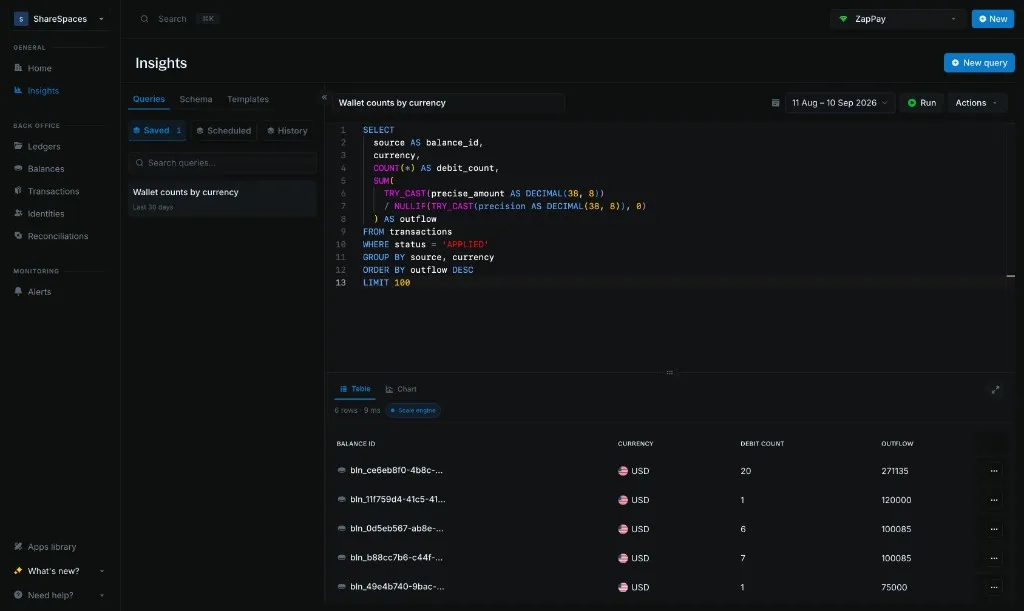
Insights and Create new query read that copy instead of the ledger that processes transactions. A volume report or an investigation stays off the path that moves money.
Your ledger stays the source of truth.
When to use it
Use the lake for activity over a period. Use the ledger when you need what a wallet holds right now.
| Question | Where to get it |
|---|---|
| Money that moved over a period | Create new query or Insights |
| Wallets, ledgers, and identities in that history | Create new query or Insights |
| Amount in a wallet right now | Get balance |
| Amount in a wallet at a past time | Historical balances |
Schema lists the columns. Queries covers how the date range changes what a query can see.
Run a query
Send instance_id, start_date, end_date, and one read-only sql.
curl -X POST 'https://api.cloud.blnkfinance.com/data/lake/query' \
  -H 'X-blnk-key: CLOUD_API_KEY' \
  -H 'Content-Type: application/json' \
  -d '{
    "instance_id": "YOUR_INSTANCE_ID",
    "start_date": "2026-08-01",
    "end_date": "2026-08-31",
    "sql": "SELECT currency, COUNT(*) AS txn_count FROM transactions GROUP BY currency LIMIT 1000"
  }'
Send saved_query_id instead of sql to rerun a saved query. Use filters when you do not want to write SQL.
Field details are on Create new query.
Open Insights
Select Insights from the side navigation.
Check the instance in the top-right corner. The query runs on that instance’s data lake.
Set the date range
Use the date picker in the toolbar. Choose a preset, or enter a start and end date.
Run and save
Paste a read-only SELECT or WITH, then click Run.
Click Save when you want to keep the query.