

Start here
Enterprise API
Call the Enterprise API on Blnk Cloud or a self-hosted Enterprise deployment.
The Enterprise API is the HTTP API for Blnk Cloud and for a self-hosted Enterprise deployment. It covers deployments, the audit log, the data lake, alerts, agents, and billing. It can also forward a Core request to a connected instance.
Use it when one credential and one host should reach every instance, instead of storing each Core key in your app.
How it works with Core
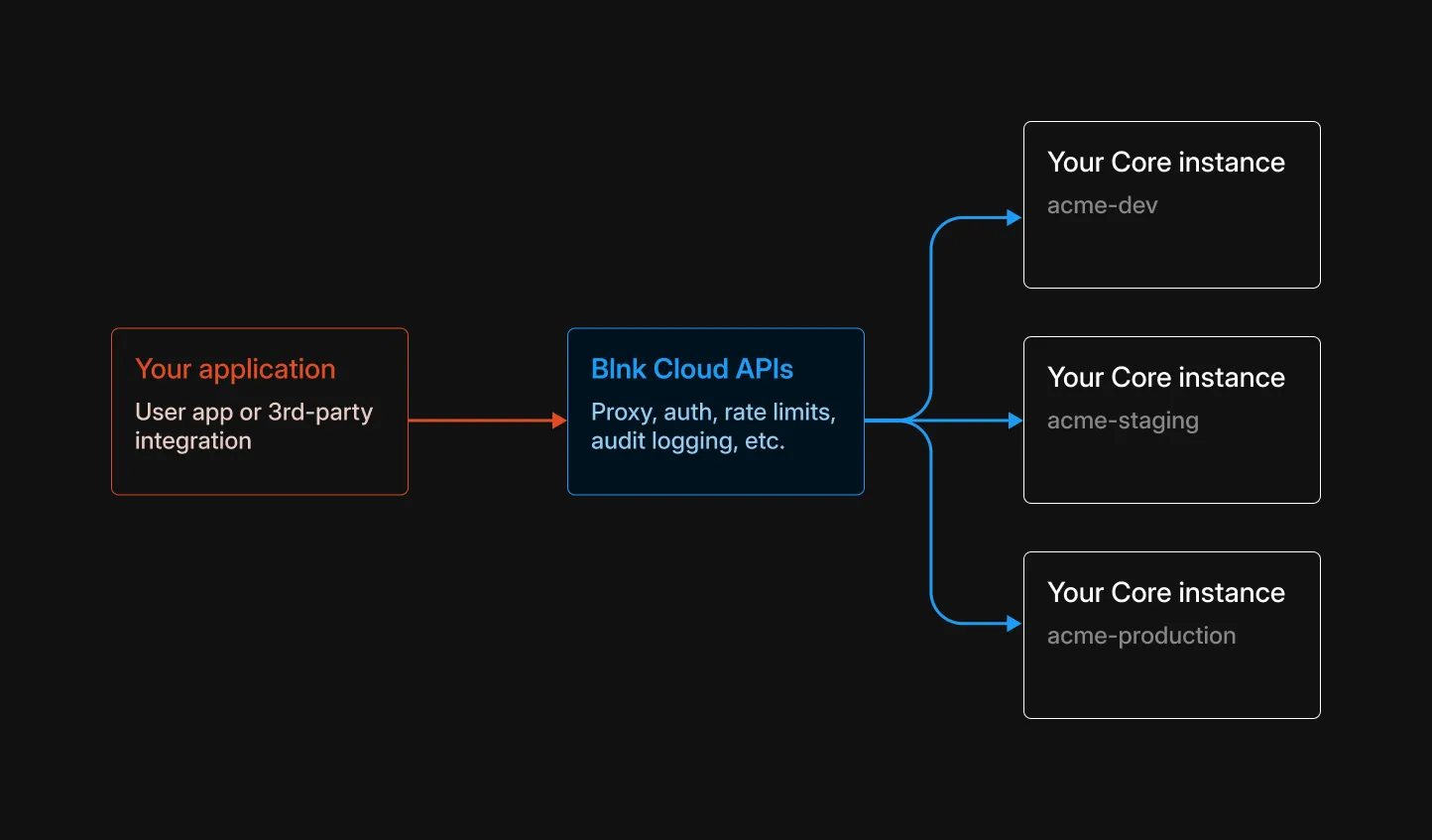
The Enterprise API sits between your application and your Core instances. It does not replace the Core API. It authenticates the caller, picks the instance, and records the call.
You have an internal back-office UI, and you want to know who performed each action. With open-source Core, you build and maintain the audit log and the role-based access (RBAC) yourself.
The Enterprise API handles the routing, the role-based access, and the audit log for you. You build your back office with the Proxy API, and anyone on your dashboard can handle the rest.
You can also seamlessly switch between connected instances and keep that same access on every one.
How to use it
On Blnk Cloud the host is https://api.cloud.blnkfinance.com. On a self-hosted Enterprise deployment the host is ENTERPRISE_PUBLIC_URL.
Send an Enterprise API key or an OAuth access token in X-blnk-key.
Connect your Core instances
Connect each Core instance to the workspace. Each connection gets an instance_id. Later calls use that id to choose the instance.
Create an Enterprise API key
Create a key for each user of the tool. The key authenticates that user on Enterprise API calls.
Call Core through the proxy
Send Core requests through the proxy. The Enterprise API checks the key, writes the audit log, and forwards the request.
The request goes to the proxy. The workspace checks the key, logs the action, and routes it to the instance.
curl -X POST "https://api.cloud.blnkfinance.com/proxy/refund-transaction/txn_f482a1b3-6c2d-4e89-a17b-3d5e8f2a1c94?instance_id=YOUR_INSTANCE_ID" \
  -H "X-blnk-key: YOUR_API_KEY"
Read that user’s actions in the workspace audit log, or call List audit logs.
The request goes straight to Core. You handle routing, authentication, and the audit log.
curl -X POST "https://YOUR_CORE_INSTANCE_URL/refund-transaction/txn_f482a1b3-6c2d-4e89-a17b-3d5e8f2a1c94" \
  -H "X-blnk-key: YOUR_SECRET_KEY"
Enterprise Proxy
The proxy forwards a Core request to a connected instance. You send the same method, path, and body you would send to Core. Prefix the path with /proxy, send your Enterprise API key or an OAuth access token, and add instance_id.
The workspace forwards the request and returns the Core response unchanged. Use Create new query for historical reporting. Alerts, deployments, and the other Cloud routes stay on their own paths.
How it works
- Your app sends the request to
https://api.cloud.blnkfinance.com/proxy/...with the Core method. On a self-hosted Enterprise deployment, useENTERPRISE_PUBLIC_URLinstead. - The workspace authenticates the Enterprise API key or OAuth access token.
- It uses
instance_idto choose the Core instance. - It forwards the request.
- It returns the Core response unchanged.
Field shapes match the Core API. Send that payload to the proxy URL with an Enterprise API key and instance_id.
Core:   {METHOD} http://CORE_INSTANCE_URL/{path}
Proxy:  {METHOD} https://api.cloud.blnkfinance.com/proxy/{path}?instance_id=YOUR_INSTANCE_ID
URL format and headers
pathstring
Core path after /proxy. Use the same path you would call on Core.
instance_idstring
Instance to target. Required on every proxy request. Read it from Get instance (instance_...). Do not send deployment_id here.
X-blnk-keystring
Enterprise API key, or an OAuth access token.
Content-Typestring
Required when the request has a body. Use application/json, or multipart/form-data for a reconciliation upload.
Calling Core endpoints
Prefix the Core path with /proxy and keep the HTTP method. Append ?instance_id=YOUR_INSTANCE_ID to every request.
| Method | Core path | Proxy path |
|---|---|---|
| GET | /ledgers | /proxy/ledgers |
| GET | /ledgers/{ledger_id} | /proxy/ledgers/{ledger_id} |
| POST | /ledgers | /proxy/ledgers |
| PUT | /ledgers/{ledger_id} | /proxy/ledgers/{ledger_id} |
| DELETE | /reconciliation/matching-rules/{rule_id} | /proxy/reconciliation/matching-rules/{rule_id} |
Every Core route follows the same pattern. When you create a transaction and omit precision or reference, Cloud sets precision to 100 and generates a reference.
Response
When the workspace can reach Core, the status code and body match that Core endpoint. If instance_id is missing, the response is a JSON error.
curl -X POST "https://api.cloud.blnkfinance.com/proxy/ledgers?instance_id=YOUR_INSTANCE_ID" \
  -H "X-blnk-key: OAUTH_ACCESS_TOKEN" \
  -H "Content-Type: application/json" \
  -d '{
    "name": "My Integration Ledger",
    "meta_data": {
      "description": "Ledger for integration test"
    }
  }'
curl -X GET "https://api.cloud.blnkfinance.com/proxy/ledgers/ldg_073f7ffe-9dfd-42ce-aa50-d1dca1788adc?instance_id=YOUR_INSTANCE_ID" \
-H "X-blnk-key: OAUTH_ACCESS_TOKEN"curl -X PUT "https://api.cloud.blnkfinance.com/proxy/ledgers/ldg_073f7ffe-9dfd-42ce-aa50-d1dca1788adc?instance_id=YOUR_INSTANCE_ID" \
-H "X-blnk-key: OAUTH_ACCESS_TOKEN" \
-H "Content-Type: application/json" \
-d '{
"name": "Updated Customer Savings Ledger"
}'curl -X DELETE "https://api.cloud.blnkfinance.com/proxy/reconciliation/matching-rules/rule_6e6feddd-930b-4e13-8ba1-1a3eee659bb3?instance_id=YOUR_INSTANCE_ID" \
-H "X-blnk-key: OAUTH_ACCESS_TOKEN"{
"ledger_id": "ldg_073f7ffe-9dfd-42ce-aa50-d1dca1788adc",
"name": "My Integration Ledger",
"created_at": "2024-02-20T05:28:03.558281542Z",
"meta_data": {
"description": "Ledger for integration test"
}
}{
"error": "instance_id is required"
}