Data Lake
Data lake overview
See why the data lake exists, how records are copied into it, and what you use it for.
In a ledger, recording the payment is the start. Reports, investigations, and reviews all read that same history afterward.
Running those reads on the live database competes with the service that posts transactions, and the ledger slows down under work it still has to do.
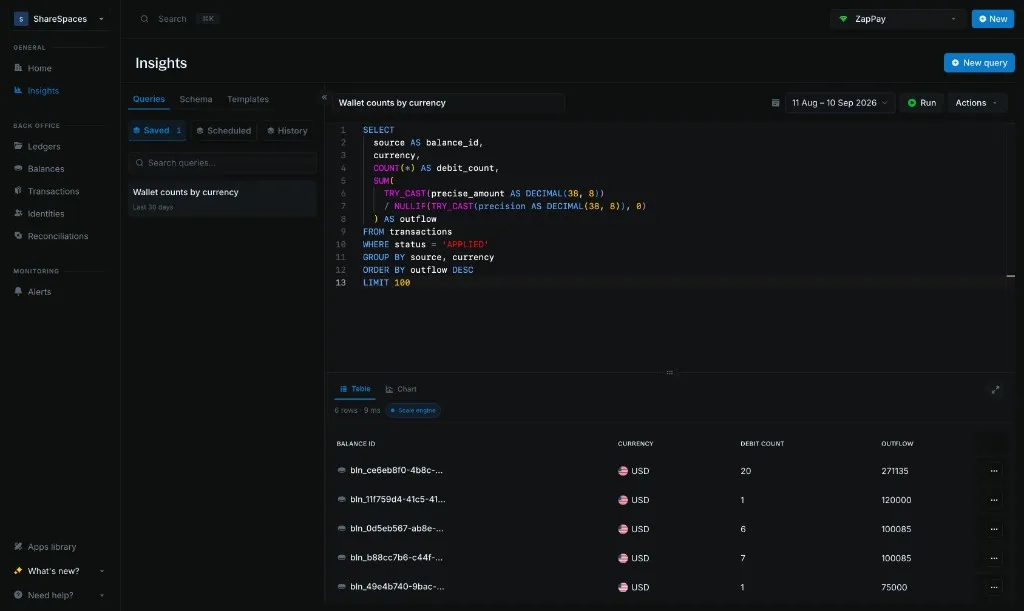
The data lake is a separate copy of transactions, balances, ledgers, and identity, kept so those reads can easily work with billions of records without pressure on the live ledger instance. Insights and Create new query run SQL on the copy. The ledger stays the source of truth.
How it works
Blnk Core writes ledger data as Parquet. Those files sync to object storage, and a query engine runs Insights and analytics on the copy.
When to use it
Use the lake for activity over a period. Use the ledger when you need what a wallet holds right now.
| Question | Where to get it |
|---|---|
| Money that moved over a period | Queries or Create new query |
| Wallets, ledgers, and identities in that history | Queries or Create new query |
| Amount in a wallet right now | Get balance |
| Amount in a wallet at a past time | Historical balances |
Schema lists the columns and how the four tables join.
What you use it for
Write the SQL yourself, or start from a template. The same copy serves a period report and a dashboard.
Break down posted volume
Total posted volume, then break it down by currency, day, or status, and see whether a period is up or down.
Those scans run on the lake, including when the history runs into billions of records.
Write your own SQL
Send one read-only SELECT or WITH from Insights or Create new query.
This statement finds a common monitoring case: a balance that received money and sent nearly the same amount straight back out. It joins that balance to its ledger and its identity.
WITH applied AS (
  SELECT
    currency,
    source,
    destination,
    TRY_CAST(precise_amount AS DECIMAL(38, 8))
      / NULLIF(TRY_CAST(precision AS DECIMAL(38, 8)), 0) AS amount
  FROM transactions
  WHERE status = 'APPLIED'
),
inflow AS (
  SELECT
    destination AS balance_id,
    currency,
    SUM(amount) AS inflow
  FROM applied
  GROUP BY 1, 2
),
outflow AS (
  SELECT
    source AS balance_id,
    currency,
    SUM(amount) AS outflow
  FROM applied
  GROUP BY 1, 2
),
balances_one AS (
  SELECT
    balance_id,
    ANY_VALUE(ledger_id) AS ledger_id,
    ANY_VALUE(identity_id) AS identity_id
  FROM balances
  GROUP BY balance_id
),
ledgers_one AS (
  SELECT
    ledger_id,
    ANY_VALUE(name) AS ledger_name
  FROM ledgers
  GROUP BY ledger_id
),
identity_one AS (
  SELECT
    identity_id,
    ANY_VALUE(identity_type) AS identity_type,
    ANY_VALUE(first_name) AS first_name,
    ANY_VALUE(last_name) AS last_name,
    ANY_VALUE(organization_name) AS organization_name,
    ANY_VALUE(email_address) AS email_address
  FROM identity
  GROUP BY identity_id
)
SELECT
  f.balance_id,
  f.currency,
  l.ledger_name,
  i.identity_type,
  i.organization_name,
  i.first_name,
  i.last_name,
  i.email_address,
  f.inflow,
  o.outflow,
  LEAST(f.inflow, o.outflow) AS passed_through
FROM inflow f
JOIN outflow o
  ON o.balance_id = f.balance_id
  AND o.currency = f.currency
JOIN balances_one b ON b.balance_id = f.balance_id
JOIN ledgers_one l ON l.ledger_id = b.ledger_id
JOIN identity_one i ON i.identity_id = b.identity_id
WHERE f.inflow > 0
  AND o.outflow > 0
  AND LEAST(f.inflow, o.outflow) / GREATEST(f.inflow, o.outflow) >= 0.8
ORDER BY passed_through DESC
LIMIT 100
Run business intelligence on billions of rows
Join transactions, balances, ledgers, and identity, group the rows, and use a window when a result needs the rows around it.
That calculation can cover billions of records on the copy, and the figure it returns was never stored as its own record.
Run a report from a dashboard
Save the statement in Queries and run it on a schedule, or call it from your own BI tool through Create new query.
That SQL is the report. It does not need a separate warehouse in front of the ledger.