

Available in version 0.6.0 and later.
inflight parameter, transactions follow a specialized workflow that maintains separate balances for pending operations.
It is best used when you want to wait for feedback or authorization before a transaction is applied in your ledger.
Before we start,
Remember that all ledger balances in Blnk have 6 main balance parameters:balance: This shows the current value held in the ledger balance.credit_balance: This is the total sum of all amounts received by a ledger balance.debit_balance: This is the total sum of all amounts sent by a ledger balance.inflight_balance: This shows the net amount held inflight for a balance.inflight_credit_balance: This is the total sum of all amount waiting to be received by a ledger balance.inflight_debit_balance: This is the total sum of all amount waiting to be deducted from a ledger balance.
How Inflight works
This is how inflight transactions work in Blnk:Record transaction with Inflight
First, specify that the transaction should be held inflight by setting When recording a new transaction with Inflight, the system, by default, will:
inflight: true.Response
- Initializes the transaction in the
QUEUEDstate. - Processes and moves the transaction to
INFLIGHT. - Maintains the original balances while tracking the pending amounts in inflight balance parameters.
Balance management
Next, understand how Blnk tracks inflight amounts. We use these three balance parameters: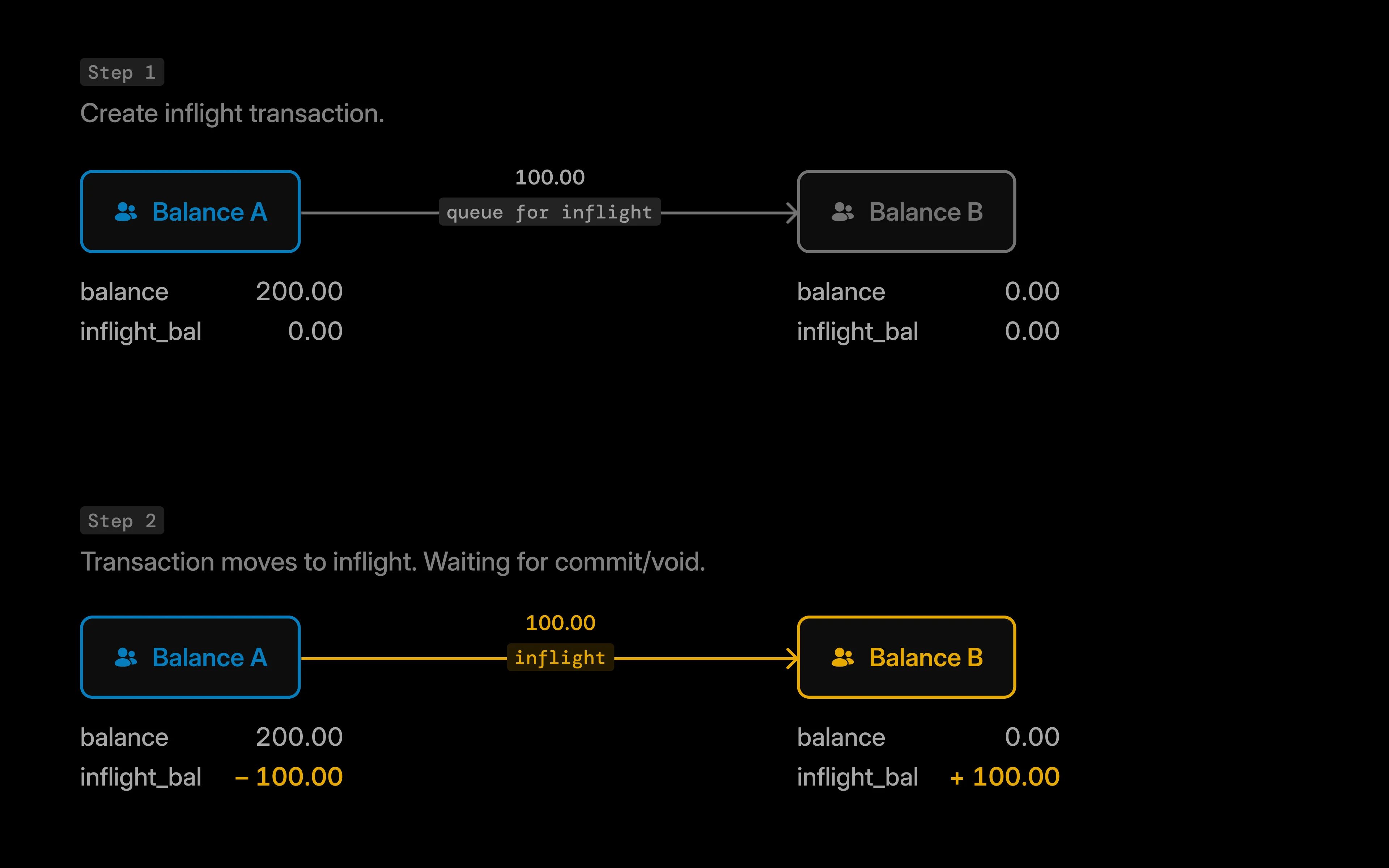
In this scenario:
balance_id | Main balance | Inflight balance | Inflight credit | Inflight debit |
|---|---|---|---|---|
balance_A | 200 | -100 | 0 | 100 |
balance_B | 0 | 100 | 100 | 0 |
balance_Ashows a negative inflight balance (-100) because funds are pending outflow.balance_Bshows a positive inflight balance (100) because funds are pending inflow.- The main balances remain unchanged until the transaction is committed.
Updating Inflight
Updating an inflight transaction means telling Blnk what to do with it next: commit or void?To update an inflight transaction, use the Update Inflight endpoint: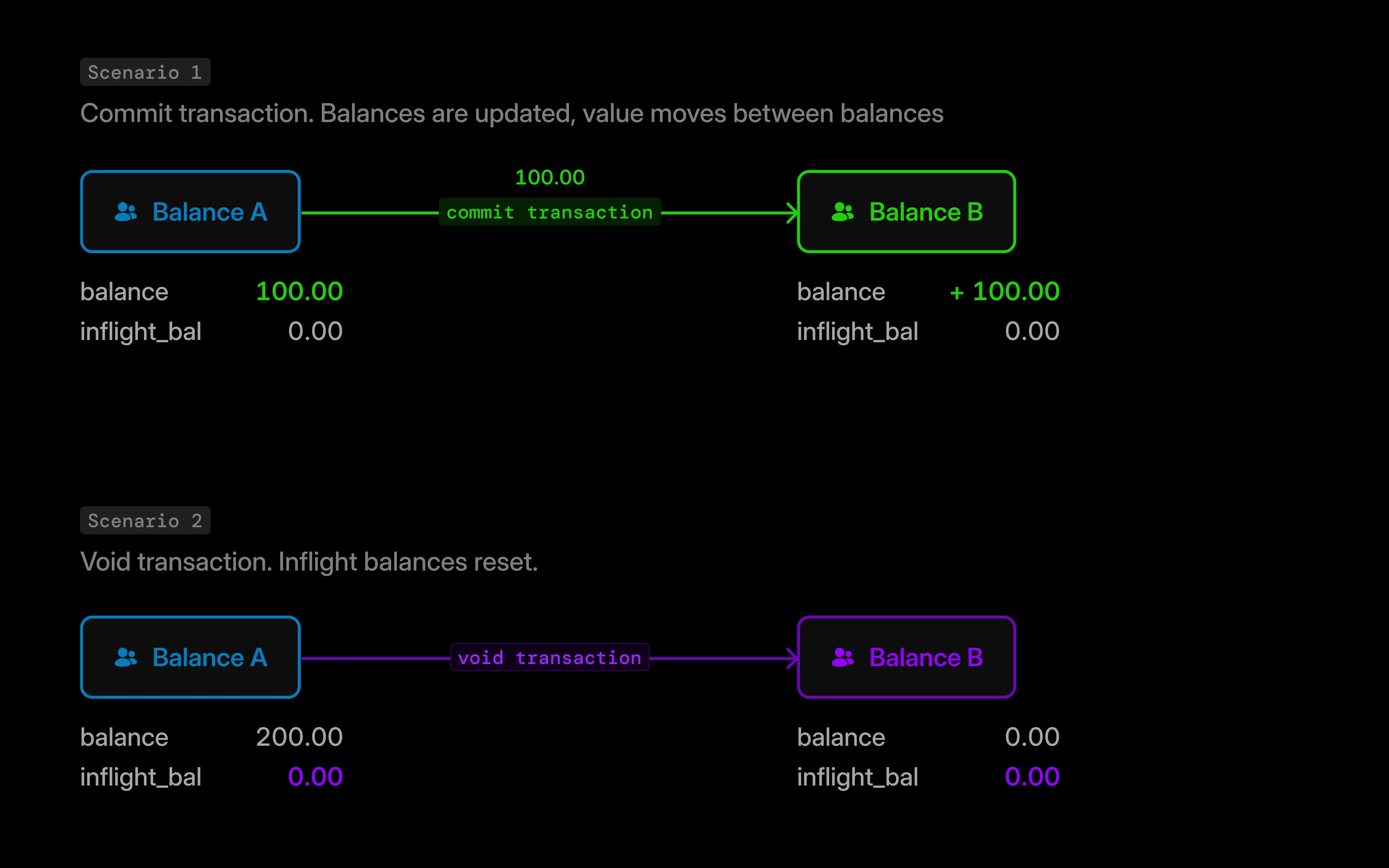
- Commit inflight
- Partial commits
- Void inflight
- Indicates transaction conditions are met.
- Triggers balance updates, and clears the inflight balances.
- Creates new transaction record with
APPLIEDstatus.
Response
balance_id | Main balance | Inflight balance | Inflight credit | Inflight debit |
|---|---|---|---|---|
balance_A | 100 | 0 | 0 | 0 |
balance_B | 100 | 0 | 0 | 0 |
Bulk inflight updates
Available in version 0.14.2 and later.
Bulk inflight updates are for independently-created inflight transactions. For inflight transactions created through the bulk transaction API, use the batch update flow in Bulk transactions.
- Bulk commit
- Bulk void
Response
succeeded, failed, and a results array with each transaction’s status.
See also: Bulk commit inflight and Bulk void inflight.
Schedule inflight commits
Available in version 0.14.1 and later.
inflight_commit_date, you can specify in your request when you want Blnk to automatically commit an inflight transaction for you.
This is useful when the inflight transaction starts now, but the final commit should happen at a known future time.
Scheduled inflight commits are processed through a background queue. Before using
inflight_commit_date, add BLNK_QUEUE_INFLIGHT_COMMIT to your environment or inflight_commit_queue in blnk.json. See Queue configuration for the default and other queue settings.For example, you can reserve funds for a hotel booking today and have Blnk commit the transaction automatically on the check-in date.
Response
Schedule inflight expiry
A transaction stays inflight until you commit it, void it manually, or it expires. To cap how long funds can remain held inflight, includeinflight_expiry_date when you record the transaction.
- If the transaction is still
INFLIGHTafter the expiry time, Blnk voids it automatically (same outcome as Update Inflight withvoid). - Creates a new record with
VOIDstatus. - Resets inflight balances without changing your settled balances.
Response
If you use both
inflight_commit_date and inflight_expiry_date, set the commit time before the expiry time so Blnk can commit the hold before it would auto-void.Verifying inflight statuses
Via Search API
You can verify transaction status using the Search API by querying with the appropriate transaction ID:- When skip_queue = false (default)
- When skip_queue = true
Use the queued transaction ID to search for its child transactions.
Via webhooks
The most reliable way to verify if an inflight transaction has been committed or voided is through webhooks. This approach allows you to receive real-time notifications when the transaction status changes:Add verification reference to metadata
Before creating the inflight transaction, generate a unique verification reference and add it to the transaction’s metadata:
Handle webhook notifications
When the inflight transaction is committed or voided, Blnk sends a webhook notification. The metadata from the parent transaction is passed down to the child transaction, so you can identify your transaction using the verification reference.
transaction.applied
Inflight for multiple sources/destinations
Multiple sources in Blnk allow you send from multiple sources to a single destination simultaneously, while multiple destinations allow you to send from one source to multiple destinations. Learn more: Multiple Sources and Multiple Destinations.Initiate inflight
When initiating inflight transactions with multiple sources/destinations, enable the inflight feature in your transaction request. Here’s how to structure your request:When using multiple sources/destinations, each transaction is recorded separately in the ledger.However, these transactions are linked together through a
Use the same Create transaction request as a single transfer, and set
"inflight": true in the body. For multiple sources or destinations, include the sources or destinations array instead of source / destination.parent_transaction attribute, which you’ll receive in the response to your transaction request. This parent_transaction helps you track and manage related transactions as a single unit.Update Inflight
To commit or void all transactions at once, call the Update Inflight endpoint and pass the root-level
transaction_id from your API response as the path parameter.Response
Use cases
Useful applications forinflight include:
- For managing KYC limits: When an account crosses its KYC limits determined by your application, you can hold all deposits with inflight until the user’s KYC is updated.
- For escrow: Inflight allows you to easily implement escrow features in your application, allowing your users see the amount being held (but not available to them to spend).
- For card payouts: Hold amounts in an inflight balance until the card is authorized by the payment processor for successful payment.
- For external payouts: Hold amount in an inflight balance while your payout is being processed by your provider; only release it when the transaction is successful or failed.