

AI integrations
MCP server
Connect an AI client to a Core instance through the Blnk MCP server.
/mcp/{instance_id}The Blnk MCP server exposes a Core instance through the Model Context Protocol. Cursor, Claude Desktop, and ChatGPT connect to Cloud, and Cloud forwards authorized tool calls to that instance.
Clients do not open a connection to Core. Cloud checks the credential, enforces mcp:read and mcp:write, and sends the operation to the instance in the URL.
Set up your client
Create credentials
Create an API key or an OAuth client. Both need mcp:read and mcp:write.
Copy the MCP endpoint
Open Settings > MCP and copy the configuration for the instance.
{
  "mcpServers": {
    "blnk": {
      "url": "https://api.cloud.blnkfinance.com/mcp/YOUR_INSTANCE_ID",
      "headers": {
        "X-blnk-key": "CLOUD_API_KEY"
      }
    }
  }
}Use the endpoint URL with your OAuth client id and client secret. The client signs in. You do not put a Cloud API key in the config.
https://api.cloud.blnkfinance.com/mcp/YOUR_INSTANCE_IDAdd the server to the client
Open Cursor settings, go to MCP, and add the server. Paste the JSON for an API key, or the endpoint URL for OAuth.
Add the configuration to claude_desktop_config.json.
~/Library/Application Support/Claude/claude_desktop_config.json%APPDATA%\Claude\claude_desktop_config.jsonGo to Settings > Apps. Open Advanced settings, enable Developer mode, and click Create app.
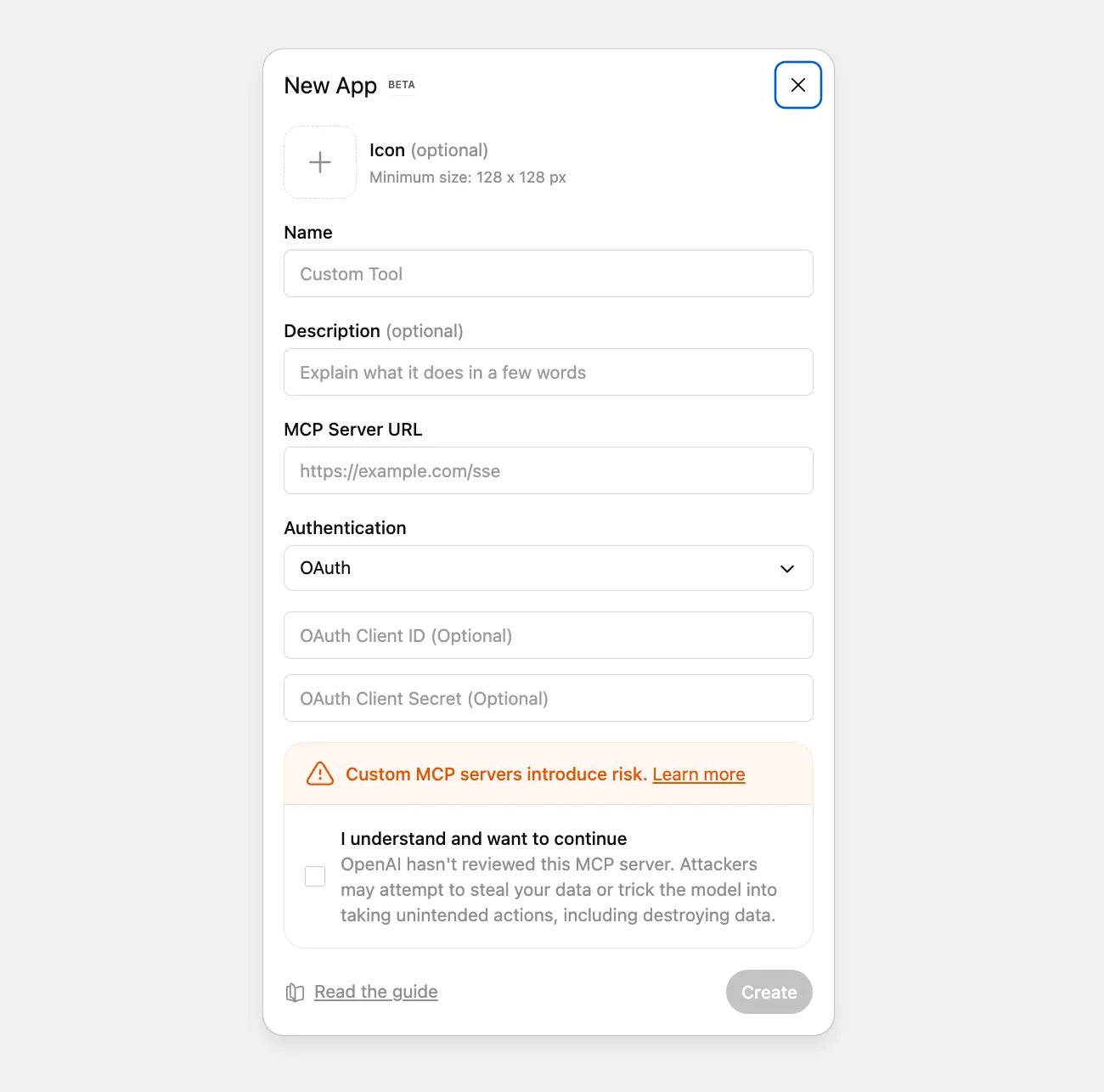
- Name: A name such as Blnk MCP.
- MCP Server URL: The endpoint from the previous step.
- Authentication: OAuth, then the client id and client secret.
Click Create and sign in to Blnk Cloud when asked.
Ask about the ledger
The client can read and update ledger data through the tools below.
What you can ask
- Activity: Transactions from the last 24 hours, or what changed since yesterday.
- Balances: The balance for a wallet, or balances that are negative or low.
- Failures: Failed or voided transactions, or a transaction by reference.
- Large movements: USD transactions over $5,000, or unusually large transactions today.
- Totals: How much moved today, or the total across customer wallets.
- Lake: The lake schema, a count of
APPLIEDtransactions last month, or a saved query on a daily schedule. - Workflows: A balance monitor, a bulk inflight commit, or a reconciliation run.
Supported tools
Blnk MCP registers 74 tools: 4 ledgers, 14 balances, 13 transactions, 10 identities, 3 search, 4 filters, 7 reconciliation, 5 hooks, 1 metadata, 2 system, and 11 lake.
create_ledgerget_ledgerlist_ledgersupdate_ledger
create_balanceget_balancelist_balancesget_balance_by_indicatortake_balance_snapshotsget_historical_balanceget_balance_lineageupdate_balance_identitycreate_balance_monitorget_balance_monitorlist_balance_monitorslist_balance_monitors_by_balanceupdate_balance_monitordelete_balance_monitor
record_transactionget_transactionget_transaction_by_referencelist_transactionscommit_inflightvoid_inflightbulk_commit_inflightbulk_void_inflightrecover_queued_transactionsrefund_transactionschedule_transactionbulk_transactionsget_transaction_lineage
create_identityget_identitylist_identitiesupdate_identitydelete_identitytokenize_fieldtokenize_identitydetokenize_fielddetokenize_identityget_tokenized_fields
searchstart_reindexget_reindex
query_transactionsquery_balancesquery_ledgersquery_identities
upload_reconciliation_datacreate_matching_ruleupdate_matching_ruledelete_matching_rulestart_reconciliationstart_instant_reconciliationget_reconciliation
create_hookupdate_hookget_hooklist_hooksdelete_hook
update_metadata
get_healthget_metrics
lake_schemalake_querylist_lake_queriesget_lake_querycreate_lake_queryupdate_lake_querydelete_lake_querylist_lake_query_runsget_lake_query_runput_lake_query_scheduledelete_lake_query_schedule
Response
Blnk MCP follows the Model Context Protocol specification. Message shape, session lifecycle, transport, and errors are defined there. Most clients handle that for you.