> ## Documentation Index
> Fetch the complete documentation index at: https://docs.blnkfinance.com/llms.txt
> Use this file to discover all available pages before exploring further.
# Webhooks
> Use Blnk webhooks to reliably react to ledger events and keep your product in sync-without polling the API.
export const CtaCallout = props => {
const {title, buttonLabel, href, trackingEvent, buttonTarget, rel = "noopener noreferrer", children} = props;
const handleCtaClick = () => {
if (typeof window === "undefined" || !trackingEvent) {
return;
}
try {
window.dispatchEvent(new CustomEvent("blnk:docs-cta", {
detail: {
name: trackingEvent,
href
}
}));
} catch {}
try {
window.posthog?.capture?.(trackingEvent, {
href
});
} catch {}
const gaPayload = {
cta_href: href
};
try {
window.gtag?.("event", trackingEvent, gaPayload);
} catch {}
try {
window.dataLayer = window.dataLayer || [];
window.dataLayer.push({
event: trackingEvent,
...gaPayload
});
} catch {}
};
const isExternal = typeof href === "string" && (/^https?:\/\//i).test(href);
const target = buttonTarget ?? (isExternal ? "_blank" : undefined);
const linkRel = isExternal ? rel : undefined;
return ;
};
Global webhooks are available in version 0.8.4 and later. Signed deliveries require version 0.13.0 and later.
Blnk sends webhook events to your HTTP endpoints in real time. Your code reacts when a transaction is created, committed, voided, or when a reconciliation completes.
This is critical in financial systems where timing matters. Polling risks gaps: you might miss a window between checks, or waste resources on empty requests.
Webhooks push the exact event to you the moment it happens, so your balances, notifications, and downstream workflows stay accurate and in sync.
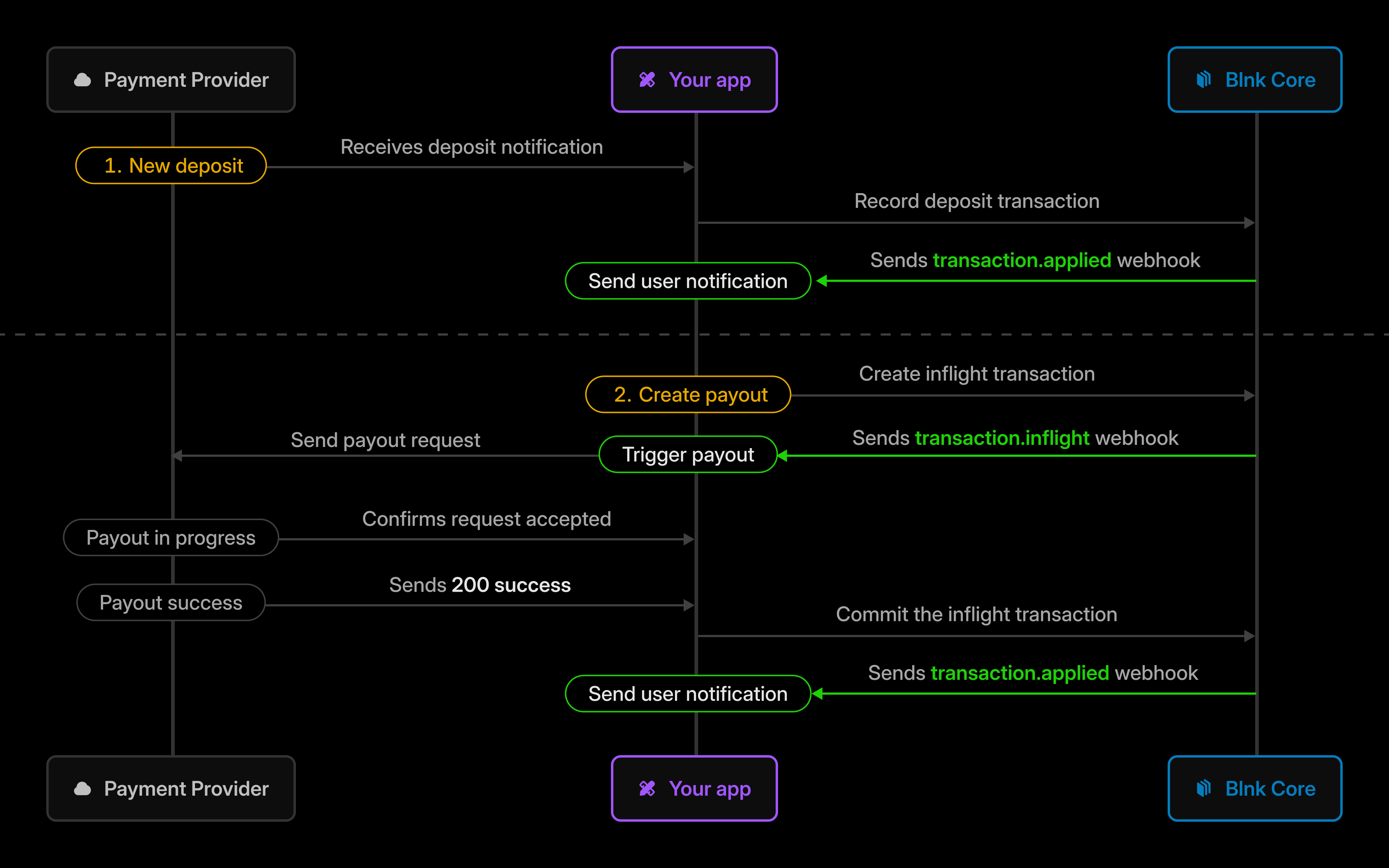 Instead of asking Blnk "did anything change?" on a timer, your app listens once and reacts when the ledger moves, keeping your product and tools like payments, notifications, etc. aligned.
***
## Webhook types
Blnk offers two types of webhooks:
* **[Global webhooks](/webhooks/global-webhooks):** A single endpoint for ledger-wide event notifications: resource lifecycle changes, reconciliation outcomes, and system errors.
* **[Transaction hooks](/webhooks/transaction-hooks):** Registered endpoints tied to transactions for workflows that run before or after a transaction is applied.
Here's how they differ:
| | Global webhooks | Transaction hooks |
| :----------------- | :--------------------------------------------------------------------- | :------------------------------------------------------------------------------- |
| **Configuration** | In [notification configuration](/advanced/configuration/notifications) | With the [Hooks API](/webhooks/transaction-hooks) |
| **When they fire** | On all named lifecycle events | Only on transaction events |
| **Management** | Edit Blnk configuration | Update, list, delete via Hooks API |
| **Typical use** | Global notifications, reconciliation results, system errors | Related to transaction workflows (validation, enrichment, pipeline side effects) |
***
## Webhook security
Available in version 0.13.0 and later.
Blnk signs outbound webhook requests so you can verify they came from your Blnk Core and were not tampered with.
Both **global webhooks** and **transaction hooks** use the same signing scheme.
| Header | Description |
| :----------------- | :---------------------------------------------------------------------------------------- |
| `X-Blnk-Signature` | Hex-encoded HMAC-SHA256 of the signed payload. |
| `X-Blnk-Timestamp` | Unix timestamp in seconds (string), used in the signed payload and for replay protection. |
| `X-Hook-ID` | The hook identifier (transaction hooks only). |
| `X-Hook-Type` | `PRE_TRANSACTION` or `POST_TRANSACTION` (transaction hooks only). |
To verify a webhook:
Read `X-Blnk-Signature` and `X-Blnk-Timestamp` from the request. Reject requests missing either header.
Preserve the **exact raw bytes** of the request body before JSON parsing. Do not use a parsed or re-serialized body-any whitespace or encoding changes will cause verification to fail.
Concatenate the timestamp and raw body:
```
signed = timestamp + "." + rawRequestBody
```
Compute `HMAC-SHA256` using `server.secret_key` from your [Blnk configuration](/advanced/secure-blnk), then hex-encode:
```
expected = hex( HMAC-SHA256(secret_key, signed) )
```
Compare `expected` to `X-Blnk-Signature` using a **constant-time comparison** (e.g. `crypto.timingSafeEqual` in Node.js). If they match, the webhook is authentic.
For replay protection, also reject timestamps outside a small window (e.g. ±5 minutes).
```javascript Node.js theme={"system"}
import express from "express";
import crypto from "crypto";
const app = express();
const SECRET = process.env.BLNK_SECRET; // must match server.secret_key
app.use(express.json({ verify: (req, _, buf) => { req.rawBody = buf; } }));
app.post("/webhook", (req, res) => {
const sig = req.header("x-blnk-signature");
const ts = req.header("x-blnk-timestamp");
if (!sig || !ts) return res.sendStatus(400);
const expected = crypto.createHmac("sha256", SECRET)
.update(`${ts}.${req.rawBody}`)
.digest("hex");
if (!crypto.timingSafeEqual(Buffer.from(sig), Buffer.from(expected)))
return res.sendStatus(401);
res.sendStatus(200);
});
app.listen(3000);
```
```go Go theme={"system"}
package main
import (
"crypto/hmac"
"crypto/sha256"
"encoding/hex"
"io"
"net/http"
"os"
)
var secret = []byte(os.Getenv("BLNK_SECRET")) // must match server.secret_key
func webhook(w http.ResponseWriter, r *http.Request) {
sig := r.Header.Get("X-Blnk-Signature")
ts := r.Header.Get("X-Blnk-Timestamp")
if sig == "" || ts == "" {
http.Error(w, "missing headers", http.StatusBadRequest)
return
}
body, _ := io.ReadAll(r.Body)
mac := hmac.New(sha256.New, secret)
mac.Write([]byte(ts + "." + string(body)))
expected := hex.EncodeToString(mac.Sum(nil))
if !hmac.Equal([]byte(sig), []byte(expected)) {
http.Error(w, "invalid signature", http.StatusUnauthorized)
return
}
w.WriteHeader(http.StatusOK)
}
func main() {
http.HandleFunc("/webhook", webhook)
http.ListenAndServe(":3000", nil)
}
```
```python Python theme={"system"}
import hmac, hashlib, os
from flask import Flask, request, abort
app = Flask(__name__)
SECRET = os.environ.get("BLNK_SECRET").encode() # must match server.secret_key
@app.route("/webhook", methods=["POST"])
def webhook():
sig = request.headers.get("X-Blnk-Signature")
ts = request.headers.get("X-Blnk-Timestamp")
if not sig or not ts:
abort(400)
signed = f"{ts}.".encode() + request.get_data()
expected = hmac.new(SECRET, signed, hashlib.sha256).hexdigest()
if not hmac.compare_digest(sig, expected):
abort(401)
return "", 200
if __name__ == "__main__":
app.run(port=3000)
```
***
## Related docs
Configure your webhook URL and handle deliveries.
Register PRE and POST transaction endpoints.
Full catalog of global webhook event names.
Environment variables and `blnk.json` settings.
***
## Need help?
We are very happy to help you make the most of Blnk, regardless of whether it is your first time or you are switching from another tool.
To ask questions or discuss issues, please [contact us](mailto:support@blnkfinance.com) or [join our Discord community](https://discord.gg/7WNv94zPpx).
Sign up and manage your ledger with our back-office dashboard. You can invite teammates to collaborate and manage your ledger operations directly from the dashboard.
Instead of asking Blnk "did anything change?" on a timer, your app listens once and reacts when the ledger moves, keeping your product and tools like payments, notifications, etc. aligned.
***
## Webhook types
Blnk offers two types of webhooks:
* **[Global webhooks](/webhooks/global-webhooks):** A single endpoint for ledger-wide event notifications: resource lifecycle changes, reconciliation outcomes, and system errors.
* **[Transaction hooks](/webhooks/transaction-hooks):** Registered endpoints tied to transactions for workflows that run before or after a transaction is applied.
Here's how they differ:
| | Global webhooks | Transaction hooks |
| :----------------- | :--------------------------------------------------------------------- | :------------------------------------------------------------------------------- |
| **Configuration** | In [notification configuration](/advanced/configuration/notifications) | With the [Hooks API](/webhooks/transaction-hooks) |
| **When they fire** | On all named lifecycle events | Only on transaction events |
| **Management** | Edit Blnk configuration | Update, list, delete via Hooks API |
| **Typical use** | Global notifications, reconciliation results, system errors | Related to transaction workflows (validation, enrichment, pipeline side effects) |
***
## Webhook security
Available in version 0.13.0 and later.
Blnk signs outbound webhook requests so you can verify they came from your Blnk Core and were not tampered with.
Both **global webhooks** and **transaction hooks** use the same signing scheme.
| Header | Description |
| :----------------- | :---------------------------------------------------------------------------------------- |
| `X-Blnk-Signature` | Hex-encoded HMAC-SHA256 of the signed payload. |
| `X-Blnk-Timestamp` | Unix timestamp in seconds (string), used in the signed payload and for replay protection. |
| `X-Hook-ID` | The hook identifier (transaction hooks only). |
| `X-Hook-Type` | `PRE_TRANSACTION` or `POST_TRANSACTION` (transaction hooks only). |
To verify a webhook:
Read `X-Blnk-Signature` and `X-Blnk-Timestamp` from the request. Reject requests missing either header.
Preserve the **exact raw bytes** of the request body before JSON parsing. Do not use a parsed or re-serialized body-any whitespace or encoding changes will cause verification to fail.
Concatenate the timestamp and raw body:
```
signed = timestamp + "." + rawRequestBody
```
Compute `HMAC-SHA256` using `server.secret_key` from your [Blnk configuration](/advanced/secure-blnk), then hex-encode:
```
expected = hex( HMAC-SHA256(secret_key, signed) )
```
Compare `expected` to `X-Blnk-Signature` using a **constant-time comparison** (e.g. `crypto.timingSafeEqual` in Node.js). If they match, the webhook is authentic.
For replay protection, also reject timestamps outside a small window (e.g. ±5 minutes).
```javascript Node.js theme={"system"}
import express from "express";
import crypto from "crypto";
const app = express();
const SECRET = process.env.BLNK_SECRET; // must match server.secret_key
app.use(express.json({ verify: (req, _, buf) => { req.rawBody = buf; } }));
app.post("/webhook", (req, res) => {
const sig = req.header("x-blnk-signature");
const ts = req.header("x-blnk-timestamp");
if (!sig || !ts) return res.sendStatus(400);
const expected = crypto.createHmac("sha256", SECRET)
.update(`${ts}.${req.rawBody}`)
.digest("hex");
if (!crypto.timingSafeEqual(Buffer.from(sig), Buffer.from(expected)))
return res.sendStatus(401);
res.sendStatus(200);
});
app.listen(3000);
```
```go Go theme={"system"}
package main
import (
"crypto/hmac"
"crypto/sha256"
"encoding/hex"
"io"
"net/http"
"os"
)
var secret = []byte(os.Getenv("BLNK_SECRET")) // must match server.secret_key
func webhook(w http.ResponseWriter, r *http.Request) {
sig := r.Header.Get("X-Blnk-Signature")
ts := r.Header.Get("X-Blnk-Timestamp")
if sig == "" || ts == "" {
http.Error(w, "missing headers", http.StatusBadRequest)
return
}
body, _ := io.ReadAll(r.Body)
mac := hmac.New(sha256.New, secret)
mac.Write([]byte(ts + "." + string(body)))
expected := hex.EncodeToString(mac.Sum(nil))
if !hmac.Equal([]byte(sig), []byte(expected)) {
http.Error(w, "invalid signature", http.StatusUnauthorized)
return
}
w.WriteHeader(http.StatusOK)
}
func main() {
http.HandleFunc("/webhook", webhook)
http.ListenAndServe(":3000", nil)
}
```
```python Python theme={"system"}
import hmac, hashlib, os
from flask import Flask, request, abort
app = Flask(__name__)
SECRET = os.environ.get("BLNK_SECRET").encode() # must match server.secret_key
@app.route("/webhook", methods=["POST"])
def webhook():
sig = request.headers.get("X-Blnk-Signature")
ts = request.headers.get("X-Blnk-Timestamp")
if not sig or not ts:
abort(400)
signed = f"{ts}.".encode() + request.get_data()
expected = hmac.new(SECRET, signed, hashlib.sha256).hexdigest()
if not hmac.compare_digest(sig, expected):
abort(401)
return "", 200
if __name__ == "__main__":
app.run(port=3000)
```
***
## Related docs
Configure your webhook URL and handle deliveries.
Register PRE and POST transaction endpoints.
Full catalog of global webhook event names.
Environment variables and `blnk.json` settings.
***
## Need help?
We are very happy to help you make the most of Blnk, regardless of whether it is your first time or you are switching from another tool.
To ask questions or discuss issues, please [contact us](mailto:support@blnkfinance.com) or [join our Discord community](https://discord.gg/7WNv94zPpx).
Sign up and manage your ledger with our back-office dashboard. You can invite teammates to collaborate and manage your ledger operations directly from the dashboard.