> ## Documentation Index
> Fetch the complete documentation index at: https://docs.blnkfinance.com/llms.txt
> Use this file to discover all available pages before exploring further.
# Building a Wallet Management System
> Learn how to implement a complete wallet management system with Blnk.
export const CtaCallout = props => {
const {title, buttonLabel, href, trackingEvent, buttonTarget, rel = "noopener noreferrer", children} = props;
const handleCtaClick = () => {
if (typeof window === "undefined" || !trackingEvent) {
return;
}
try {
window.dispatchEvent(new CustomEvent("blnk:docs-cta", {
detail: {
name: trackingEvent,
href
}
}));
} catch {}
try {
window.posthog?.capture?.(trackingEvent, {
href
});
} catch {}
const gaPayload = {
cta_href: href
};
try {
window.gtag?.("event", trackingEvent, gaPayload);
} catch {}
try {
window.dataLayer = window.dataLayer || [];
window.dataLayer.push({
event: trackingEvent,
...gaPayload
});
} catch {}
};
const isExternal = typeof href === "string" && (/^https?:\/\//i).test(href);
const target = buttonTarget ?? (isExternal ? "_blank" : undefined);
const linkRel = isExternal ? rel : undefined;
return ;
};
This tutorial will guide you through implementing a simple wallet management system using the Blnk Ledger. By the end, you'll have built a system that can:
1. Create customer wallets.
2. Link wallets to customer identities.
3. Support deposits and withdrawals from wallets.
4. Create purpose-specific wallets (e.g. card balances).
5. Enable transfers between wallets.
For this tutorial, we'll use the [Blnk TypeScript SDK](/sdks/typescript) and [Blnk Go SDK](/sdks/go) for the implementation. If you prefer, you can also refer to the [API reference](/reference/create-ledger) for details on the available endpoints.
***
## Designing your map
Before writing code, it's crucial to design a [money movement map](/ledgers/money-movement-map) that outlines how money moves in your system. This serves as the blueprint for your implementation.
For our wallet management system, here's how funds will flow:
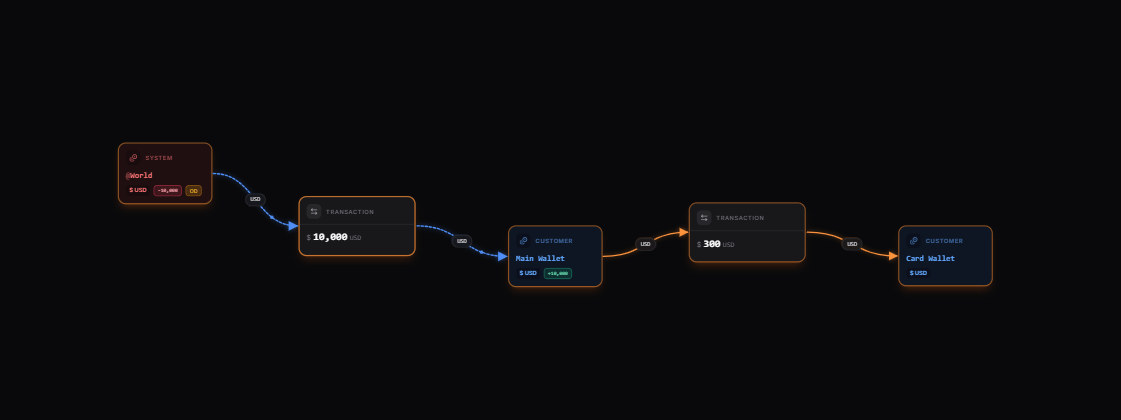 [Explore the map yourself here](https://map.blnkfinance.xyz/1R830Knmgh)
This map shows three key components:
* `@World`: Represents external funding sources and withdrawal destinations.
* `Main Wallet`: The customer's primary wallet for deposits and withdrawals.
* `Card Wallet`: A second wallet for card-related transactions.
From our map, we can verify that:
* Customers can deposit money from external sources to their main wallet.
* Customers can withdraw money from their main wallet to external destinations.
* Customers can transfer money from their main wallet to their card wallet.
***
## Set up your implementation
Based on our map, we'll implement the following steps:
1. Create a customer ledger to organise all customer wallets.
2. Create customer identity for storing user information.
3. Create a main wallet and link it to the identity.
4. Implement deposit functionality.
5. Implement withdrawal functionality.
6. Create a card wallet and link it to the same identity.
7. Fund the card wallet from the main wallet.
***
## Prerequisites
Before starting, ensure you have:
1. A running Blnk Core instance (e.g. at `http://localhost:5001`).
2. An API key for Blnk (replace `YOUR_API_KEY` in the code examples). Required for authenticated requests.
3. Optionally, you can connect your Blnk Core to your [Blnk Cloud](https://cloud.blnkfinance.com/?utm_source=blnk_docs\&utm_medium=documentation\&utm_campaign=tutorials%2Fquick-start%2Fwallet-management) workspace to view your ledger data.
***
## Create customer ledger
You can also create separate ledgers for different wallet types, e.g., `Customer Main Ledger` and `Customer Card Ledger`, to keep your balances more organized.
Create a [ledger](/ledgers/introduction) to organize all customer wallets - main and card wallets:
```bash cURL wrap theme={"system"}
curl -X POST "http://localhost:5001/ledgers" \
-H "X-blnk-key: " \
-H "Content-Type: application/json" \
-d '{
"name": "Customer Wallets Ledger",
"meta_data": {
"description": "Ledger for managing customer wallets",
"application": "Wallet Management System"
}
}'
```
```typescript TypeScript wrap theme={"system"}
async function createCustomerLedger() {
const customerLedger = await blnk.Ledgers.create({
name: "Customer Wallets Ledger",
meta_data: {
description: "Ledger for managing customer wallets",
application: "Wallet Management System"
}
});
console.log("Customer Ledger created:", customerLedger.data.ledger_id);
return customerLedger.data.ledger_id;
}
```
```go Go wrap theme={"system"}
func createCustomerLedger() (string, error) {
client := getClient()
ledger, _, err := client.Ledger.Create(blnkgo.CreateLedgerRequest{
Name: "Customer Wallets Ledger",
MetaData: map[string]interface{}{
"description": "Ledger for managing customer wallets",
"application": "Wallet Management System",
},
})
if err != nil {
return "", err
}
fmt.Println("Customer Ledger created:", ledger.LedgerID)
return ledger.LedgerID, nil
}
```
Always save the `ledger_id` in your database. You'll use this ID to create balances for the customer wallets.
***
## Create customer identity
Create a customer [identity](/identities/introduction) to store user profile information:
```bash cURL wrap theme={"system"}
curl -X POST "http://localhost:5001/identities" \
-H "X-blnk-key: " \
-H "Content-Type: application/json" \
-d '{
"identity_type": "individual",
"first_name": "Alice",
"last_name": "Johnson",
"email_address": "alice@example.com",
"phone_number": "+1234567890",
"meta_data": {
"customer_id": "CUST-001",
"registration_date": "2024-02-25T10:30:00Z"
}
}'
```
```typescript TypeScript wrap expandable theme={"system"}
async function createCustomerIdentity(customerData) {
const identity = await blnk.Identity.create({
identity_type: "individual",
first_name: customerData.firstName,
last_name: customerData.lastName,
email_address: customerData.email,
phone_number: customerData.phone,
meta_data: {
customer_id: customerData.customerId,
registration_date: new Date().toISOString()
}
});
console.log("Customer Identity created:", identity.data.identity_id);
return identity.data.identity_id;
}
```
```go Go wrap expandable theme={"system"}
func createCustomerIdentity(customerData CustomerData) (string, error) {
client := getClient()
identity, _, err := client.Identity.Create(blnkgo.Identity{
IdentityType: blnkgo.Individual,
FirstName: customerData.FirstName,
LastName: customerData.LastName,
EmailAddress: customerData.Email,
PhoneNumber: customerData.Phone,
MetaData: map[string]interface{}{
"customer_id": customerData.CustomerID,
"registration_date": time.Now().UTC().Format(time.RFC3339),
},
})
if err != nil {
return "", err
}
fmt.Println("Customer Identity created:", identity.IdentityID)
return identity.IdentityID, nil
}
```
Always save the `identity_id` in your database. You'll use this ID to link balances to this identity or query all balances owned by this identity.
***
## Create main wallet
[Create a balance](/balances/introduction) to represent the customer main wallet and link to the customer identity:
```bash cURL wrap theme={"system"}
curl -X POST "http://localhost:5001/balances" \
-H "X-blnk-key: " \
-H "Content-Type: application/json" \
-d '{
"ledger_id": "",
"identity_id": "",
"currency": "USD",
"meta_data": {
"wallet_type": "main",
"purpose": "general",
"status": "active"
}
}'
```
```typescript TypeScript wrap expandable theme={"system"}
async function createMainWallet(ledgerId, identityId, currency) {
const mainWallet = await blnk.LedgerBalances.create({
ledger_id: ledgerId,
identity_id: identityId,
currency: currency,
meta_data: {
wallet_type: "main",
purpose: "general",
status: "active"
}
});
console.log("Main Wallet created:", mainWallet.data.balance_id);
return mainWallet.data.balance_id;
}
```
```go Go wrap expandable theme={"system"}
func createMainWallet(ledgerID, identityID, currency string) (string, error) {
client := getClient()
balance, _, err := client.LedgerBalance.Create(blnkgo.CreateLedgerBalanceRequest{
LedgerID: ledgerID,
IdentityID: identityID,
Currency: currency,
MetaData: map[string]interface{}{
"wallet_type": "main",
"purpose": "general",
"status": "active",
},
})
if err != nil {
return "", err
}
fmt.Println("Main Wallet created:", balance.BalanceID)
return balance.BalanceID, nil
}
```
Always store the `balance_id` in your database and associate it with the customer. You'll use this ID for all future transactions involving this wallet.
***
## Funding the main wallet
Use an [internal balance](/balances/internal-balances) to represent external deposit sources-such as bank accounts, cards, and other funding methods-responsible for funding a customer's wallet.
Record a deposit from an external source to fund the main wallet:
```bash cURL wrap expandable theme={"system"}
curl -X POST "http://localhost:5001/transactions" \
-H "X-blnk-key: " \
-H "Content-Type: application/json" \
-d '{
"precise_amount": 100000,
"precision": 100,
"reference": "DEP-20250225-103000",
"description": "Initial deposit",
"currency": "USD",
"source": "@WorldUSD",
"destination": "",
"allow_overdraft": true,
"meta_data": {
"transaction_type": "deposit",
"channel": "bank_transfer"
}
}'
```
```typescript TypeScript wrap expandable theme={"system"}
async function depositToWallet(customerBalanceID, amount, uniqueReference, description) {
const deposit = await blnk.Transactions.create({
precise_amount: amount * 100,
precision: 100,
reference: uniqueReference,
description: description || "Deposit to wallet",
currency: "USD",
source: "@WorldUSD",
destination: customerBalanceID,
allow_overdraft: true, // Enable for the external source
meta_data: {
transaction_type: "deposit",
channel: "bank_transfer"
}
});
console.log("Deposit transaction created:", deposit.data.transaction_id);
return deposit.data.transaction_id;
}
```
```go Go wrap expandable theme={"system"}
func depositToWallet(customerBalanceID string, amount float64, uniqueReference, description string) (string, error) {
client := getClient()
if description == "" {
description = "Deposit to wallet"
}
deposit, _, err := client.Transaction.Create(blnkgo.CreateTransactionRequest{
ParentTransaction: blnkgo.ParentTransaction{
PreciseAmount: amount * 100,
Precision: 100,
Reference: uniqueReference,
Description: description,
Currency: "USD",
Source: "@WorldUSD",
Destination: customerBalanceID,
MetaData: map[string]interface{}{
"transaction_type": "deposit",
"channel": "bank_transfer",
},
},
AllowOverdraft: true,
})
if err != nil {
return "", err
}
fmt.Println("Deposit transaction created:", deposit.TransactionID)
return deposit.TransactionID, nil
}
```
Setting `allow_overdraft` to `true` enables the transaction to proceed even if the source balance lacks sufficient funds.
***
## Withdrawals from the main wallet
You can use the same internal balance to represent external withdrawal destinations to balance out your ledger, or you can allocate a separate internal balance specifically for withdrawals.
Record a withdrawal from the main wallet to an external destination:
```bash cURL wrap expandable theme={"system"}
curl -X POST "http://localhost:5001/transactions" \
-H "X-blnk-key: " \
-H "Content-Type: application/json" \
-d '{
"precise_amount": 10000,
"precision": 100,
"reference": "WDR-20250225-104500",
"description": "Wallet withdrawal",
"currency": "USD",
"source": "",
"destination": "@WorldUSD",
"meta_data": {
"transaction_type": "withdrawal",
"channel": "atm"
}
}'
```
```typescript TypeScript wrap expandable theme={"system"}
async function withdrawFromWallet(customerBalanceID, amount, uniqueReference, description) {
const withdrawal = await blnk.Transactions.create({
precise_amount: amount * 100,
precision: 100,
reference: uniqueReference,
description: description || "Withdrawal from wallet",
currency: "USD",
source: customerBalanceID,
destination: "@WorldUSD",
meta_data: {
transaction_type: "withdrawal",
channel: "bank_transfer"
}
});
console.log("Withdrawal transaction created:", withdrawal.data.transaction_id);
return withdrawal.data.transaction_id;
}
```
```go Go wrap expandable theme={"system"}
func withdrawFromWallet(customerBalanceID string, amount float64, uniqueReference, description string) (string, error) {
client := getClient()
if description == "" {
description = "Withdrawal from wallet"
}
withdrawal, _, err := client.Transaction.Create(blnkgo.CreateTransactionRequest{
ParentTransaction: blnkgo.ParentTransaction{
PreciseAmount: amount * 100,
Precision: 100,
Reference: uniqueReference,
Description: description,
Currency: "USD",
Source: customerBalanceID,
Destination: "@WorldUSD",
MetaData: map[string]interface{}{
"transaction_type": "withdrawal",
"channel": "bank_transfer",
},
},
})
if err != nil {
return "", err
}
fmt.Println("Withdrawal transaction created:", withdrawal.TransactionID)
return withdrawal.TransactionID, nil
}
```
***
## Creating a card balance
To create a card balance and link it to the customer:
```bash cURL wrap expandable theme={"system"}
curl -X POST "http://localhost:5001/balances" \
-H "X-blnk-key: " \
-H "Content-Type: application/json" \
-d '{
"ledger_id": "",
"identity_id": "",
"currency": "USD",
"meta_data": {
"wallet_type": "card",
"purpose": "card_payments",
"status": "active",
"card_details": {
"masked_number": "xxxx-xxxx-xxxx-1234",
"expiry": "12/25",
"type": "virtual"
}
}
}'
```
```typescript TypeScript wrap expandable theme={"system"}
async function createCardWallet(ledgerId, identityId, currency) {
const cardWallet = await blnk.LedgerBalances.create({
ledger_id: ledgerId,
identity_id: identityId,
currency: currency,
meta_data: {
wallet_type: "card",
purpose: "card_payments",
status: "active",
card_details: {
masked_number: "xxxx-xxxx-xxxx-1234",
expiry: "12/25",
type: "virtual"
}
}
});
console.log("Card Wallet created:", cardWallet.data.balance_id);
return cardWallet.data.balance_id;
}
```
```go Go wrap expandable theme={"system"}
func createCardWallet(ledgerID, identityID, currency string) (string, error) {
client := getClient()
balance, _, err := client.LedgerBalance.Create(blnkgo.CreateLedgerBalanceRequest{
LedgerID: ledgerID,
IdentityID: identityID,
Currency: currency,
MetaData: map[string]interface{}{
"wallet_type": "card",
"purpose": "card_payments",
"status": "active",
"card_details": map[string]interface{}{
"masked_number": "xxxx-xxxx-xxxx-1234",
"expiry": "12/25",
"type": "virtual",
},
},
})
if err != nil {
return "", err
}
fmt.Println("Card Wallet created:", balance.BalanceID)
return balance.BalanceID, nil
}
```
***
## Funding the card from main wallet
Record a transaction between both balances to fund your card balance:
```bash cURL wrap expandable theme={"system"}
curl -X POST "http://localhost:5001/transactions" \
-H "X-blnk-key: " \
-H "Content-Type: application/json" \
-d '{
"precise_amount": 20000,
"precision": 100,
"reference": "TRF-20250225-110000",
"description": "Transfer to card wallet",
"currency": "USD",
"source": "",
"destination": "",
"meta_data": {
"transaction_type": "internal_transfer",
"purpose": "fund_card"
}
}'
```
```typescript TypeScript wrap expandable theme={"system"}
async function transferToCardWallet(mainBalanceID, cardBalanceID, amount, uniqueReference, description) {
const transfer = await blnk.Transactions.create({
precise_amount: amount * 100,
precision: 100,
reference: uniqueReference,
description: description || "Transfer to card wallet",
currency: "USD",
source: mainBalanceID,
destination: cardBalanceID,
meta_data: {
transaction_type: "internal_transfer",
purpose: "fund_card"
}
});
console.log("Transfer transaction created:", transfer.data.transaction_id);
return transfer.data.transaction_id;
}
```
```go Go wrap expandable theme={"system"}
func transferToCardWallet(mainBalanceID, cardBalanceID string, amount float64, uniqueReference, description string) (string, error) {
client := getClient()
if description == "" {
description = "Transfer to card wallet"
}
transfer, _, err := client.Transaction.Create(blnkgo.CreateTransactionRequest{
ParentTransaction: blnkgo.ParentTransaction{
PreciseAmount: amount * 100,
Precision: 100,
Reference: uniqueReference,
Description: description,
Currency: "USD",
Source: mainBalanceID,
Destination: cardBalanceID,
MetaData: map[string]interface{}{
"transaction_type": "internal_transfer",
"purpose": "fund_card",
},
},
})
if err != nil {
return "", err
}
fmt.Println("Transfer transaction created:", transfer.TransactionID)
return transfer.TransactionID, nil
}
```
***
## Conclusion
You should now have a fully functional and scalable wallet management system.
As your application grows, you can expand its capabilities with features like [transaction history](/search/typesense/introduction), [scheduled transfers](/transactions/scheduling), [balance monitors](/balances/balance-monitoring), and [webhooks](/webhooks/overview) to enhance performance and user experience.
***
Get dedicated support for architecture reviews, integration planning, ledger workflows, and production deployment.
[Explore the map yourself here](https://map.blnkfinance.xyz/1R830Knmgh)
This map shows three key components:
* `@World`: Represents external funding sources and withdrawal destinations.
* `Main Wallet`: The customer's primary wallet for deposits and withdrawals.
* `Card Wallet`: A second wallet for card-related transactions.
From our map, we can verify that:
* Customers can deposit money from external sources to their main wallet.
* Customers can withdraw money from their main wallet to external destinations.
* Customers can transfer money from their main wallet to their card wallet.
***
## Set up your implementation
Based on our map, we'll implement the following steps:
1. Create a customer ledger to organise all customer wallets.
2. Create customer identity for storing user information.
3. Create a main wallet and link it to the identity.
4. Implement deposit functionality.
5. Implement withdrawal functionality.
6. Create a card wallet and link it to the same identity.
7. Fund the card wallet from the main wallet.
***
## Prerequisites
Before starting, ensure you have:
1. A running Blnk Core instance (e.g. at `http://localhost:5001`).
2. An API key for Blnk (replace `YOUR_API_KEY` in the code examples). Required for authenticated requests.
3. Optionally, you can connect your Blnk Core to your [Blnk Cloud](https://cloud.blnkfinance.com/?utm_source=blnk_docs\&utm_medium=documentation\&utm_campaign=tutorials%2Fquick-start%2Fwallet-management) workspace to view your ledger data.
***
## Create customer ledger
You can also create separate ledgers for different wallet types, e.g., `Customer Main Ledger` and `Customer Card Ledger`, to keep your balances more organized.
Create a [ledger](/ledgers/introduction) to organize all customer wallets - main and card wallets:
```bash cURL wrap theme={"system"}
curl -X POST "http://localhost:5001/ledgers" \
-H "X-blnk-key: " \
-H "Content-Type: application/json" \
-d '{
"name": "Customer Wallets Ledger",
"meta_data": {
"description": "Ledger for managing customer wallets",
"application": "Wallet Management System"
}
}'
```
```typescript TypeScript wrap theme={"system"}
async function createCustomerLedger() {
const customerLedger = await blnk.Ledgers.create({
name: "Customer Wallets Ledger",
meta_data: {
description: "Ledger for managing customer wallets",
application: "Wallet Management System"
}
});
console.log("Customer Ledger created:", customerLedger.data.ledger_id);
return customerLedger.data.ledger_id;
}
```
```go Go wrap theme={"system"}
func createCustomerLedger() (string, error) {
client := getClient()
ledger, _, err := client.Ledger.Create(blnkgo.CreateLedgerRequest{
Name: "Customer Wallets Ledger",
MetaData: map[string]interface{}{
"description": "Ledger for managing customer wallets",
"application": "Wallet Management System",
},
})
if err != nil {
return "", err
}
fmt.Println("Customer Ledger created:", ledger.LedgerID)
return ledger.LedgerID, nil
}
```
Always save the `ledger_id` in your database. You'll use this ID to create balances for the customer wallets.
***
## Create customer identity
Create a customer [identity](/identities/introduction) to store user profile information:
```bash cURL wrap theme={"system"}
curl -X POST "http://localhost:5001/identities" \
-H "X-blnk-key: " \
-H "Content-Type: application/json" \
-d '{
"identity_type": "individual",
"first_name": "Alice",
"last_name": "Johnson",
"email_address": "alice@example.com",
"phone_number": "+1234567890",
"meta_data": {
"customer_id": "CUST-001",
"registration_date": "2024-02-25T10:30:00Z"
}
}'
```
```typescript TypeScript wrap expandable theme={"system"}
async function createCustomerIdentity(customerData) {
const identity = await blnk.Identity.create({
identity_type: "individual",
first_name: customerData.firstName,
last_name: customerData.lastName,
email_address: customerData.email,
phone_number: customerData.phone,
meta_data: {
customer_id: customerData.customerId,
registration_date: new Date().toISOString()
}
});
console.log("Customer Identity created:", identity.data.identity_id);
return identity.data.identity_id;
}
```
```go Go wrap expandable theme={"system"}
func createCustomerIdentity(customerData CustomerData) (string, error) {
client := getClient()
identity, _, err := client.Identity.Create(blnkgo.Identity{
IdentityType: blnkgo.Individual,
FirstName: customerData.FirstName,
LastName: customerData.LastName,
EmailAddress: customerData.Email,
PhoneNumber: customerData.Phone,
MetaData: map[string]interface{}{
"customer_id": customerData.CustomerID,
"registration_date": time.Now().UTC().Format(time.RFC3339),
},
})
if err != nil {
return "", err
}
fmt.Println("Customer Identity created:", identity.IdentityID)
return identity.IdentityID, nil
}
```
Always save the `identity_id` in your database. You'll use this ID to link balances to this identity or query all balances owned by this identity.
***
## Create main wallet
[Create a balance](/balances/introduction) to represent the customer main wallet and link to the customer identity:
```bash cURL wrap theme={"system"}
curl -X POST "http://localhost:5001/balances" \
-H "X-blnk-key: " \
-H "Content-Type: application/json" \
-d '{
"ledger_id": "",
"identity_id": "",
"currency": "USD",
"meta_data": {
"wallet_type": "main",
"purpose": "general",
"status": "active"
}
}'
```
```typescript TypeScript wrap expandable theme={"system"}
async function createMainWallet(ledgerId, identityId, currency) {
const mainWallet = await blnk.LedgerBalances.create({
ledger_id: ledgerId,
identity_id: identityId,
currency: currency,
meta_data: {
wallet_type: "main",
purpose: "general",
status: "active"
}
});
console.log("Main Wallet created:", mainWallet.data.balance_id);
return mainWallet.data.balance_id;
}
```
```go Go wrap expandable theme={"system"}
func createMainWallet(ledgerID, identityID, currency string) (string, error) {
client := getClient()
balance, _, err := client.LedgerBalance.Create(blnkgo.CreateLedgerBalanceRequest{
LedgerID: ledgerID,
IdentityID: identityID,
Currency: currency,
MetaData: map[string]interface{}{
"wallet_type": "main",
"purpose": "general",
"status": "active",
},
})
if err != nil {
return "", err
}
fmt.Println("Main Wallet created:", balance.BalanceID)
return balance.BalanceID, nil
}
```
Always store the `balance_id` in your database and associate it with the customer. You'll use this ID for all future transactions involving this wallet.
***
## Funding the main wallet
Use an [internal balance](/balances/internal-balances) to represent external deposit sources-such as bank accounts, cards, and other funding methods-responsible for funding a customer's wallet.
Record a deposit from an external source to fund the main wallet:
```bash cURL wrap expandable theme={"system"}
curl -X POST "http://localhost:5001/transactions" \
-H "X-blnk-key: " \
-H "Content-Type: application/json" \
-d '{
"precise_amount": 100000,
"precision": 100,
"reference": "DEP-20250225-103000",
"description": "Initial deposit",
"currency": "USD",
"source": "@WorldUSD",
"destination": "",
"allow_overdraft": true,
"meta_data": {
"transaction_type": "deposit",
"channel": "bank_transfer"
}
}'
```
```typescript TypeScript wrap expandable theme={"system"}
async function depositToWallet(customerBalanceID, amount, uniqueReference, description) {
const deposit = await blnk.Transactions.create({
precise_amount: amount * 100,
precision: 100,
reference: uniqueReference,
description: description || "Deposit to wallet",
currency: "USD",
source: "@WorldUSD",
destination: customerBalanceID,
allow_overdraft: true, // Enable for the external source
meta_data: {
transaction_type: "deposit",
channel: "bank_transfer"
}
});
console.log("Deposit transaction created:", deposit.data.transaction_id);
return deposit.data.transaction_id;
}
```
```go Go wrap expandable theme={"system"}
func depositToWallet(customerBalanceID string, amount float64, uniqueReference, description string) (string, error) {
client := getClient()
if description == "" {
description = "Deposit to wallet"
}
deposit, _, err := client.Transaction.Create(blnkgo.CreateTransactionRequest{
ParentTransaction: blnkgo.ParentTransaction{
PreciseAmount: amount * 100,
Precision: 100,
Reference: uniqueReference,
Description: description,
Currency: "USD",
Source: "@WorldUSD",
Destination: customerBalanceID,
MetaData: map[string]interface{}{
"transaction_type": "deposit",
"channel": "bank_transfer",
},
},
AllowOverdraft: true,
})
if err != nil {
return "", err
}
fmt.Println("Deposit transaction created:", deposit.TransactionID)
return deposit.TransactionID, nil
}
```
Setting `allow_overdraft` to `true` enables the transaction to proceed even if the source balance lacks sufficient funds.
***
## Withdrawals from the main wallet
You can use the same internal balance to represent external withdrawal destinations to balance out your ledger, or you can allocate a separate internal balance specifically for withdrawals.
Record a withdrawal from the main wallet to an external destination:
```bash cURL wrap expandable theme={"system"}
curl -X POST "http://localhost:5001/transactions" \
-H "X-blnk-key: " \
-H "Content-Type: application/json" \
-d '{
"precise_amount": 10000,
"precision": 100,
"reference": "WDR-20250225-104500",
"description": "Wallet withdrawal",
"currency": "USD",
"source": "",
"destination": "@WorldUSD",
"meta_data": {
"transaction_type": "withdrawal",
"channel": "atm"
}
}'
```
```typescript TypeScript wrap expandable theme={"system"}
async function withdrawFromWallet(customerBalanceID, amount, uniqueReference, description) {
const withdrawal = await blnk.Transactions.create({
precise_amount: amount * 100,
precision: 100,
reference: uniqueReference,
description: description || "Withdrawal from wallet",
currency: "USD",
source: customerBalanceID,
destination: "@WorldUSD",
meta_data: {
transaction_type: "withdrawal",
channel: "bank_transfer"
}
});
console.log("Withdrawal transaction created:", withdrawal.data.transaction_id);
return withdrawal.data.transaction_id;
}
```
```go Go wrap expandable theme={"system"}
func withdrawFromWallet(customerBalanceID string, amount float64, uniqueReference, description string) (string, error) {
client := getClient()
if description == "" {
description = "Withdrawal from wallet"
}
withdrawal, _, err := client.Transaction.Create(blnkgo.CreateTransactionRequest{
ParentTransaction: blnkgo.ParentTransaction{
PreciseAmount: amount * 100,
Precision: 100,
Reference: uniqueReference,
Description: description,
Currency: "USD",
Source: customerBalanceID,
Destination: "@WorldUSD",
MetaData: map[string]interface{}{
"transaction_type": "withdrawal",
"channel": "bank_transfer",
},
},
})
if err != nil {
return "", err
}
fmt.Println("Withdrawal transaction created:", withdrawal.TransactionID)
return withdrawal.TransactionID, nil
}
```
***
## Creating a card balance
To create a card balance and link it to the customer:
```bash cURL wrap expandable theme={"system"}
curl -X POST "http://localhost:5001/balances" \
-H "X-blnk-key: " \
-H "Content-Type: application/json" \
-d '{
"ledger_id": "",
"identity_id": "",
"currency": "USD",
"meta_data": {
"wallet_type": "card",
"purpose": "card_payments",
"status": "active",
"card_details": {
"masked_number": "xxxx-xxxx-xxxx-1234",
"expiry": "12/25",
"type": "virtual"
}
}
}'
```
```typescript TypeScript wrap expandable theme={"system"}
async function createCardWallet(ledgerId, identityId, currency) {
const cardWallet = await blnk.LedgerBalances.create({
ledger_id: ledgerId,
identity_id: identityId,
currency: currency,
meta_data: {
wallet_type: "card",
purpose: "card_payments",
status: "active",
card_details: {
masked_number: "xxxx-xxxx-xxxx-1234",
expiry: "12/25",
type: "virtual"
}
}
});
console.log("Card Wallet created:", cardWallet.data.balance_id);
return cardWallet.data.balance_id;
}
```
```go Go wrap expandable theme={"system"}
func createCardWallet(ledgerID, identityID, currency string) (string, error) {
client := getClient()
balance, _, err := client.LedgerBalance.Create(blnkgo.CreateLedgerBalanceRequest{
LedgerID: ledgerID,
IdentityID: identityID,
Currency: currency,
MetaData: map[string]interface{}{
"wallet_type": "card",
"purpose": "card_payments",
"status": "active",
"card_details": map[string]interface{}{
"masked_number": "xxxx-xxxx-xxxx-1234",
"expiry": "12/25",
"type": "virtual",
},
},
})
if err != nil {
return "", err
}
fmt.Println("Card Wallet created:", balance.BalanceID)
return balance.BalanceID, nil
}
```
***
## Funding the card from main wallet
Record a transaction between both balances to fund your card balance:
```bash cURL wrap expandable theme={"system"}
curl -X POST "http://localhost:5001/transactions" \
-H "X-blnk-key: " \
-H "Content-Type: application/json" \
-d '{
"precise_amount": 20000,
"precision": 100,
"reference": "TRF-20250225-110000",
"description": "Transfer to card wallet",
"currency": "USD",
"source": "",
"destination": "",
"meta_data": {
"transaction_type": "internal_transfer",
"purpose": "fund_card"
}
}'
```
```typescript TypeScript wrap expandable theme={"system"}
async function transferToCardWallet(mainBalanceID, cardBalanceID, amount, uniqueReference, description) {
const transfer = await blnk.Transactions.create({
precise_amount: amount * 100,
precision: 100,
reference: uniqueReference,
description: description || "Transfer to card wallet",
currency: "USD",
source: mainBalanceID,
destination: cardBalanceID,
meta_data: {
transaction_type: "internal_transfer",
purpose: "fund_card"
}
});
console.log("Transfer transaction created:", transfer.data.transaction_id);
return transfer.data.transaction_id;
}
```
```go Go wrap expandable theme={"system"}
func transferToCardWallet(mainBalanceID, cardBalanceID string, amount float64, uniqueReference, description string) (string, error) {
client := getClient()
if description == "" {
description = "Transfer to card wallet"
}
transfer, _, err := client.Transaction.Create(blnkgo.CreateTransactionRequest{
ParentTransaction: blnkgo.ParentTransaction{
PreciseAmount: amount * 100,
Precision: 100,
Reference: uniqueReference,
Description: description,
Currency: "USD",
Source: mainBalanceID,
Destination: cardBalanceID,
MetaData: map[string]interface{}{
"transaction_type": "internal_transfer",
"purpose": "fund_card",
},
},
})
if err != nil {
return "", err
}
fmt.Println("Transfer transaction created:", transfer.TransactionID)
return transfer.TransactionID, nil
}
```
***
## Conclusion
You should now have a fully functional and scalable wallet management system.
As your application grows, you can expand its capabilities with features like [transaction history](/search/typesense/introduction), [scheduled transfers](/transactions/scheduling), [balance monitors](/balances/balance-monitoring), and [webhooks](/webhooks/overview) to enhance performance and user experience.
***
Get dedicated support for architecture reviews, integration planning, ledger workflows, and production deployment.