> ## Documentation Index
> Fetch the complete documentation index at: https://docs.blnkfinance.com/llms.txt
> Use this file to discover all available pages before exploring further.
# Building a Savings Application
> Learn how to implement scheduled savings deposit with Blnk.
export const CtaCallout = props => {
const {title, buttonLabel, href, trackingEvent, buttonTarget, rel = "noopener noreferrer", children} = props;
const handleCtaClick = () => {
if (typeof window === "undefined" || !trackingEvent) {
return;
}
try {
window.dispatchEvent(new CustomEvent("blnk:docs-cta", {
detail: {
name: trackingEvent,
href
}
}));
} catch {}
try {
window.posthog?.capture?.(trackingEvent, {
href
});
} catch {}
const gaPayload = {
cta_href: href
};
try {
window.gtag?.("event", trackingEvent, gaPayload);
} catch {}
try {
window.dataLayer = window.dataLayer || [];
window.dataLayer.push({
event: trackingEvent,
...gaPayload
});
} catch {}
};
const isExternal = typeof href === "string" && (/^https?:\/\//i).test(href);
const target = buttonTarget ?? (isExternal ? "_blank" : undefined);
const linkRel = isExternal ? rel : undefined;
return ;
};
In this tutorial, you'll learn how to implement, monitor, and manage scheduled savings deposits with the Blnk ledger. Here's what we'll do:
1. Create a customer savings wallet balance.
2. Initiate a scheduled deposit transaction. For one-time funding: [Wallet Funding Tutorial →](/tutorials/quick-start/wallet-management#funding-the-main-wallet).
3. Update the savings frequency.
For this tutorial, we'll use the [Blnk TypeScript SDK](/sdks/typescript) and [Blnk Go SDK](/sdks/go) for the implementation. If you prefer, you can also refer to the [API reference](/reference/create-ledger) for details on the available endpoints.
***
## Designing your map
Before writing code, it's crucial to design a [money movement map](/ledgers/money-movement-map) that outlines how money moves in your system. This serves as the blueprint for your implementation.
For our scheduled savings deposit workflow, here's our map:
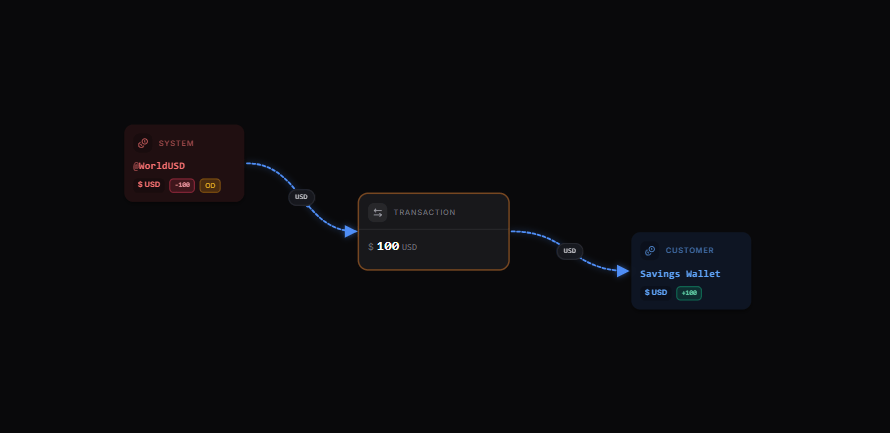 [Explore the map yourself here](https://map.blnkfinance.xyz/t43CN89PVX)
Read more: [Scheduling transactions →](/transactions/scheduling)
***
## Set up your implementation
Based on our map, we'll implement the following steps:
1. Initiate a scheduled transaction to `Savings Wallet`
2. Monitor the date of the next scheduled deposit to ensure timely execution.
3. Set up a new scheduled transaction after the current one has been successfully processed.
***
## Prerequisites
Before starting, ensure you have:
1. A running Blnk Core instance (e.g. at `http://localhost:5001`).
2. An API key for Blnk (replace `YOUR_API_KEY` in the code examples). Required for authenticated requests.
3. Optionally, you can connect your Blnk Core to your [Blnk Cloud](https://cloud.blnkfinance.com/?utm_source=blnk_docs\&utm_medium=documentation\&utm_campaign=tutorials%2Fquick-start%2Fsavings-application) workspace to view your ledger data.
4. A customer savings ledger to organise the customers' savings balances. Learn how: [How to Create a Ledger →](/tutorials/quick-start/wallet-management#create-customer-ledger)
***
## Create customer savings balance
Create a balance with the `ledger_id` of your `Customer Savings Ledger` to represent your customer savings wallet:
```bash cURL wrap expandable theme={"system"}
curl -X POST "http://localhost:5001/balances" \
-H "X-blnk-key: " \
-H "Content-Type: application/json" \
-d '{
"ledger_id": "",
"identity_id": "",
"currency": "USD",
"meta_data": {
"wallet_type": "savings",
"schedule_savings": true,
"savings_frequency": "monthly",
"savings_amount": 10000,
"next_scheduled_savings": ""
}
}'
```
```typescript TypeScript wrap expandable theme={"system"}
async function createSavingsWallet(savingsLedgerId, identityId, currency) {
const savingsWallet = await blnk.LedgerBalances.create({
ledger_id: savingsLedgerId,
identity_id: identityId,
currency: currency,
meta_data: {
wallet_type: "savings",
schedule_savings: true,
savings_frequency: "monthly",
savings_amount: 10000,
next_scheduled_savings: ""
}
});
console.log("Savings Wallet created:", savingsWallet.data.balance_id);
return savingsWallet.data.balance_id;
}
```
```go Go wrap expandable theme={"system"}
func createSavingsWallet(savingsLedgerID, identityID, currency string) (string, error) {
client := getClient()
balance, _, err := client.LedgerBalance.Create(blnkgo.CreateLedgerBalanceRequest{
LedgerID: savingsLedgerID,
IdentityID: identityID,
Currency: currency,
MetaData: map[string]interface{}{
"wallet_type": "savings",
"schedule_savings": true,
"savings_frequency": "monthly",
"savings_amount": 10000,
"next_scheduled_savings": "",
},
})
if err != nil {
return "", err
}
fmt.Println("Savings Wallet created:", balance.BalanceID)
return balance.BalanceID, nil
}
```
This creates a savings balance with a set of default metadata:
1. This customer balance is subscribed to scheduled deposits.
2. Schedule frequency is monthly.
3. The next scheduled savings date can be monitored on the customer balance
***
## Initiate scheduled transaction
Schedule a transaction on the ledger with the `scheduled_for` parameter:
```bash cURL wrap expandable theme={"system"}
curl -X POST "http://localhost:5001/transactions" \
-H "X-blnk-key: " \
-H "Content-Type: application/json" \
-d '{
"precise_amount": 100000,
"precision": 100,
"reference": "SAV_0001",
"description": "Scheduled savings deposit",
"currency": "USD",
"source": "@WorldUSD",
"destination": "",
"scheduled_for": "2025-12-25T02:42:19Z",
"meta_data": {
"transaction_type": "savings"
}
}'
```
```typescript TypeScript wrap expandable theme={"system"}
async function createScheduledSavingsTransaction(savingsBalanceId, savingsAmount, uniqueReference, description, scheduledDate) {
const scheduledSavings = await blnk.Transactions.create({
precise_amount: savingsAmount * 100,
precision: 100,
reference: uniqueReference,
description: description || "Scheduled savings deposit",
currency: "USD",
source: "@WorldUSD", // Represents external funding source
destination: savingsBalanceId,
scheduled_for: scheduledDate,
meta_data: {
transaction_type: "savings"
}
});
console.log("Savings successfully scheduled:", scheduledSavings.data.transaction_id);
return scheduledSavings.data.transaction_id;
}
```
```go Go wrap expandable theme={"system"}
func createScheduledSavingsTransaction(savingsBalanceID string, savingsAmount float64, uniqueReference, description string, scheduledDate time.Time) (string, error) {
client := getClient()
if description == "" {
description = "Scheduled savings deposit"
}
scheduledSavings, _, err := client.Transaction.Create(blnkgo.CreateTransactionRequest{
ParentTransaction: blnkgo.ParentTransaction{
PreciseAmount: savingsAmount * 100,
Precision: 100,
Reference: uniqueReference,
Description: description,
Currency: "USD",
Source: "@WorldUSD",
Destination: savingsBalanceID,
MetaData: map[string]interface{}{
"transaction_type": "savings",
},
},
ScheduledFor: &scheduledDate,
})
if err != nil {
return "", err
}
fmt.Println("Savings successfully scheduled:", scheduledSavings.TransactionID)
return scheduledSavings.TransactionID, nil
}
```
A `SCHEDULED` transaction is created waiting to be applied on the specified scheduled date.
***
## Set up new scheduled transaction
To schedule the next savings deposit, verify that `scheduled_savings` is still active on the customer's balance and retrieve its frequency.
Blnk sends a webhook when a scheduled transaction gets applied.
Update balance metadata and create the next scheduled savings transaction:
```bash cURL wrap expandable theme={"system"}
# After a scheduled savings transaction is applied, update balance metadata:
curl -X POST "http://localhost:5001/balances//metadata" \
-H "X-blnk-key: " \
-H "Content-Type: application/json" \
-d '{
"meta_data": {
"next_scheduled_savings": "2026-01-25T02:42:19Z"
}
}'
# Then create the next scheduled transaction:
curl -X POST "http://localhost:5001/transactions" \
-H "X-blnk-key: " \
-H "Content-Type: application/json" \
-d '{
"precise_amount": 1000000,
"precision": 100,
"reference": "sch-savings-1709741652384",
"description": "Scheduled savings deposit",
"currency": "USD",
"source": "@WorldUSD",
"destination": "",
"scheduled_for": "2026-01-25T02:42:19Z",
"meta_data": {
"transaction_type": "savings"
}
}'
```
```typescript TypeScript wrap expandable theme={"system"}
import express from 'express';
const app = express();
app.use(express.json());
app.post('/webhooks/transactions', async (req, res) => {
const { event, data } = req.body;
if (event === 'transaction.applied') {
const transaction = data;
if (
transaction.meta_data?.transaction_type === 'savings'
) {
console.log('Scheduled savings completed:', transaction.transaction_id);
const savingsBalanceId = transaction.destination;
const savingsBalance = await blnk.LedgerBalances.get(savingsBalanceId);
if (
savingsBalance.meta_data?.schedule_savings === true
) {
const frequency = savingsBalance.meta_data.savings_frequency || "monthly";
const amount = savingsBalance.meta_data.savings_amount;
const nextScheduledDate = calculateNextScheduledDate(frequency);
// 1. Update metadata with the next scheduled date
const baseUrl = process.env.BLNK_BASE_URL ?? 'http://localhost:5001';
const apiKey = process.env.BLNK_API_KEY ?? '';
const metaRes = await fetch(`${baseUrl}/${savingsBalanceId}/metadata`, {
method: 'POST',
headers: {
'X-Blnk-Key': apiKey,
'Content-Type': 'application/json',
},
body: JSON.stringify({
meta_data: {
next_scheduled_savings: nextScheduledDate.toISOString(),
},
}),
});
if (!metaRes.ok) throw new Error(await metaRes.text());
// 2. Create a new scheduled transaction
const uniqueReference = `sch-savings-${Date.now()}`;
const scheduledSavings = await blnk.Transactions.create({
precise_amount: amount * 100,
precision: 100,
reference: uniqueReference,
description: "Scheduled savings deposit",
currency: "USD",
source: "@WorldUSD",
destination: savingsBalanceId,
scheduled_for: nextScheduledDate.toISOString(),
meta_data: {
transaction_type: "savings"
}
});
console.log(`Next scheduled deposit created for ${nextScheduledDate.toISOString()}:`, scheduledSavings.data.transaction_id);
} else {
console.log(`Scheduled savings is no longer active for balance ${savingsBalanceId}`);
}
}
}
res.status(200).send('Webhook received');
});
function calculateNextScheduledDate(frequency) {
const now = new Date();
const nextDate = new Date(now);
switch (frequency) {
case 'daily':
nextDate.setDate(now.getDate() + 1);
break;
case 'weekly':
nextDate.setDate(now.getDate() + 7);
break;
case 'biweekly':
nextDate.setDate(now.getDate() + 14);
break;
case 'monthly':
nextDate.setMonth(now.getMonth() + 1);
break;
default:
nextDate.setMonth(now.getMonth() + 1);
}
return nextDate;
}
const PORT = process.env.PORT || 3000;
app.listen(PORT, () => {
console.log(`Webhook server listening on port ${PORT}`);
});
```
```go Go wrap expandable theme={"system"}
func handleTransactionWebhook(w http.ResponseWriter, r *http.Request) {
var payload struct {
Event string `json:"event"`
Data map[string]interface{} `json:"data"`
}
if err := json.NewDecoder(r.Body).Decode(&payload); err != nil {
http.Error(w, "invalid payload", http.StatusBadRequest)
return
}
if payload.Event != "transaction.applied" {
w.WriteHeader(http.StatusOK)
return
}
meta, _ := payload.Data["meta_data"].(map[string]interface{})
if meta["transaction_type"] != "savings" {
w.WriteHeader(http.StatusOK)
return
}
client := getClient()
savingsBalanceID, _ := payload.Data["destination"].(string)
savingsBalance, _, err := client.LedgerBalance.Get(savingsBalanceID)
if err != nil {
http.Error(w, err.Error(), http.StatusInternalServerError)
return
}
balanceMeta := savingsBalance.MetaData
if scheduleSavings, _ := balanceMeta["schedule_savings"].(bool); !scheduleSavings {
w.WriteHeader(http.StatusOK)
return
}
frequency, _ := balanceMeta["savings_frequency"].(string)
if frequency == "" {
frequency = "monthly"
}
amount, _ := balanceMeta["savings_amount"].(float64)
nextScheduledDate := calculateNextScheduledDate(frequency)
_, _, err = client.Metadata.UpdateMetadata(savingsBalanceID, blnkgo.UpdateMetaDataRequest{
MetaData: map[string]interface{}{
"next_scheduled_savings": nextScheduledDate.Format(time.RFC3339),
},
})
if err != nil {
http.Error(w, err.Error(), http.StatusInternalServerError)
return
}
uniqueReference := fmt.Sprintf("sch-savings-%d", time.Now().Unix())
scheduledSavings, _, err := client.Transaction.Create(blnkgo.CreateTransactionRequest{
ParentTransaction: blnkgo.ParentTransaction{
PreciseAmount: amount * 100,
Precision: 100,
Reference: uniqueReference,
Description: "Scheduled savings deposit",
Currency: "USD",
Source: "@WorldUSD",
Destination: savingsBalanceID,
MetaData: map[string]interface{}{
"transaction_type": "savings",
},
},
ScheduledFor: &nextScheduledDate,
})
if err != nil {
http.Error(w, err.Error(), http.StatusInternalServerError)
return
}
fmt.Printf("Next scheduled deposit created for %s: %s\n", nextScheduledDate.Format(time.RFC3339), scheduledSavings.TransactionID)
w.WriteHeader(http.StatusOK)
}
```
***
## Change savings frequency
To change the savings frequency of a balance, use the [Update Metadata](/metadata/update-metadata) endpoint:
Update the savings frequency on the customer balance:
```bash cURL wrap theme={"system"}
curl -X POST "http://localhost:5001/balances//metadata" \
-H "X-blnk-key: " \
-H "Content-Type: application/json" \
-d '{
"meta_data": {
"savings_frequency": "daily"
}
}'
```
```typescript TypeScript wrap expandable theme={"system"}
async function updateSavingsFrequency(balanceId, newFrequency) {
try {
const baseUrl = process.env.BLNK_BASE_URL ?? 'http://localhost:5001';
const apiKey = process.env.BLNK_API_KEY ?? '';
const res = await fetch(`${baseUrl}/${balanceId}/metadata`, {
method: 'POST',
headers: {
'X-Blnk-Key': apiKey,
'Content-Type': 'application/json',
},
body: JSON.stringify({
meta_data: { savings_frequency: newFrequency },
}),
});
if (!res.ok) throw new Error(await res.text());
const data = await res.json();
console.log(`Successfully updated savings frequency to ${newFrequency} for balance ${balanceId}`);
return data;
} catch (error) {
console.error(`Failed to update savings frequency for balance ${balanceId}:`, error);
throw error;
}
}
```
```go Go wrap theme={"system"}
func updateSavingsFrequency(balanceID, newFrequency string) error {
client := getClient()
_, _, err := client.Metadata.UpdateMetadata(balanceID, blnkgo.UpdateMetaDataRequest{
MetaData: map[string]interface{}{
"savings_frequency": newFrequency,
},
})
if err != nil {
return err
}
fmt.Printf("Successfully updated savings frequency to %s for balance %s\n", newFrequency, balanceID)
return nil
}
```
***
## Conclusion
In this tutorial, we've built a scheduled savings workflow for a wallet app using Blnk. Here's what we covered:
* Setting up savings ledgers and customer savings accounts
* Adding scheduled deposits
* Automatically rescheduling deposits after they're completed
* Handling deposit frequencies and customer preferences
* Using webhooks to detect completed transactions and schedule new deposits.
With these features, your app offers customers an easy, automated way to save regularly without extra effort. The webhook-based architecture ensures that your system remains resilient and responsive to transaction events.
***
Get dedicated support for architecture reviews, integration planning, ledger workflows, and production deployment.
[Explore the map yourself here](https://map.blnkfinance.xyz/t43CN89PVX)
Read more: [Scheduling transactions →](/transactions/scheduling)
***
## Set up your implementation
Based on our map, we'll implement the following steps:
1. Initiate a scheduled transaction to `Savings Wallet`
2. Monitor the date of the next scheduled deposit to ensure timely execution.
3. Set up a new scheduled transaction after the current one has been successfully processed.
***
## Prerequisites
Before starting, ensure you have:
1. A running Blnk Core instance (e.g. at `http://localhost:5001`).
2. An API key for Blnk (replace `YOUR_API_KEY` in the code examples). Required for authenticated requests.
3. Optionally, you can connect your Blnk Core to your [Blnk Cloud](https://cloud.blnkfinance.com/?utm_source=blnk_docs\&utm_medium=documentation\&utm_campaign=tutorials%2Fquick-start%2Fsavings-application) workspace to view your ledger data.
4. A customer savings ledger to organise the customers' savings balances. Learn how: [How to Create a Ledger →](/tutorials/quick-start/wallet-management#create-customer-ledger)
***
## Create customer savings balance
Create a balance with the `ledger_id` of your `Customer Savings Ledger` to represent your customer savings wallet:
```bash cURL wrap expandable theme={"system"}
curl -X POST "http://localhost:5001/balances" \
-H "X-blnk-key: " \
-H "Content-Type: application/json" \
-d '{
"ledger_id": "",
"identity_id": "",
"currency": "USD",
"meta_data": {
"wallet_type": "savings",
"schedule_savings": true,
"savings_frequency": "monthly",
"savings_amount": 10000,
"next_scheduled_savings": ""
}
}'
```
```typescript TypeScript wrap expandable theme={"system"}
async function createSavingsWallet(savingsLedgerId, identityId, currency) {
const savingsWallet = await blnk.LedgerBalances.create({
ledger_id: savingsLedgerId,
identity_id: identityId,
currency: currency,
meta_data: {
wallet_type: "savings",
schedule_savings: true,
savings_frequency: "monthly",
savings_amount: 10000,
next_scheduled_savings: ""
}
});
console.log("Savings Wallet created:", savingsWallet.data.balance_id);
return savingsWallet.data.balance_id;
}
```
```go Go wrap expandable theme={"system"}
func createSavingsWallet(savingsLedgerID, identityID, currency string) (string, error) {
client := getClient()
balance, _, err := client.LedgerBalance.Create(blnkgo.CreateLedgerBalanceRequest{
LedgerID: savingsLedgerID,
IdentityID: identityID,
Currency: currency,
MetaData: map[string]interface{}{
"wallet_type": "savings",
"schedule_savings": true,
"savings_frequency": "monthly",
"savings_amount": 10000,
"next_scheduled_savings": "",
},
})
if err != nil {
return "", err
}
fmt.Println("Savings Wallet created:", balance.BalanceID)
return balance.BalanceID, nil
}
```
This creates a savings balance with a set of default metadata:
1. This customer balance is subscribed to scheduled deposits.
2. Schedule frequency is monthly.
3. The next scheduled savings date can be monitored on the customer balance
***
## Initiate scheduled transaction
Schedule a transaction on the ledger with the `scheduled_for` parameter:
```bash cURL wrap expandable theme={"system"}
curl -X POST "http://localhost:5001/transactions" \
-H "X-blnk-key: " \
-H "Content-Type: application/json" \
-d '{
"precise_amount": 100000,
"precision": 100,
"reference": "SAV_0001",
"description": "Scheduled savings deposit",
"currency": "USD",
"source": "@WorldUSD",
"destination": "",
"scheduled_for": "2025-12-25T02:42:19Z",
"meta_data": {
"transaction_type": "savings"
}
}'
```
```typescript TypeScript wrap expandable theme={"system"}
async function createScheduledSavingsTransaction(savingsBalanceId, savingsAmount, uniqueReference, description, scheduledDate) {
const scheduledSavings = await blnk.Transactions.create({
precise_amount: savingsAmount * 100,
precision: 100,
reference: uniqueReference,
description: description || "Scheduled savings deposit",
currency: "USD",
source: "@WorldUSD", // Represents external funding source
destination: savingsBalanceId,
scheduled_for: scheduledDate,
meta_data: {
transaction_type: "savings"
}
});
console.log("Savings successfully scheduled:", scheduledSavings.data.transaction_id);
return scheduledSavings.data.transaction_id;
}
```
```go Go wrap expandable theme={"system"}
func createScheduledSavingsTransaction(savingsBalanceID string, savingsAmount float64, uniqueReference, description string, scheduledDate time.Time) (string, error) {
client := getClient()
if description == "" {
description = "Scheduled savings deposit"
}
scheduledSavings, _, err := client.Transaction.Create(blnkgo.CreateTransactionRequest{
ParentTransaction: blnkgo.ParentTransaction{
PreciseAmount: savingsAmount * 100,
Precision: 100,
Reference: uniqueReference,
Description: description,
Currency: "USD",
Source: "@WorldUSD",
Destination: savingsBalanceID,
MetaData: map[string]interface{}{
"transaction_type": "savings",
},
},
ScheduledFor: &scheduledDate,
})
if err != nil {
return "", err
}
fmt.Println("Savings successfully scheduled:", scheduledSavings.TransactionID)
return scheduledSavings.TransactionID, nil
}
```
A `SCHEDULED` transaction is created waiting to be applied on the specified scheduled date.
***
## Set up new scheduled transaction
To schedule the next savings deposit, verify that `scheduled_savings` is still active on the customer's balance and retrieve its frequency.
Blnk sends a webhook when a scheduled transaction gets applied.
Update balance metadata and create the next scheduled savings transaction:
```bash cURL wrap expandable theme={"system"}
# After a scheduled savings transaction is applied, update balance metadata:
curl -X POST "http://localhost:5001/balances//metadata" \
-H "X-blnk-key: " \
-H "Content-Type: application/json" \
-d '{
"meta_data": {
"next_scheduled_savings": "2026-01-25T02:42:19Z"
}
}'
# Then create the next scheduled transaction:
curl -X POST "http://localhost:5001/transactions" \
-H "X-blnk-key: " \
-H "Content-Type: application/json" \
-d '{
"precise_amount": 1000000,
"precision": 100,
"reference": "sch-savings-1709741652384",
"description": "Scheduled savings deposit",
"currency": "USD",
"source": "@WorldUSD",
"destination": "",
"scheduled_for": "2026-01-25T02:42:19Z",
"meta_data": {
"transaction_type": "savings"
}
}'
```
```typescript TypeScript wrap expandable theme={"system"}
import express from 'express';
const app = express();
app.use(express.json());
app.post('/webhooks/transactions', async (req, res) => {
const { event, data } = req.body;
if (event === 'transaction.applied') {
const transaction = data;
if (
transaction.meta_data?.transaction_type === 'savings'
) {
console.log('Scheduled savings completed:', transaction.transaction_id);
const savingsBalanceId = transaction.destination;
const savingsBalance = await blnk.LedgerBalances.get(savingsBalanceId);
if (
savingsBalance.meta_data?.schedule_savings === true
) {
const frequency = savingsBalance.meta_data.savings_frequency || "monthly";
const amount = savingsBalance.meta_data.savings_amount;
const nextScheduledDate = calculateNextScheduledDate(frequency);
// 1. Update metadata with the next scheduled date
const baseUrl = process.env.BLNK_BASE_URL ?? 'http://localhost:5001';
const apiKey = process.env.BLNK_API_KEY ?? '';
const metaRes = await fetch(`${baseUrl}/${savingsBalanceId}/metadata`, {
method: 'POST',
headers: {
'X-Blnk-Key': apiKey,
'Content-Type': 'application/json',
},
body: JSON.stringify({
meta_data: {
next_scheduled_savings: nextScheduledDate.toISOString(),
},
}),
});
if (!metaRes.ok) throw new Error(await metaRes.text());
// 2. Create a new scheduled transaction
const uniqueReference = `sch-savings-${Date.now()}`;
const scheduledSavings = await blnk.Transactions.create({
precise_amount: amount * 100,
precision: 100,
reference: uniqueReference,
description: "Scheduled savings deposit",
currency: "USD",
source: "@WorldUSD",
destination: savingsBalanceId,
scheduled_for: nextScheduledDate.toISOString(),
meta_data: {
transaction_type: "savings"
}
});
console.log(`Next scheduled deposit created for ${nextScheduledDate.toISOString()}:`, scheduledSavings.data.transaction_id);
} else {
console.log(`Scheduled savings is no longer active for balance ${savingsBalanceId}`);
}
}
}
res.status(200).send('Webhook received');
});
function calculateNextScheduledDate(frequency) {
const now = new Date();
const nextDate = new Date(now);
switch (frequency) {
case 'daily':
nextDate.setDate(now.getDate() + 1);
break;
case 'weekly':
nextDate.setDate(now.getDate() + 7);
break;
case 'biweekly':
nextDate.setDate(now.getDate() + 14);
break;
case 'monthly':
nextDate.setMonth(now.getMonth() + 1);
break;
default:
nextDate.setMonth(now.getMonth() + 1);
}
return nextDate;
}
const PORT = process.env.PORT || 3000;
app.listen(PORT, () => {
console.log(`Webhook server listening on port ${PORT}`);
});
```
```go Go wrap expandable theme={"system"}
func handleTransactionWebhook(w http.ResponseWriter, r *http.Request) {
var payload struct {
Event string `json:"event"`
Data map[string]interface{} `json:"data"`
}
if err := json.NewDecoder(r.Body).Decode(&payload); err != nil {
http.Error(w, "invalid payload", http.StatusBadRequest)
return
}
if payload.Event != "transaction.applied" {
w.WriteHeader(http.StatusOK)
return
}
meta, _ := payload.Data["meta_data"].(map[string]interface{})
if meta["transaction_type"] != "savings" {
w.WriteHeader(http.StatusOK)
return
}
client := getClient()
savingsBalanceID, _ := payload.Data["destination"].(string)
savingsBalance, _, err := client.LedgerBalance.Get(savingsBalanceID)
if err != nil {
http.Error(w, err.Error(), http.StatusInternalServerError)
return
}
balanceMeta := savingsBalance.MetaData
if scheduleSavings, _ := balanceMeta["schedule_savings"].(bool); !scheduleSavings {
w.WriteHeader(http.StatusOK)
return
}
frequency, _ := balanceMeta["savings_frequency"].(string)
if frequency == "" {
frequency = "monthly"
}
amount, _ := balanceMeta["savings_amount"].(float64)
nextScheduledDate := calculateNextScheduledDate(frequency)
_, _, err = client.Metadata.UpdateMetadata(savingsBalanceID, blnkgo.UpdateMetaDataRequest{
MetaData: map[string]interface{}{
"next_scheduled_savings": nextScheduledDate.Format(time.RFC3339),
},
})
if err != nil {
http.Error(w, err.Error(), http.StatusInternalServerError)
return
}
uniqueReference := fmt.Sprintf("sch-savings-%d", time.Now().Unix())
scheduledSavings, _, err := client.Transaction.Create(blnkgo.CreateTransactionRequest{
ParentTransaction: blnkgo.ParentTransaction{
PreciseAmount: amount * 100,
Precision: 100,
Reference: uniqueReference,
Description: "Scheduled savings deposit",
Currency: "USD",
Source: "@WorldUSD",
Destination: savingsBalanceID,
MetaData: map[string]interface{}{
"transaction_type": "savings",
},
},
ScheduledFor: &nextScheduledDate,
})
if err != nil {
http.Error(w, err.Error(), http.StatusInternalServerError)
return
}
fmt.Printf("Next scheduled deposit created for %s: %s\n", nextScheduledDate.Format(time.RFC3339), scheduledSavings.TransactionID)
w.WriteHeader(http.StatusOK)
}
```
***
## Change savings frequency
To change the savings frequency of a balance, use the [Update Metadata](/metadata/update-metadata) endpoint:
Update the savings frequency on the customer balance:
```bash cURL wrap theme={"system"}
curl -X POST "http://localhost:5001/balances//metadata" \
-H "X-blnk-key: " \
-H "Content-Type: application/json" \
-d '{
"meta_data": {
"savings_frequency": "daily"
}
}'
```
```typescript TypeScript wrap expandable theme={"system"}
async function updateSavingsFrequency(balanceId, newFrequency) {
try {
const baseUrl = process.env.BLNK_BASE_URL ?? 'http://localhost:5001';
const apiKey = process.env.BLNK_API_KEY ?? '';
const res = await fetch(`${baseUrl}/${balanceId}/metadata`, {
method: 'POST',
headers: {
'X-Blnk-Key': apiKey,
'Content-Type': 'application/json',
},
body: JSON.stringify({
meta_data: { savings_frequency: newFrequency },
}),
});
if (!res.ok) throw new Error(await res.text());
const data = await res.json();
console.log(`Successfully updated savings frequency to ${newFrequency} for balance ${balanceId}`);
return data;
} catch (error) {
console.error(`Failed to update savings frequency for balance ${balanceId}:`, error);
throw error;
}
}
```
```go Go wrap theme={"system"}
func updateSavingsFrequency(balanceID, newFrequency string) error {
client := getClient()
_, _, err := client.Metadata.UpdateMetadata(balanceID, blnkgo.UpdateMetaDataRequest{
MetaData: map[string]interface{}{
"savings_frequency": newFrequency,
},
})
if err != nil {
return err
}
fmt.Printf("Successfully updated savings frequency to %s for balance %s\n", newFrequency, balanceID)
return nil
}
```
***
## Conclusion
In this tutorial, we've built a scheduled savings workflow for a wallet app using Blnk. Here's what we covered:
* Setting up savings ledgers and customer savings accounts
* Adding scheduled deposits
* Automatically rescheduling deposits after they're completed
* Handling deposit frequencies and customer preferences
* Using webhooks to detect completed transactions and schedule new deposits.
With these features, your app offers customers an easy, automated way to save regularly without extra effort. The webhook-based architecture ensures that your system remains resilient and responsive to transaction events.
***
Get dedicated support for architecture reviews, integration planning, ledger workflows, and production deployment.