> ## Documentation Index
> Fetch the complete documentation index at: https://docs.blnkfinance.com/llms.txt
> Use this file to discover all available pages before exploring further.
# Building a Loyalty Points System
> Learn how to implement a loyalty points system with Blnk.
export const CtaCallout = props => {
const {title, buttonLabel, href, trackingEvent, buttonTarget, rel = "noopener noreferrer", children} = props;
const handleCtaClick = () => {
if (typeof window === "undefined" || !trackingEvent) {
return;
}
try {
window.dispatchEvent(new CustomEvent("blnk:docs-cta", {
detail: {
name: trackingEvent,
href
}
}));
} catch {}
try {
window.posthog?.capture?.(trackingEvent, {
href
});
} catch {}
const gaPayload = {
cta_href: href
};
try {
window.gtag?.("event", trackingEvent, gaPayload);
} catch {}
try {
window.dataLayer = window.dataLayer || [];
window.dataLayer.push({
event: trackingEvent,
...gaPayload
});
} catch {}
};
const isExternal = typeof href === "string" && (/^https?:\/\//i).test(href);
const target = buttonTarget ?? (isExternal ? "_blank" : undefined);
const linkRel = isExternal ? rel : undefined;
return ;
};
In this tutorial, we will build a simple loyalty points system using the Blnk Ledger. Here's what we'll do:
1. Create and manage multi-asset wallets in your ledger.
2. Manage a pool of issued loyalty points.
3. Award points to customers when they make purchases.
4. Allow customers to redeem their points for discounts on future purchases.
For this tutorial, we'll use the [Blnk TypeScript SDK](/sdks/typescript) and [Blnk Go SDK](/sdks/go) for the implementation. If you prefer, you can also refer to the [API reference](/reference/create-ledger) for details on the available endpoints.
***
## Designing your map
Before writing code, it's crucial to design a [money movement map](/ledgers/money-movement-map) that outlines how money moves in your system. This serves as the blueprint for your implementation.
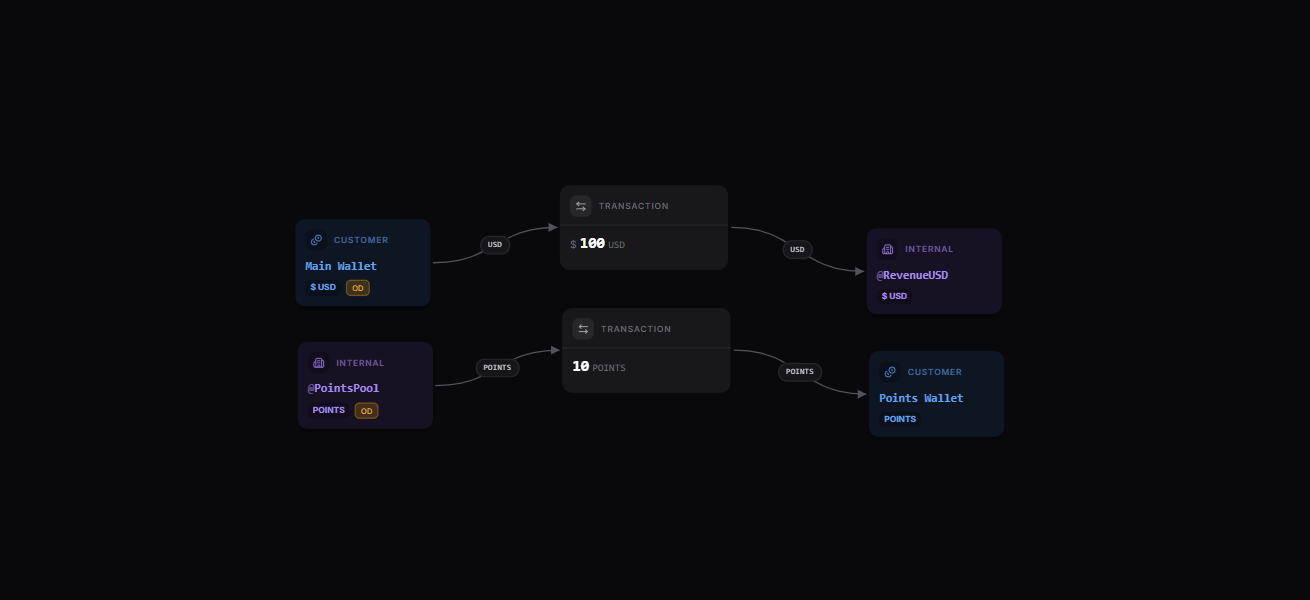
For our loyalty points system, we have two workflows - awarding points and redeeming points.
1. **Awarding points:**
Points are awarded to customers who qualify for the loyalty program. A customer purchase triggers the process: funds from the `Customer Main Wallet` are used for the purchase, contributing to `@RevenueUSD`.
Once the purchase is completed, points are awarded from the `@PointsPool` to the `Customer Points Wallet`.
* `@RevenueUSD`: An internal balance representing the business' revenue.
* `@PointsPool`: An internal balance tracking the total points issued to customers.
 [Explore the map yourself here](https://map.blnkfinance.xyz/1RoI16CkPd)
2. **Redeeming points:**
Customers can redeem points to receive discounts on purchases. When a customer applies points to a transaction, the discount is deducted from the original price.
Once the purchase is completed, the redeemed points are transferred from the `Customer Points Wallet` to `@PointsPool`.
[Explore the map yourself here](https://map.blnkfinance.xyz/1RoI16CkPd)
2. **Redeeming points:**
Customers can redeem points to receive discounts on purchases. When a customer applies points to a transaction, the discount is deducted from the original price.
Once the purchase is completed, the redeemed points are transferred from the `Customer Points Wallet` to `@PointsPool`.
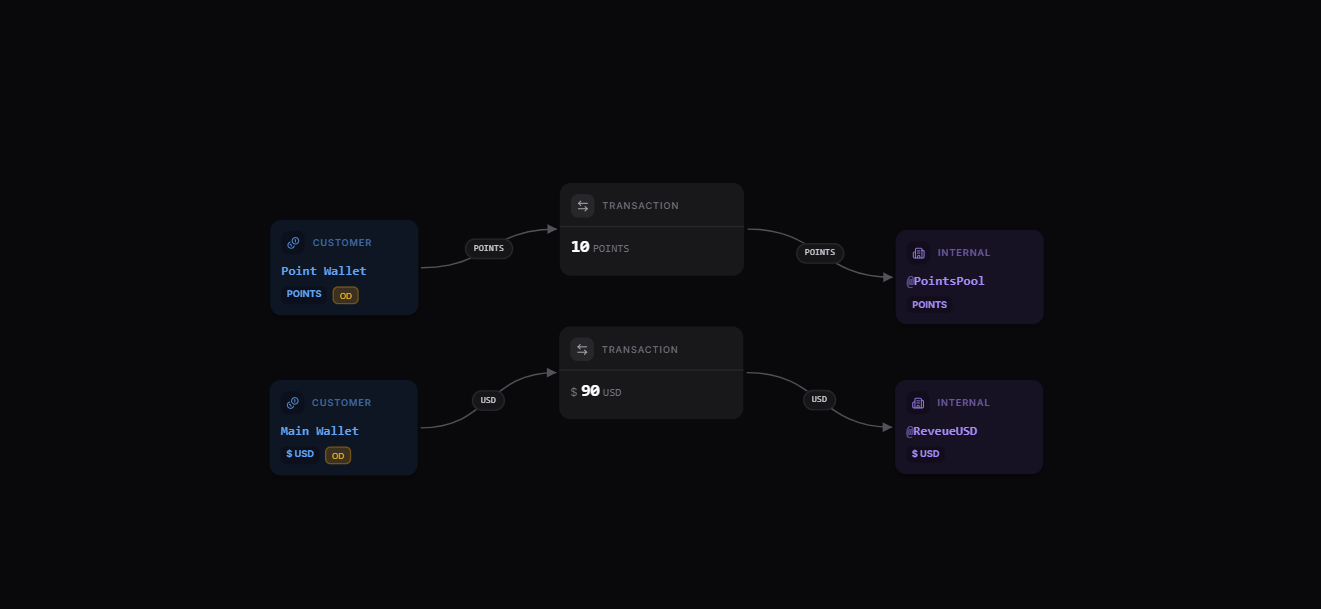 `@PointsPool` records all issued points using the `debit_balance` parameter and tracks all redeemed points using the `credit_balance` parameter.
***
## Set up your implementation
Based on our map, we'll implement the following:
1. Create the main and points balances for the customer.
2. Initiate a purchase transaction and award points to the customer.
3. Redeem the points in a second purchase transaction.
***
## Prerequisites
Before starting, ensure you have:
1. A running Blnk Core instance (e.g. at `http://localhost:5001`).
2. An API key for Blnk (replace `YOUR_API_KEY` in the code examples). Required for authenticated requests.
3. Optionally, you can connect your Blnk Core to your [Blnk Cloud](https://cloud.blnkfinance.com/?utm_source=blnk_docs\&utm_medium=documentation\&utm_campaign=tutorials%2Fquick-start%2Floyalty-points) workspace to view your ledger data.
***
## Create your ledgers
First, we need to create ledgers to organize our wallets:
```bash cURL wrap expandable theme={"system"}
# Create main wallet ledger
curl -X POST "http://localhost:5001/ledgers" \
-H "X-blnk-key: " \
-H "Content-Type: application/json" \
-d '{
"name": "Customer Main Wallets",
"meta_data": {
"description": "Ledger for customer USD wallets"
}
}'
# Create points wallet ledger
curl -X POST "http://localhost:5001/ledgers" \
-H "X-blnk-key: " \
-H "Content-Type: application/json" \
-d '{
"name": "Customer Points Wallets",
"meta_data": {
"description": "Ledger for customer loyalty points"
}
}'
```
```typescript TypeScript wrap expandable theme={"system"}
async function createLedgers() {
// Create a ledger for customer main wallets (USD)
const mainLedger = await blnk.Ledgers.create({
name: "Customer Main Wallets",
meta_data: {
description: "Ledger for customer USD wallets"
}
});
// Create a ledger for customer points wallets
const pointsLedger = await blnk.Ledgers.create({
name: "Customer Points Wallets",
meta_data: {
description: "Ledger for customer loyalty points"
}
});
console.log("Created main wallet ledger:", mainLedger.data.ledger_id);
console.log("Created points wallet ledger:", pointsLedger.data.ledger_id);
return {
mainLedgerId: mainLedger.data.ledger_id,
pointsLedgerId: pointsLedger.data.ledger_id
};
}
```
```go Go wrap expandable theme={"system"}
func createLedgers() (mainLedgerID, pointsLedgerID string, err error) {
client := getClient()
mainLedger, _, err := client.Ledger.Create(blnkgo.CreateLedgerRequest{
Name: "Customer Main Wallets",
MetaData: map[string]interface{}{
"description": "Ledger for customer USD wallets",
},
})
if err != nil {
return "", "", err
}
pointsLedger, _, err := client.Ledger.Create(blnkgo.CreateLedgerRequest{
Name: "Customer Points Wallets",
MetaData: map[string]interface{}{
"description": "Ledger for customer loyalty points",
},
})
if err != nil {
return "", "", err
}
fmt.Println("Created main wallet ledger:", mainLedger.LedgerID)
fmt.Println("Created points wallet ledger:", pointsLedger.LedgerID)
return mainLedger.LedgerID, pointsLedger.LedgerID, nil
}
```
***
## Create balances for customer funds and loyalty points
Blnk Finance supports tracking of different assets (e.g., USD and POINTS) in your ledger.
Now, let's create the main wallet and points wallet for the customer:
```bash cURL wrap expandable theme={"system"}
# Create main wallet
curl -X POST "http://localhost:5001/balances" \
-H "X-blnk-key: " \
-H "Content-Type: application/json" \
-d '{
"ledger_id": "",
"identity_id": "",
"currency": "USD",
"meta_data": {
"wallet_type": "main",
"status": "active"
}
}'
# Create points wallet
curl -X POST "http://localhost:5001/balances" \
-H "X-blnk-key: " \
-H "Content-Type: application/json" \
-d '{
"ledger_id": "",
"identity_id": "",
"currency": "POINTS",
"meta_data": {
"wallet_type": "points",
"status": "active"
}
}'
```
```typescript TypeScript wrap expandable theme={"system"}
async function createCustomerWallets(mainLedgerId, pointsLedgerId, identityId) {
// Create main wallet (USD)
const mainWallet = await blnk.LedgerBalances.create({
ledger_id: mainLedgerId,
identity_id: identityId,
currency: "USD",
meta_data: {
wallet_type: "main",
status: "active"
}
});
// Create points wallet
const pointsWallet = await blnk.LedgerBalances.create({
ledger_id: pointsLedgerId,
identity_id: identityId,
currency: "POINTS",
meta_data: {
wallet_type: "points",
status: "active"
}
});
console.log("Created main wallet:", mainWallet.data.balance_id);
console.log("Created points wallet:", pointsWallet.data.balance_id);
return {
mainWalletId: mainWallet.data.balance_id,
pointsWalletId: pointsWallet.data.balance_id
};
}
```
```go Go wrap expandable theme={"system"}
func createCustomerWallets(mainLedgerID, pointsLedgerID, identityID string) (mainWalletID, pointsWalletID string, err error) {
client := getClient()
mainWallet, _, err := client.LedgerBalance.Create(blnkgo.CreateLedgerBalanceRequest{
LedgerID: mainLedgerID,
IdentityID: identityID,
Currency: "USD",
MetaData: map[string]interface{}{
"wallet_type": "main",
"status": "active",
},
})
if err != nil {
return "", "", err
}
pointsWallet, _, err := client.LedgerBalance.Create(blnkgo.CreateLedgerBalanceRequest{
LedgerID: pointsLedgerID,
IdentityID: identityID,
Currency: "POINTS",
MetaData: map[string]interface{}{
"wallet_type": "points",
"status": "active",
},
})
if err != nil {
return "", "", err
}
fmt.Println("Created main wallet:", mainWallet.BalanceID)
fmt.Println("Created points wallet:", pointsWallet.BalanceID)
return mainWallet.BalanceID, pointsWallet.BalanceID, nil
}
```
***
## Awarding points after a purchase
When a customer makes a purchase, we need to:
1. Process the payment from the customer's main wallet to the revenue account.
2. Award loyalty points based on the purchase amount.
Ensure your customer main wallet is funded. Learn how: [Wallet Funding →](/tutorials/quick-start/wallet-management#funding-the-main-wallet)
Record the purchase payment and award loyalty points:
```bash cURL wrap expandable theme={"system"}
# Process purchase
curl -X POST "http://localhost:5001/transactions" \
-H "X-blnk-key: " \
-H "Content-Type: application/json" \
-d '{
"precise_amount": 10000,
"precision": 100,
"reference": "purchase-123456789",
"currency": "USD",
"source": "",
"destination": "@RevenueUSD",
"description": "Product purchase",
"meta_data": {
"transaction_type": "purchase"
}
}'
# Award points
curl -X POST "http://localhost:5001/transactions" \
-H "X-blnk-key: " \
-H "Content-Type: application/json" \
-d '{
"precise_amount": 10,
"precision": 1,
"reference": "points-purchase-123456789",
"currency": "POINTS",
"source": "@PointsPool",
"destination": "",
"description": "Loyalty points award",
"allow_overdraft": true,
"meta_data": {
"purchase_reference": "purchase-123456789",
"purchase_amount": 100
}
}'
```
```typescript TypeScript wrap expandable theme={"system"}
async function processPurchaseAndAwardPoints(mainWalletId, pointsWalletId, purchaseAmount, pointsToAward) {
// Generate a unique reference for this purchase
const purchaseReference = `purchase-${Date.now()}`;
// Step 1: Process the purchase payment
const purchase = await blnk.Transactions.create({
precise_amount: purchaseAmount * 100,
precision: 100,
reference: purchaseReference,
currency: "USD",
source: mainWalletId,
destination: "@RevenueUSD",
description: "Product purchase",
meta_data: {
transaction_type: "purchase"
}
});
// Step 2: Award loyalty points
const pointsAward = await blnk.Transactions.create({
precise_amount: pointsToAward,
precision: 1, // Points typically don't have decimal places
reference: `points-${purchaseReference}`,
currency: "POINTS",
source: "@PointsPool",
destination: pointsWalletId,
description: "Loyalty points award",
allow_overdraft: true, // Points pool can have negative balance
meta_data: {
purchase_reference: purchaseReference,
purchase_amount: purchaseAmount
}
});
console.log("Purchase processed:", purchase.data.transaction_id);
console.log("Points awarded:", pointsAward.data.transaction_id);
return {
purchaseId: purchase.data.transaction_id,
pointsAwardId: pointsAward.data.transaction_id
};
}
```
```go Go wrap expandable theme={"system"}
func processPurchaseAndAwardPoints(mainWalletID, pointsWalletID string, purchaseAmount, pointsToAward float64) (purchaseID, pointsAwardID string, err error) {
client := getClient()
purchaseReference := fmt.Sprintf("purchase-%d", time.Now().Unix())
purchase, _, err := client.Transaction.Create(blnkgo.CreateTransactionRequest{
ParentTransaction: blnkgo.ParentTransaction{
PreciseAmount: purchaseAmount * 100,
Precision: 100,
Reference: purchaseReference,
Currency: "USD",
Source: mainWalletID,
Destination: "@RevenueUSD",
Description: "Product purchase",
MetaData: map[string]interface{}{
"transaction_type": "purchase",
},
},
})
if err != nil {
return "", "", err
}
pointsAward, _, err := client.Transaction.Create(blnkgo.CreateTransactionRequest{
ParentTransaction: blnkgo.ParentTransaction{
PreciseAmount: pointsToAward,
Precision: 1,
Reference: "points-" + purchaseReference,
Currency: "POINTS",
Source: "@PointsPool",
Destination: pointsWalletID,
Description: "Loyalty points award",
MetaData: map[string]interface{}{
"purchase_reference": purchaseReference,
"purchase_amount": purchaseAmount,
},
},
AllowOverdraft: true,
})
if err != nil {
return "", "", err
}
fmt.Println("Purchase processed:", purchase.TransactionID)
fmt.Println("Points awarded:", pointsAward.TransactionID)
return purchase.TransactionID, pointsAward.TransactionID, nil
}
```
As shown above, you can set custom precision for each currency, like 100 for USD or 1 for POINTS in our example.
For ledger accuracy, ensure the source and destination currencies match when posting transactions.
***
## Redeeming points during a purchase
When you make a purchase, you can use your loyalty points to get a discount. In our example, 10 points = 1 USD.
For example, a customer has 500 points and wants to buy something that costs \$100:
1. They choose to use 200 points from their `Points Wallet`.
2. Those 200 points convert to \$20 (at the 10 points = \$1 rate)
3. Their final cost to pay from their `Main Wallet` would be \$80 instead of \$100.
Behind the scenes, here's what we'll do:
1. Take points from the `Customer Points Wallet` to `@PointsPool`.
2. Convert the points to its equivalent dollar value, apply it as discount, and calculate the final cost for the customer.
3. Charge the `Customer Main Wallet` with the final discounted cost.
Redeem points and charge the discounted purchase amount:
```bash cURL wrap expandable theme={"system"}
# Redeem points
curl -X POST "http://localhost:5001/transactions" \
-H "X-blnk-key: " \
-H "Content-Type: application/json" \
-d '{
"precise_amount": 200,
"precision": 1,
"reference": "redemption-123456789",
"currency": "POINTS",
"source": "",
"destination": "@PointsPool",
"description": "Points redemption for discount",
"meta_data": {
"transaction_type": "redemption",
"convert_to_usd": 20
}
}'
# Process discounted purchase
curl -X POST "http://localhost:5001/transactions" \
-H "X-blnk-key: " \
-H "Content-Type: application/json" \
-d '{
"precise_amount": 8000,
"precision": 100,
"reference": "purchase-redemption-123456789",
"currency": "USD",
"source": "",
"destination": "@RevenueUSD",
"description": "Discounted purchase with points",
"meta_data": {
"redemption_reference": "redemption-123456789",
"original_amount": 100,
"points_redeemed": 200
}
}'
```
```typescript TypeScript wrap expandable theme={"system"}
async function redeemPointsForDiscount(mainWalletId, pointsWalletId, purchaseAmount, pointsToRedeem) {
// Calculate points conversion to dollar: 10 points = 1 dollar
const convertedAmount = pointsToRedeem / 10;
// Generate a unique reference for this redemption
const redemptionReference = `redemption-${Date.now()}`;
// Step 1: Redeem points
const pointsRedemption = await blnk.Transactions.create({
precise_amount: pointsToRedeem,
precision: 1,
reference: redemptionReference,
currency: "POINTS",
source: pointsWalletId,
destination: "@PointsPool",
description: "Points redemption for discount",
meta_data: {
transaction_type: "redemption",
convert_to_usd: convertedAmount
}
});
// Step 2: Process the discounted purchase
const discountedAmount = purchaseAmount - convertedAmount;
const discountedPurchase = await blnk.Transactions.create({
precise_amount: discountedAmount * 100,
precision: 100,
reference: `purchase-${redemptionReference}`,
currency: "USD",
source: mainWalletId,
destination: "@RevenueUSD",
description: "Discounted purchase with points",
meta_data: {
redemption_reference: redemptionReference,
original_amount: purchaseAmount,
points_redeemed: pointsToRedeem
}
});
console.log("Points redeemed:", pointsRedemption.data.transaction_id);
console.log("Discounted purchase processed:", discountedPurchase.data.transaction_id);
return {
redemptionId: pointsRedemption.data.transaction_id,
purchaseId: discountedPurchase.data.transaction_id
};
}
```
```go Go wrap expandable theme={"system"}
func redeemPointsForDiscount(mainWalletID, pointsWalletID string, purchaseAmount, pointsToRedeem float64) (redemptionID, purchaseID string, err error) {
client := getClient()
convertedAmount := pointsToRedeem / 10
redemptionReference := fmt.Sprintf("redemption-%d", time.Now().Unix())
pointsRedemption, _, err := client.Transaction.Create(blnkgo.CreateTransactionRequest{
ParentTransaction: blnkgo.ParentTransaction{
PreciseAmount: pointsToRedeem,
Precision: 1,
Reference: redemptionReference,
Currency: "POINTS",
Source: pointsWalletID,
Destination: "@PointsPool",
Description: "Points redemption for discount",
MetaData: map[string]interface{}{
"transaction_type": "redemption",
"convert_to_usd": convertedAmount,
},
},
})
if err != nil {
return "", "", err
}
discountedAmount := purchaseAmount - convertedAmount
discountedPurchase, _, err := client.Transaction.Create(blnkgo.CreateTransactionRequest{
ParentTransaction: blnkgo.ParentTransaction{
PreciseAmount: discountedAmount * 100,
Precision: 100,
Reference: "purchase-" + redemptionReference,
Currency: "USD",
Source: mainWalletID,
Destination: "@RevenueUSD",
Description: "Discounted purchase with points",
MetaData: map[string]interface{}{
"redemption_reference": redemptionReference,
"original_amount": purchaseAmount,
"points_redeemed": pointsToRedeem,
},
},
})
if err != nil {
return "", "", err
}
fmt.Println("Points redeemed:", pointsRedemption.TransactionID)
fmt.Println("Discounted purchase processed:", discountedPurchase.TransactionID)
return pointsRedemption.TransactionID, discountedPurchase.TransactionID, nil
}
```
***
## Conclusion
You now have a basic loyalty points system built with the Blnk Ledger. This system enables you to award points to customers based on their purchases and allows them to redeem those points for discounts.
The system is flexible and can be extended with additional features like:
* Points expiry management
* Tiered rewards based on customer spending levels
* Special promotions with bonus points
* Point transfers between customers
By leveraging Blnk's transaction system, you can ensure all point movements are accurately tracked and reconciled, providing a reliable foundation for your loyalty program.
***
Get dedicated support for architecture reviews, integration planning, ledger workflows, and production deployment.
`@PointsPool` records all issued points using the `debit_balance` parameter and tracks all redeemed points using the `credit_balance` parameter.
***
## Set up your implementation
Based on our map, we'll implement the following:
1. Create the main and points balances for the customer.
2. Initiate a purchase transaction and award points to the customer.
3. Redeem the points in a second purchase transaction.
***
## Prerequisites
Before starting, ensure you have:
1. A running Blnk Core instance (e.g. at `http://localhost:5001`).
2. An API key for Blnk (replace `YOUR_API_KEY` in the code examples). Required for authenticated requests.
3. Optionally, you can connect your Blnk Core to your [Blnk Cloud](https://cloud.blnkfinance.com/?utm_source=blnk_docs\&utm_medium=documentation\&utm_campaign=tutorials%2Fquick-start%2Floyalty-points) workspace to view your ledger data.
***
## Create your ledgers
First, we need to create ledgers to organize our wallets:
```bash cURL wrap expandable theme={"system"}
# Create main wallet ledger
curl -X POST "http://localhost:5001/ledgers" \
-H "X-blnk-key: " \
-H "Content-Type: application/json" \
-d '{
"name": "Customer Main Wallets",
"meta_data": {
"description": "Ledger for customer USD wallets"
}
}'
# Create points wallet ledger
curl -X POST "http://localhost:5001/ledgers" \
-H "X-blnk-key: " \
-H "Content-Type: application/json" \
-d '{
"name": "Customer Points Wallets",
"meta_data": {
"description": "Ledger for customer loyalty points"
}
}'
```
```typescript TypeScript wrap expandable theme={"system"}
async function createLedgers() {
// Create a ledger for customer main wallets (USD)
const mainLedger = await blnk.Ledgers.create({
name: "Customer Main Wallets",
meta_data: {
description: "Ledger for customer USD wallets"
}
});
// Create a ledger for customer points wallets
const pointsLedger = await blnk.Ledgers.create({
name: "Customer Points Wallets",
meta_data: {
description: "Ledger for customer loyalty points"
}
});
console.log("Created main wallet ledger:", mainLedger.data.ledger_id);
console.log("Created points wallet ledger:", pointsLedger.data.ledger_id);
return {
mainLedgerId: mainLedger.data.ledger_id,
pointsLedgerId: pointsLedger.data.ledger_id
};
}
```
```go Go wrap expandable theme={"system"}
func createLedgers() (mainLedgerID, pointsLedgerID string, err error) {
client := getClient()
mainLedger, _, err := client.Ledger.Create(blnkgo.CreateLedgerRequest{
Name: "Customer Main Wallets",
MetaData: map[string]interface{}{
"description": "Ledger for customer USD wallets",
},
})
if err != nil {
return "", "", err
}
pointsLedger, _, err := client.Ledger.Create(blnkgo.CreateLedgerRequest{
Name: "Customer Points Wallets",
MetaData: map[string]interface{}{
"description": "Ledger for customer loyalty points",
},
})
if err != nil {
return "", "", err
}
fmt.Println("Created main wallet ledger:", mainLedger.LedgerID)
fmt.Println("Created points wallet ledger:", pointsLedger.LedgerID)
return mainLedger.LedgerID, pointsLedger.LedgerID, nil
}
```
***
## Create balances for customer funds and loyalty points
Blnk Finance supports tracking of different assets (e.g., USD and POINTS) in your ledger.
Now, let's create the main wallet and points wallet for the customer:
```bash cURL wrap expandable theme={"system"}
# Create main wallet
curl -X POST "http://localhost:5001/balances" \
-H "X-blnk-key: " \
-H "Content-Type: application/json" \
-d '{
"ledger_id": "",
"identity_id": "",
"currency": "USD",
"meta_data": {
"wallet_type": "main",
"status": "active"
}
}'
# Create points wallet
curl -X POST "http://localhost:5001/balances" \
-H "X-blnk-key: " \
-H "Content-Type: application/json" \
-d '{
"ledger_id": "",
"identity_id": "",
"currency": "POINTS",
"meta_data": {
"wallet_type": "points",
"status": "active"
}
}'
```
```typescript TypeScript wrap expandable theme={"system"}
async function createCustomerWallets(mainLedgerId, pointsLedgerId, identityId) {
// Create main wallet (USD)
const mainWallet = await blnk.LedgerBalances.create({
ledger_id: mainLedgerId,
identity_id: identityId,
currency: "USD",
meta_data: {
wallet_type: "main",
status: "active"
}
});
// Create points wallet
const pointsWallet = await blnk.LedgerBalances.create({
ledger_id: pointsLedgerId,
identity_id: identityId,
currency: "POINTS",
meta_data: {
wallet_type: "points",
status: "active"
}
});
console.log("Created main wallet:", mainWallet.data.balance_id);
console.log("Created points wallet:", pointsWallet.data.balance_id);
return {
mainWalletId: mainWallet.data.balance_id,
pointsWalletId: pointsWallet.data.balance_id
};
}
```
```go Go wrap expandable theme={"system"}
func createCustomerWallets(mainLedgerID, pointsLedgerID, identityID string) (mainWalletID, pointsWalletID string, err error) {
client := getClient()
mainWallet, _, err := client.LedgerBalance.Create(blnkgo.CreateLedgerBalanceRequest{
LedgerID: mainLedgerID,
IdentityID: identityID,
Currency: "USD",
MetaData: map[string]interface{}{
"wallet_type": "main",
"status": "active",
},
})
if err != nil {
return "", "", err
}
pointsWallet, _, err := client.LedgerBalance.Create(blnkgo.CreateLedgerBalanceRequest{
LedgerID: pointsLedgerID,
IdentityID: identityID,
Currency: "POINTS",
MetaData: map[string]interface{}{
"wallet_type": "points",
"status": "active",
},
})
if err != nil {
return "", "", err
}
fmt.Println("Created main wallet:", mainWallet.BalanceID)
fmt.Println("Created points wallet:", pointsWallet.BalanceID)
return mainWallet.BalanceID, pointsWallet.BalanceID, nil
}
```
***
## Awarding points after a purchase
When a customer makes a purchase, we need to:
1. Process the payment from the customer's main wallet to the revenue account.
2. Award loyalty points based on the purchase amount.
Ensure your customer main wallet is funded. Learn how: [Wallet Funding →](/tutorials/quick-start/wallet-management#funding-the-main-wallet)
Record the purchase payment and award loyalty points:
```bash cURL wrap expandable theme={"system"}
# Process purchase
curl -X POST "http://localhost:5001/transactions" \
-H "X-blnk-key: " \
-H "Content-Type: application/json" \
-d '{
"precise_amount": 10000,
"precision": 100,
"reference": "purchase-123456789",
"currency": "USD",
"source": "",
"destination": "@RevenueUSD",
"description": "Product purchase",
"meta_data": {
"transaction_type": "purchase"
}
}'
# Award points
curl -X POST "http://localhost:5001/transactions" \
-H "X-blnk-key: " \
-H "Content-Type: application/json" \
-d '{
"precise_amount": 10,
"precision": 1,
"reference": "points-purchase-123456789",
"currency": "POINTS",
"source": "@PointsPool",
"destination": "",
"description": "Loyalty points award",
"allow_overdraft": true,
"meta_data": {
"purchase_reference": "purchase-123456789",
"purchase_amount": 100
}
}'
```
```typescript TypeScript wrap expandable theme={"system"}
async function processPurchaseAndAwardPoints(mainWalletId, pointsWalletId, purchaseAmount, pointsToAward) {
// Generate a unique reference for this purchase
const purchaseReference = `purchase-${Date.now()}`;
// Step 1: Process the purchase payment
const purchase = await blnk.Transactions.create({
precise_amount: purchaseAmount * 100,
precision: 100,
reference: purchaseReference,
currency: "USD",
source: mainWalletId,
destination: "@RevenueUSD",
description: "Product purchase",
meta_data: {
transaction_type: "purchase"
}
});
// Step 2: Award loyalty points
const pointsAward = await blnk.Transactions.create({
precise_amount: pointsToAward,
precision: 1, // Points typically don't have decimal places
reference: `points-${purchaseReference}`,
currency: "POINTS",
source: "@PointsPool",
destination: pointsWalletId,
description: "Loyalty points award",
allow_overdraft: true, // Points pool can have negative balance
meta_data: {
purchase_reference: purchaseReference,
purchase_amount: purchaseAmount
}
});
console.log("Purchase processed:", purchase.data.transaction_id);
console.log("Points awarded:", pointsAward.data.transaction_id);
return {
purchaseId: purchase.data.transaction_id,
pointsAwardId: pointsAward.data.transaction_id
};
}
```
```go Go wrap expandable theme={"system"}
func processPurchaseAndAwardPoints(mainWalletID, pointsWalletID string, purchaseAmount, pointsToAward float64) (purchaseID, pointsAwardID string, err error) {
client := getClient()
purchaseReference := fmt.Sprintf("purchase-%d", time.Now().Unix())
purchase, _, err := client.Transaction.Create(blnkgo.CreateTransactionRequest{
ParentTransaction: blnkgo.ParentTransaction{
PreciseAmount: purchaseAmount * 100,
Precision: 100,
Reference: purchaseReference,
Currency: "USD",
Source: mainWalletID,
Destination: "@RevenueUSD",
Description: "Product purchase",
MetaData: map[string]interface{}{
"transaction_type": "purchase",
},
},
})
if err != nil {
return "", "", err
}
pointsAward, _, err := client.Transaction.Create(blnkgo.CreateTransactionRequest{
ParentTransaction: blnkgo.ParentTransaction{
PreciseAmount: pointsToAward,
Precision: 1,
Reference: "points-" + purchaseReference,
Currency: "POINTS",
Source: "@PointsPool",
Destination: pointsWalletID,
Description: "Loyalty points award",
MetaData: map[string]interface{}{
"purchase_reference": purchaseReference,
"purchase_amount": purchaseAmount,
},
},
AllowOverdraft: true,
})
if err != nil {
return "", "", err
}
fmt.Println("Purchase processed:", purchase.TransactionID)
fmt.Println("Points awarded:", pointsAward.TransactionID)
return purchase.TransactionID, pointsAward.TransactionID, nil
}
```
As shown above, you can set custom precision for each currency, like 100 for USD or 1 for POINTS in our example.
For ledger accuracy, ensure the source and destination currencies match when posting transactions.
***
## Redeeming points during a purchase
When you make a purchase, you can use your loyalty points to get a discount. In our example, 10 points = 1 USD.
For example, a customer has 500 points and wants to buy something that costs \$100:
1. They choose to use 200 points from their `Points Wallet`.
2. Those 200 points convert to \$20 (at the 10 points = \$1 rate)
3. Their final cost to pay from their `Main Wallet` would be \$80 instead of \$100.
Behind the scenes, here's what we'll do:
1. Take points from the `Customer Points Wallet` to `@PointsPool`.
2. Convert the points to its equivalent dollar value, apply it as discount, and calculate the final cost for the customer.
3. Charge the `Customer Main Wallet` with the final discounted cost.
Redeem points and charge the discounted purchase amount:
```bash cURL wrap expandable theme={"system"}
# Redeem points
curl -X POST "http://localhost:5001/transactions" \
-H "X-blnk-key: " \
-H "Content-Type: application/json" \
-d '{
"precise_amount": 200,
"precision": 1,
"reference": "redemption-123456789",
"currency": "POINTS",
"source": "",
"destination": "@PointsPool",
"description": "Points redemption for discount",
"meta_data": {
"transaction_type": "redemption",
"convert_to_usd": 20
}
}'
# Process discounted purchase
curl -X POST "http://localhost:5001/transactions" \
-H "X-blnk-key: " \
-H "Content-Type: application/json" \
-d '{
"precise_amount": 8000,
"precision": 100,
"reference": "purchase-redemption-123456789",
"currency": "USD",
"source": "",
"destination": "@RevenueUSD",
"description": "Discounted purchase with points",
"meta_data": {
"redemption_reference": "redemption-123456789",
"original_amount": 100,
"points_redeemed": 200
}
}'
```
```typescript TypeScript wrap expandable theme={"system"}
async function redeemPointsForDiscount(mainWalletId, pointsWalletId, purchaseAmount, pointsToRedeem) {
// Calculate points conversion to dollar: 10 points = 1 dollar
const convertedAmount = pointsToRedeem / 10;
// Generate a unique reference for this redemption
const redemptionReference = `redemption-${Date.now()}`;
// Step 1: Redeem points
const pointsRedemption = await blnk.Transactions.create({
precise_amount: pointsToRedeem,
precision: 1,
reference: redemptionReference,
currency: "POINTS",
source: pointsWalletId,
destination: "@PointsPool",
description: "Points redemption for discount",
meta_data: {
transaction_type: "redemption",
convert_to_usd: convertedAmount
}
});
// Step 2: Process the discounted purchase
const discountedAmount = purchaseAmount - convertedAmount;
const discountedPurchase = await blnk.Transactions.create({
precise_amount: discountedAmount * 100,
precision: 100,
reference: `purchase-${redemptionReference}`,
currency: "USD",
source: mainWalletId,
destination: "@RevenueUSD",
description: "Discounted purchase with points",
meta_data: {
redemption_reference: redemptionReference,
original_amount: purchaseAmount,
points_redeemed: pointsToRedeem
}
});
console.log("Points redeemed:", pointsRedemption.data.transaction_id);
console.log("Discounted purchase processed:", discountedPurchase.data.transaction_id);
return {
redemptionId: pointsRedemption.data.transaction_id,
purchaseId: discountedPurchase.data.transaction_id
};
}
```
```go Go wrap expandable theme={"system"}
func redeemPointsForDiscount(mainWalletID, pointsWalletID string, purchaseAmount, pointsToRedeem float64) (redemptionID, purchaseID string, err error) {
client := getClient()
convertedAmount := pointsToRedeem / 10
redemptionReference := fmt.Sprintf("redemption-%d", time.Now().Unix())
pointsRedemption, _, err := client.Transaction.Create(blnkgo.CreateTransactionRequest{
ParentTransaction: blnkgo.ParentTransaction{
PreciseAmount: pointsToRedeem,
Precision: 1,
Reference: redemptionReference,
Currency: "POINTS",
Source: pointsWalletID,
Destination: "@PointsPool",
Description: "Points redemption for discount",
MetaData: map[string]interface{}{
"transaction_type": "redemption",
"convert_to_usd": convertedAmount,
},
},
})
if err != nil {
return "", "", err
}
discountedAmount := purchaseAmount - convertedAmount
discountedPurchase, _, err := client.Transaction.Create(blnkgo.CreateTransactionRequest{
ParentTransaction: blnkgo.ParentTransaction{
PreciseAmount: discountedAmount * 100,
Precision: 100,
Reference: "purchase-" + redemptionReference,
Currency: "USD",
Source: mainWalletID,
Destination: "@RevenueUSD",
Description: "Discounted purchase with points",
MetaData: map[string]interface{}{
"redemption_reference": redemptionReference,
"original_amount": purchaseAmount,
"points_redeemed": pointsToRedeem,
},
},
})
if err != nil {
return "", "", err
}
fmt.Println("Points redeemed:", pointsRedemption.TransactionID)
fmt.Println("Discounted purchase processed:", discountedPurchase.TransactionID)
return pointsRedemption.TransactionID, discountedPurchase.TransactionID, nil
}
```
***
## Conclusion
You now have a basic loyalty points system built with the Blnk Ledger. This system enables you to award points to customers based on their purchases and allows them to redeem those points for discounts.
The system is flexible and can be extended with additional features like:
* Points expiry management
* Tiered rewards based on customer spending levels
* Special promotions with bonus points
* Point transfers between customers
By leveraging Blnk's transaction system, you can ensure all point movements are accurately tracked and reconciled, providing a reliable foundation for your loyalty program.
***
Get dedicated support for architecture reviews, integration planning, ledger workflows, and production deployment.