> ## Documentation Index
> Fetch the complete documentation index at: https://docs.blnkfinance.com/llms.txt
> Use this file to discover all available pages before exploring further.
# Building an Escrow Payment Workflow
> Learn how to implement an escrow payment with Blnk.
export const CtaCallout = props => {
const {title, buttonLabel, href, trackingEvent, buttonTarget, rel = "noopener noreferrer", children} = props;
const handleCtaClick = () => {
if (typeof window === "undefined" || !trackingEvent) {
return;
}
try {
window.dispatchEvent(new CustomEvent("blnk:docs-cta", {
detail: {
name: trackingEvent,
href
}
}));
} catch {}
try {
window.posthog?.capture?.(trackingEvent, {
href
});
} catch {}
const gaPayload = {
cta_href: href
};
try {
window.gtag?.("event", trackingEvent, gaPayload);
} catch {}
try {
window.dataLayer = window.dataLayer || [];
window.dataLayer.push({
event: trackingEvent,
...gaPayload
});
} catch {}
};
const isExternal = typeof href === "string" && (/^https?:\/\//i).test(href);
const target = buttonTarget ?? (isExternal ? "_blank" : undefined);
const linkRel = isExternal ? rel : undefined;
return ;
};
In this tutorial, we'll build a simple escrow payment workflow using Blnk's inflight transaction feature. Here's what we'll do:
1. Initiate an escrow transaction.
2. Verify that all conditions have been met.
3. Update the transaction based on the conditions.
4. Handle alternative use cases cases like partial fulfilment.
For this tutorial, we'll use the [Blnk TypeScript SDK](/sdks/typescript) and [Blnk Go SDK](/sdks/go) for the implementation. If you prefer, you can also refer to the [API reference](/reference/create-ledger) for details on the available endpoints.
***
## Designing your map
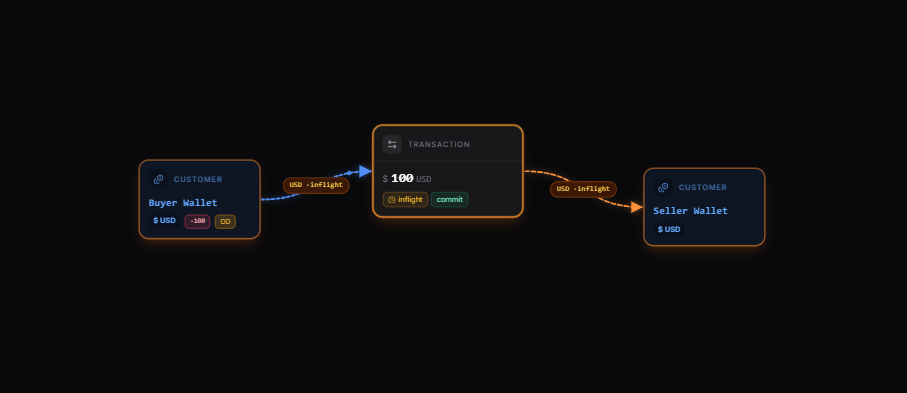
Before writing code, it's crucial to design a [money movement map](/ledgers/money-movement-map) that outlines how money moves in your system. This serves as the blueprint for your implementation.
For our escrow payments workflow, here's our map:
 [Explore the map yourself here](https://map.blnkfinance.xyz/IgmT0FSLzG)
Read more: [Create inflight →](/transactions/inflight/creating-inflight)
This map shows three key aspects of the escrow fund flow:
* `Buyer` initiates transaction to `Seller`.
* Transaction is held inflight until the escrow conditions are met or not.
* Transaction is completed or discarded depending on the inflight status, and the balances get updated.
***
## Set up your implementation
Based on our map, we'll implement the following steps:
1. Initiate a transaction with inflight between the `Buyer Wallet` and the `Seller Wallet`.
2. Update the status of our inflight transaction.
* Commit if the escrow payment is successful.
* Void if the escrow payment failed.
***
## Prerequisites
Before starting, ensure you have:
1. A running Blnk Core instance (e.g. at `http://localhost:5001`).
2. An API key for Blnk (replace `YOUR_API_KEY` in the code examples). Required for authenticated requests.
3. Optionally, you can connect your Blnk Core to your [Blnk Cloud](https://cloud.blnkfinance.com/?utm_source=blnk_docs\&utm_medium=documentation\&utm_campaign=tutorials%2Fquick-start%2Fescrow-payments) workspace to view your ledger data.
4. Balances created for the buyer and seller wallets in your Blnk Ledger. Learn how: [Building a Wallet Management System with Blnk →](/tutorials/quick-start/wallet-management).
5. Funded the buyer wallet balance in ledger.
***
## Initiate escrow transaction
[Create a transaction](/transactions/introduction#recording-a-transaction) with `inflight` enabled.
```bash cURL wrap expandable theme={"system"}
curl -X POST "http://localhost:5001/transactions" \
-H "X-blnk-key: " \
-H "Content-Type: application/json" \
-d '{
"precise_amount": 10043,
"precision": 100,
"reference": "escrow_ref_12345",
"description": "Escrow payment",
"currency": "USD",
"source": "",
"destination": "",
"inflight": true,
"meta_data": {
"transaction_type": "escrow",
"escrow_status": "pending",
"buyer_confirmation": false,
"seller_confirmation": false
}
}'
```
```typescript TypeScript wrap expandable {13} theme={"system"}
async function createEscrowTransaction(buyerWalletId, sellerWalletId, amount, uniqueReference, description) {
const escrow = await blnk.Transactions.create({
precise_amount: amount * 100,
precision: 100,
reference: uniqueReference,
description: description || "Escrow payment",
currency: "USD",
source: buyerWalletId,
destination: sellerWalletId,
inflight: true, // Holds funds in escrow
meta_data: {
transaction_type: "escrow",
escrow_status: "pending",
buyer_confirmation: false,
seller_confirmation: false,
}
});
console.log("Escrow transaction created:", escrow.data.transaction_id);
return escrow.data.transaction_id;
}
```
```go Go wrap expandable theme={"system"}
func createEscrowTransaction(buyerWalletID, sellerWalletID string, amount float64, uniqueReference, description string) (string, error) {
client := getClient()
if description == "" {
description = "Escrow payment"
}
escrow, _, err := client.Transaction.Create(blnkgo.CreateTransactionRequest{
ParentTransaction: blnkgo.ParentTransaction{
PreciseAmount: amount * 100,
Precision: 100,
Reference: uniqueReference,
Description: description,
Currency: "USD",
Source: buyerWalletID,
Destination: sellerWalletID,
MetaData: map[string]interface{}{
"transaction_type": "escrow",
"escrow_status": "pending",
"buyer_confirmation": false,
"seller_confirmation": false,
},
},
Inflight: true,
})
if err != nil {
return "", err
}
fmt.Println("Escrow transaction created:", escrow.TransactionID)
return escrow.TransactionID, nil
}
```
When `inflight` is enabled, the transaction remains pending, ensuring that neither the source nor the destination balance is affected until the specified conditions are met.
***
## Path 1: Successful escrow payment
For a successful escrow payment, commit the inflight transaction to apply it to the buyer and seller balances:
```bash cURL wrap theme={"system"}
curl -X PUT "http://localhost:5001/transactions/inflight/" \
-H "X-blnk-key: " \
-H "Content-Type: application/json" \
-d '{
"status": "commit"
}'
```
```typescript TypeScript wrap expandable theme={"system"}
async function commitInflightTransaction(transactionId) {
try {
const response = await blnk.Transactions.updateStatus(transactionId, {
status: 'commit',
});
if (response.status !== 200 || !response.data) {
throw new Error(response.message ?? 'Failed to commit transaction');
}
console.log(`Transaction ${transactionId} successfully committed`);
return response.data;
} catch (error) {
console.error(`Error committing transaction ${transactionId}:`, error);
throw error;
}
}
```
```go Go wrap theme={"system"}
func commitInflightTransaction(transactionID string) (*blnkgo.Transaction, error) {
client := getClient()
committed, _, err := client.Transaction.Update(transactionID, blnkgo.UpdateStatus{
Status: blnkgo.InflightStatusCommit,
})
if err != nil {
return nil, err
}
fmt.Printf("Transaction %s successfully committed\n", transactionID)
return committed, nil
}
```
***
## Path 2: Failed escrow payment
If the escrow failed, void the inflight transaction instead:
```bash cURL wrap theme={"system"}
curl -X PUT "http://localhost:5001/transactions/inflight/" \
-H "X-blnk-key: " \
-H "Content-Type: application/json" \
-d '{
"status": "void"
}'
```
```typescript TypeScript wrap expandable theme={"system"}
async function voidInflightTransaction(transactionId) {
try {
const response = await blnk.Transactions.updateStatus(transactionId, {
status: 'void',
});
if (response.status !== 200 || !response.data) {
throw new Error(response.message ?? 'Failed to void transaction');
}
console.log(`Transaction ${transactionId} successfully voided`);
return response.data;
} catch (error) {
console.error(`Error voiding transaction ${transactionId}:`, error);
throw error;
}
}
```
```go Go wrap theme={"system"}
func voidInflightTransaction(transactionID string) (*blnkgo.Transaction, error) {
client := getClient()
voided, _, err := client.Transaction.Update(transactionID, blnkgo.UpdateStatus{
Status: blnkgo.InflightStatusVoid,
})
if err != nil {
return nil, err
}
fmt.Printf("Transaction %s successfully voided\n", transactionID)
return voided, nil
}
```
***
## Path 3: Partial escrow payment
Escrow payments can also be fulfilled in bits, meaning you can complete part of the total amount over time, e.g., for a \$100 transaction, you can commit \$30, then \$40, then the remaining \$30 later.
Commit a partial amount from the inflight escrow transaction:
```bash cURL wrap theme={"system"}
curl -X PUT "http://localhost:5001/transactions/inflight/" \
-H "X-blnk-key: " \
-H "Content-Type: application/json" \
-d '{
"status": "commit",
"precise_amount": 3000
}'
```
```typescript TypeScript wrap expandable theme={"system"}
async function commitPartialInflightTransaction(transactionId, partialAmount) {
try {
const response = await blnk.Transactions.updateStatus(transactionId, {
status: 'commit',
precise_amount: partialAmount * 100,
});
if (response.status !== 200 || !response.data) {
throw new Error(response.message ?? 'Failed to commit partial transaction');
}
console.log(`Transaction ${transactionId} successfully committed`);
return response.data;
} catch (error) {
console.error(`Error committing transaction ${transactionId}:`, error);
throw error;
}
}
```
```go Go wrap theme={"system"}
func commitPartialInflightTransaction(transactionID string, partialAmount float64) (*blnkgo.Transaction, error) {
client := getClient()
committed, _, err := client.Transaction.Update(transactionID, blnkgo.UpdateStatus{
Status: blnkgo.InflightStatusCommit,
PreciseAmount: partialAmount * 100,
})
if err != nil {
return nil, err
}
fmt.Printf("Transaction %s successfully committed\n", transactionID)
return committed, nil
}
```
You can also make multiple partial commits and void the remaining inflight amount if needed.
***
## Conclusion
This tutorial demonstrated how to build a secure escrow payment system using Blnk's inflight feature, enabling safe transactions for buyers and sellers. The system includes initiating escrows, tracking confirmations, releasing funds upon mutual agreement, and handling cancellations.
With Blnk's flexible architecture, you can easily adapt this escrow system to various business models, including from marketplace transactions and freelancer payments to real estate deals and complex business contracts.
Hold, commit, void, and best practices.
***
Get dedicated support for architecture reviews, integration planning, ledger workflows, and production deployment.
[Explore the map yourself here](https://map.blnkfinance.xyz/IgmT0FSLzG)
Read more: [Create inflight →](/transactions/inflight/creating-inflight)
This map shows three key aspects of the escrow fund flow:
* `Buyer` initiates transaction to `Seller`.
* Transaction is held inflight until the escrow conditions are met or not.
* Transaction is completed or discarded depending on the inflight status, and the balances get updated.
***
## Set up your implementation
Based on our map, we'll implement the following steps:
1. Initiate a transaction with inflight between the `Buyer Wallet` and the `Seller Wallet`.
2. Update the status of our inflight transaction.
* Commit if the escrow payment is successful.
* Void if the escrow payment failed.
***
## Prerequisites
Before starting, ensure you have:
1. A running Blnk Core instance (e.g. at `http://localhost:5001`).
2. An API key for Blnk (replace `YOUR_API_KEY` in the code examples). Required for authenticated requests.
3. Optionally, you can connect your Blnk Core to your [Blnk Cloud](https://cloud.blnkfinance.com/?utm_source=blnk_docs\&utm_medium=documentation\&utm_campaign=tutorials%2Fquick-start%2Fescrow-payments) workspace to view your ledger data.
4. Balances created for the buyer and seller wallets in your Blnk Ledger. Learn how: [Building a Wallet Management System with Blnk →](/tutorials/quick-start/wallet-management).
5. Funded the buyer wallet balance in ledger.
***
## Initiate escrow transaction
[Create a transaction](/transactions/introduction#recording-a-transaction) with `inflight` enabled.
```bash cURL wrap expandable theme={"system"}
curl -X POST "http://localhost:5001/transactions" \
-H "X-blnk-key: " \
-H "Content-Type: application/json" \
-d '{
"precise_amount": 10043,
"precision": 100,
"reference": "escrow_ref_12345",
"description": "Escrow payment",
"currency": "USD",
"source": "",
"destination": "",
"inflight": true,
"meta_data": {
"transaction_type": "escrow",
"escrow_status": "pending",
"buyer_confirmation": false,
"seller_confirmation": false
}
}'
```
```typescript TypeScript wrap expandable {13} theme={"system"}
async function createEscrowTransaction(buyerWalletId, sellerWalletId, amount, uniqueReference, description) {
const escrow = await blnk.Transactions.create({
precise_amount: amount * 100,
precision: 100,
reference: uniqueReference,
description: description || "Escrow payment",
currency: "USD",
source: buyerWalletId,
destination: sellerWalletId,
inflight: true, // Holds funds in escrow
meta_data: {
transaction_type: "escrow",
escrow_status: "pending",
buyer_confirmation: false,
seller_confirmation: false,
}
});
console.log("Escrow transaction created:", escrow.data.transaction_id);
return escrow.data.transaction_id;
}
```
```go Go wrap expandable theme={"system"}
func createEscrowTransaction(buyerWalletID, sellerWalletID string, amount float64, uniqueReference, description string) (string, error) {
client := getClient()
if description == "" {
description = "Escrow payment"
}
escrow, _, err := client.Transaction.Create(blnkgo.CreateTransactionRequest{
ParentTransaction: blnkgo.ParentTransaction{
PreciseAmount: amount * 100,
Precision: 100,
Reference: uniqueReference,
Description: description,
Currency: "USD",
Source: buyerWalletID,
Destination: sellerWalletID,
MetaData: map[string]interface{}{
"transaction_type": "escrow",
"escrow_status": "pending",
"buyer_confirmation": false,
"seller_confirmation": false,
},
},
Inflight: true,
})
if err != nil {
return "", err
}
fmt.Println("Escrow transaction created:", escrow.TransactionID)
return escrow.TransactionID, nil
}
```
When `inflight` is enabled, the transaction remains pending, ensuring that neither the source nor the destination balance is affected until the specified conditions are met.
***
## Path 1: Successful escrow payment
For a successful escrow payment, commit the inflight transaction to apply it to the buyer and seller balances:
```bash cURL wrap theme={"system"}
curl -X PUT "http://localhost:5001/transactions/inflight/" \
-H "X-blnk-key: " \
-H "Content-Type: application/json" \
-d '{
"status": "commit"
}'
```
```typescript TypeScript wrap expandable theme={"system"}
async function commitInflightTransaction(transactionId) {
try {
const response = await blnk.Transactions.updateStatus(transactionId, {
status: 'commit',
});
if (response.status !== 200 || !response.data) {
throw new Error(response.message ?? 'Failed to commit transaction');
}
console.log(`Transaction ${transactionId} successfully committed`);
return response.data;
} catch (error) {
console.error(`Error committing transaction ${transactionId}:`, error);
throw error;
}
}
```
```go Go wrap theme={"system"}
func commitInflightTransaction(transactionID string) (*blnkgo.Transaction, error) {
client := getClient()
committed, _, err := client.Transaction.Update(transactionID, blnkgo.UpdateStatus{
Status: blnkgo.InflightStatusCommit,
})
if err != nil {
return nil, err
}
fmt.Printf("Transaction %s successfully committed\n", transactionID)
return committed, nil
}
```
***
## Path 2: Failed escrow payment
If the escrow failed, void the inflight transaction instead:
```bash cURL wrap theme={"system"}
curl -X PUT "http://localhost:5001/transactions/inflight/" \
-H "X-blnk-key: " \
-H "Content-Type: application/json" \
-d '{
"status": "void"
}'
```
```typescript TypeScript wrap expandable theme={"system"}
async function voidInflightTransaction(transactionId) {
try {
const response = await blnk.Transactions.updateStatus(transactionId, {
status: 'void',
});
if (response.status !== 200 || !response.data) {
throw new Error(response.message ?? 'Failed to void transaction');
}
console.log(`Transaction ${transactionId} successfully voided`);
return response.data;
} catch (error) {
console.error(`Error voiding transaction ${transactionId}:`, error);
throw error;
}
}
```
```go Go wrap theme={"system"}
func voidInflightTransaction(transactionID string) (*blnkgo.Transaction, error) {
client := getClient()
voided, _, err := client.Transaction.Update(transactionID, blnkgo.UpdateStatus{
Status: blnkgo.InflightStatusVoid,
})
if err != nil {
return nil, err
}
fmt.Printf("Transaction %s successfully voided\n", transactionID)
return voided, nil
}
```
***
## Path 3: Partial escrow payment
Escrow payments can also be fulfilled in bits, meaning you can complete part of the total amount over time, e.g., for a \$100 transaction, you can commit \$30, then \$40, then the remaining \$30 later.
Commit a partial amount from the inflight escrow transaction:
```bash cURL wrap theme={"system"}
curl -X PUT "http://localhost:5001/transactions/inflight/" \
-H "X-blnk-key: " \
-H "Content-Type: application/json" \
-d '{
"status": "commit",
"precise_amount": 3000
}'
```
```typescript TypeScript wrap expandable theme={"system"}
async function commitPartialInflightTransaction(transactionId, partialAmount) {
try {
const response = await blnk.Transactions.updateStatus(transactionId, {
status: 'commit',
precise_amount: partialAmount * 100,
});
if (response.status !== 200 || !response.data) {
throw new Error(response.message ?? 'Failed to commit partial transaction');
}
console.log(`Transaction ${transactionId} successfully committed`);
return response.data;
} catch (error) {
console.error(`Error committing transaction ${transactionId}:`, error);
throw error;
}
}
```
```go Go wrap theme={"system"}
func commitPartialInflightTransaction(transactionID string, partialAmount float64) (*blnkgo.Transaction, error) {
client := getClient()
committed, _, err := client.Transaction.Update(transactionID, blnkgo.UpdateStatus{
Status: blnkgo.InflightStatusCommit,
PreciseAmount: partialAmount * 100,
})
if err != nil {
return nil, err
}
fmt.Printf("Transaction %s successfully committed\n", transactionID)
return committed, nil
}
```
You can also make multiple partial commits and void the remaining inflight amount if needed.
***
## Conclusion
This tutorial demonstrated how to build a secure escrow payment system using Blnk's inflight feature, enabling safe transactions for buyers and sellers. The system includes initiating escrows, tracking confirmations, releasing funds upon mutual agreement, and handling cancellations.
With Blnk's flexible architecture, you can easily adapt this escrow system to various business models, including from marketplace transactions and freelancer payments to real estate deals and complex business contracts.
Hold, commit, void, and best practices.
***
Get dedicated support for architecture reviews, integration planning, ledger workflows, and production deployment.