> ## Documentation Index
> Fetch the complete documentation index at: https://docs.blnkfinance.com/llms.txt
> Use this file to discover all available pages before exploring further.
# Crypto Order Exchange
> Implementing a cryptocurrency order exchange system with the Blnk Ledger.
export const CtaCallout = props => {
const {title, buttonLabel, href, trackingEvent, buttonTarget, rel = "noopener noreferrer", children} = props;
const handleCtaClick = () => {
if (typeof window === "undefined" || !trackingEvent) {
return;
}
try {
window.dispatchEvent(new CustomEvent("blnk:docs-cta", {
detail: {
name: trackingEvent,
href
}
}));
} catch {}
try {
window.posthog?.capture?.(trackingEvent, {
href
});
} catch {}
const gaPayload = {
cta_href: href
};
try {
window.gtag?.("event", trackingEvent, gaPayload);
} catch {}
try {
window.dataLayer = window.dataLayer || [];
window.dataLayer.push({
event: trackingEvent,
...gaPayload
});
} catch {}
};
const isExternal = typeof href === "string" && (/^https?:\/\//i).test(href);
const target = buttonTarget ?? (isExternal ? "_blank" : undefined);
const linkRel = isExternal ? rel : undefined;
return ;
};
This guide demonstrates how to implement a secure and efficient cryptocurrency order exchange system with the Blnk Ledger. You'll learn how to handle order creation, escrow management, order matching, and atomic settlements.
A cryptocurrency exchange operates in three main steps:
* **Order Creation:** Users express their intent to trade by creating orders
* **Order Matching:** Compatible orders are paired together
* **Settlement:** Assets are exchanged atomically between parties
To illustrate this flow, let's work with a practical example where two users want to exchange different cryptocurrencies:
```
Initial State:
John has 1 ETH available in his account
Emily has 10 MATIC available in her account
Order Intent:
John wants to receive 10 MATIC in exchange for 1 ETH
Emily wants to receive 1 ETH in exchange for 10 MATIC
```
***
## Designing your map
Before writing code, it's crucial to design a [money movement map](/ledgers/money-movement-map) that outlines how money moves in your system. This serves as the blueprint for your implementation.
For our order exchange system, here's how funds will flow:
### Step 1: Order creation
Each customer initiates their order by starting a transaction in an inflight state, temporarily holding their assets (e.g., ETH or MATIC) in escrow (`@ETH_Escrow` or `@MATIC_Escrow`) until the order is matched or finalized:
1. John deposits ETH into `@ETH_Escrow` (inflight).
2. Emily deposits MATIC into `@MATIC_Escrow` (inflight).
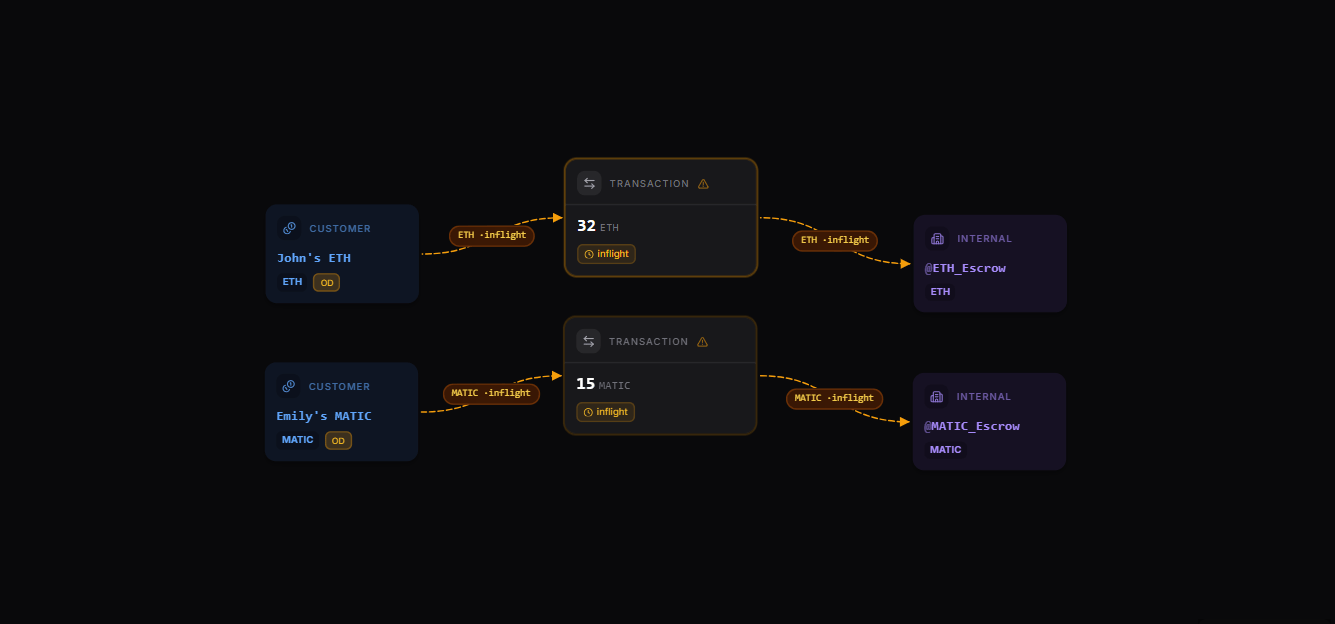 [Explore the map yourself here](https://map.blnkfinance.xyz/k0CMhscpI9)
### Step 2: Order matching
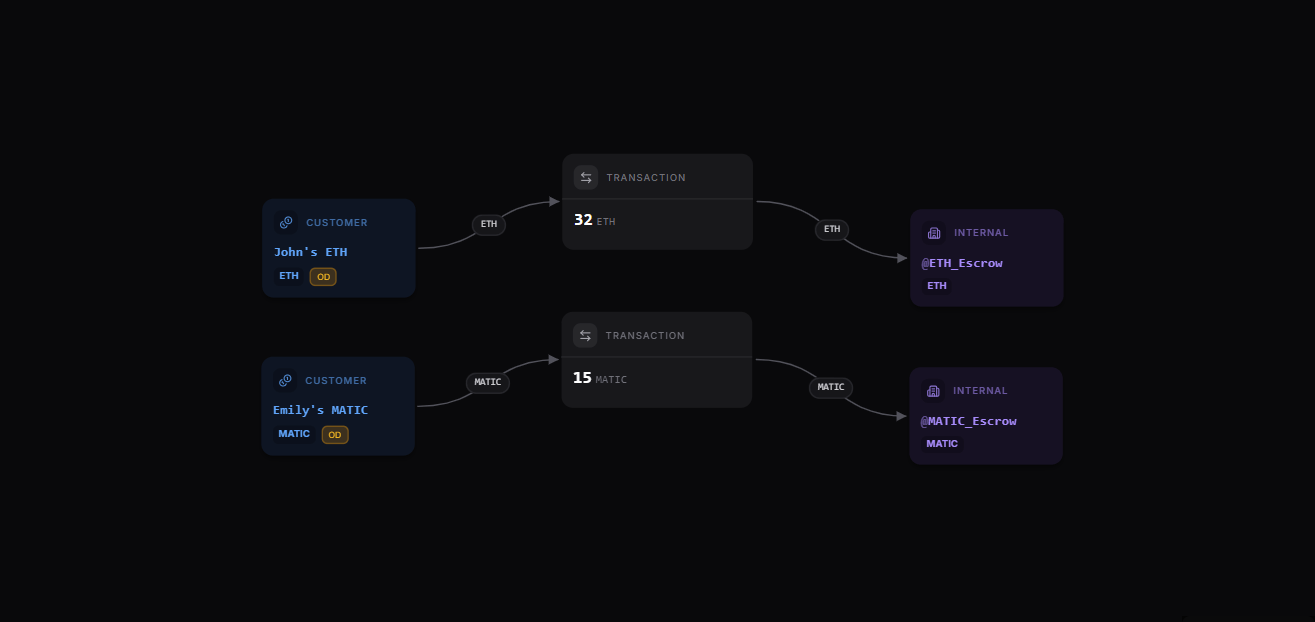
Order matching occurs when the system pairs John’s inflight ETH transaction in `@ETH_Escrow` with Customer B’s inflight MATIC transaction in `@MATIC_Escrow`, linking them under a shared {root_id_123}. This step confirms compatibility and prepares the orders for settlement, keeping funds securely held in escrow until the final exchange.
1. John’s ETH in `@ETH_Escrow` matches Emily’s MATIC order (and linked by a root id: `root_id_123`).
2. Emily’s MATIC in `@MATIC_Escrow` matches John’s ETH order (and linked by a root id: `root_id_123`).
[Explore the map yourself here](https://map.blnkfinance.xyz/k0CMhscpI9)
### Step 2: Order matching
Order matching occurs when the system pairs John’s inflight ETH transaction in `@ETH_Escrow` with Customer B’s inflight MATIC transaction in `@MATIC_Escrow`, linking them under a shared {root_id_123}. This step confirms compatibility and prepares the orders for settlement, keeping funds securely held in escrow until the final exchange.
1. John’s ETH in `@ETH_Escrow` matches Emily’s MATIC order (and linked by a root id: `root_id_123`).
2. Emily’s MATIC in `@MATIC_Escrow` matches John’s ETH order (and linked by a root id: `root_id_123`).
 ### Step 3: Order settlement
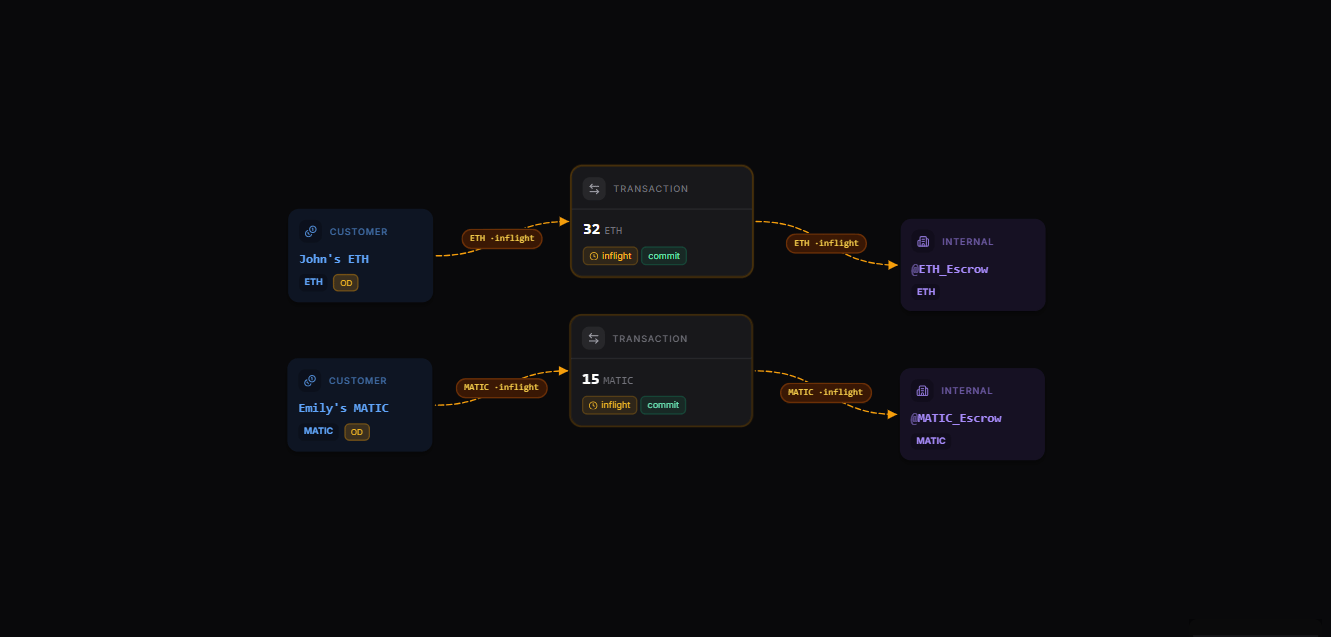
1. Inflight MATIC transaction to `@MATIC_Escrow` commits and settles to John's MATIC balance. The settlement transactions are linked to matched orders with the `root_id`.
2. Inflight ETH transaction to `@ETH_Escrow` commits and settles to Emily's ETH balance. The settlement transactions are linked to matched orders with the `root_id`.
### Step 3: Order settlement
1. Inflight MATIC transaction to `@MATIC_Escrow` commits and settles to John's MATIC balance. The settlement transactions are linked to matched orders with the `root_id`.
2. Inflight ETH transaction to `@ETH_Escrow` commits and settles to Emily's ETH balance. The settlement transactions are linked to matched orders with the `root_id`.
 ***
## Prerequisites
Before starting, ensure you have:
1. A running Blnk Core instance (e.g. at `http://localhost:5001`).
2. An API key for Blnk (replace `YOUR_API_KEY` in the code examples). Required for authenticated requests.
3. Optionally, you can connect your Blnk Core to your [Blnk Cloud](https://cloud.blnkfinance.com/?utm_source=blnk_docs\&utm_medium=documentation\&utm_campaign=tutorials%2Fmore%2Forder-exchange) workspace to view your ledger data.
***
## Setting up your ledger
Before implementing the exchange logic, we need to establish the foundational structure in your Blnk Ledger. Let's set up separate ledgers for each cryptocurrency and create the necessary balances:
### Create customer ledgers
Create two ledgers to segregate different cryptocurrencies:
```javascript theme={"system"}
const ethLedger = await blnk.Ledgers.create({
name: "Customer ETH Ledger"
});
const maticLedger = await blnk.Ledgers.create({
name: "Customer MATIC Ledger"
});
```
### Create customer balances
Create balances for both users in each ledger:
```typescript TypeScript wrap expandable theme={"system"}
// Create ETH balances
const johnEthBalance = await blnk.LedgerBalances.create({
ledger_id: ethLedger.id,
currency: "ETH"
});
const emilyEthBalance = await blnk.LedgerBalances.create({
ledger_id: ethLedger.id,
currency: "ETH"
});
// Create MATIC balances
const johnMaticBalance = await blnk.LedgerBalances.create({
ledger_id: maticLedger.id,
currency: "MATIC"
});
const emilyMaticBalance = await blnk.LedgerBalances.create({
ledger_id: maticLedger.id,
currency: "MATIC"
});
```
### Fund the initial balances
In this example, we use a precision of 100 for simplicity (e.g., 1 ETH = 100 units). In production, cryptocurrencies like ETH use a precision of 10^18 (1 ETH = 10^18 wei). Adjust the `precision` parameter in all transaction calls accordingly and ensure amount calculations reflect this precision.
```typescript TypeScript wrap expandable theme={"system"}
// Fund John's ETH balance
await blnk.Transactions.create({
precise_amount: 100,
currency: "ETH",
reference: `ref_${uuidv4()}`,
precision: 100,
source: "@ETH_FundingPool",
destination: johnEthBalance.id,
description: "Initial ETH funding",
allow_overdraft: true
});
// Fund Emily's MATIC balance
await blnk.Transactions.create({
precise_amount: 1000,
currency: "MATIC",
reference: `ref_${uuidv4()}`,
precision: 100,
source: "@MATIC_FundingPool",
destination: emilyMaticBalance.id,
description: "Initial MATIC funding",
allow_overdraft: true
});
```
***
## Phase 1: Order Creation
When John or Emily creates an order, we need to:
1. Confirm that they have sufficient funds to successfully place the order.
```javascript theme={"system"}
async function checkBalance(balanceId: string, amount: number) {
const response = await blnk.LedgerBalances.get(balanceId);
if (response.status !== 200 || !response.data) {
throw new Error(response.message ?? 'Failed to get balance');
}
const balance = response.data;
const availableBalance = balance.balance - balance.inflight_debit_balance;
if (amount > availableBalance) {
return { success: false, message: 'insufficient funds' };
}
return { success: true, availableBalance };
}
```
2. Initialize it via [inflight](/transactions/inflight/creating-inflight) on your Ledger and reserve the funds in escrow until the order is matched or canceled.
```javascript theme={"system"}
async function createInflightTransaction(balanceId: string, amount: number, currency: string, receiveCurrency: string) {
const orderReference = `order_${uuidv4()}`;
const inflightResponse = await blnk.Transactions.create({
precise_amount: amount * 100,
currency: currency,
precision: 100,
source: balanceId,
destination: `@${currency}_Escrow`,
description: `Exchange order: ${currency} to ${receiveCurrency}`,
reference: orderReference,
inflight: true,
});
if (inflightResponse.status !== 201 || !inflightResponse.data) {
throw new Error(inflightResponse.message ?? 'Failed to create inflight transaction');
}
const inflightTx = inflightResponse.data;
return { inflightTx, orderReference };
}
```
3. Record in our order book.
```javascript theme={"system"}
async function recordOrder(orderReference: string, sendCurrency: string, receiveCurrency: string, amount: number) {
const orderBook = {
reference: orderReference,
send_currency: sendCurrency,
receive_currency: receiveCurrency,
amount: amount,
status: 'pending_match',
created_at: new Date().toISOString()
};
// Store in your order book system
// This is a placeholder - implement your storage logic here
return orderBook;
}
```
4. Bringing it all together.
```javascript theme={"system"}
async function createExchangeOrder(
sourceBalanceId: string,
amount: number,
sendCurrency: string,
receiveCurrency: string
) {
// Step 1: Check balance
const balanceCheck = await checkBalance(sourceBalanceId, amount);
if (!balanceCheck.success) {
return balanceCheck;
}
// Step 2: Create inflight transaction
const { inflightTx, orderReference } = await createInflightTransaction(
sourceBalanceId,
amount,
sendCurrency,
receiveCurrency
);
// Step 3: Record in order book
const order = await recordOrder(orderReference, sendCurrency, receiveCurrency, amount);
return {
success: true,
orderReference,
transaction: inflightTx,
order
};
}
// Create order for John
const johnOrder = await createExchangeOrder(
johnEthBalance.id, // John's ETH balance ID
1, // 1 ETH (with precision 100)
'ETH', // Sending ETH
'MATIC' // Receiving MATIC
);
// Create order for Emily
const emilyOrder = await createExchangeOrder(
emilyMaticBalance.id, // Emily's MATIC balance ID
10, // 10 MATIC
'MATIC', // Sending MATIC
'ETH' // Receiving ETH
);
```
Add `inflight_expiry_date` to automatically roll back the inflight transaction if an order isn’t matched within a timeout period.
***
## Phase 2: Order Matching
When two orders are matched (e.g., John and Emily), we want to link them together with a common matching ID. This helps us track which orders in our Ledger were matched with each other.
```typescript TypeScript wrap expandable theme={"system"}
async function linkMatchedOrders(transaction1Id: string, transaction2Id: string) {
const baseUrl = process.env.BLNK_BASE_URL ?? 'http://localhost:5001';
const apiKey = process.env.BLNK_API_KEY ?? '';
const matchingId = `match_${uuidv4()}`;
for (const [txnId, matchedWith] of [
[transaction1Id, transaction2Id],
[transaction2Id, transaction1Id],
]) {
const res = await fetch(`${baseUrl}/${txnId}/metadata`, {
method: 'POST',
headers: {
'X-Blnk-Key': apiKey,
'Content-Type': 'application/json',
},
body: JSON.stringify({
meta_data: {
matching_id: matchingId,
matched_with_tx: matchedWith,
},
}),
});
if (!res.ok) throw new Error(await res.text());
}
return matchingId;
}
// Example usage when John and Emily's orders are matched:
const matchingId = await linkMatchedOrders(
johnOrder.transaction.transaction_id, // John's inflight transaction ID
emilyOrder.transaction.transaction_id // Emily's inflight transaction ID
);
```
***
## Phase 3: Settling the Matched Orders
Finally, we need to execute the exchange of assets between the matched orders - John & Emily. Here's how we do it:
1. We need to commit these transactions to move the funds to escrow.
2. Then we create new transactions to move funds from escrow to the respective recipient balances (John's MATIC balance and Emily's ETH balance).
```typescript TypeScript wrap expandable theme={"system"}
async function settleMatchedOrders(
johnTxId: string, // John's ETH inflight transaction ID
emilyTxId: string // Emily's MATIC inflight transaction ID
) {
try {
const baseUrl = process.env.BLNK_BASE_URL ?? 'http://localhost:5001';
const apiKey = process.env.BLNK_API_KEY ?? '';
for (const txId of [johnTxId, emilyTxId]) {
const commit = await blnk.Transactions.updateStatus(txId, {
status: 'commit',
});
if (commit.status !== 200 || !commit.data) {
throw new Error(commit.message ?? `Failed to commit ${txId}`);
}
}
const johnRes = await fetch(`${baseUrl}/transactions/${johnTxId}`, {
headers: { 'X-Blnk-Key': apiKey },
});
if (!johnRes.ok) throw new Error(await johnRes.text());
const johnTx = await johnRes.json();
const matchingId = johnTx.meta_data?.matching_id || `match_${uuidv4()}`;
const settlementReference = `settlement_${uuidv4()}`;
// Step 3: Move ETH from escrow to Emily
const ethTransfer = await blnk.Transactions.create({
precise_amount: johnTx.precise_amount,
currency: 'ETH',
precision: 100,
source: '@ETH_Escrow',
destination: emilyEthBalance.id,
reference: `${settlementReference}_eth`,
meta_data: {
matching_id: matchingId,
settlement_type: 'exchange'
}
});
// Step 4: Move MATIC from escrow to John
const maticTransfer = await blnk.Transactions.create({
precise_amount: emilyTx.precise_amount, // 10 MATIC
currency: 'MATIC',
precision: 100,
source: '@MATIC_Escrow',
destination: johnMaticBalance.id,
reference: `${settlementReference}_matic`,
meta_data: {
matching_id: matchingId,
settlement_type: 'exchange'
}
});
return { success: true, matchingId, ethTransfer, maticTransfer };
} catch (error) {
return { success: false, error: error.message };
}
}
```
***
## Best Practices
1. **Balance Validation:** Always verify available balances before creating orders. Remember to consider both actual balances and inflight amounts to prevent over-commitment of funds.
2. **Transaction References:** Always use meaningful reference prefixes ('order\_', 'match\_', 'settlement\_') combined with UUIDs. This makes it easier to track and audit transactions throughout their lifecycle.
3. **Metadata Management:** Ensure metadata consistency across all related transactions. The matching ID should flow through all transactions involved in an exchange, creating a clear chain of linked operations.
4. **Error Handling:** Implement comprehensive error handling at each step. If any part of the process fails, you need to be able to identify where the failure occurred and handle it appropriately.
***
## Additional Considerations
1. **Rate Limiting:** Consider implementing rate limits for order creation to prevent system overload and potential abuse. See the [server and security configuration docs](/advanced/configuration/server-security#rate-limiting).
2. **Currency Precision:** Different cryptocurrencies might require different precision settings. Ensure to use consistent precision value per currency in your Ledger.
3. **Escrow Management:** Regularly audit escrow accounts to ensure they zero out correctly after settlements. Any remaining balance could indicate failed or incomplete settlements.
***
Get dedicated support for architecture reviews, integration planning, ledger workflows, and production deployment.
***
## Prerequisites
Before starting, ensure you have:
1. A running Blnk Core instance (e.g. at `http://localhost:5001`).
2. An API key for Blnk (replace `YOUR_API_KEY` in the code examples). Required for authenticated requests.
3. Optionally, you can connect your Blnk Core to your [Blnk Cloud](https://cloud.blnkfinance.com/?utm_source=blnk_docs\&utm_medium=documentation\&utm_campaign=tutorials%2Fmore%2Forder-exchange) workspace to view your ledger data.
***
## Setting up your ledger
Before implementing the exchange logic, we need to establish the foundational structure in your Blnk Ledger. Let's set up separate ledgers for each cryptocurrency and create the necessary balances:
### Create customer ledgers
Create two ledgers to segregate different cryptocurrencies:
```javascript theme={"system"}
const ethLedger = await blnk.Ledgers.create({
name: "Customer ETH Ledger"
});
const maticLedger = await blnk.Ledgers.create({
name: "Customer MATIC Ledger"
});
```
### Create customer balances
Create balances for both users in each ledger:
```typescript TypeScript wrap expandable theme={"system"}
// Create ETH balances
const johnEthBalance = await blnk.LedgerBalances.create({
ledger_id: ethLedger.id,
currency: "ETH"
});
const emilyEthBalance = await blnk.LedgerBalances.create({
ledger_id: ethLedger.id,
currency: "ETH"
});
// Create MATIC balances
const johnMaticBalance = await blnk.LedgerBalances.create({
ledger_id: maticLedger.id,
currency: "MATIC"
});
const emilyMaticBalance = await blnk.LedgerBalances.create({
ledger_id: maticLedger.id,
currency: "MATIC"
});
```
### Fund the initial balances
In this example, we use a precision of 100 for simplicity (e.g., 1 ETH = 100 units). In production, cryptocurrencies like ETH use a precision of 10^18 (1 ETH = 10^18 wei). Adjust the `precision` parameter in all transaction calls accordingly and ensure amount calculations reflect this precision.
```typescript TypeScript wrap expandable theme={"system"}
// Fund John's ETH balance
await blnk.Transactions.create({
precise_amount: 100,
currency: "ETH",
reference: `ref_${uuidv4()}`,
precision: 100,
source: "@ETH_FundingPool",
destination: johnEthBalance.id,
description: "Initial ETH funding",
allow_overdraft: true
});
// Fund Emily's MATIC balance
await blnk.Transactions.create({
precise_amount: 1000,
currency: "MATIC",
reference: `ref_${uuidv4()}`,
precision: 100,
source: "@MATIC_FundingPool",
destination: emilyMaticBalance.id,
description: "Initial MATIC funding",
allow_overdraft: true
});
```
***
## Phase 1: Order Creation
When John or Emily creates an order, we need to:
1. Confirm that they have sufficient funds to successfully place the order.
```javascript theme={"system"}
async function checkBalance(balanceId: string, amount: number) {
const response = await blnk.LedgerBalances.get(balanceId);
if (response.status !== 200 || !response.data) {
throw new Error(response.message ?? 'Failed to get balance');
}
const balance = response.data;
const availableBalance = balance.balance - balance.inflight_debit_balance;
if (amount > availableBalance) {
return { success: false, message: 'insufficient funds' };
}
return { success: true, availableBalance };
}
```
2. Initialize it via [inflight](/transactions/inflight/creating-inflight) on your Ledger and reserve the funds in escrow until the order is matched or canceled.
```javascript theme={"system"}
async function createInflightTransaction(balanceId: string, amount: number, currency: string, receiveCurrency: string) {
const orderReference = `order_${uuidv4()}`;
const inflightResponse = await blnk.Transactions.create({
precise_amount: amount * 100,
currency: currency,
precision: 100,
source: balanceId,
destination: `@${currency}_Escrow`,
description: `Exchange order: ${currency} to ${receiveCurrency}`,
reference: orderReference,
inflight: true,
});
if (inflightResponse.status !== 201 || !inflightResponse.data) {
throw new Error(inflightResponse.message ?? 'Failed to create inflight transaction');
}
const inflightTx = inflightResponse.data;
return { inflightTx, orderReference };
}
```
3. Record in our order book.
```javascript theme={"system"}
async function recordOrder(orderReference: string, sendCurrency: string, receiveCurrency: string, amount: number) {
const orderBook = {
reference: orderReference,
send_currency: sendCurrency,
receive_currency: receiveCurrency,
amount: amount,
status: 'pending_match',
created_at: new Date().toISOString()
};
// Store in your order book system
// This is a placeholder - implement your storage logic here
return orderBook;
}
```
4. Bringing it all together.
```javascript theme={"system"}
async function createExchangeOrder(
sourceBalanceId: string,
amount: number,
sendCurrency: string,
receiveCurrency: string
) {
// Step 1: Check balance
const balanceCheck = await checkBalance(sourceBalanceId, amount);
if (!balanceCheck.success) {
return balanceCheck;
}
// Step 2: Create inflight transaction
const { inflightTx, orderReference } = await createInflightTransaction(
sourceBalanceId,
amount,
sendCurrency,
receiveCurrency
);
// Step 3: Record in order book
const order = await recordOrder(orderReference, sendCurrency, receiveCurrency, amount);
return {
success: true,
orderReference,
transaction: inflightTx,
order
};
}
// Create order for John
const johnOrder = await createExchangeOrder(
johnEthBalance.id, // John's ETH balance ID
1, // 1 ETH (with precision 100)
'ETH', // Sending ETH
'MATIC' // Receiving MATIC
);
// Create order for Emily
const emilyOrder = await createExchangeOrder(
emilyMaticBalance.id, // Emily's MATIC balance ID
10, // 10 MATIC
'MATIC', // Sending MATIC
'ETH' // Receiving ETH
);
```
Add `inflight_expiry_date` to automatically roll back the inflight transaction if an order isn’t matched within a timeout period.
***
## Phase 2: Order Matching
When two orders are matched (e.g., John and Emily), we want to link them together with a common matching ID. This helps us track which orders in our Ledger were matched with each other.
```typescript TypeScript wrap expandable theme={"system"}
async function linkMatchedOrders(transaction1Id: string, transaction2Id: string) {
const baseUrl = process.env.BLNK_BASE_URL ?? 'http://localhost:5001';
const apiKey = process.env.BLNK_API_KEY ?? '';
const matchingId = `match_${uuidv4()}`;
for (const [txnId, matchedWith] of [
[transaction1Id, transaction2Id],
[transaction2Id, transaction1Id],
]) {
const res = await fetch(`${baseUrl}/${txnId}/metadata`, {
method: 'POST',
headers: {
'X-Blnk-Key': apiKey,
'Content-Type': 'application/json',
},
body: JSON.stringify({
meta_data: {
matching_id: matchingId,
matched_with_tx: matchedWith,
},
}),
});
if (!res.ok) throw new Error(await res.text());
}
return matchingId;
}
// Example usage when John and Emily's orders are matched:
const matchingId = await linkMatchedOrders(
johnOrder.transaction.transaction_id, // John's inflight transaction ID
emilyOrder.transaction.transaction_id // Emily's inflight transaction ID
);
```
***
## Phase 3: Settling the Matched Orders
Finally, we need to execute the exchange of assets between the matched orders - John & Emily. Here's how we do it:
1. We need to commit these transactions to move the funds to escrow.
2. Then we create new transactions to move funds from escrow to the respective recipient balances (John's MATIC balance and Emily's ETH balance).
```typescript TypeScript wrap expandable theme={"system"}
async function settleMatchedOrders(
johnTxId: string, // John's ETH inflight transaction ID
emilyTxId: string // Emily's MATIC inflight transaction ID
) {
try {
const baseUrl = process.env.BLNK_BASE_URL ?? 'http://localhost:5001';
const apiKey = process.env.BLNK_API_KEY ?? '';
for (const txId of [johnTxId, emilyTxId]) {
const commit = await blnk.Transactions.updateStatus(txId, {
status: 'commit',
});
if (commit.status !== 200 || !commit.data) {
throw new Error(commit.message ?? `Failed to commit ${txId}`);
}
}
const johnRes = await fetch(`${baseUrl}/transactions/${johnTxId}`, {
headers: { 'X-Blnk-Key': apiKey },
});
if (!johnRes.ok) throw new Error(await johnRes.text());
const johnTx = await johnRes.json();
const matchingId = johnTx.meta_data?.matching_id || `match_${uuidv4()}`;
const settlementReference = `settlement_${uuidv4()}`;
// Step 3: Move ETH from escrow to Emily
const ethTransfer = await blnk.Transactions.create({
precise_amount: johnTx.precise_amount,
currency: 'ETH',
precision: 100,
source: '@ETH_Escrow',
destination: emilyEthBalance.id,
reference: `${settlementReference}_eth`,
meta_data: {
matching_id: matchingId,
settlement_type: 'exchange'
}
});
// Step 4: Move MATIC from escrow to John
const maticTransfer = await blnk.Transactions.create({
precise_amount: emilyTx.precise_amount, // 10 MATIC
currency: 'MATIC',
precision: 100,
source: '@MATIC_Escrow',
destination: johnMaticBalance.id,
reference: `${settlementReference}_matic`,
meta_data: {
matching_id: matchingId,
settlement_type: 'exchange'
}
});
return { success: true, matchingId, ethTransfer, maticTransfer };
} catch (error) {
return { success: false, error: error.message };
}
}
```
***
## Best Practices
1. **Balance Validation:** Always verify available balances before creating orders. Remember to consider both actual balances and inflight amounts to prevent over-commitment of funds.
2. **Transaction References:** Always use meaningful reference prefixes ('order\_', 'match\_', 'settlement\_') combined with UUIDs. This makes it easier to track and audit transactions throughout their lifecycle.
3. **Metadata Management:** Ensure metadata consistency across all related transactions. The matching ID should flow through all transactions involved in an exchange, creating a clear chain of linked operations.
4. **Error Handling:** Implement comprehensive error handling at each step. If any part of the process fails, you need to be able to identify where the failure occurred and handle it appropriately.
***
## Additional Considerations
1. **Rate Limiting:** Consider implementing rate limits for order creation to prevent system overload and potential abuse. See the [server and security configuration docs](/advanced/configuration/server-security#rate-limiting).
2. **Currency Precision:** Different cryptocurrencies might require different precision settings. Ensure to use consistent precision value per currency in your Ledger.
3. **Escrow Management:** Regularly audit escrow accounts to ensure they zero out correctly after settlements. Any remaining balance could indicate failed or incomplete settlements.
***
Get dedicated support for architecture reviews, integration planning, ledger workflows, and production deployment.