> ## Documentation Index
> Fetch the complete documentation index at: https://docs.blnkfinance.com/llms.txt
> Use this file to discover all available pages before exploring further.
# Handling Deposits & Payouts
> Learn how to manage and track deposits and payouts with Blnk.
export const CtaCallout = props => {
const {title, buttonLabel, href, trackingEvent, buttonTarget, rel = "noopener noreferrer", children} = props;
const handleCtaClick = () => {
if (typeof window === "undefined" || !trackingEvent) {
return;
}
try {
window.dispatchEvent(new CustomEvent("blnk:docs-cta", {
detail: {
name: trackingEvent,
href
}
}));
} catch {}
try {
window.posthog?.capture?.(trackingEvent, {
href
});
} catch {}
const gaPayload = {
cta_href: href
};
try {
window.gtag?.("event", trackingEvent, gaPayload);
} catch {}
try {
window.dataLayer = window.dataLayer || [];
window.dataLayer.push({
event: trackingEvent,
...gaPayload
});
} catch {}
};
const isExternal = typeof href === "string" && (/^https?:\/\//i).test(href);
const target = buttonTarget ?? (isExternal ? "_blank" : undefined);
const linkRel = isExternal ? rel : undefined;
return ;
};
In this tutorial, you’ll learn how to implement deposits and payouts using the Blnk Ledger. You’ll explore and apply a variety of workflows to handle deposits and payouts seamlessly. This includes:
1. Understanding how to set up your ledger for effective tracking of deposits and payouts in your system.
2. Designing flexible workflows to accommodate various scenarios.
3. Ensuring reliable and accurate transaction processing for your users.
For this tutorial, we’ll use the [Blnk TypeScript SDK](/sdks/typescript) for the implementation. If you prefer, you can also refer to the [API reference](/reference/create-ledger) for details on the available endpoints.
***
## Prerequisites
Before starting, ensure you have:
1. A running Blnk Core instance (e.g. at `http://localhost:5001`).
2. An API key for Blnk (replace `YOUR_API_KEY` in the code examples). Required for authenticated requests.
3. Optionally, you can connect your Blnk Core to your [Blnk Cloud](https://cloud.blnkfinance.com/?utm_source=blnk_docs\&utm_medium=documentation\&utm_campaign=tutorials%2Fdigital-banking%2Fdeposits-withdrawals) workspace to view your ledger data.
To prepare for the rest of this tutorial, read our [Building a Wallet with Blnk](/tutorials/quick-start/wallet-management) tutorial if you haven’t already.
This resource will walk you through creating ledger balances for accounts in Blnk, which are essential for implementing deposits, withdrawals, and other financial operations covered later in this tutorial.
***
## Handling deposits
When using Blnk to manage deposits, you can track the sources of your deposits-such as Stripe, Acme Bank, or others-directly in your ledger, enabling more detailed and accurate reporting.
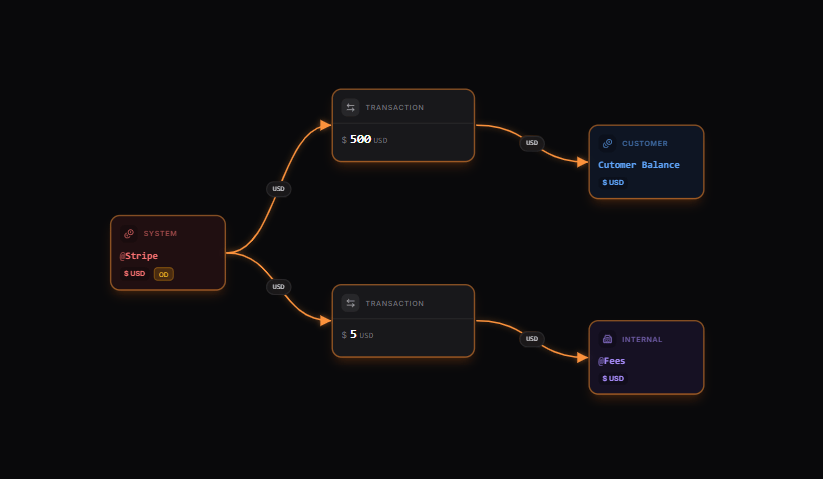
As illustrated in the map below, each source can be assigned to an internal balance, which will be reflected as the value of the `source` field in your transaction request. Fees (1% of the deposit amount, capped at \$5) are deducted and tracked separately.
 [Explore the map yourself here](https://map.blnkfinance.xyz/lsLqJyW8VQ)
From our map, we can verify:
* The source of the deposit, for example, @AcmeBank if it originates from Acme Bank.
* That the customer receives funds after the fees have been dededucted.
* The deposit fees are tracked using the `@Fees` balance.
### Deposits with fee processing
When recording a deposit with fee processing, we’ll use the [Multiple Destinations](/transactions/multiple-destinations) feature to distribute the incoming funds between the customer’s balance and the fees balance.
We’ll also apply `inflight` to validate the deposits against predefined business rules before finalizing the transaction.
```typescript TypeScript wrap expandable theme={"system"}
async function recordDeposit(sourceId, customerBalanceId, amount, reference, stripePaymentId) {
// Calculate fee (1% capped at $5)
const feePercentage = 0.01;
const feeCap = 5;
const calculatedFee = Math.min(amount * feePercentage, feeCap);
const customerAmount = amount - calculatedFee;
// Record the deposit with multiple destinations
const transaction = await blnk.Transactions.create({
precise_amount: amount * 100, // Total amount being deposited
precision: 100,
reference: reference,
currency: "USD",
source: sourceId,
inflight: true, // Hold for verification
destinations: [
{
identifier: customerBalanceId,
distribution: `${customerAmount}`,
narration: "Deposit to your account"
},
{
identifier: "@Fees",
distribution: `${calculatedFee}`,
narration: "Processing fee"
}
],
meta_data: {
fee_amount: calculatedFee,
stripe_payment_id: stripePaymentId
},
skip_queue: true // Process immediately, bypassing queue
});
console.log(`Deposit recorded with ID: ${transaction.data.transaction_id}`);
return transaction.data;
}
```
When you apply `inflight` to a multiple destinations transaction, all associated transactions-distributing funds to both destinations-are also placed in an `inflight` state until the commit or void is executed.
### Verifying deposits based on business rules
Next, we’ll develop functions to process deposits according to the following business rules. In this tutorial, we’ll implement checks for two rules:
1. If the balance is blocked or frozen, the deposit should be voided.
2. If the deposit amount exceeds 1 million USD, it should remain in an `inflight` state, and a notification should be sent for further investigation.
#### Rule 1: Check if balance is blocked or frozen
```typescript TypeScript wrap expandable theme={"system"}
async function processDepositBasedOnRules(transactionId) {
const baseUrl = process.env.BLNK_BASE_URL ?? 'http://localhost:5001';
const apiKey = process.env.BLNK_API_KEY ?? '';
const txnRes = await fetch(`${baseUrl}/transactions/${transactionId}`, {
headers: { 'X-Blnk-Key': apiKey },
});
if (!txnRes.ok) throw new Error(await txnRes.text());
const transaction = await txnRes.json();
const destinations = transaction.destinations || [];
const customerBalanceId = destinations[0]?.identifier;
const balanceResponse = await blnk.LedgerBalances.get(customerBalanceId);
const meta = balanceResponse.data?.meta_data || {};
if (meta.status === 'frozen' || meta.status === 'blocked') {
const metaUpdate = await fetch(`${baseUrl}/${transactionId}/metadata`, {
method: 'POST',
headers: {
'X-Blnk-Key': apiKey,
'Content-Type': 'application/json',
},
body: JSON.stringify({
meta_data: { void_reason: `Account ${meta.status}` },
}),
});
if (!metaUpdate.ok) throw new Error(await metaUpdate.text());
const voidResult = await blnk.Transactions.updateStatus(transactionId, {
status: 'void',
});
if (voidResult.status !== 200 || !voidResult.data) {
throw new Error(voidResult.message ?? 'Failed to void transaction');
}
console.log(`Transaction ${transactionId} voided: account ${meta.status}`);
return voidResult.data;
}
return await processDepositByAmount(transactionId);
}
```
#### Rule 2: Check amount rule
```typescript TypeScript wrap expandable theme={"system"}
async function processDepositByAmount(transactionId) {
const baseUrl = process.env.BLNK_BASE_URL ?? 'http://localhost:5001';
const apiKey = process.env.BLNK_API_KEY ?? '';
const txnRes = await fetch(`${baseUrl}/transactions/${transactionId}`, {
headers: { 'X-Blnk-Key': apiKey },
});
if (!txnRes.ok) throw new Error(await txnRes.text());
const transaction = await txnRes.json();
const amount = transaction.precise_amount;
if (amount < 100000000) {
const commit = await blnk.Transactions.updateStatus(transactionId, {
status: 'commit',
});
if (commit.status !== 200 || !commit.data) {
throw new Error(commit.message ?? 'Failed to commit transaction');
}
console.log(`Transaction ${transactionId} committed: amount below threshold`);
return commit.data;
}
const metaRes = await fetch(`${baseUrl}/${transactionId}/metadata`, {
method: 'POST',
headers: {
'X-Blnk-Key': apiKey,
'Content-Type': 'application/json',
},
body: JSON.stringify({
meta_data: {
investigation_required: true,
investigation_reason: 'Large deposit amount',
flagged_at: new Date().toISOString(),
},
}),
});
if (!metaRes.ok) throw new Error(await metaRes.text());
const flagged = await metaRes.json();
await triggerLargeDepositHook(transactionId, amount);
console.log(`Transaction ${transactionId} flagged for investigation: large amount`);
return flagged;
}
```
Read more: [Webhooks overview →](/webhooks/overview)
### Putting it all together
```typescript TypeScript wrap expandable theme={"system"}
async function handleStripeDeposit(stripePaymentId, customerBalanceId, amount) {
// Step 1: Record the deposit with fee processing
const reference = `stripe_${stripePaymentId}`;
const depositData = await recordDeposit(
"@Stripe",
customerBalanceId,
amount,
reference,
stripePaymentId
);
// Step 2: Process the deposit based on business rules
const result = await processDepositBasedOnRules(depositData.transaction_id);
return {
message: `Deposit processed with status: ${result.status}`
};
}
```
### Refunding deposits
To process refunds in your ledger and reverse a deposit:
```typescript TypeScript wrap expandable theme={"system"}
async function refundDeposit(transactionId, reason = 'Customer requested refund') {
// Process the refund
const refund = await blnk.Transactions.refund(transactionId);
const baseUrl = process.env.BLNK_BASE_URL ?? 'http://localhost:5001';
const apiKey = process.env.BLNK_API_KEY ?? '';
const metaRes = await fetch(`${baseUrl}/${refund.data.refund_id}/metadata`, {
method: 'POST',
headers: {
'X-Blnk-Key': apiKey,
'Content-Type': 'application/json',
},
body: JSON.stringify({
meta_data: { refund_reason: reason },
}),
});
if (!metaRes.ok) throw new Error(await metaRes.text());
console.log(`Deposit refunded: ${refund.data.refund_id}`);
return refund.data;
}
```
***
## Handling payouts
Payouts function similarly to deposits but in reverse.
The `Customer Balance` serves as the source, while the `Payout Destination` and `@Fees` act as the destinations. Include `@Fees` if the customer incurs fees for payment processing.
[Explore the map yourself here](https://map.blnkfinance.xyz/lsLqJyW8VQ)
From our map, we can verify:
* The source of the deposit, for example, @AcmeBank if it originates from Acme Bank.
* That the customer receives funds after the fees have been dededucted.
* The deposit fees are tracked using the `@Fees` balance.
### Deposits with fee processing
When recording a deposit with fee processing, we’ll use the [Multiple Destinations](/transactions/multiple-destinations) feature to distribute the incoming funds between the customer’s balance and the fees balance.
We’ll also apply `inflight` to validate the deposits against predefined business rules before finalizing the transaction.
```typescript TypeScript wrap expandable theme={"system"}
async function recordDeposit(sourceId, customerBalanceId, amount, reference, stripePaymentId) {
// Calculate fee (1% capped at $5)
const feePercentage = 0.01;
const feeCap = 5;
const calculatedFee = Math.min(amount * feePercentage, feeCap);
const customerAmount = amount - calculatedFee;
// Record the deposit with multiple destinations
const transaction = await blnk.Transactions.create({
precise_amount: amount * 100, // Total amount being deposited
precision: 100,
reference: reference,
currency: "USD",
source: sourceId,
inflight: true, // Hold for verification
destinations: [
{
identifier: customerBalanceId,
distribution: `${customerAmount}`,
narration: "Deposit to your account"
},
{
identifier: "@Fees",
distribution: `${calculatedFee}`,
narration: "Processing fee"
}
],
meta_data: {
fee_amount: calculatedFee,
stripe_payment_id: stripePaymentId
},
skip_queue: true // Process immediately, bypassing queue
});
console.log(`Deposit recorded with ID: ${transaction.data.transaction_id}`);
return transaction.data;
}
```
When you apply `inflight` to a multiple destinations transaction, all associated transactions-distributing funds to both destinations-are also placed in an `inflight` state until the commit or void is executed.
### Verifying deposits based on business rules
Next, we’ll develop functions to process deposits according to the following business rules. In this tutorial, we’ll implement checks for two rules:
1. If the balance is blocked or frozen, the deposit should be voided.
2. If the deposit amount exceeds 1 million USD, it should remain in an `inflight` state, and a notification should be sent for further investigation.
#### Rule 1: Check if balance is blocked or frozen
```typescript TypeScript wrap expandable theme={"system"}
async function processDepositBasedOnRules(transactionId) {
const baseUrl = process.env.BLNK_BASE_URL ?? 'http://localhost:5001';
const apiKey = process.env.BLNK_API_KEY ?? '';
const txnRes = await fetch(`${baseUrl}/transactions/${transactionId}`, {
headers: { 'X-Blnk-Key': apiKey },
});
if (!txnRes.ok) throw new Error(await txnRes.text());
const transaction = await txnRes.json();
const destinations = transaction.destinations || [];
const customerBalanceId = destinations[0]?.identifier;
const balanceResponse = await blnk.LedgerBalances.get(customerBalanceId);
const meta = balanceResponse.data?.meta_data || {};
if (meta.status === 'frozen' || meta.status === 'blocked') {
const metaUpdate = await fetch(`${baseUrl}/${transactionId}/metadata`, {
method: 'POST',
headers: {
'X-Blnk-Key': apiKey,
'Content-Type': 'application/json',
},
body: JSON.stringify({
meta_data: { void_reason: `Account ${meta.status}` },
}),
});
if (!metaUpdate.ok) throw new Error(await metaUpdate.text());
const voidResult = await blnk.Transactions.updateStatus(transactionId, {
status: 'void',
});
if (voidResult.status !== 200 || !voidResult.data) {
throw new Error(voidResult.message ?? 'Failed to void transaction');
}
console.log(`Transaction ${transactionId} voided: account ${meta.status}`);
return voidResult.data;
}
return await processDepositByAmount(transactionId);
}
```
#### Rule 2: Check amount rule
```typescript TypeScript wrap expandable theme={"system"}
async function processDepositByAmount(transactionId) {
const baseUrl = process.env.BLNK_BASE_URL ?? 'http://localhost:5001';
const apiKey = process.env.BLNK_API_KEY ?? '';
const txnRes = await fetch(`${baseUrl}/transactions/${transactionId}`, {
headers: { 'X-Blnk-Key': apiKey },
});
if (!txnRes.ok) throw new Error(await txnRes.text());
const transaction = await txnRes.json();
const amount = transaction.precise_amount;
if (amount < 100000000) {
const commit = await blnk.Transactions.updateStatus(transactionId, {
status: 'commit',
});
if (commit.status !== 200 || !commit.data) {
throw new Error(commit.message ?? 'Failed to commit transaction');
}
console.log(`Transaction ${transactionId} committed: amount below threshold`);
return commit.data;
}
const metaRes = await fetch(`${baseUrl}/${transactionId}/metadata`, {
method: 'POST',
headers: {
'X-Blnk-Key': apiKey,
'Content-Type': 'application/json',
},
body: JSON.stringify({
meta_data: {
investigation_required: true,
investigation_reason: 'Large deposit amount',
flagged_at: new Date().toISOString(),
},
}),
});
if (!metaRes.ok) throw new Error(await metaRes.text());
const flagged = await metaRes.json();
await triggerLargeDepositHook(transactionId, amount);
console.log(`Transaction ${transactionId} flagged for investigation: large amount`);
return flagged;
}
```
Read more: [Webhooks overview →](/webhooks/overview)
### Putting it all together
```typescript TypeScript wrap expandable theme={"system"}
async function handleStripeDeposit(stripePaymentId, customerBalanceId, amount) {
// Step 1: Record the deposit with fee processing
const reference = `stripe_${stripePaymentId}`;
const depositData = await recordDeposit(
"@Stripe",
customerBalanceId,
amount,
reference,
stripePaymentId
);
// Step 2: Process the deposit based on business rules
const result = await processDepositBasedOnRules(depositData.transaction_id);
return {
message: `Deposit processed with status: ${result.status}`
};
}
```
### Refunding deposits
To process refunds in your ledger and reverse a deposit:
```typescript TypeScript wrap expandable theme={"system"}
async function refundDeposit(transactionId, reason = 'Customer requested refund') {
// Process the refund
const refund = await blnk.Transactions.refund(transactionId);
const baseUrl = process.env.BLNK_BASE_URL ?? 'http://localhost:5001';
const apiKey = process.env.BLNK_API_KEY ?? '';
const metaRes = await fetch(`${baseUrl}/${refund.data.refund_id}/metadata`, {
method: 'POST',
headers: {
'X-Blnk-Key': apiKey,
'Content-Type': 'application/json',
},
body: JSON.stringify({
meta_data: { refund_reason: reason },
}),
});
if (!metaRes.ok) throw new Error(await metaRes.text());
console.log(`Deposit refunded: ${refund.data.refund_id}`);
return refund.data;
}
```
***
## Handling payouts
Payouts function similarly to deposits but in reverse.
The `Customer Balance` serves as the source, while the `Payout Destination` and `@Fees` act as the destinations. Include `@Fees` if the customer incurs fees for payment processing.
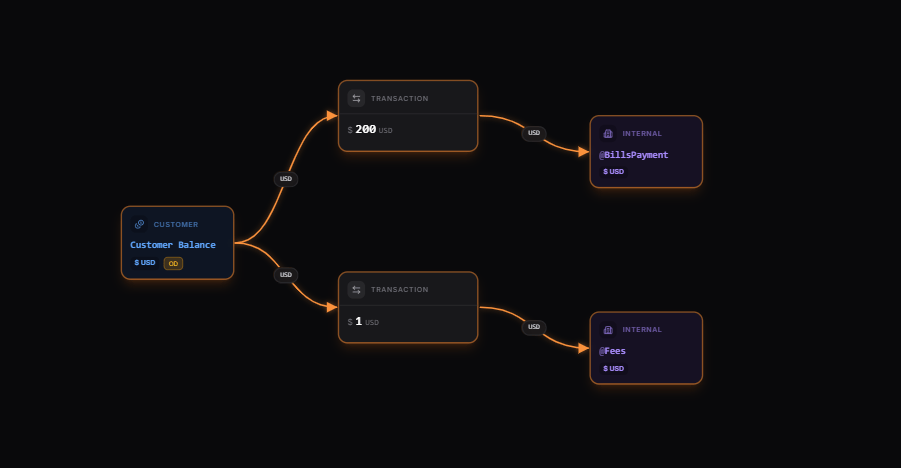 From our map, we can verify:
* The destination of the withdrawal.
* That the customer receives funds after the fees have been deducted.
* The deposit fees are tracked using the `@Fees` balance.
### Path 1: Successful payouts
Here, the payout was successfully completed by your payout provider:
```typescript TypeScript wrap expandable theme={"system"}
// Initiate a payout with inflight
async function initiatePayout(customerBalanceId, billsAmount, reference) {
// Calculate fee (0.5% with $1 minimum)
const feePercentage = 0.005;
const minFee = 1;
const calculatedFee = Math.max(billsAmount * feePercentage, minFee);
const totalAmount = billsAmount + calculatedFee;
const payout = await blnk.Transactions.create({
precise_amount: totalAmount * 100,
precision: 100,
reference: reference,
description: "Payout for bills",
currency: "USD",
source: customerBalanceId,
destinations: [
{
identifier: "@BillsPayment",
distribution: `${billsAmount}`,
narration: "Payout for bills"
},
{
identifier: "@Fees",
distribution: `${calculatedFee}`,
narration: "Payout processing fee"
}
],
inflight: true,
inflight_expiry_date: getExpiryDate(24), // Expires if no response is gotten in 24 hours
meta_data: {
payout_status: "pending",
fee_amount: calculatedFee
},
skip_queue: true // Process immediately, bypassing queue
});
console.log(`Payout initiated: ${payout.data.transaction_id}`);
return payout.data;
}
// Generate expiry date (hours from now)
function getExpiryDate(hours) {
const date = new Date();
date.setHours(date.getHours() + hours);
return date.toISOString();
}
```
#### Commit based on feedback from payout provider
```typescript TypeScript wrap expandable theme={"system"}
// Webhook handler for payment processor notifications
async function handlePaymentWebhook(webhookBody) {
const {
event_type,
payout_id,
status,
transaction_reference
} = webhookBody;
if (event_type === 'payment.success') {
// Find the transaction by reference
const searchResult = await blnk.Search.search({
q: transaction_reference,
query_by: "reference",
filter_by: "status:=INFLIGHT"
}, "transactions");
// Get the parent transaction (transaction_id connecting both transactions together)
const transaction = searchResult.data.hits[0].document;
const transactionId = transaction.parent_transaction;
const baseUrl = process.env.BLNK_BASE_URL ?? 'http://localhost:5001';
const apiKey = process.env.BLNK_API_KEY ?? '';
const metaRes = await fetch(`${baseUrl}/${transactionId}/metadata`, {
method: 'POST',
headers: {
'X-Blnk-Key': apiKey,
'Content-Type': 'application/json',
},
body: JSON.stringify({
meta_data: {
payout_status: 'confirmed',
provider_payout_id: payout_id,
confirmation_time: new Date().toISOString(),
},
}),
});
if (!metaRes.ok) throw new Error(await metaRes.text());
const commit = await blnk.Transactions.updateStatus(transactionId, {
status: 'commit',
});
if (commit.status !== 200 || !commit.data) {
throw new Error(commit.message ?? 'Failed to commit payout');
}
console.log(`Payout confirmed and committed: ${transactionId}`);
return {
processed: true,
transaction_id: transactionId,
};
}
}
```
#### How multiple destinations work
When using [Multiple Destinations](/transactions/multiple-destinations) in a transaction (like in our tutorial), Blnk automatically generates a separate transaction record for each distribution. These individual records are linked together with the `parent_transaction` parameter.
This structure organizes and connects all parts of a multi-destination transaction efficiently.
A standout feature of this system is how actions on the `parent_transaction` affect the entire group:
* Committing the `parent_transaction` automatically commits all associated distributions, confirming the full distribution.
* Voiding the `parent_transaction` automatically voids all distributions, canceling the entire distribution in one step.
This unified approach simplifies managing complex transactions involving multiple recipients.
### Path 2: Failed payouts
The payout is pending, but a failure message was received from the provider, resulting in the transaction being voided:
```typescript TypeScript wrap expandable theme={"system"}
async function handlePaymentWebhook(webhookBody) {
const {
event_type,
payout_id,
status,
transaction_reference
} = webhookBody;
if (event_type === 'payment.failed') {
// Find the transaction by reference
const searchResult = await blnk.Search.search({
q: transaction_reference,
query_by: "reference",
filter_by: "status:=INFLIGHT"
}, "transactions");
// Get the parent transaction (transaction_id connecting both transactions together)
const transaction = searchResult.data.hits[0].document;
const transactionId = transaction.parent_transaction;
const baseUrl = process.env.BLNK_BASE_URL ?? 'http://localhost:5001';
const apiKey = process.env.BLNK_API_KEY ?? '';
const metaRes = await fetch(`${baseUrl}/${transactionId}/metadata`, {
method: 'POST',
headers: {
'X-Blnk-Key': apiKey,
'Content-Type': 'application/json',
},
body: JSON.stringify({
meta_data: {
payout_status: 'failed',
provider_payout_id: payout_id,
confirmation_time: new Date().toISOString(),
},
}),
});
if (!metaRes.ok) throw new Error(await metaRes.text());
const voidResult = await blnk.Transactions.updateStatus(transactionId, {
status: 'void',
});
if (voidResult.status !== 200 || !voidResult.data) {
throw new Error(voidResult.message ?? 'Failed to void payout');
}
console.log(`Payout cancelled: ${transactionId}`);
return {
processed: true,
transaction_id: transactionId,
};
}
}
```
### Path 2: Successful payout but reversed
The payout was initially successful, with confirmation received from the provider, but the funds were reversed by the provider due to an inability to settle the transaction:
```typescript TypeScript wrap expandable theme={"system"}
async function refundPayout(transactionId, reason = "Can't complete payout") {
// Process the refund
const refund = await blnk.Transactions.refund(transactionId);
const baseUrl = process.env.BLNK_BASE_URL ?? 'http://localhost:5001';
const apiKey = process.env.BLNK_API_KEY ?? '';
const metaRes = await fetch(`${baseUrl}/${refund.data.refund_id}/metadata`, {
method: 'POST',
headers: {
'X-Blnk-Key': apiKey,
'Content-Type': 'application/json',
},
body: JSON.stringify({
meta_data: { refund_reason: reason },
}),
});
if (!metaRes.ok) throw new Error(await metaRes.text());
console.log(`Payout refunded: ${refund.data.refund_id}`);
return refund.data;
}
```
***
## Conclusion
You now have a basic deposits and payouts system powered by Blnk Ledger. It efficiently processes transactions while ensuring accurate records.
The system is flexible and can be expanded with features like:
* Automated handling of failed transactions
* Custom withdrawal limits and approval workflows
* Support for multiple funding sources
* Real-time transaction monitoring and alerts
With Blnk’s transaction system, you can track and manage all money movements, building a solid foundation for your financial operations.
***
Get dedicated support for architecture reviews, integration planning, ledger workflows, and production deployment.
From our map, we can verify:
* The destination of the withdrawal.
* That the customer receives funds after the fees have been deducted.
* The deposit fees are tracked using the `@Fees` balance.
### Path 1: Successful payouts
Here, the payout was successfully completed by your payout provider:
```typescript TypeScript wrap expandable theme={"system"}
// Initiate a payout with inflight
async function initiatePayout(customerBalanceId, billsAmount, reference) {
// Calculate fee (0.5% with $1 minimum)
const feePercentage = 0.005;
const minFee = 1;
const calculatedFee = Math.max(billsAmount * feePercentage, minFee);
const totalAmount = billsAmount + calculatedFee;
const payout = await blnk.Transactions.create({
precise_amount: totalAmount * 100,
precision: 100,
reference: reference,
description: "Payout for bills",
currency: "USD",
source: customerBalanceId,
destinations: [
{
identifier: "@BillsPayment",
distribution: `${billsAmount}`,
narration: "Payout for bills"
},
{
identifier: "@Fees",
distribution: `${calculatedFee}`,
narration: "Payout processing fee"
}
],
inflight: true,
inflight_expiry_date: getExpiryDate(24), // Expires if no response is gotten in 24 hours
meta_data: {
payout_status: "pending",
fee_amount: calculatedFee
},
skip_queue: true // Process immediately, bypassing queue
});
console.log(`Payout initiated: ${payout.data.transaction_id}`);
return payout.data;
}
// Generate expiry date (hours from now)
function getExpiryDate(hours) {
const date = new Date();
date.setHours(date.getHours() + hours);
return date.toISOString();
}
```
#### Commit based on feedback from payout provider
```typescript TypeScript wrap expandable theme={"system"}
// Webhook handler for payment processor notifications
async function handlePaymentWebhook(webhookBody) {
const {
event_type,
payout_id,
status,
transaction_reference
} = webhookBody;
if (event_type === 'payment.success') {
// Find the transaction by reference
const searchResult = await blnk.Search.search({
q: transaction_reference,
query_by: "reference",
filter_by: "status:=INFLIGHT"
}, "transactions");
// Get the parent transaction (transaction_id connecting both transactions together)
const transaction = searchResult.data.hits[0].document;
const transactionId = transaction.parent_transaction;
const baseUrl = process.env.BLNK_BASE_URL ?? 'http://localhost:5001';
const apiKey = process.env.BLNK_API_KEY ?? '';
const metaRes = await fetch(`${baseUrl}/${transactionId}/metadata`, {
method: 'POST',
headers: {
'X-Blnk-Key': apiKey,
'Content-Type': 'application/json',
},
body: JSON.stringify({
meta_data: {
payout_status: 'confirmed',
provider_payout_id: payout_id,
confirmation_time: new Date().toISOString(),
},
}),
});
if (!metaRes.ok) throw new Error(await metaRes.text());
const commit = await blnk.Transactions.updateStatus(transactionId, {
status: 'commit',
});
if (commit.status !== 200 || !commit.data) {
throw new Error(commit.message ?? 'Failed to commit payout');
}
console.log(`Payout confirmed and committed: ${transactionId}`);
return {
processed: true,
transaction_id: transactionId,
};
}
}
```
#### How multiple destinations work
When using [Multiple Destinations](/transactions/multiple-destinations) in a transaction (like in our tutorial), Blnk automatically generates a separate transaction record for each distribution. These individual records are linked together with the `parent_transaction` parameter.
This structure organizes and connects all parts of a multi-destination transaction efficiently.
A standout feature of this system is how actions on the `parent_transaction` affect the entire group:
* Committing the `parent_transaction` automatically commits all associated distributions, confirming the full distribution.
* Voiding the `parent_transaction` automatically voids all distributions, canceling the entire distribution in one step.
This unified approach simplifies managing complex transactions involving multiple recipients.
### Path 2: Failed payouts
The payout is pending, but a failure message was received from the provider, resulting in the transaction being voided:
```typescript TypeScript wrap expandable theme={"system"}
async function handlePaymentWebhook(webhookBody) {
const {
event_type,
payout_id,
status,
transaction_reference
} = webhookBody;
if (event_type === 'payment.failed') {
// Find the transaction by reference
const searchResult = await blnk.Search.search({
q: transaction_reference,
query_by: "reference",
filter_by: "status:=INFLIGHT"
}, "transactions");
// Get the parent transaction (transaction_id connecting both transactions together)
const transaction = searchResult.data.hits[0].document;
const transactionId = transaction.parent_transaction;
const baseUrl = process.env.BLNK_BASE_URL ?? 'http://localhost:5001';
const apiKey = process.env.BLNK_API_KEY ?? '';
const metaRes = await fetch(`${baseUrl}/${transactionId}/metadata`, {
method: 'POST',
headers: {
'X-Blnk-Key': apiKey,
'Content-Type': 'application/json',
},
body: JSON.stringify({
meta_data: {
payout_status: 'failed',
provider_payout_id: payout_id,
confirmation_time: new Date().toISOString(),
},
}),
});
if (!metaRes.ok) throw new Error(await metaRes.text());
const voidResult = await blnk.Transactions.updateStatus(transactionId, {
status: 'void',
});
if (voidResult.status !== 200 || !voidResult.data) {
throw new Error(voidResult.message ?? 'Failed to void payout');
}
console.log(`Payout cancelled: ${transactionId}`);
return {
processed: true,
transaction_id: transactionId,
};
}
}
```
### Path 2: Successful payout but reversed
The payout was initially successful, with confirmation received from the provider, but the funds were reversed by the provider due to an inability to settle the transaction:
```typescript TypeScript wrap expandable theme={"system"}
async function refundPayout(transactionId, reason = "Can't complete payout") {
// Process the refund
const refund = await blnk.Transactions.refund(transactionId);
const baseUrl = process.env.BLNK_BASE_URL ?? 'http://localhost:5001';
const apiKey = process.env.BLNK_API_KEY ?? '';
const metaRes = await fetch(`${baseUrl}/${refund.data.refund_id}/metadata`, {
method: 'POST',
headers: {
'X-Blnk-Key': apiKey,
'Content-Type': 'application/json',
},
body: JSON.stringify({
meta_data: { refund_reason: reason },
}),
});
if (!metaRes.ok) throw new Error(await metaRes.text());
console.log(`Payout refunded: ${refund.data.refund_id}`);
return refund.data;
}
```
***
## Conclusion
You now have a basic deposits and payouts system powered by Blnk Ledger. It efficiently processes transactions while ensuring accurate records.
The system is flexible and can be expanded with features like:
* Automated handling of failed transactions
* Custom withdrawal limits and approval workflows
* Support for multiple funding sources
* Real-time transaction monitoring and alerts
With Blnk’s transaction system, you can track and manage all money movements, building a solid foundation for your financial operations.
***
Get dedicated support for architecture reviews, integration planning, ledger workflows, and production deployment.