> ## Documentation Index
> Fetch the complete documentation index at: https://docs.blnkfinance.com/llms.txt
> Use this file to discover all available pages before exploring further.
# Transaction Lifecycle
> Learn how transactions move through different states in Blnk.
export const CtaCallout = props => {
const {title, buttonLabel, href, trackingEvent, buttonTarget, rel = "noopener noreferrer", children} = props;
const handleCtaClick = () => {
if (typeof window === "undefined" || !trackingEvent) {
return;
}
try {
window.dispatchEvent(new CustomEvent("blnk:docs-cta", {
detail: {
name: trackingEvent,
href
}
}));
} catch {}
try {
window.posthog?.capture?.(trackingEvent, {
href
});
} catch {}
const gaPayload = {
cta_href: href
};
try {
window.gtag?.("event", trackingEvent, gaPayload);
} catch {}
try {
window.dataLayer = window.dataLayer || [];
window.dataLayer.push({
event: trackingEvent,
...gaPayload
});
} catch {}
};
const isExternal = typeof href === "string" && (/^https?:\/\//i).test(href);
const target = buttonTarget ?? (isExternal ? "_blank" : undefined);
const linkRel = isExternal ? rel : undefined;
return ;
};
Every transaction goes through multiple states in Blnk, and each state change is stored as a separate record in the database. This gives you complete traceability, allowing you to see the lifecycle of a transaction from initiation to completion.
Each state is connected to the previous state through a `parent_transaction` attribute. Here's how it works:
 ***
## Statuses
Blnk transactions can have one of five possible statuses throughout their lifecycle. Each status represents a specific state in the transaction processing flow:
| Status | Description | When it occurs |
| :--------- | :--------------------------------------------------------------------- | :----------------------------------------------------------------------------------- |
| `QUEUED` | Transaction is received and waiting to be processed | Initial state when a transaction is first created |
| `APPLIED` | Transaction has been successfully processed and applied to balances | When transaction completes successfully or when an inflight transaction is committed |
| `INFLIGHT` | Transaction is on hold, waiting for further action | When a transaction is created with `"inflight": true` |
| `VOID` | Inflight transaction was cancelled and balances reset | When an inflight transaction is voided |
| `REJECTED` | Transaction was not processed due to errors (e.g., insufficient funds) | When transaction fails validation or processing |
All transactions in Blnk are immutable. Once a transaction has been applied, committed, or voided, you cannot roll back the status to its previous state.
***
## Transaction lifecycle
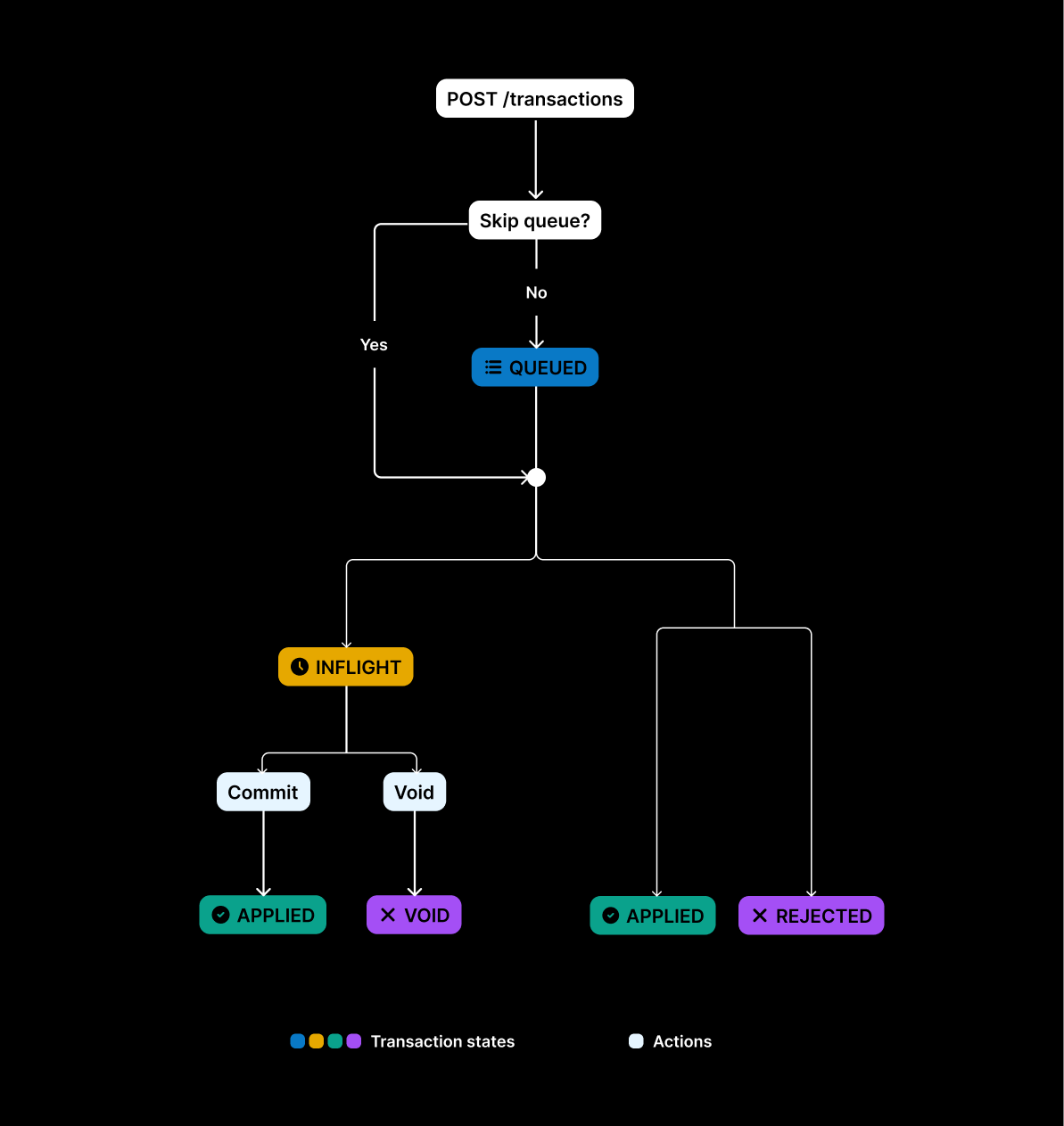
By default, every transaction begins in a `QUEUED` state.
You can track balances with transactions still in queue using [Queued Balances](/balances/introduction#queued-balances).
Blnk then processes it and moves it to one of three possible states:
* `INFLIGHT`: If the transaction request includes `"inflight": "true"`. It continues to:
* `APPLIED`: If the inflight transaction is committed or;
* `VOID`: If the inflight transaction is voided.
* `APPLIED`: When the transaction is completed and applied to the balances.
* `REJECTED`: When the transaction is not processed due to reasons like insufficient funds, etc.
Here's an example response when you record a new transaction on Blnk:
```json Example response {13} expandable theme={"system"}
{
"precise_amount": 10000000,
"amount": 100000,
"rate": 0,
"precision": 100,
"transaction_id": "txn_d4951810-706c-44d1-be45-6f254be0e167",
"parent_transaction": "",
"source": "bln_7769aedf-bc88-49f7-bbb2-118f121daee6",
"destination": "bln_c42e4bbd-4ea9-494a-89be-7634b0c1e41a",
"reference": "ref_e55c4f33-bff7-4c30-9b9f-5d2d10a29b7a",
"currency": "USD",
"description": "Sample transaction",
"status": "QUEUED",
"hash": "3ef19e9cd9aba07d33068d096da1e1596f1270a70c9aa2d160206b4d6da553dc",
"allow_overdraft": true,
"inflight": false,
"created_at": "2025-02-02T02:35:16.606614793Z",
"scheduled_for": "0001-01-01T00:00:00Z",
"inflight_expiry_date": "0001-01-01T00:00:00Z",
"inflight_commit_date": "0001-01-01T00:00:00Z"
}
```
***
## Parent transactions
Because transactions in Blnk are immutable, each new state or related record is linked back to the one that created it through the `parent_transaction` field.
For example, if you have a \$100 inflight transaction that is later committed, the commit record points to the inflight record as its parent.
This structure ensures that every transaction has a clear lineage. By following the `parent_transaction` chain, you can always trace a transaction back to its origin, see how it evolved, and connect it to any related siblings.
* Queued transactions act as the parent of the next state (e.g. `APPLIED`, `INFLIGHT`, `REJECTED`).
* Inflight transactions are the parent of their final outcome (e.g. `APPLIED`, `VOID`).
* Split transactions are the parent of the resulting individual transactions.
* Bulk transactions are the parent of the included individual transactions.
* Scheduled transactions are the parent of the executed state (e.g. `APPLIED`, `REJECTED`).
* Refunds use the original transaction as their parent.
Linked states and traceability across updates.
***
## Skip transaction queue
Available in version 0.8.2 and later.
The `skip_queue` feature allows you to bypass the default transaction queuing system and immediately process transactions directly. This is useful for scenarios where you need real-time transaction processing while still maintaining data consistency.
To enable this feature, include "skip\_queue": true in the request body when calling the [Create Transaction](/reference/create-transaction.mdx) endpoint:
```json {6} theme={"system"}
{
"amount": 102.12,
"precision": 100,
...
"allow_overdraft": true,
"skip_queue": true
}
```
### How it works
When you enable `skip_queue`, the transaction:
* Bypasses the normal queuing process
* Executes immediately on the balance
* Uses distributed locks via Redis to maintain consistency
* Applies optimistic locking at the database level
### Example applications
Use `skip_queue` when:
* Processing low-volume transactions with minimal balance contention;
* You need synchronous confirmation of transaction completion;
* Time-sensitive financial operations.
For high traffic, use the default queue (`skip_queue: false`). Learn more: [Handling Hot Balances](/guides/hot-balances#using-the-queue).
QUEUED, APPLIED, INFLIGHT, and more.
Hold funds until conditions are met.
***
## Need help?
We are very happy to help you make the most of Blnk, regardless of whether it is your first time or you are switching from another tool.
To ask questions or discuss issues, please [contact us](mailto:support@blnkfinance.com) or [join our Discord community](https://discord.gg/7WNv94zPpx).
Sign up and manage your ledger with our back-office dashboard. You can invite teammates to collaborate and manage your ledger operations directly from the dashboard.
***
## Statuses
Blnk transactions can have one of five possible statuses throughout their lifecycle. Each status represents a specific state in the transaction processing flow:
| Status | Description | When it occurs |
| :--------- | :--------------------------------------------------------------------- | :----------------------------------------------------------------------------------- |
| `QUEUED` | Transaction is received and waiting to be processed | Initial state when a transaction is first created |
| `APPLIED` | Transaction has been successfully processed and applied to balances | When transaction completes successfully or when an inflight transaction is committed |
| `INFLIGHT` | Transaction is on hold, waiting for further action | When a transaction is created with `"inflight": true` |
| `VOID` | Inflight transaction was cancelled and balances reset | When an inflight transaction is voided |
| `REJECTED` | Transaction was not processed due to errors (e.g., insufficient funds) | When transaction fails validation or processing |
All transactions in Blnk are immutable. Once a transaction has been applied, committed, or voided, you cannot roll back the status to its previous state.
***
## Transaction lifecycle
By default, every transaction begins in a `QUEUED` state.
You can track balances with transactions still in queue using [Queued Balances](/balances/introduction#queued-balances).
Blnk then processes it and moves it to one of three possible states:
* `INFLIGHT`: If the transaction request includes `"inflight": "true"`. It continues to:
* `APPLIED`: If the inflight transaction is committed or;
* `VOID`: If the inflight transaction is voided.
* `APPLIED`: When the transaction is completed and applied to the balances.
* `REJECTED`: When the transaction is not processed due to reasons like insufficient funds, etc.
Here's an example response when you record a new transaction on Blnk:
```json Example response {13} expandable theme={"system"}
{
"precise_amount": 10000000,
"amount": 100000,
"rate": 0,
"precision": 100,
"transaction_id": "txn_d4951810-706c-44d1-be45-6f254be0e167",
"parent_transaction": "",
"source": "bln_7769aedf-bc88-49f7-bbb2-118f121daee6",
"destination": "bln_c42e4bbd-4ea9-494a-89be-7634b0c1e41a",
"reference": "ref_e55c4f33-bff7-4c30-9b9f-5d2d10a29b7a",
"currency": "USD",
"description": "Sample transaction",
"status": "QUEUED",
"hash": "3ef19e9cd9aba07d33068d096da1e1596f1270a70c9aa2d160206b4d6da553dc",
"allow_overdraft": true,
"inflight": false,
"created_at": "2025-02-02T02:35:16.606614793Z",
"scheduled_for": "0001-01-01T00:00:00Z",
"inflight_expiry_date": "0001-01-01T00:00:00Z",
"inflight_commit_date": "0001-01-01T00:00:00Z"
}
```
***
## Parent transactions
Because transactions in Blnk are immutable, each new state or related record is linked back to the one that created it through the `parent_transaction` field.
For example, if you have a \$100 inflight transaction that is later committed, the commit record points to the inflight record as its parent.
This structure ensures that every transaction has a clear lineage. By following the `parent_transaction` chain, you can always trace a transaction back to its origin, see how it evolved, and connect it to any related siblings.
* Queued transactions act as the parent of the next state (e.g. `APPLIED`, `INFLIGHT`, `REJECTED`).
* Inflight transactions are the parent of their final outcome (e.g. `APPLIED`, `VOID`).
* Split transactions are the parent of the resulting individual transactions.
* Bulk transactions are the parent of the included individual transactions.
* Scheduled transactions are the parent of the executed state (e.g. `APPLIED`, `REJECTED`).
* Refunds use the original transaction as their parent.
Linked states and traceability across updates.
***
## Skip transaction queue
Available in version 0.8.2 and later.
The `skip_queue` feature allows you to bypass the default transaction queuing system and immediately process transactions directly. This is useful for scenarios where you need real-time transaction processing while still maintaining data consistency.
To enable this feature, include "skip\_queue": true in the request body when calling the [Create Transaction](/reference/create-transaction.mdx) endpoint:
```json {6} theme={"system"}
{
"amount": 102.12,
"precision": 100,
...
"allow_overdraft": true,
"skip_queue": true
}
```
### How it works
When you enable `skip_queue`, the transaction:
* Bypasses the normal queuing process
* Executes immediately on the balance
* Uses distributed locks via Redis to maintain consistency
* Applies optimistic locking at the database level
### Example applications
Use `skip_queue` when:
* Processing low-volume transactions with minimal balance contention;
* You need synchronous confirmation of transaction completion;
* Time-sensitive financial operations.
For high traffic, use the default queue (`skip_queue: false`). Learn more: [Handling Hot Balances](/guides/hot-balances#using-the-queue).
QUEUED, APPLIED, INFLIGHT, and more.
Hold funds until conditions are met.
***
## Need help?
We are very happy to help you make the most of Blnk, regardless of whether it is your first time or you are switching from another tool.
To ask questions or discuss issues, please [contact us](mailto:support@blnkfinance.com) or [join our Discord community](https://discord.gg/7WNv94zPpx).
Sign up and manage your ledger with our back-office dashboard. You can invite teammates to collaborate and manage your ledger operations directly from the dashboard.