> ## Documentation Index
> Fetch the complete documentation index at: https://docs.blnkfinance.com/llms.txt
> Use this file to discover all available pages before exploring further.
# Parent Transactions
> Learn how parent transactions work in Blnk and how to use them in your application
export const CtaCallout = props => {
const {title, buttonLabel, href, trackingEvent, buttonTarget, rel = "noopener noreferrer", children} = props;
const handleCtaClick = () => {
if (typeof window === "undefined" || !trackingEvent) {
return;
}
try {
window.dispatchEvent(new CustomEvent("blnk:docs-cta", {
detail: {
name: trackingEvent,
href
}
}));
} catch {}
try {
window.posthog?.capture?.(trackingEvent, {
href
});
} catch {}
const gaPayload = {
cta_href: href
};
try {
window.gtag?.("event", trackingEvent, gaPayload);
} catch {}
try {
window.dataLayer = window.dataLayer || [];
window.dataLayer.push({
event: trackingEvent,
...gaPayload
});
} catch {}
};
const isExternal = typeof href === "string" && (/^https?:\/\//i).test(href);
const target = buttonTarget ?? (isExternal ? "_blank" : undefined);
const linkRel = isExternal ? rel : undefined;
return ;
};
In simple terms, a parent transaction is a transaction that generates another transaction in your ledger.
Because transactions in Blnk are immutable, each status change creates a new transaction record. This new record references the previous one as its "parent".
Blnk records the ID of this parent transaction in the `parent_transaction` field of the new (child) transaction. This creates a clear lineage of transactions, allowing you to trace a transaction back to its origin, see how it evolved, and connect it to any related siblings.
```json transaction.json theme={"system"}
{
"transaction_id": "txn_1234567890",
"parent_transaction": "txn_9023802909"
}
```
***
## Single transaction
Consider a single \$100 transaction in your ledger. Its lifecycle might look like this:
 1. When the transaction is first created, it starts in the `QUEUED` state.
2. Once Blnk processes it, a new transaction is created in the `APPLIED` state.
3. The initial `QUEUED` transaction becomes the parent of the new `APPLIED` transaction.
***
## Inflight transaction
Consider an inflight transaction of \$100. Its lifecycle looks like this:
1. When the transaction is first created, it starts in the `QUEUED` state.
2. Once Blnk processes it, a new transaction is created in the `APPLIED` state.
3. The initial `QUEUED` transaction becomes the parent of the new `APPLIED` transaction.
***
## Inflight transaction
Consider an inflight transaction of \$100. Its lifecycle looks like this:
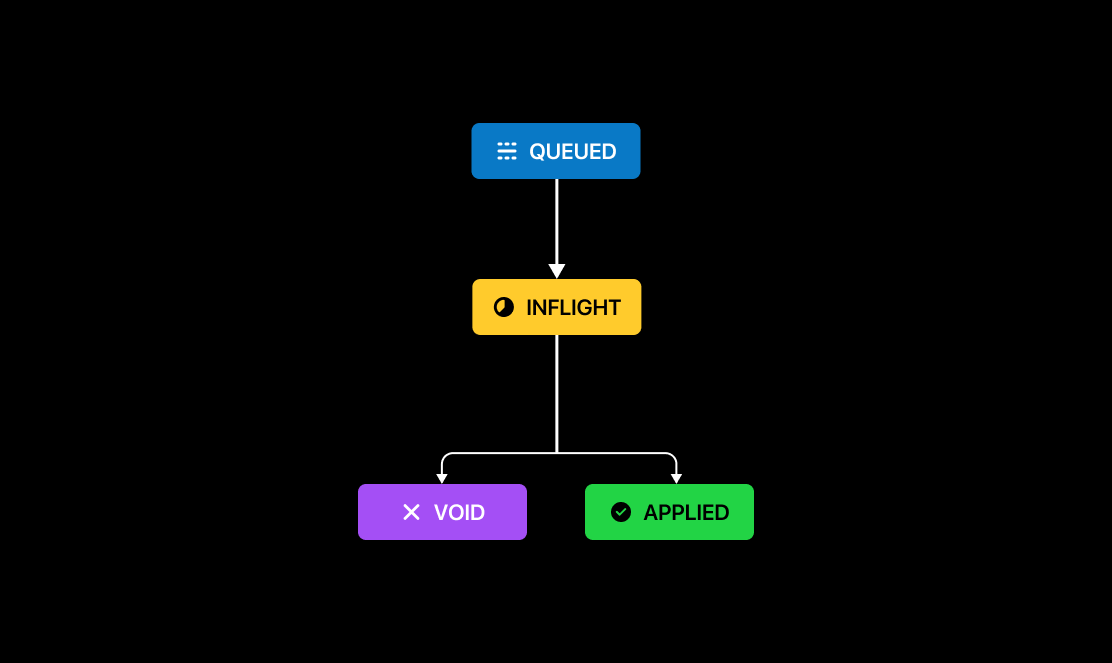 1. When the transaction is created, it starts in the `QUEUED` state.
2. Once Blnk processes it, a new transaction is created in the `INFLIGHT` state.
3. The initial `QUEUED` transaction becomes the parent of the new `INFLIGHT` transaction.
4. Once the inflight transaction is committed, a new transaction is created in the `APPLIED` state.
5. If the inflight transaction is voided instead, a new transaction is created in the `VOID` state.
When you use **`inflight_commit_date`**, Blnk commits automatically at that time; the resulting **`APPLIED`** transaction still uses the inflight record as its **`parent_transaction`**, just like a manual commit via [Update Inflight](/reference/update-inflight).
6. The `INFLIGHT` transaction becomes the parent of the `APPLIED` and/or `VOID` transactions.
With the `INFLIGHT` record as the parent, you can retrieve the complete outcome of that transaction by querying for all transactions whose `parent_transaction` field matches the `INFLIGHT` transaction ID:
```bash cURL wrap theme={"system"}
curl -X POST "http://YOUR_BLNK_INSTANCE_URL/search/transactions" \
-H "X-Blnk-Key: " \
-H "Content-Type: application/json" \
-d '{
"q": "",
"query_by": "parent_transaction"
}'
```
```typescript TypeScript wrap theme={"system"}
const response = await blnk.Search.search(
{ q: '', query_by: 'parent_transaction' },
'transactions',
);
```
```go Go wrap theme={"system"}
results, resp, err := client.Search.SearchDocument(
blnkgo.SearchParams{Q: "", QueryBy: "parent_transaction"},
blnkgo.Transactions,
)
```
```json Response theme={"system"}
{
"found": 1,
"hits": [
{
"document": {
"transaction_id": "txn_6164573b-6cc8-45a4-ad2e-7b4ba6a60f7d",
"parent_transaction": "",
"status": "APPLIED"
}
}
]
}
```
***
## Queued parent transactions
A queued parent transaction refers to the very first transaction in a chain - the one that initiates the entire transaction lifecycle.
In most cases, this initial transaction starts in the `QUEUED` state, serving as the root from which all subsequent transactions (like `INFLIGHT` or `APPLIED`) are derived.
Blnk records the ID of this initial transaction in the `meta_data.QUEUED_PARENT_TRANSACTION` field of every subsequent transaction. You can use this ID to query and retrieve all transactions that belong to the same lifecycle chain:
```bash cURL wrap theme={"system"}
curl -X POST "http://YOUR_BLNK_INSTANCE_URL/search/transactions" \
-H "X-Blnk-Key: " \
-H "Content-Type: application/json" \
-d '{
"q": "",
"query_by": "meta_data.QUEUED_PARENT_TRANSACTION"
}'
```
```typescript TypeScript wrap theme={"system"}
const response = await blnk.Search.search(
{
q: '',
query_by: 'meta_data.QUEUED_PARENT_TRANSACTION',
},
'transactions',
);
```
```go Go wrap theme={"system"}
results, resp, err := client.Search.SearchDocument(
blnkgo.SearchParams{
Q: "",
QueryBy: "meta_data.QUEUED_PARENT_TRANSACTION",
},
blnkgo.Transactions,
)
```
```json Response theme={"system"}
{
"found": 2,
"hits": [
{
"document": {
"transaction_id": "txn_59347177-aa7e-d8ad-9f4f-d09628b32ec3",
"meta_data": {
"QUEUED_PARENT_TRANSACTION": ""
},
"status": "APPLIED"
}
}
]
}
```
Blnk automatically creates this field whenever you use the queue system to process any transaction - single, inflight, split, or bulk transactions.
In the case of split or bulk transactions, it becomes particularly useful, as it lets you trace the entire chain and identify the final outcome of each branch.
### Queued parent for bulk/split transactions
Consider a split transaction of \$100. Half to person A and half to person B. The lifecycle of this transaction would be as follows:
1. When the transaction is created, it starts in the `QUEUED` state.
2. Once Blnk processes it, a new transaction is created in the `INFLIGHT` state.
3. The initial `QUEUED` transaction becomes the parent of the new `INFLIGHT` transaction.
4. Once the inflight transaction is committed, a new transaction is created in the `APPLIED` state.
5. If the inflight transaction is voided instead, a new transaction is created in the `VOID` state.
When you use **`inflight_commit_date`**, Blnk commits automatically at that time; the resulting **`APPLIED`** transaction still uses the inflight record as its **`parent_transaction`**, just like a manual commit via [Update Inflight](/reference/update-inflight).
6. The `INFLIGHT` transaction becomes the parent of the `APPLIED` and/or `VOID` transactions.
With the `INFLIGHT` record as the parent, you can retrieve the complete outcome of that transaction by querying for all transactions whose `parent_transaction` field matches the `INFLIGHT` transaction ID:
```bash cURL wrap theme={"system"}
curl -X POST "http://YOUR_BLNK_INSTANCE_URL/search/transactions" \
-H "X-Blnk-Key: " \
-H "Content-Type: application/json" \
-d '{
"q": "",
"query_by": "parent_transaction"
}'
```
```typescript TypeScript wrap theme={"system"}
const response = await blnk.Search.search(
{ q: '', query_by: 'parent_transaction' },
'transactions',
);
```
```go Go wrap theme={"system"}
results, resp, err := client.Search.SearchDocument(
blnkgo.SearchParams{Q: "", QueryBy: "parent_transaction"},
blnkgo.Transactions,
)
```
```json Response theme={"system"}
{
"found": 1,
"hits": [
{
"document": {
"transaction_id": "txn_6164573b-6cc8-45a4-ad2e-7b4ba6a60f7d",
"parent_transaction": "",
"status": "APPLIED"
}
}
]
}
```
***
## Queued parent transactions
A queued parent transaction refers to the very first transaction in a chain - the one that initiates the entire transaction lifecycle.
In most cases, this initial transaction starts in the `QUEUED` state, serving as the root from which all subsequent transactions (like `INFLIGHT` or `APPLIED`) are derived.
Blnk records the ID of this initial transaction in the `meta_data.QUEUED_PARENT_TRANSACTION` field of every subsequent transaction. You can use this ID to query and retrieve all transactions that belong to the same lifecycle chain:
```bash cURL wrap theme={"system"}
curl -X POST "http://YOUR_BLNK_INSTANCE_URL/search/transactions" \
-H "X-Blnk-Key: " \
-H "Content-Type: application/json" \
-d '{
"q": "",
"query_by": "meta_data.QUEUED_PARENT_TRANSACTION"
}'
```
```typescript TypeScript wrap theme={"system"}
const response = await blnk.Search.search(
{
q: '',
query_by: 'meta_data.QUEUED_PARENT_TRANSACTION',
},
'transactions',
);
```
```go Go wrap theme={"system"}
results, resp, err := client.Search.SearchDocument(
blnkgo.SearchParams{
Q: "",
QueryBy: "meta_data.QUEUED_PARENT_TRANSACTION",
},
blnkgo.Transactions,
)
```
```json Response theme={"system"}
{
"found": 2,
"hits": [
{
"document": {
"transaction_id": "txn_59347177-aa7e-d8ad-9f4f-d09628b32ec3",
"meta_data": {
"QUEUED_PARENT_TRANSACTION": ""
},
"status": "APPLIED"
}
}
]
}
```
Blnk automatically creates this field whenever you use the queue system to process any transaction - single, inflight, split, or bulk transactions.
In the case of split or bulk transactions, it becomes particularly useful, as it lets you trace the entire chain and identify the final outcome of each branch.
### Queued parent for bulk/split transactions
Consider a split transaction of \$100. Half to person A and half to person B. The lifecycle of this transaction would be as follows:
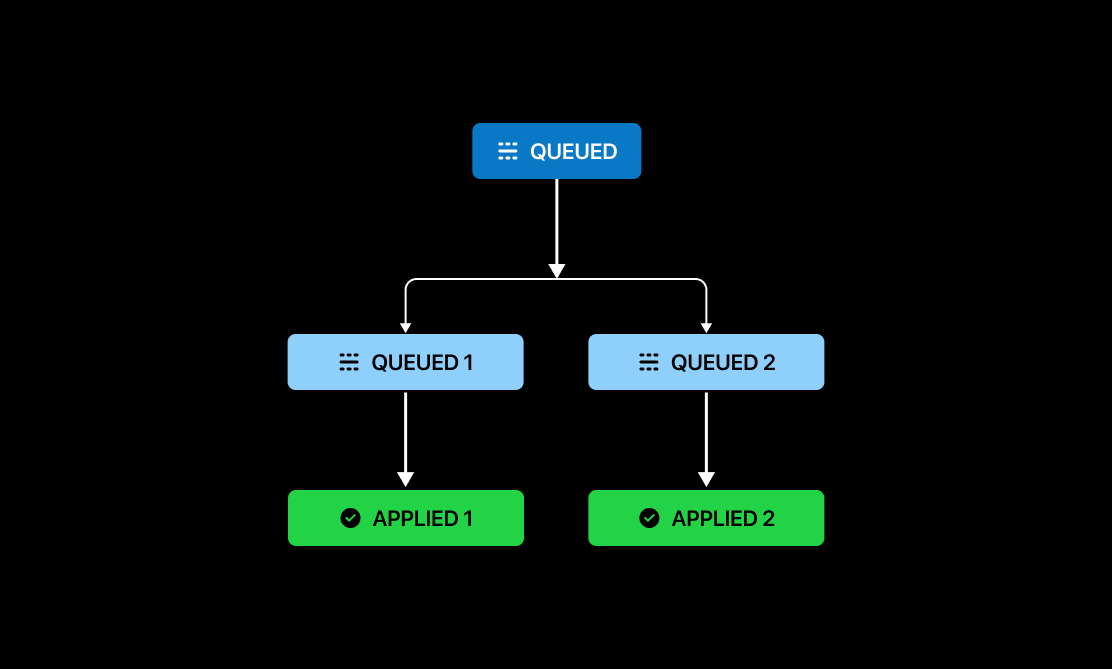 1. The split transaction is first created in the `QUEUED` state.
2. Blnk then generates two individual transactions - one for Person A and one for Person B - both in the `QUEUED` state.
3. The original `QUEUED` split transaction becomes the parent of these two new `QUEUED` transactions.
4. As Blnk processes the two individual transactions, it creates two new transactions in the `APPLIED` state.
5. Each individual child `QUEUED` transaction becomes the parent of its corresponding `APPLIED` transaction.
Unlike the [inflight transaction](#inflight-transaction) example above, you can’t query by `parent_transaction` to get the final outcome of a split transaction.
This is because the final `APPLIED` transactions aren’t directly linked to the original split transaction. Instead, they’re linked to the two individual `QUEUED` transactions created from it - each representing a separate outcome for Person A and Person B.
Instead you'll need to query by the `meta_data.QUEUED_PARENT_TRANSACTION` field, which is present in all related transactions, regardless of their parent.
***
## Need help?
We are very happy to help you make the most of Blnk, regardless of whether it is your first time or you are switching from another tool.
To ask questions or discuss issues, please [contact us](mailto:support@blnkfinance.com) or [join our Discord community](https://discord.gg/7WNv94zPpx).
Sign up and manage your ledger with our back-office dashboard. You can invite teammates to collaborate and manage your ledger operations directly from the dashboard.
1. The split transaction is first created in the `QUEUED` state.
2. Blnk then generates two individual transactions - one for Person A and one for Person B - both in the `QUEUED` state.
3. The original `QUEUED` split transaction becomes the parent of these two new `QUEUED` transactions.
4. As Blnk processes the two individual transactions, it creates two new transactions in the `APPLIED` state.
5. Each individual child `QUEUED` transaction becomes the parent of its corresponding `APPLIED` transaction.
Unlike the [inflight transaction](#inflight-transaction) example above, you can’t query by `parent_transaction` to get the final outcome of a split transaction.
This is because the final `APPLIED` transactions aren’t directly linked to the original split transaction. Instead, they’re linked to the two individual `QUEUED` transactions created from it - each representing a separate outcome for Person A and Person B.
Instead you'll need to query by the `meta_data.QUEUED_PARENT_TRANSACTION` field, which is present in all related transactions, regardless of their parent.
***
## Need help?
We are very happy to help you make the most of Blnk, regardless of whether it is your first time or you are switching from another tool.
To ask questions or discuss issues, please [contact us](mailto:support@blnkfinance.com) or [join our Discord community](https://discord.gg/7WNv94zPpx).
Sign up and manage your ledger with our back-office dashboard. You can invite teammates to collaborate and manage your ledger operations directly from the dashboard.