> ## Documentation Index
> Fetch the complete documentation index at: https://docs.blnkfinance.com/llms.txt
> Use this file to discover all available pages before exploring further.
# Multiple Sources
> Move money from multiple sources to a single destination.
export const CtaCallout = props => {
const {title, buttonLabel, href, trackingEvent, buttonTarget, rel = "noopener noreferrer", children} = props;
const handleCtaClick = () => {
if (typeof window === "undefined" || !trackingEvent) {
return;
}
try {
window.dispatchEvent(new CustomEvent("blnk:docs-cta", {
detail: {
name: trackingEvent,
href
}
}));
} catch {}
try {
window.posthog?.capture?.(trackingEvent, {
href
});
} catch {}
const gaPayload = {
cta_href: href
};
try {
window.gtag?.("event", trackingEvent, gaPayload);
} catch {}
try {
window.dataLayer = window.dataLayer || [];
window.dataLayer.push({
event: trackingEvent,
...gaPayload
});
} catch {}
};
const isExternal = typeof href === "string" && (/^https?:\/\//i).test(href);
const target = buttonTarget ?? (isExternal ? "_blank" : undefined);
const linkRel = isExternal ? rel : undefined;
return ;
};
Available in version 0.6.0 and later.
Blnk allows you to move money from multiple sources to a single destination in one transaction. This provides enhanced flexibility for complex money flows and makes tracking and reconciliation easier.
***
## Example workflow
Pooling contributions, topping up a wallet from multiple linked accounts, or settling an invoice from more than one internal pot are common use cases for multiple sources.
For example, Sarah should receive **USD 30,000** **into** her balance. Alice contributes 10%, Bob sends a fixed \$20,000, and Charlie’s contribution uses `"left"` so whatever remains after the first two legs comes from Charlie automatically.
Money movement would look like this:
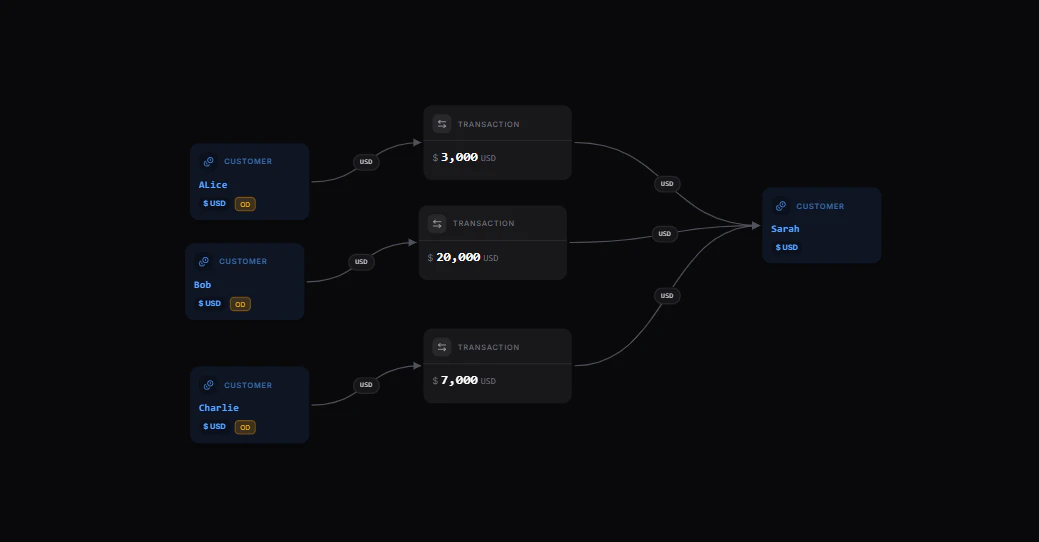 [Explore the map yourself here](https://map.blnkfinance.xyz/GvPWMwzF3r)
| | Balance ID | Amount |
| :-------------------- | :---------------------------------------- | :--------------------------- |
| Alice | bln\_f2073f6b-905a-4e3e-b5a2-8d1b3dc2fb7f | 10% (USD 3,000) |
| Bob | bln\_64c50fb5-32d5-4f78-9f4a-e8b01aaf025d | USD 20,000 |
| Charlie | bln\_7d98dfe9-5c3e-4c9b-b96a-65f6d9f7b89b | Remaining amount (USD 7,000) |
| **Sarah (Recipient)** | bln\_92e4b9b6-0b85-4ef4-87a2-682c31500d38 | **Total: USD 30,000** |
When sending from multiple sources, you can only send to one destination.
***
## Create multiple sources transaction
Call the [Create Transaction](/reference/create-transaction) endpoint with these fields:
```bash cURL wrap expandable theme={"system"}
curl -X POST http://localhost:5001/transactions \
-H "Content-Type: application/json" \
-H "X-Blnk-Key: " \
-d '{
"precise_amount": 3000000,
"precision": 100,
"reference": "ref_001adcfgf",
"currency": "USD",
"sources": [
{
"identifier": "bln_f2073f6b-905a-4e3e-b5a2-8d1b3dc2fb7f",
"distribution": "10%"
},
{
"identifier": "bln_64c50fb5-32d5-4f78-9f4a-e8b01aaf025d",
"precise_distribution": "2000000"
},
{
"identifier": "bln_7d98dfe9-5c3e-4c9b-b96a-65f6d9f7b89b",
"distribution": "left"
}
],
"destination": "bln_92e4b9b6-0b85-4ef4-87a2-682c31500d38",
"description": "Payment to Sarah"
}'
```
```typescript TypeScript wrap theme={"system"}
const response = await blnk.Transactions.create({
precise_amount: 3000000,
precision: 100,
reference: 'ref_001adcfgf',
currency: 'USD',
sources: [
{ identifier: 'bln_f2073f6b-905a-4e3e-b5a2-8d1b3dc2fb7f', distribution: '10%' },
{ identifier: 'bln_64c50fb5-32d5-4f78-9f4a-e8b01aaf025d', precise_distribution: '2000000' },
{ identifier: 'bln_7d98dfe9-5c3e-4c9b-b96a-65f6d9f7b89b', distribution: 'left' },
],
destination: 'bln_92e4b9b6-0b85-4ef4-87a2-682c31500d38',
description: 'Payment to Sarah',
});
```
```go Go wrap expandable theme={"system"}
transaction, resp, err := client.Transaction.Create(blnkgo.CreateTransactionRequest{
ParentTransaction: blnkgo.ParentTransaction{
PreciseAmount: 3000000,
Precision: 100,
Reference: "ref_001adcfgf",
Currency: "USD",
Description: "Payment to Sarah",
Sources: []blnkgo.Source{
{Identifier: "bln_f2073f6b-905a-4e3e-b5a2-8d1b3dc2fb7f", Distribution: "10%"},
{Identifier: "bln_64c50fb5-32d5-4f78-9f4a-e8b01aaf025d", PreciseDistribution: "2000000"},
{Identifier: "bln_7d98dfe9-5c3e-4c9b-b96a-65f6d9f7b89b", Distribution: "left"},
},
Destination: "bln_92e4b9b6-0b85-4ef4-87a2-682c31500d38",
},
})
```
```bash Blnk CLI wrap theme={"system"}
blnk transactions create
```
| Field | Description | Required | Type |
| :--------------------- | :------------------------------------------------------------------------------------------------------------------------------------------------------------------------------------- | :------- | :-------- |
| `precise_amount` | Total amount to be received in its smallest unit. Send either `precise_amount` or `amount`, not both - see [Precision](/transactions/precision#using-both-precision-options-together). | Yes | `integer` |
| `amount` | Total amount to be received as a float. Blnk multiplies by `precision` to store `precise_amount`. | Yes | `float` |
| `precision` | Precision for the transaction currency. See [Understanding precision](/transactions/precision) | No | `int64` |
| `reference` | Unique transaction reference | Yes | `string` |
| `currency` | Asset class code. | Yes | `string` |
| `sources` | Array of source objects with `identifier` and `distribution` fields | Yes | `array` |
| `sources.identifier` | Balance ID of the source account | Yes | `string` |
| `sources.distribution` | Amount to send from this source (specific amount, percentage, or "left") | Yes | `string` |
| `destination` | Recipient's balance ID | Yes | `string` |
| `atomic` | When `true`, all source legs succeed or the entire split fails. Default: `false`. | No | `boolean` |
| `meta_data` | Custom transaction data | No | `object` |
When sending from multiple sources, do not include the `source` field in your payload. Use the `sources` array to group the participating balances in your payload.
***
## Atomic split processing
By default, Blnk processes a multiple sources split with `atomic: false`. Each source leg is evaluated independently. Legs that pass validation are marked `APPLIED`, while legs that fail are marked `REJECTED`. This can result in a partial split, where some sources are debited and others are not.
Set `atomic: true` to enable all-or-nothing processing. All source legs must succeed for the split to be completed. If any leg fails, Blnk rolls back any previously `APPLIED` or `INFLIGHT` legs, reversing the debits so the split is fully cancelled and no partial state remains on the ledger.
```bash cURL wrap expandable theme={"system"}
curl -X POST http://localhost:5001/transactions \
-H "Content-Type: application/json" \
-H "X-Blnk-Key: " \
-d '{
"precise_amount": 3000000,
"precision": 100,
"reference": "ref_001adcfgf",
"currency": "USD",
"atomic": true,
"sources": [
{
"identifier": "bln_f2073f6b-905a-4e3e-b5a2-8d1b3dc2fb7f",
"distribution": "10%"
},
{
"identifier": "bln_64c50fb5-32d5-4f78-9f4a-e8b01aaf025d",
"precise_distribution": "2000000"
},
{
"identifier": "bln_7d98dfe9-5c3e-4c9b-b96a-65f6d9f7b89b",
"distribution": "left"
}
],
"destination": "bln_92e4b9b6-0b85-4ef4-87a2-682c31500d38",
"description": "Payment to Sarah"
}'
```
```typescript TypeScript wrap theme={"system"}
const response = await blnk.Transactions.create({
precise_amount: 3000000,
precision: 100,
reference: 'ref_001adcfgf',
currency: 'USD',
atomic: true,
sources: [
{ identifier: 'bln_f2073f6b-905a-4e3e-b5a2-8d1b3dc2fb7f', distribution: '10%' },
{ identifier: 'bln_64c50fb5-32d5-4f78-9f4a-e8b01aaf025d', precise_distribution: '2000000' },
{ identifier: 'bln_7d98dfe9-5c3e-4c9b-b96a-65f6d9f7b89b', distribution: 'left' },
],
destination: 'bln_92e4b9b6-0b85-4ef4-87a2-682c31500d38',
description: 'Payment to Sarah',
});
```
```go Go wrap expandable theme={"system"}
transaction, resp, err := client.Transaction.Create(blnkgo.CreateTransactionRequest{
ParentTransaction: blnkgo.ParentTransaction{
PreciseAmount: 3000000,
Precision: 100,
Reference: "ref_001adcfgf",
Currency: "USD",
Description: "Payment to Sarah",
Sources: []blnkgo.Source{
{Identifier: "bln_f2073f6b-905a-4e3e-b5a2-8d1b3dc2fb7f", Distribution: "10%"},
{Identifier: "bln_64c50fb5-32d5-4f78-9f4a-e8b01aaf025d", PreciseDistribution: "2000000"},
{Identifier: "bln_7d98dfe9-5c3e-4c9b-b96a-65f6d9f7b89b", Distribution: "left"},
},
Destination: "bln_92e4b9b6-0b85-4ef4-87a2-682c31500d38",
},
Atomic: true,
})
```
```bash Blnk CLI wrap theme={"system"}
blnk transactions create
```
Use `atomic: true` when partial funding is not acceptable. For example, when settling an invoice, every contributor account must be able to cover its share for the transaction to succeed.
***
## API response structure
When you create a multiple sources transaction, Blnk records one coordinated request and creates separate ledger movements per source-all credited to the single **destination**.
Blnk returns a response containing:
* A **main transaction ID** for the overall split transaction. If `inflight: true`, it can be used to commit or void all transactions at once.
* A **sources array** with individual transaction IDs for each source.
```json Response {7,23,28,33} expandable theme={"system"}
{
"precise_amount": 3000000,
"amount": 30000,
"rate": 1,
"precision": 100,
"overdraft_limit": 0,
"transaction_id": "txn_0b59f6e-6c4a-4efa-915c-526f77ef61ab",
"parent_transaction": "",
"source": "",
"reference": "ref_001adcfgf",
"currency": "USD",
"description": "txn",
"status": "QUEUED",
"hash": "8cfdc0f2562ce30c3728ef624dc29fbd0e4207c77df9220df0c699d45de0eef",
"allow_overdraft": true,
"inflight": false,
"skip_queue": false,
"atomic": false,
"sources": [
{
"identifier": "@test-2024",
"distribution": "10%",
"transaction_id": "txn_59347177-aa7e-d8ad-9f4f-d09628b32ec3"
},
{
"identifier": "@test-21",
"distribution": "20000",
"transaction_id": "txn_7ddc8d4f-3b77-4b7d-a37f-240216ab074c"
},
{
"identifier": "@test-218",
"distribution": "left",
"transaction_id": "txn_5aad04dd-ed53-4f77-9f01-4916d31fac5f"
}
],
"destination": "bln_92e4b9b6-0b85-4ef4-87a2-682c31500d38",
"created_at": "2025-09-18T01:26:30.648049042Z",
"scheduled_for": "0001-01-01T00:00:00Z",
"inflight_expiry_date": "0001-01-01T00:00:00Z",
"meta_data": {
"QUEUED_PARENT_TRANSACTION": "txn_0b59f6e-6c4a-4efa-915c-526f77ef61ab"
}
}
```
### Retrieving child transactions
You can retrieve all transactions in the split by searching for the main transaction ID in the `meta_data.QUEUED_PARENT_TRANSACTION` field:
```bash cURL wrap theme={"system"}
curl -X POST "http://localhost:5001/search/transactions" \
-H "X-Blnk-Key: " \
-H "Content-Type: application/json" \
-d '{
"q": "txn_0b59f6e-6c4a-4efa-915c-526f77ef61ab",
"query_by": "meta_data.QUEUED_PARENT_TRANSACTION"
}'
```
```typescript TypeScript wrap theme={"system"}
const response = await blnk.Search.search(
{
q: 'txn_0b59f6e-6c4a-4efa-915c-526f77ef61ab',
query_by: 'meta_data.QUEUED_PARENT_TRANSACTION',
},
'transactions',
);
```
```go Go wrap theme={"system"}
results, resp, err := client.Search.SearchDocument(
blnkgo.SearchParams{
Q: "txn_0b59f6e-6c4a-4efa-915c-526f77ef61ab",
QueryBy: "meta_data.QUEUED_PARENT_TRANSACTION",
},
blnkgo.Transactions,
)
```
```json Response theme={"system"}
{
"hits": [
{
"document": {
"transaction_id": "txn_59347177-aa7e-d8ad-9f4f-d09628b32ec3",
"parent_transaction": "txn_0b59f6e-6c4a-4efa-915c-526f77ef61ab",
"status": "APPLIED"
}
}
],
"found": 3
}
```
This will return all individual transactions that were created as part of the multiple sources transaction, allowing you to track and manage the complete set of related transactions.
***
## Distribution types
You can specify distribution amounts in three ways:
| Type | Description | Example |
| :------------------ | :------------------------------------------------------------------------------------------- | :---------------------------------- |
| **Specific amount** | Fixed amount to send. Use `precise_distribution` when the transaction uses `precise_amount`. | `"precise_distribution": "2000000"` |
| **Percentage** | Percentage of total amount | `"distribution": "10%"` |
| **Remaining** | Leftover amount after other distributions | `"distribution": "left"` |
You can only use `"left"` once per transaction, and all distributions must sum to the total amount.
### Using `precise_distribution` with `precise_amount`
When a transaction uses `precise_amount`, use `precise_distribution` in place of `distribution` only for sources that specify an exact value.
For example:
```json Example with precise_amount {7} wrap theme={"system"}
{
...
"precise_amount": 189207535698279000,
"sources": [
{
"identifier": "bln_f2073f6b-905a-4e3e-b5a2-8d1b3dc2fb7f",
"precise_distribution": "37841507139655800"
},
{
"identifier": "bln_64c50fb5-32d5-4f78-9f4a-e8b01aaf025d",
"distribution": "20%"
}
]
}
```
For more information about precision and `precise_amount`, see [Transaction precision](/transactions/precision).
***
## Transaction references
Blnk automatically generates unique references for each transaction record by appending a counter to your original reference (starting from `1`).
**Example:** If your reference is `ref_001adcfgf`, the generated references will be:
* `ref_001adcfgf_1` (first source)
* `ref_001adcfgf_2` (second source)
* `ref_001adcfgf_3` (third source)
This ensures traceability while maintaining connection to the original transaction.
Also see:
One source, multiple destinations.
***
## Need help?
We are very happy to help you make the most of Blnk, regardless of whether it is your first time or you are switching from another tool.
To ask questions or discuss issues, please [contact us](mailto:support@blnkfinance.com) or [join our Discord community](https://discord.gg/7WNv94zPpx).
Sign up and manage your ledger with our back-office dashboard. You can invite teammates to collaborate and manage your ledger operations directly from the dashboard.
[Explore the map yourself here](https://map.blnkfinance.xyz/GvPWMwzF3r)
| | Balance ID | Amount |
| :-------------------- | :---------------------------------------- | :--------------------------- |
| Alice | bln\_f2073f6b-905a-4e3e-b5a2-8d1b3dc2fb7f | 10% (USD 3,000) |
| Bob | bln\_64c50fb5-32d5-4f78-9f4a-e8b01aaf025d | USD 20,000 |
| Charlie | bln\_7d98dfe9-5c3e-4c9b-b96a-65f6d9f7b89b | Remaining amount (USD 7,000) |
| **Sarah (Recipient)** | bln\_92e4b9b6-0b85-4ef4-87a2-682c31500d38 | **Total: USD 30,000** |
When sending from multiple sources, you can only send to one destination.
***
## Create multiple sources transaction
Call the [Create Transaction](/reference/create-transaction) endpoint with these fields:
```bash cURL wrap expandable theme={"system"}
curl -X POST http://localhost:5001/transactions \
-H "Content-Type: application/json" \
-H "X-Blnk-Key: " \
-d '{
"precise_amount": 3000000,
"precision": 100,
"reference": "ref_001adcfgf",
"currency": "USD",
"sources": [
{
"identifier": "bln_f2073f6b-905a-4e3e-b5a2-8d1b3dc2fb7f",
"distribution": "10%"
},
{
"identifier": "bln_64c50fb5-32d5-4f78-9f4a-e8b01aaf025d",
"precise_distribution": "2000000"
},
{
"identifier": "bln_7d98dfe9-5c3e-4c9b-b96a-65f6d9f7b89b",
"distribution": "left"
}
],
"destination": "bln_92e4b9b6-0b85-4ef4-87a2-682c31500d38",
"description": "Payment to Sarah"
}'
```
```typescript TypeScript wrap theme={"system"}
const response = await blnk.Transactions.create({
precise_amount: 3000000,
precision: 100,
reference: 'ref_001adcfgf',
currency: 'USD',
sources: [
{ identifier: 'bln_f2073f6b-905a-4e3e-b5a2-8d1b3dc2fb7f', distribution: '10%' },
{ identifier: 'bln_64c50fb5-32d5-4f78-9f4a-e8b01aaf025d', precise_distribution: '2000000' },
{ identifier: 'bln_7d98dfe9-5c3e-4c9b-b96a-65f6d9f7b89b', distribution: 'left' },
],
destination: 'bln_92e4b9b6-0b85-4ef4-87a2-682c31500d38',
description: 'Payment to Sarah',
});
```
```go Go wrap expandable theme={"system"}
transaction, resp, err := client.Transaction.Create(blnkgo.CreateTransactionRequest{
ParentTransaction: blnkgo.ParentTransaction{
PreciseAmount: 3000000,
Precision: 100,
Reference: "ref_001adcfgf",
Currency: "USD",
Description: "Payment to Sarah",
Sources: []blnkgo.Source{
{Identifier: "bln_f2073f6b-905a-4e3e-b5a2-8d1b3dc2fb7f", Distribution: "10%"},
{Identifier: "bln_64c50fb5-32d5-4f78-9f4a-e8b01aaf025d", PreciseDistribution: "2000000"},
{Identifier: "bln_7d98dfe9-5c3e-4c9b-b96a-65f6d9f7b89b", Distribution: "left"},
},
Destination: "bln_92e4b9b6-0b85-4ef4-87a2-682c31500d38",
},
})
```
```bash Blnk CLI wrap theme={"system"}
blnk transactions create
```
| Field | Description | Required | Type |
| :--------------------- | :------------------------------------------------------------------------------------------------------------------------------------------------------------------------------------- | :------- | :-------- |
| `precise_amount` | Total amount to be received in its smallest unit. Send either `precise_amount` or `amount`, not both - see [Precision](/transactions/precision#using-both-precision-options-together). | Yes | `integer` |
| `amount` | Total amount to be received as a float. Blnk multiplies by `precision` to store `precise_amount`. | Yes | `float` |
| `precision` | Precision for the transaction currency. See [Understanding precision](/transactions/precision) | No | `int64` |
| `reference` | Unique transaction reference | Yes | `string` |
| `currency` | Asset class code. | Yes | `string` |
| `sources` | Array of source objects with `identifier` and `distribution` fields | Yes | `array` |
| `sources.identifier` | Balance ID of the source account | Yes | `string` |
| `sources.distribution` | Amount to send from this source (specific amount, percentage, or "left") | Yes | `string` |
| `destination` | Recipient's balance ID | Yes | `string` |
| `atomic` | When `true`, all source legs succeed or the entire split fails. Default: `false`. | No | `boolean` |
| `meta_data` | Custom transaction data | No | `object` |
When sending from multiple sources, do not include the `source` field in your payload. Use the `sources` array to group the participating balances in your payload.
***
## Atomic split processing
By default, Blnk processes a multiple sources split with `atomic: false`. Each source leg is evaluated independently. Legs that pass validation are marked `APPLIED`, while legs that fail are marked `REJECTED`. This can result in a partial split, where some sources are debited and others are not.
Set `atomic: true` to enable all-or-nothing processing. All source legs must succeed for the split to be completed. If any leg fails, Blnk rolls back any previously `APPLIED` or `INFLIGHT` legs, reversing the debits so the split is fully cancelled and no partial state remains on the ledger.
```bash cURL wrap expandable theme={"system"}
curl -X POST http://localhost:5001/transactions \
-H "Content-Type: application/json" \
-H "X-Blnk-Key: " \
-d '{
"precise_amount": 3000000,
"precision": 100,
"reference": "ref_001adcfgf",
"currency": "USD",
"atomic": true,
"sources": [
{
"identifier": "bln_f2073f6b-905a-4e3e-b5a2-8d1b3dc2fb7f",
"distribution": "10%"
},
{
"identifier": "bln_64c50fb5-32d5-4f78-9f4a-e8b01aaf025d",
"precise_distribution": "2000000"
},
{
"identifier": "bln_7d98dfe9-5c3e-4c9b-b96a-65f6d9f7b89b",
"distribution": "left"
}
],
"destination": "bln_92e4b9b6-0b85-4ef4-87a2-682c31500d38",
"description": "Payment to Sarah"
}'
```
```typescript TypeScript wrap theme={"system"}
const response = await blnk.Transactions.create({
precise_amount: 3000000,
precision: 100,
reference: 'ref_001adcfgf',
currency: 'USD',
atomic: true,
sources: [
{ identifier: 'bln_f2073f6b-905a-4e3e-b5a2-8d1b3dc2fb7f', distribution: '10%' },
{ identifier: 'bln_64c50fb5-32d5-4f78-9f4a-e8b01aaf025d', precise_distribution: '2000000' },
{ identifier: 'bln_7d98dfe9-5c3e-4c9b-b96a-65f6d9f7b89b', distribution: 'left' },
],
destination: 'bln_92e4b9b6-0b85-4ef4-87a2-682c31500d38',
description: 'Payment to Sarah',
});
```
```go Go wrap expandable theme={"system"}
transaction, resp, err := client.Transaction.Create(blnkgo.CreateTransactionRequest{
ParentTransaction: blnkgo.ParentTransaction{
PreciseAmount: 3000000,
Precision: 100,
Reference: "ref_001adcfgf",
Currency: "USD",
Description: "Payment to Sarah",
Sources: []blnkgo.Source{
{Identifier: "bln_f2073f6b-905a-4e3e-b5a2-8d1b3dc2fb7f", Distribution: "10%"},
{Identifier: "bln_64c50fb5-32d5-4f78-9f4a-e8b01aaf025d", PreciseDistribution: "2000000"},
{Identifier: "bln_7d98dfe9-5c3e-4c9b-b96a-65f6d9f7b89b", Distribution: "left"},
},
Destination: "bln_92e4b9b6-0b85-4ef4-87a2-682c31500d38",
},
Atomic: true,
})
```
```bash Blnk CLI wrap theme={"system"}
blnk transactions create
```
Use `atomic: true` when partial funding is not acceptable. For example, when settling an invoice, every contributor account must be able to cover its share for the transaction to succeed.
***
## API response structure
When you create a multiple sources transaction, Blnk records one coordinated request and creates separate ledger movements per source-all credited to the single **destination**.
Blnk returns a response containing:
* A **main transaction ID** for the overall split transaction. If `inflight: true`, it can be used to commit or void all transactions at once.
* A **sources array** with individual transaction IDs for each source.
```json Response {7,23,28,33} expandable theme={"system"}
{
"precise_amount": 3000000,
"amount": 30000,
"rate": 1,
"precision": 100,
"overdraft_limit": 0,
"transaction_id": "txn_0b59f6e-6c4a-4efa-915c-526f77ef61ab",
"parent_transaction": "",
"source": "",
"reference": "ref_001adcfgf",
"currency": "USD",
"description": "txn",
"status": "QUEUED",
"hash": "8cfdc0f2562ce30c3728ef624dc29fbd0e4207c77df9220df0c699d45de0eef",
"allow_overdraft": true,
"inflight": false,
"skip_queue": false,
"atomic": false,
"sources": [
{
"identifier": "@test-2024",
"distribution": "10%",
"transaction_id": "txn_59347177-aa7e-d8ad-9f4f-d09628b32ec3"
},
{
"identifier": "@test-21",
"distribution": "20000",
"transaction_id": "txn_7ddc8d4f-3b77-4b7d-a37f-240216ab074c"
},
{
"identifier": "@test-218",
"distribution": "left",
"transaction_id": "txn_5aad04dd-ed53-4f77-9f01-4916d31fac5f"
}
],
"destination": "bln_92e4b9b6-0b85-4ef4-87a2-682c31500d38",
"created_at": "2025-09-18T01:26:30.648049042Z",
"scheduled_for": "0001-01-01T00:00:00Z",
"inflight_expiry_date": "0001-01-01T00:00:00Z",
"meta_data": {
"QUEUED_PARENT_TRANSACTION": "txn_0b59f6e-6c4a-4efa-915c-526f77ef61ab"
}
}
```
### Retrieving child transactions
You can retrieve all transactions in the split by searching for the main transaction ID in the `meta_data.QUEUED_PARENT_TRANSACTION` field:
```bash cURL wrap theme={"system"}
curl -X POST "http://localhost:5001/search/transactions" \
-H "X-Blnk-Key: " \
-H "Content-Type: application/json" \
-d '{
"q": "txn_0b59f6e-6c4a-4efa-915c-526f77ef61ab",
"query_by": "meta_data.QUEUED_PARENT_TRANSACTION"
}'
```
```typescript TypeScript wrap theme={"system"}
const response = await blnk.Search.search(
{
q: 'txn_0b59f6e-6c4a-4efa-915c-526f77ef61ab',
query_by: 'meta_data.QUEUED_PARENT_TRANSACTION',
},
'transactions',
);
```
```go Go wrap theme={"system"}
results, resp, err := client.Search.SearchDocument(
blnkgo.SearchParams{
Q: "txn_0b59f6e-6c4a-4efa-915c-526f77ef61ab",
QueryBy: "meta_data.QUEUED_PARENT_TRANSACTION",
},
blnkgo.Transactions,
)
```
```json Response theme={"system"}
{
"hits": [
{
"document": {
"transaction_id": "txn_59347177-aa7e-d8ad-9f4f-d09628b32ec3",
"parent_transaction": "txn_0b59f6e-6c4a-4efa-915c-526f77ef61ab",
"status": "APPLIED"
}
}
],
"found": 3
}
```
This will return all individual transactions that were created as part of the multiple sources transaction, allowing you to track and manage the complete set of related transactions.
***
## Distribution types
You can specify distribution amounts in three ways:
| Type | Description | Example |
| :------------------ | :------------------------------------------------------------------------------------------- | :---------------------------------- |
| **Specific amount** | Fixed amount to send. Use `precise_distribution` when the transaction uses `precise_amount`. | `"precise_distribution": "2000000"` |
| **Percentage** | Percentage of total amount | `"distribution": "10%"` |
| **Remaining** | Leftover amount after other distributions | `"distribution": "left"` |
You can only use `"left"` once per transaction, and all distributions must sum to the total amount.
### Using `precise_distribution` with `precise_amount`
When a transaction uses `precise_amount`, use `precise_distribution` in place of `distribution` only for sources that specify an exact value.
For example:
```json Example with precise_amount {7} wrap theme={"system"}
{
...
"precise_amount": 189207535698279000,
"sources": [
{
"identifier": "bln_f2073f6b-905a-4e3e-b5a2-8d1b3dc2fb7f",
"precise_distribution": "37841507139655800"
},
{
"identifier": "bln_64c50fb5-32d5-4f78-9f4a-e8b01aaf025d",
"distribution": "20%"
}
]
}
```
For more information about precision and `precise_amount`, see [Transaction precision](/transactions/precision).
***
## Transaction references
Blnk automatically generates unique references for each transaction record by appending a counter to your original reference (starting from `1`).
**Example:** If your reference is `ref_001adcfgf`, the generated references will be:
* `ref_001adcfgf_1` (first source)
* `ref_001adcfgf_2` (second source)
* `ref_001adcfgf_3` (third source)
This ensures traceability while maintaining connection to the original transaction.
Also see:
One source, multiple destinations.
***
## Need help?
We are very happy to help you make the most of Blnk, regardless of whether it is your first time or you are switching from another tool.
To ask questions or discuss issues, please [contact us](mailto:support@blnkfinance.com) or [join our Discord community](https://discord.gg/7WNv94zPpx).
Sign up and manage your ledger with our back-office dashboard. You can invite teammates to collaborate and manage your ledger operations directly from the dashboard.