> ## Documentation Index
> Fetch the complete documentation index at: https://docs.blnkfinance.com/llms.txt
> Use this file to discover all available pages before exploring further.
# Multiple Destinations
> Move money from a single source to multiple destinations.
export const CtaCallout = props => {
const {title, buttonLabel, href, trackingEvent, buttonTarget, rel = "noopener noreferrer", children} = props;
const handleCtaClick = () => {
if (typeof window === "undefined" || !trackingEvent) {
return;
}
try {
window.dispatchEvent(new CustomEvent("blnk:docs-cta", {
detail: {
name: trackingEvent,
href
}
}));
} catch {}
try {
window.posthog?.capture?.(trackingEvent, {
href
});
} catch {}
const gaPayload = {
cta_href: href
};
try {
window.gtag?.("event", trackingEvent, gaPayload);
} catch {}
try {
window.dataLayer = window.dataLayer || [];
window.dataLayer.push({
event: trackingEvent,
...gaPayload
});
} catch {}
};
const isExternal = typeof href === "string" && (/^https?:\/\//i).test(href);
const target = buttonTarget ?? (isExternal ? "_blank" : undefined);
const linkRel = isExternal ? rel : undefined;
return ;
};
Available in version 0.6.0 and later.
Blnk allows you to move money from a single source to multiple destinations in one transaction. This provides enhanced flexibility for complex money flows and makes tracking and reconciliation easier.
***
## Example workflow
**One sender, many recipients** is pretty common: a payroll run, a marketplace split, or a refund that returns funds to several customer wallets at once.
For example, Sarah is sending **USD 30,000** **out** of her balance. She routes 20% to Alice, a fixed \$10,000 to Bob, and assigns `"left"` to Charlie so whatever remains after the first two legs goes to Charlie automatically.
Money movement would look like this:
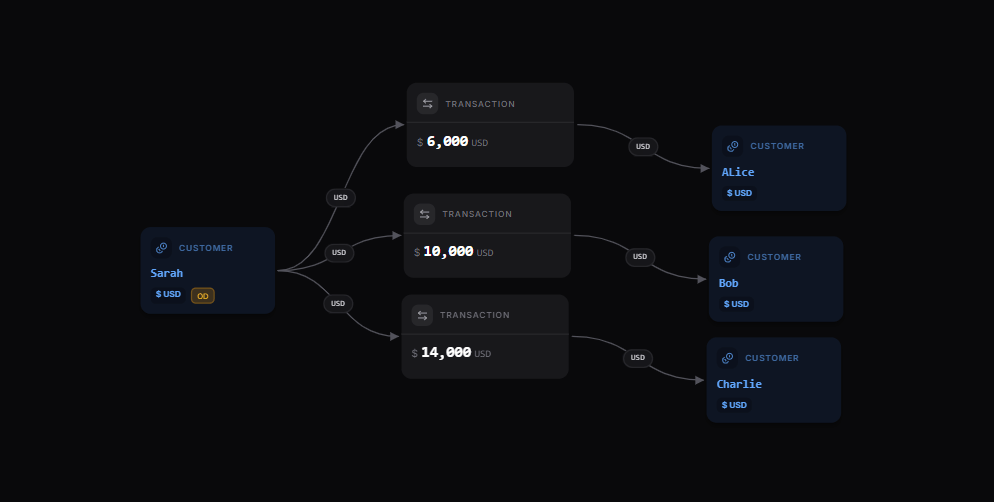 [Explore the map yourself here](https://map.blnkfinance.xyz/2MmTXXT8tj)
| | Balance ID | Amount |
| :----------------- | :---------------------------------------- | :---------------------------- |
| Alice | bln\_f2073f6b-905a-4e3e-b5a2-8d1b3dc2fb7f | 20% (USD 6,000) |
| Bob | bln\_64c50fb5-32d5-4f78-9f4a-e8b01aaf025d | USD 10,000 |
| Charlie | bln\_7d98dfe9-5c3e-4c9b-b96a-65f6d9f7b89b | Remaining amount (USD 14,000) |
| **Sarah (Sender)** | bln\_92e4b9b6-0b85-4ef4-87a2-682c31500d38 | **Total: USD 30,000** |
From a product perspective, that usually maps to one user-facing action (“Send \$30k”) while your ledger still exposes each recipient line for reporting, disputes, or partial reversals.
When sending to multiple destinations, you can only send from one source.
***
## Create multiple destinations transaction
Call the [Create Transaction](/reference/create-transaction) endpoint with these fields:
```bash cURL wrap expandable theme={"system"}
curl -X POST http://localhost:5001/transactions \
-H "Content-Type: application/json" \
-H "X-Blnk-Key: " \
-d '{
"precise_amount": 3000000,
"precision": 100,
"reference": "ref_001adcfgf",
"currency": "USD",
"source": "bln_92e4b9b6-0b85-4ef4-87a2-682c31500d38",
"destinations": [
{
"identifier": "bln_f2073f6b-905a-4e3e-b5a2-8d1b3dc2fb7f",
"distribution": "20%"
},
{
"identifier": "bln_64c50fb5-32d5-4f78-9f4a-e8b01aaf025d",
"precise_distribution": "1000000"
},
{
"identifier": "bln_7d98dfe9-5c3e-4c9b-b96a-65f6d9f7b89b",
"distribution": "left"
}
],
"description": "Payment from Sarah"
}'
```
```typescript TypeScript wrap theme={"system"}
const response = await blnk.Transactions.create({
precise_amount: 3000000,
precision: 100,
reference: 'ref_001adcfgf',
currency: 'USD',
source: 'bln_92e4b9b6-0b85-4ef4-87a2-682c31500d38',
destinations: [
{ identifier: 'bln_f2073f6b-905a-4e3e-b5a2-8d1b3dc2fb7f', distribution: '20%' },
{ identifier: 'bln_64c50fb5-32d5-4f78-9f4a-e8b01aaf025d', precise_distribution: '1000000' },
{ identifier: 'bln_7d98dfe9-5c3e-4c9b-b96a-65f6d9f7b89b', distribution: 'left' },
],
description: 'Payment from Sarah',
});
```
```go Go wrap expandable theme={"system"}
transaction, resp, err := client.Transaction.Create(blnkgo.CreateTransactionRequest{
ParentTransaction: blnkgo.ParentTransaction{
PreciseAmount: 3000000,
Precision: 100,
Reference: "ref_001adcfgf",
Currency: "USD",
Source: "bln_92e4b9b6-0b85-4ef4-87a2-682c31500d38",
Description: "Payment from Sarah",
Destinations: []blnkgo.Source{
{Identifier: "bln_f2073f6b-905a-4e3e-b5a2-8d1b3dc2fb7f", Distribution: "20%"},
{Identifier: "bln_64c50fb5-32d5-4f78-9f4a-e8b01aaf025d", PreciseDistribution: "1000000"},
{Identifier: "bln_7d98dfe9-5c3e-4c9b-b96a-65f6d9f7b89b", Distribution: "left"},
},
},
})
```
```bash Blnk CLI wrap theme={"system"}
blnk transactions create
```
| Field | Description | Required | Type |
| :-------------------------- | :--------------------------------------------------------------------------------------------------------------------------------------------------------------------------------- | :------- | :-------- |
| `precise_amount` | Total amount to be sent in its smallest unit. Send either `precise_amount` or `amount`, not both - see [Precision](/transactions/precision#using-both-precision-options-together). | Yes | `integer` |
| `amount` | Total amount to be sent as a float. Blnk multiplies by `precision` to store `precise_amount`. | Yes | `float` |
| `precision` | Precision for the transaction currency. See [Understanding precision](/transactions/precision) | No | `int64` |
| `reference` | Unique transaction reference | Yes | `string` |
| `currency` | Asset class code. | Yes | `string` |
| `source` | Sender's balance ID | Yes | `string` |
| `destinations` | Array of destination objects with `identifier` and `distribution` fields | Yes | `array` |
| `destinations.identifier` | Balance ID of the destination account | Yes | `string` |
| `destinations.distribution` | Amount to send to this destination (specific amount, percentage, or "left") | Yes | `string` |
| `atomic` | When `true`, all destination legs succeed or the entire split fails. Default: `false`. | No | `boolean` |
| `meta_data` | Custom transaction data | No | `object` |
When sending to multiple destinations, do not include the `destination` field in your payload. Use the `destinations` array to group the participating balances in your payload.
***
## Atomic split processing
By default, Blnk processes a multiple destinations split with `atomic: false`. Each destination leg is evaluated independently. Legs that pass validation are marked `APPLIED`, while legs that fail are marked `REJECTED`. This can result in a partial split, where some destinations are credited and others are not.
Set `atomic: true` to enable all-or-nothing processing. All destination legs must succeed for the split to be completed. If any leg fails, Blnk rolls back any previously `APPLIED` or `INFLIGHT` legs, reversing the credits so the split is fully cancelled and no partial state remains on the ledger.
```bash cURL wrap expandable theme={"system"}
curl -X POST http://localhost:5001/transactions \
-H "Content-Type: application/json" \
-H "X-Blnk-Key: " \
-d '{
"precise_amount": 3000000,
"precision": 100,
"reference": "ref_001adcfgf",
"currency": "USD",
"atomic": true,
"source": "bln_92e4b9b6-0b85-4ef4-87a2-682c31500d38",
"destinations": [
{
"identifier": "bln_f2073f6b-905a-4e3e-b5a2-8d1b3dc2fb7f",
"distribution": "20%"
},
{
"identifier": "bln_64c50fb5-32d5-4f78-9f4a-e8b01aaf025d",
"precise_distribution": "1000000"
},
{
"identifier": "bln_7d98dfe9-5c3e-4c9b-b96a-65f6d9f7b89b",
"distribution": "left"
}
],
"description": "Payment from Sarah"
}'
```
```typescript TypeScript wrap theme={"system"}
const response = await blnk.Transactions.create({
precise_amount: 3000000,
precision: 100,
reference: 'ref_001adcfgf',
currency: 'USD',
atomic: true,
source: 'bln_92e4b9b6-0b85-4ef4-87a2-682c31500d38',
destinations: [
{ identifier: 'bln_f2073f6b-905a-4e3e-b5a2-8d1b3dc2fb7f', distribution: '20%' },
{ identifier: 'bln_64c50fb5-32d5-4f78-9f4a-e8b01aaf025d', precise_distribution: '1000000' },
{ identifier: 'bln_7d98dfe9-5c3e-4c9b-b96a-65f6d9f7b89b', distribution: 'left' },
],
description: 'Payment from Sarah',
});
```
```go Go wrap expandable theme={"system"}
transaction, resp, err := client.Transaction.Create(blnkgo.CreateTransactionRequest{
ParentTransaction: blnkgo.ParentTransaction{
PreciseAmount: 3000000,
Precision: 100,
Reference: "ref_001adcfgf",
Currency: "USD",
Source: "bln_92e4b9b6-0b85-4ef4-87a2-682c31500d38",
Description: "Payment from Sarah",
Destinations: []blnkgo.Source{
{Identifier: "bln_f2073f6b-905a-4e3e-b5a2-8d1b3dc2fb7f", Distribution: "20%"},
{Identifier: "bln_64c50fb5-32d5-4f78-9f4a-e8b01aaf025d", PreciseDistribution: "1000000"},
{Identifier: "bln_7d98dfe9-5c3e-4c9b-b96a-65f6d9f7b89b", Distribution: "left"},
},
},
Atomic: true,
})
```
```bash Blnk CLI wrap theme={"system"}
blnk transactions create
```
Use `atomic: true` when partial results are not acceptable. For example, when sending a split payment, every destination must succeed for the transaction to go through.
***
## API response structure
When you create a multiple destinations transaction, Blnk creates separate transaction records for each destination.
Blnk returns a response containing:
* A **main transaction ID** for the overall split transaction. If `inflight: true`, it can be used to commit or void all transactions at once.
* A **destinations array** with individual transaction IDs for each destination.
```json Response {7,23,28,33} expandable theme={"system"}
{
"precise_amount": 3000000,
"amount": 30000,
"rate": 1,
"precision": 100,
"overdraft_limit": 0,
"transaction_id": "txn_0b59f6e-6c4a-4efa-915c-526f77ef61ab",
"parent_transaction": "",
"source": "bln_92e4b9b6-0b85-4ef4-87a2-682c31500d38",
"reference": "ref_001adcfgf",
"currency": "USD",
"description": "Payment from Sarah",
"status": "QUEUED",
"hash": "8cfdc0f2562ce30c3728ef624dc29fbd0e4207c77df9220df0c699d45de0eef",
"allow_overdraft": true,
"inflight": false,
"skip_queue": false,
"atomic": false,
"destinations": [
{
"identifier": "bln_f2073f6b-905a-4e3e-b5a2-8d1b3dc2fb7f",
"distribution": "20%",
"transaction_id": "txn_59347177-aa7e-d8ad-9f4f-d09628b32ec3"
},
{
"identifier": "bln_64c50fb5-32d5-4f78-9f4a-e8b01aaf025d",
"distribution": "10000",
"transaction_id": "txn_7ddc8d4f-3b77-4b7d-a37f-240216ab074c"
},
{
"identifier": "bln_7d98dfe9-5c3e-4c9b-b96a-65f6d9f7b89b",
"distribution": "left",
"transaction_id": "txn_5aad04dd-ed53-4f77-9f01-4916d31fac5f"
}
],
"created_at": "2025-09-18T01:26:30.648049042Z",
"scheduled_for": "0001-01-01T00:00:00Z",
"inflight_expiry_date": "0001-01-01T00:00:00Z",
"meta_data": {
"QUEUED_PARENT_TRANSACTION": "txn_0b59f6e-6c4a-4efa-915c-526f77ef61ab"
}
}
```
### Retrieving child transactions
You can retrieve all transactions in the split by searching for the main transaction ID in the `meta_data.QUEUED_PARENT_TRANSACTION` field:
```bash cURL wrap theme={"system"}
curl -X POST "http://localhost:5001/search/transactions" \
-H "X-Blnk-Key: " \
-H "Content-Type: application/json" \
-d '{
"q": "txn_0b59f6e-6c4a-4efa-915c-526f77ef61ab",
"query_by": "meta_data.QUEUED_PARENT_TRANSACTION"
}'
```
```typescript TypeScript wrap theme={"system"}
const response = await blnk.Search.search(
{
q: 'txn_0b59f6e-6c4a-4efa-915c-526f77ef61ab',
query_by: 'meta_data.QUEUED_PARENT_TRANSACTION',
},
'transactions',
);
```
```go Go wrap theme={"system"}
results, resp, err := client.Search.SearchDocument(
blnkgo.SearchParams{
Q: "txn_0b59f6e-6c4a-4efa-915c-526f77ef61ab",
QueryBy: "meta_data.QUEUED_PARENT_TRANSACTION",
},
blnkgo.Transactions,
)
```
```json Response theme={"system"}
{
"hits": [
{
"document": {
"transaction_id": "txn_59347177-aa7e-d8ad-9f4f-d09628b32ec3",
"parent_transaction": "txn_0b59f6e-6c4a-4efa-915c-526f77ef61ab",
"status": "APPLIED"
}
}
],
"found": 3
}
```
This will return all individual transactions that were created as part of the multiple destinations transaction, allowing you to track and manage the complete set of related transactions.
***
## Distribution types
You can specify distribution amounts in three ways:
| Type | Description | Example |
| :------------------ | :------------------------------------------------------------------------------------------- | :---------------------------------- |
| **Specific amount** | Fixed amount to send. Use `precise_distribution` when the transaction uses `precise_amount`. | `"precise_distribution": "1000000"` |
| **Percentage** | Percentage of total amount | `"distribution": "20%"` |
| **Remaining** | Leftover amount after other distributions | `"distribution": "left"` |
You can only use `"left"` once per transaction, and all distributions must sum to the total amount.
### Using `precise_distribution` with `precise_amount`
When a transaction uses `precise_amount`, use `precise_distribution` in place of `distribution` only for destinations that specify an exact value.
For example:
```json Example with precise_amount {7} wrap theme={"system"}
{
...
"precise_amount": 189207535698279000,
"destinations": [
{
"identifier": "bln_f2073f6b-905a-4e3e-b5a2-8d1b3dc2fb7f",
"precise_distribution": "37841507139655800"
},
{
"identifier": "bln_64c50fb5-32d5-4f78-9f4a-e8b01aaf025d",
"distribution": "20%"
}
]
}
```
For more information about precision and `precise_amount`, see [Transaction precision](/transactions/precision).
***
## Transaction references
Blnk automatically generates unique references for each transaction record by appending a counter to your original reference (starting from `1`).
**Example:** If your reference is `ref_001adcfgf`, the generated references will be:
* `ref_001adcfgf_1` (first destination)
* `ref_001adcfgf_2` (second destination)
* `ref_001adcfgf_3` (third destination)
This ensures traceability while maintaining connection to the original transaction.
Also see:
Multiple sources, one destination.
***
## Need help?
We are very happy to help you make the most of Blnk, regardless of whether it is your first time or you are switching from another tool.
To ask questions or discuss issues, please [contact us](mailto:support@blnkfinance.com) or [join our Discord community](https://discord.gg/7WNv94zPpx).
Sign up and manage your ledger with our back-office dashboard. You can invite teammates to collaborate and manage your ledger operations directly from the dashboard.
[Explore the map yourself here](https://map.blnkfinance.xyz/2MmTXXT8tj)
| | Balance ID | Amount |
| :----------------- | :---------------------------------------- | :---------------------------- |
| Alice | bln\_f2073f6b-905a-4e3e-b5a2-8d1b3dc2fb7f | 20% (USD 6,000) |
| Bob | bln\_64c50fb5-32d5-4f78-9f4a-e8b01aaf025d | USD 10,000 |
| Charlie | bln\_7d98dfe9-5c3e-4c9b-b96a-65f6d9f7b89b | Remaining amount (USD 14,000) |
| **Sarah (Sender)** | bln\_92e4b9b6-0b85-4ef4-87a2-682c31500d38 | **Total: USD 30,000** |
From a product perspective, that usually maps to one user-facing action (“Send \$30k”) while your ledger still exposes each recipient line for reporting, disputes, or partial reversals.
When sending to multiple destinations, you can only send from one source.
***
## Create multiple destinations transaction
Call the [Create Transaction](/reference/create-transaction) endpoint with these fields:
```bash cURL wrap expandable theme={"system"}
curl -X POST http://localhost:5001/transactions \
-H "Content-Type: application/json" \
-H "X-Blnk-Key: " \
-d '{
"precise_amount": 3000000,
"precision": 100,
"reference": "ref_001adcfgf",
"currency": "USD",
"source": "bln_92e4b9b6-0b85-4ef4-87a2-682c31500d38",
"destinations": [
{
"identifier": "bln_f2073f6b-905a-4e3e-b5a2-8d1b3dc2fb7f",
"distribution": "20%"
},
{
"identifier": "bln_64c50fb5-32d5-4f78-9f4a-e8b01aaf025d",
"precise_distribution": "1000000"
},
{
"identifier": "bln_7d98dfe9-5c3e-4c9b-b96a-65f6d9f7b89b",
"distribution": "left"
}
],
"description": "Payment from Sarah"
}'
```
```typescript TypeScript wrap theme={"system"}
const response = await blnk.Transactions.create({
precise_amount: 3000000,
precision: 100,
reference: 'ref_001adcfgf',
currency: 'USD',
source: 'bln_92e4b9b6-0b85-4ef4-87a2-682c31500d38',
destinations: [
{ identifier: 'bln_f2073f6b-905a-4e3e-b5a2-8d1b3dc2fb7f', distribution: '20%' },
{ identifier: 'bln_64c50fb5-32d5-4f78-9f4a-e8b01aaf025d', precise_distribution: '1000000' },
{ identifier: 'bln_7d98dfe9-5c3e-4c9b-b96a-65f6d9f7b89b', distribution: 'left' },
],
description: 'Payment from Sarah',
});
```
```go Go wrap expandable theme={"system"}
transaction, resp, err := client.Transaction.Create(blnkgo.CreateTransactionRequest{
ParentTransaction: blnkgo.ParentTransaction{
PreciseAmount: 3000000,
Precision: 100,
Reference: "ref_001adcfgf",
Currency: "USD",
Source: "bln_92e4b9b6-0b85-4ef4-87a2-682c31500d38",
Description: "Payment from Sarah",
Destinations: []blnkgo.Source{
{Identifier: "bln_f2073f6b-905a-4e3e-b5a2-8d1b3dc2fb7f", Distribution: "20%"},
{Identifier: "bln_64c50fb5-32d5-4f78-9f4a-e8b01aaf025d", PreciseDistribution: "1000000"},
{Identifier: "bln_7d98dfe9-5c3e-4c9b-b96a-65f6d9f7b89b", Distribution: "left"},
},
},
})
```
```bash Blnk CLI wrap theme={"system"}
blnk transactions create
```
| Field | Description | Required | Type |
| :-------------------------- | :--------------------------------------------------------------------------------------------------------------------------------------------------------------------------------- | :------- | :-------- |
| `precise_amount` | Total amount to be sent in its smallest unit. Send either `precise_amount` or `amount`, not both - see [Precision](/transactions/precision#using-both-precision-options-together). | Yes | `integer` |
| `amount` | Total amount to be sent as a float. Blnk multiplies by `precision` to store `precise_amount`. | Yes | `float` |
| `precision` | Precision for the transaction currency. See [Understanding precision](/transactions/precision) | No | `int64` |
| `reference` | Unique transaction reference | Yes | `string` |
| `currency` | Asset class code. | Yes | `string` |
| `source` | Sender's balance ID | Yes | `string` |
| `destinations` | Array of destination objects with `identifier` and `distribution` fields | Yes | `array` |
| `destinations.identifier` | Balance ID of the destination account | Yes | `string` |
| `destinations.distribution` | Amount to send to this destination (specific amount, percentage, or "left") | Yes | `string` |
| `atomic` | When `true`, all destination legs succeed or the entire split fails. Default: `false`. | No | `boolean` |
| `meta_data` | Custom transaction data | No | `object` |
When sending to multiple destinations, do not include the `destination` field in your payload. Use the `destinations` array to group the participating balances in your payload.
***
## Atomic split processing
By default, Blnk processes a multiple destinations split with `atomic: false`. Each destination leg is evaluated independently. Legs that pass validation are marked `APPLIED`, while legs that fail are marked `REJECTED`. This can result in a partial split, where some destinations are credited and others are not.
Set `atomic: true` to enable all-or-nothing processing. All destination legs must succeed for the split to be completed. If any leg fails, Blnk rolls back any previously `APPLIED` or `INFLIGHT` legs, reversing the credits so the split is fully cancelled and no partial state remains on the ledger.
```bash cURL wrap expandable theme={"system"}
curl -X POST http://localhost:5001/transactions \
-H "Content-Type: application/json" \
-H "X-Blnk-Key: " \
-d '{
"precise_amount": 3000000,
"precision": 100,
"reference": "ref_001adcfgf",
"currency": "USD",
"atomic": true,
"source": "bln_92e4b9b6-0b85-4ef4-87a2-682c31500d38",
"destinations": [
{
"identifier": "bln_f2073f6b-905a-4e3e-b5a2-8d1b3dc2fb7f",
"distribution": "20%"
},
{
"identifier": "bln_64c50fb5-32d5-4f78-9f4a-e8b01aaf025d",
"precise_distribution": "1000000"
},
{
"identifier": "bln_7d98dfe9-5c3e-4c9b-b96a-65f6d9f7b89b",
"distribution": "left"
}
],
"description": "Payment from Sarah"
}'
```
```typescript TypeScript wrap theme={"system"}
const response = await blnk.Transactions.create({
precise_amount: 3000000,
precision: 100,
reference: 'ref_001adcfgf',
currency: 'USD',
atomic: true,
source: 'bln_92e4b9b6-0b85-4ef4-87a2-682c31500d38',
destinations: [
{ identifier: 'bln_f2073f6b-905a-4e3e-b5a2-8d1b3dc2fb7f', distribution: '20%' },
{ identifier: 'bln_64c50fb5-32d5-4f78-9f4a-e8b01aaf025d', precise_distribution: '1000000' },
{ identifier: 'bln_7d98dfe9-5c3e-4c9b-b96a-65f6d9f7b89b', distribution: 'left' },
],
description: 'Payment from Sarah',
});
```
```go Go wrap expandable theme={"system"}
transaction, resp, err := client.Transaction.Create(blnkgo.CreateTransactionRequest{
ParentTransaction: blnkgo.ParentTransaction{
PreciseAmount: 3000000,
Precision: 100,
Reference: "ref_001adcfgf",
Currency: "USD",
Source: "bln_92e4b9b6-0b85-4ef4-87a2-682c31500d38",
Description: "Payment from Sarah",
Destinations: []blnkgo.Source{
{Identifier: "bln_f2073f6b-905a-4e3e-b5a2-8d1b3dc2fb7f", Distribution: "20%"},
{Identifier: "bln_64c50fb5-32d5-4f78-9f4a-e8b01aaf025d", PreciseDistribution: "1000000"},
{Identifier: "bln_7d98dfe9-5c3e-4c9b-b96a-65f6d9f7b89b", Distribution: "left"},
},
},
Atomic: true,
})
```
```bash Blnk CLI wrap theme={"system"}
blnk transactions create
```
Use `atomic: true` when partial results are not acceptable. For example, when sending a split payment, every destination must succeed for the transaction to go through.
***
## API response structure
When you create a multiple destinations transaction, Blnk creates separate transaction records for each destination.
Blnk returns a response containing:
* A **main transaction ID** for the overall split transaction. If `inflight: true`, it can be used to commit or void all transactions at once.
* A **destinations array** with individual transaction IDs for each destination.
```json Response {7,23,28,33} expandable theme={"system"}
{
"precise_amount": 3000000,
"amount": 30000,
"rate": 1,
"precision": 100,
"overdraft_limit": 0,
"transaction_id": "txn_0b59f6e-6c4a-4efa-915c-526f77ef61ab",
"parent_transaction": "",
"source": "bln_92e4b9b6-0b85-4ef4-87a2-682c31500d38",
"reference": "ref_001adcfgf",
"currency": "USD",
"description": "Payment from Sarah",
"status": "QUEUED",
"hash": "8cfdc0f2562ce30c3728ef624dc29fbd0e4207c77df9220df0c699d45de0eef",
"allow_overdraft": true,
"inflight": false,
"skip_queue": false,
"atomic": false,
"destinations": [
{
"identifier": "bln_f2073f6b-905a-4e3e-b5a2-8d1b3dc2fb7f",
"distribution": "20%",
"transaction_id": "txn_59347177-aa7e-d8ad-9f4f-d09628b32ec3"
},
{
"identifier": "bln_64c50fb5-32d5-4f78-9f4a-e8b01aaf025d",
"distribution": "10000",
"transaction_id": "txn_7ddc8d4f-3b77-4b7d-a37f-240216ab074c"
},
{
"identifier": "bln_7d98dfe9-5c3e-4c9b-b96a-65f6d9f7b89b",
"distribution": "left",
"transaction_id": "txn_5aad04dd-ed53-4f77-9f01-4916d31fac5f"
}
],
"created_at": "2025-09-18T01:26:30.648049042Z",
"scheduled_for": "0001-01-01T00:00:00Z",
"inflight_expiry_date": "0001-01-01T00:00:00Z",
"meta_data": {
"QUEUED_PARENT_TRANSACTION": "txn_0b59f6e-6c4a-4efa-915c-526f77ef61ab"
}
}
```
### Retrieving child transactions
You can retrieve all transactions in the split by searching for the main transaction ID in the `meta_data.QUEUED_PARENT_TRANSACTION` field:
```bash cURL wrap theme={"system"}
curl -X POST "http://localhost:5001/search/transactions" \
-H "X-Blnk-Key: " \
-H "Content-Type: application/json" \
-d '{
"q": "txn_0b59f6e-6c4a-4efa-915c-526f77ef61ab",
"query_by": "meta_data.QUEUED_PARENT_TRANSACTION"
}'
```
```typescript TypeScript wrap theme={"system"}
const response = await blnk.Search.search(
{
q: 'txn_0b59f6e-6c4a-4efa-915c-526f77ef61ab',
query_by: 'meta_data.QUEUED_PARENT_TRANSACTION',
},
'transactions',
);
```
```go Go wrap theme={"system"}
results, resp, err := client.Search.SearchDocument(
blnkgo.SearchParams{
Q: "txn_0b59f6e-6c4a-4efa-915c-526f77ef61ab",
QueryBy: "meta_data.QUEUED_PARENT_TRANSACTION",
},
blnkgo.Transactions,
)
```
```json Response theme={"system"}
{
"hits": [
{
"document": {
"transaction_id": "txn_59347177-aa7e-d8ad-9f4f-d09628b32ec3",
"parent_transaction": "txn_0b59f6e-6c4a-4efa-915c-526f77ef61ab",
"status": "APPLIED"
}
}
],
"found": 3
}
```
This will return all individual transactions that were created as part of the multiple destinations transaction, allowing you to track and manage the complete set of related transactions.
***
## Distribution types
You can specify distribution amounts in three ways:
| Type | Description | Example |
| :------------------ | :------------------------------------------------------------------------------------------- | :---------------------------------- |
| **Specific amount** | Fixed amount to send. Use `precise_distribution` when the transaction uses `precise_amount`. | `"precise_distribution": "1000000"` |
| **Percentage** | Percentage of total amount | `"distribution": "20%"` |
| **Remaining** | Leftover amount after other distributions | `"distribution": "left"` |
You can only use `"left"` once per transaction, and all distributions must sum to the total amount.
### Using `precise_distribution` with `precise_amount`
When a transaction uses `precise_amount`, use `precise_distribution` in place of `distribution` only for destinations that specify an exact value.
For example:
```json Example with precise_amount {7} wrap theme={"system"}
{
...
"precise_amount": 189207535698279000,
"destinations": [
{
"identifier": "bln_f2073f6b-905a-4e3e-b5a2-8d1b3dc2fb7f",
"precise_distribution": "37841507139655800"
},
{
"identifier": "bln_64c50fb5-32d5-4f78-9f4a-e8b01aaf025d",
"distribution": "20%"
}
]
}
```
For more information about precision and `precise_amount`, see [Transaction precision](/transactions/precision).
***
## Transaction references
Blnk automatically generates unique references for each transaction record by appending a counter to your original reference (starting from `1`).
**Example:** If your reference is `ref_001adcfgf`, the generated references will be:
* `ref_001adcfgf_1` (first destination)
* `ref_001adcfgf_2` (second destination)
* `ref_001adcfgf_3` (third destination)
This ensures traceability while maintaining connection to the original transaction.
Also see:
Multiple sources, one destination.
***
## Need help?
We are very happy to help you make the most of Blnk, regardless of whether it is your first time or you are switching from another tool.
To ask questions or discuss issues, please [contact us](mailto:support@blnkfinance.com) or [join our Discord community](https://discord.gg/7WNv94zPpx).
Sign up and manage your ledger with our back-office dashboard. You can invite teammates to collaborate and manage your ledger operations directly from the dashboard.