> ## Documentation Index
> Fetch the complete documentation index at: https://docs.blnkfinance.com/llms.txt
> Use this file to discover all available pages before exploring further.
# Fund Lineage Tracking
> Track where funds came from and how debits are allocated across providers.
export const CtaCallout = props => {
const {title, buttonLabel, href, trackingEvent, buttonTarget, rel = "noopener noreferrer", children} = props;
const handleCtaClick = () => {
if (typeof window === "undefined" || !trackingEvent) {
return;
}
try {
window.dispatchEvent(new CustomEvent("blnk:docs-cta", {
detail: {
name: trackingEvent,
href
}
}));
} catch {}
try {
window.posthog?.capture?.(trackingEvent, {
href
});
} catch {}
const gaPayload = {
cta_href: href
};
try {
window.gtag?.("event", trackingEvent, gaPayload);
} catch {}
try {
window.dataLayer = window.dataLayer || [];
window.dataLayer.push({
event: trackingEvent,
...gaPayload
});
} catch {}
};
const isExternal = typeof href === "string" && (/^https?:\/\//i).test(href);
const target = buttonTarget ?? (isExternal ? "_blank" : undefined);
const linkRel = isExternal ? rel : undefined;
return ;
};
This feature is experimental. Available in v0.13.0 and later.
Fund lineage lets you tag incoming funds into a balance and automatically track how those tagged funds are spent over time.
Once enabled, every subsequent debit records exactly which tagged funds it used and how much came from each tag. You do not need to manage this yourself. Blnk does it automatically.
This helps you answer questions like:
* Where did the funds in this balance come from?
* When you spend \$X, which funding sources did it come from?
* How much of Provider A’s funds are still available vs already spent?
***
## How to think about lineage
A normal balance tells you how much money you have. Lineage adds one extra dimension: what that money is made of. Think of a balance as having 2 layers:
1. **The balance total:** This is what you already know.
2. **The composition of the balance:** This is a breakdown of that total by tag (e.g. `stripe`, `paypal`, `treasury`, etc.)
So instead of seeing only: `Balance = $150`, lineage shows you: `Balance = $150 (stripe: $100, paypal: $50)`.
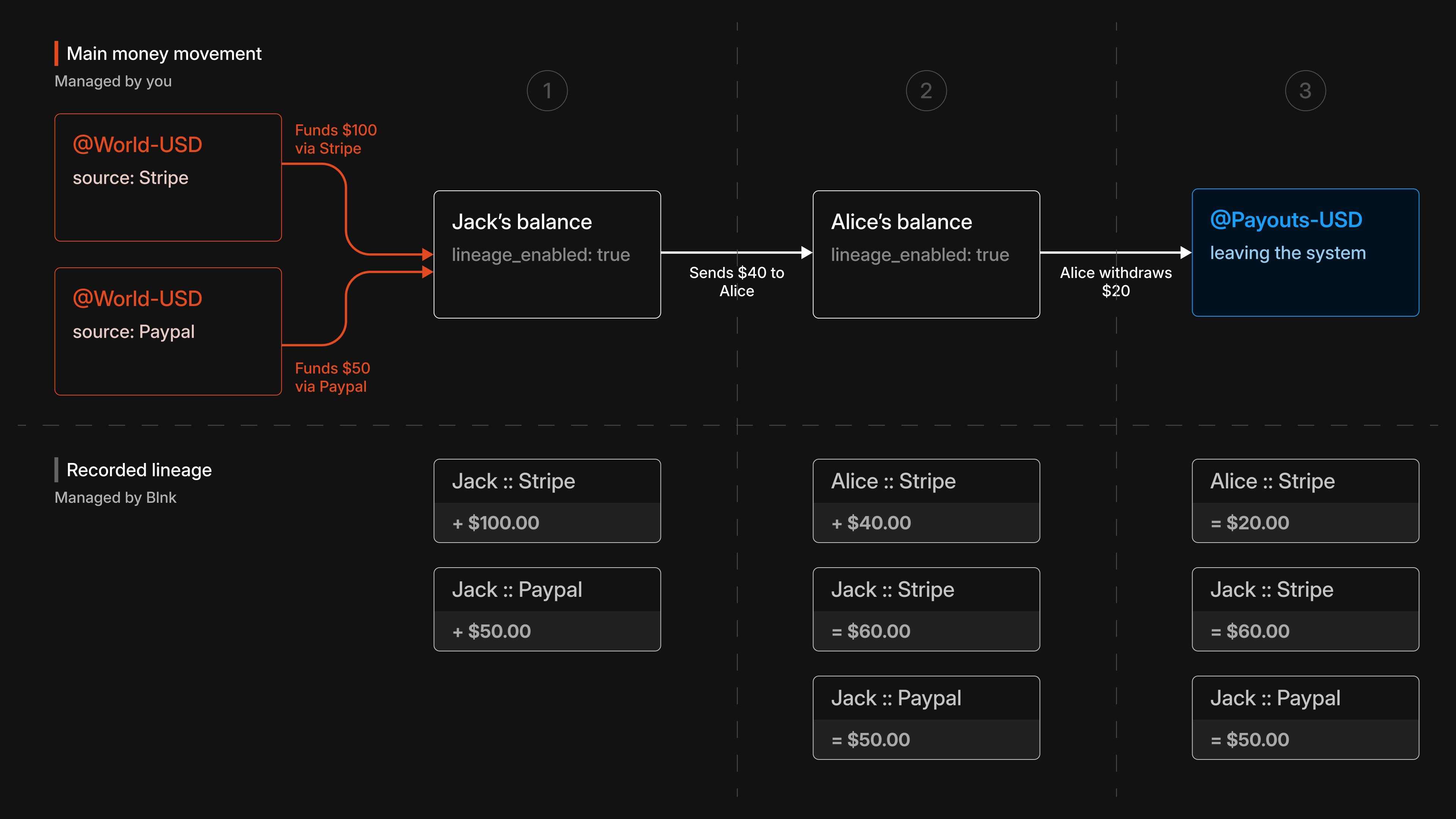 Two credits are made into Jack’s balance:
* \$100 from `stripe`
* \$50 from `paypal`
Jack's total balance is **\$150**. Because lineage is enabled on Jack's balance, Blnk also records the composition of that balance internally: **\$100** from Stripe and **\$50** from PayPal.
Jack sends \$40 to Alice. Based on the allocation strategy, Blnk:
* Selects which tagged funds to spend from
* Records how much of the \$40 came from each tag.
* Applies the same tag to the funds received by Alice
In our example, the entire \$40 is taken from Stripe, leaving:
* Jack with **\$60** from Stripe and **\$50** from PayPal
* Alice with **\$40** tagged as `Stripe`
Alice withdraws **\$20** to payouts.
Blnk records that the **\$20** leaving the system came from Alice’s Stripe-tagged funds. Alice now has **\$20** remaining from Stripe.
With this, we can determine that:
* Out of the **\$100** that came in from Stripe, we now have only **\$80** total left in our system.
* Stripe should be used to process Alice's payout, since her funds came from Stripe.
***
## What changes with lineage enabled
Only one thing: Blnk starts recording fund composition automatically.
1. When you credit a lineage-enabled balance, you attach a tag to that incoming money.
2. When you debit the balance, Blnk decides which tagged funds were used and records the breakdown.
3. When money moves to **another lineage-enabled balance**, the tag moves with it. Otherwise, lineage stops at that transfer.
***
## Enable fund lineage
Fund lineage is enabled at the balance level. You need to first ensure that the balances you want to track have lineage enabled.
Blnk requires that the balance has an `identity_id` set to enable lineage tracking for a balance.
```bash cURL wrap {8,9} theme={"system"}
curl -X POST "http://localhost:5001/balances" \
-H "X-blnk-key: " \
-H "Content-Type: application/json" \
-d '{
"ledger_id": "ldg_049495c6-356e-4ebc-a45e-60d1e1e16afb",
"identity_id": "idt_4dd12897-f085-41f2-955f-790ed3c0a7fb",
"currency": "USD",
"track_fund_lineage": true,
"allocation_strategy": "FIFO"
}'
```
```typescript TypeScript wrap {5,6} theme={"system"}
const response = await blnk.LedgerBalances.create({
ledger_id: 'ldg_049495c6-356e-4ebc-a45e-60d1e1e16afb',
identity_id: 'idt_4dd12897-f085-41f2-955f-790ed3c0a7fb',
currency: 'USD',
track_fund_lineage: true,
allocation_strategy: 'FIFO',
});
```
Allocation strategy defines how Blnk will allocate the funds when you spend from the balance. Supported allocation strategies are:
* `FIFO`: Spend oldest tagged funds first. This is the default strategy.
* `LIFO`: Spend newest tagged funds first.
* `PROPORTIONAL`: Spend proportionally across tags.
To initialize lineage for incoming funds, you must include a lineage provider. To do this, set the `meta_data.BLNK_LINEAGE_PROVIDER` field to the provider you want to tag the funds with.
```bash cURL wrap {13} theme={"system"}
curl -X POST "http://localhost:5001/transactions" \
-H "X-blnk-key: " \
-H "Content-Type: application/json" \
-d '{
"precise_amount": 10000,
"precision": 100,
"currency": "USD",
"reference": "ref_f482a1b3-6c2d-4e89-a17b-3d5e8f2a1c94",
"source": "@World",
"destination": "bln_5ce86029-3c2e-4e2a-aae2-7fb931ca4c4f",
"description": "Top up via card",
"meta_data": {
"BLNK_LINEAGE_PROVIDER": "stripe"
}
}'
```
```typescript TypeScript wrap {10} theme={"system"}
const response = await blnk.Transactions.create({
precise_amount: 10000,
precision: 100,
currency: 'USD',
reference: 'ref_f482a1b3-6c2d-4e89-a17b-3d5e8f2a1c94',
source: '@World',
destination: 'bln_5ce86029-3c2e-4e2a-aae2-7fb931ca4c4f',
description: 'Top up via card',
meta_data: {
BLNK_LINEAGE_PROVIDER: 'stripe',
},
});
```
This tells Blnk how to classify the incoming funds. No other configuration is needed.
If you omit `BLNK_LINEAGE_PROVIDER`, the transaction is recorded, but that credit will not participate in lineage tracking.
Blnk tracks funds by auto-creating internal lineage balances derived from the provider and the destination identity.
To spend from a lineage-enabled balance, you create a normal debit transaction. You don’t need to specify a provider on debits.
Blnk will:
* Select which tagged funds to spend from based on the allocation strategy
* Record the provider-level breakdown automatically
* Attach the breakdown to the transaction metadata under `BLNK_FUND_ALLOCATION`
```bash cURL wrap theme={"system"}
curl -X POST "http://localhost:5001/transactions" \
-H "X-blnk-key: " \
-H "Content-Type: application/json" \
-d '{
"precise_amount": 2500,
"precision": 100,
"currency": "USD",
"reference": "ref_c5d9e2a1-7b4f-4a3c-9e8d-1f6a2b4c8d30",
"source": "bln_5ce86029-3c2e-4e2a-aae2-7fb931ca4c4f",
"destination": "@MerchantSettlement",
"description": "Purchase"
}'
```
```typescript TypeScript wrap theme={"system"}
const response = await blnk.Transactions.create({
precise_amount: 2500,
precision: 100,
currency: 'USD',
reference: 'ref_c5d9e2a1-7b4f-4a3c-9e8d-1f6a2b4c8d30',
source: 'bln_5ce86029-3c2e-4e2a-aae2-7fb931ca4c4f',
destination: '@MerchantSettlement',
description: 'Purchase',
});
```
You can then inspect the results using:
* [Get transaction lineage](#get-transaction-lineage) (allocation + shadow transactions)
* [Get balance lineage](#get-balance-lineage) (provider breakdown on a balance)
If the destination balance of a transaction also has `track_fund_lineage: true` enabled:
* Blnk will propagate lineage automatically
* The destination balance will also have its own shadow balances created automatically if it doesn't already have them.
No additional steps are required.
***
## How Blnk names internal lineage balances
When lineage is enabled, Blnk creates internal “shadow” and “aggregate” balances using **indicator** strings derived from the provider and the destination identity:
* **Provider shadow balance**: `@PROVIDER_IDENTITY_IDENTIFIER_lineage`
* **Aggregate balance (all providers)**: `@IDENTITY_IDENTIFIER_lineage`
For example: provider `stripe` + identity `John Doe` (`identity_id: "idt_4dd12897-f085-41f2-955f-790ed3c0a7fb"`) becomes:
* Shadow balance: `@stripe_john_doe_idt_4dd1_lineage`
* Aggregate balance: `@john_doe_idt_4dd1_lineage`
***
## Query lineage
Once lineage is enabled, you can query it at two levels:
1. Balance lineage to see what funds are available and spent per provider.
2. Transaction lineage to see how a specific debit was allocated
### Get balance lineage
Use this to see the current provider breakdown for a balance.
```bash cURL wrap theme={"system"}
curl -X GET "http://localhost:5001/balances/bln_5ce86029-3c2e-4e2a-aae2-7fb931ca4c4f/lineage" \
-H "X-blnk-key: "
```
```typescript TypeScript wrap theme={"system"}
const response = await blnk.LedgerBalances.getLineage(
'bln_5ce86029-3c2e-4e2a-aae2-7fb931ca4c4f',
);
```
This returns, per provider:
* how much is still available
* how much has already been spent
```json Response wrap theme={"system"}
{
"balance_id": "bln_5ce86029-3c2e-4e2a-aae2-7fb931ca4c4f",
"aggregate_balance_id": "bln_a1b2c3d4-6e2d-4f89-a17b-3d5e8f2a1c94",
"total_with_lineage": "7500",
"providers": [
{
"provider": "stripe",
"amount": "10000",
"available": "7500",
"spent": "2500",
"shadow_balance_id": "bln_e92a1ba7-92c7-427c-8c8f-bfdca55c875d"
}
]
}
```
Amounts in lineage responses are returned in **minor units** (the same scale as `precise_amount`), so use your [precision](/transactions/precision) to convert for display.
### Get transaction lineage
Use this to see how a specific transaction was funded.
```bash cURL wrap theme={"system"}
curl -X GET "http://localhost:5001/transactions/txn_8d2ce2f0-0d75-4a91-9d43-2ad2c2e6b9ad/lineage" \
-H "X-blnk-key: "
```
```typescript TypeScript wrap theme={"system"}
const response = await blnk.Transactions.getLineage(
'txn_8d2ce2f0-0d75-4a91-9d43-2ad2c2e6b9ad',
);
```
This is most useful for debits from lineage-enabled balances. It returns:
* the fund allocation (how much was taken from each provider)
* any internal shadow transactions created for lineage tracking
```json Response wrap theme={"system"}
{
"transaction_id": "txn_8d2ce2f0-0d75-4a91-9d43-2ad2c2e6b9ad",
"fund_allocation": [
{
"provider": "stripe",
"amount": "2500"
}
],
"shadow_transactions": [
{
"transaction_id": "txn_f482a1b3-6c2d-4e89-a17b-3d5e8f2a1c94",
"reference": "ref_lineage_debit_001_release_stripe_0",
"precise_amount": "2500",
"currency": "USD"
}
]
}
```
You do not need to act on shadow transactions. They exist for auditability and tracing.
***
## Need help?
We are very happy to help you make the most of Blnk, regardless of whether it is your first time or you are switching from another tool.
To ask questions or discuss issues, please [contact us](mailto:support@blnkfinance.com) or [join our Discord community](https://discord.gg/7WNv94zPpx).
Sign up and manage your ledger with our back-office dashboard. You can invite teammates to collaborate and manage your ledger operations directly from the dashboard.
Two credits are made into Jack’s balance:
* \$100 from `stripe`
* \$50 from `paypal`
Jack's total balance is **\$150**. Because lineage is enabled on Jack's balance, Blnk also records the composition of that balance internally: **\$100** from Stripe and **\$50** from PayPal.
Jack sends \$40 to Alice. Based on the allocation strategy, Blnk:
* Selects which tagged funds to spend from
* Records how much of the \$40 came from each tag.
* Applies the same tag to the funds received by Alice
In our example, the entire \$40 is taken from Stripe, leaving:
* Jack with **\$60** from Stripe and **\$50** from PayPal
* Alice with **\$40** tagged as `Stripe`
Alice withdraws **\$20** to payouts.
Blnk records that the **\$20** leaving the system came from Alice’s Stripe-tagged funds. Alice now has **\$20** remaining from Stripe.
With this, we can determine that:
* Out of the **\$100** that came in from Stripe, we now have only **\$80** total left in our system.
* Stripe should be used to process Alice's payout, since her funds came from Stripe.
***
## What changes with lineage enabled
Only one thing: Blnk starts recording fund composition automatically.
1. When you credit a lineage-enabled balance, you attach a tag to that incoming money.
2. When you debit the balance, Blnk decides which tagged funds were used and records the breakdown.
3. When money moves to **another lineage-enabled balance**, the tag moves with it. Otherwise, lineage stops at that transfer.
***
## Enable fund lineage
Fund lineage is enabled at the balance level. You need to first ensure that the balances you want to track have lineage enabled.
Blnk requires that the balance has an `identity_id` set to enable lineage tracking for a balance.
```bash cURL wrap {8,9} theme={"system"}
curl -X POST "http://localhost:5001/balances" \
-H "X-blnk-key: " \
-H "Content-Type: application/json" \
-d '{
"ledger_id": "ldg_049495c6-356e-4ebc-a45e-60d1e1e16afb",
"identity_id": "idt_4dd12897-f085-41f2-955f-790ed3c0a7fb",
"currency": "USD",
"track_fund_lineage": true,
"allocation_strategy": "FIFO"
}'
```
```typescript TypeScript wrap {5,6} theme={"system"}
const response = await blnk.LedgerBalances.create({
ledger_id: 'ldg_049495c6-356e-4ebc-a45e-60d1e1e16afb',
identity_id: 'idt_4dd12897-f085-41f2-955f-790ed3c0a7fb',
currency: 'USD',
track_fund_lineage: true,
allocation_strategy: 'FIFO',
});
```
Allocation strategy defines how Blnk will allocate the funds when you spend from the balance. Supported allocation strategies are:
* `FIFO`: Spend oldest tagged funds first. This is the default strategy.
* `LIFO`: Spend newest tagged funds first.
* `PROPORTIONAL`: Spend proportionally across tags.
To initialize lineage for incoming funds, you must include a lineage provider. To do this, set the `meta_data.BLNK_LINEAGE_PROVIDER` field to the provider you want to tag the funds with.
```bash cURL wrap {13} theme={"system"}
curl -X POST "http://localhost:5001/transactions" \
-H "X-blnk-key: " \
-H "Content-Type: application/json" \
-d '{
"precise_amount": 10000,
"precision": 100,
"currency": "USD",
"reference": "ref_f482a1b3-6c2d-4e89-a17b-3d5e8f2a1c94",
"source": "@World",
"destination": "bln_5ce86029-3c2e-4e2a-aae2-7fb931ca4c4f",
"description": "Top up via card",
"meta_data": {
"BLNK_LINEAGE_PROVIDER": "stripe"
}
}'
```
```typescript TypeScript wrap {10} theme={"system"}
const response = await blnk.Transactions.create({
precise_amount: 10000,
precision: 100,
currency: 'USD',
reference: 'ref_f482a1b3-6c2d-4e89-a17b-3d5e8f2a1c94',
source: '@World',
destination: 'bln_5ce86029-3c2e-4e2a-aae2-7fb931ca4c4f',
description: 'Top up via card',
meta_data: {
BLNK_LINEAGE_PROVIDER: 'stripe',
},
});
```
This tells Blnk how to classify the incoming funds. No other configuration is needed.
If you omit `BLNK_LINEAGE_PROVIDER`, the transaction is recorded, but that credit will not participate in lineage tracking.
Blnk tracks funds by auto-creating internal lineage balances derived from the provider and the destination identity.
To spend from a lineage-enabled balance, you create a normal debit transaction. You don’t need to specify a provider on debits.
Blnk will:
* Select which tagged funds to spend from based on the allocation strategy
* Record the provider-level breakdown automatically
* Attach the breakdown to the transaction metadata under `BLNK_FUND_ALLOCATION`
```bash cURL wrap theme={"system"}
curl -X POST "http://localhost:5001/transactions" \
-H "X-blnk-key: " \
-H "Content-Type: application/json" \
-d '{
"precise_amount": 2500,
"precision": 100,
"currency": "USD",
"reference": "ref_c5d9e2a1-7b4f-4a3c-9e8d-1f6a2b4c8d30",
"source": "bln_5ce86029-3c2e-4e2a-aae2-7fb931ca4c4f",
"destination": "@MerchantSettlement",
"description": "Purchase"
}'
```
```typescript TypeScript wrap theme={"system"}
const response = await blnk.Transactions.create({
precise_amount: 2500,
precision: 100,
currency: 'USD',
reference: 'ref_c5d9e2a1-7b4f-4a3c-9e8d-1f6a2b4c8d30',
source: 'bln_5ce86029-3c2e-4e2a-aae2-7fb931ca4c4f',
destination: '@MerchantSettlement',
description: 'Purchase',
});
```
You can then inspect the results using:
* [Get transaction lineage](#get-transaction-lineage) (allocation + shadow transactions)
* [Get balance lineage](#get-balance-lineage) (provider breakdown on a balance)
If the destination balance of a transaction also has `track_fund_lineage: true` enabled:
* Blnk will propagate lineage automatically
* The destination balance will also have its own shadow balances created automatically if it doesn't already have them.
No additional steps are required.
***
## How Blnk names internal lineage balances
When lineage is enabled, Blnk creates internal “shadow” and “aggregate” balances using **indicator** strings derived from the provider and the destination identity:
* **Provider shadow balance**: `@PROVIDER_IDENTITY_IDENTIFIER_lineage`
* **Aggregate balance (all providers)**: `@IDENTITY_IDENTIFIER_lineage`
For example: provider `stripe` + identity `John Doe` (`identity_id: "idt_4dd12897-f085-41f2-955f-790ed3c0a7fb"`) becomes:
* Shadow balance: `@stripe_john_doe_idt_4dd1_lineage`
* Aggregate balance: `@john_doe_idt_4dd1_lineage`
***
## Query lineage
Once lineage is enabled, you can query it at two levels:
1. Balance lineage to see what funds are available and spent per provider.
2. Transaction lineage to see how a specific debit was allocated
### Get balance lineage
Use this to see the current provider breakdown for a balance.
```bash cURL wrap theme={"system"}
curl -X GET "http://localhost:5001/balances/bln_5ce86029-3c2e-4e2a-aae2-7fb931ca4c4f/lineage" \
-H "X-blnk-key: "
```
```typescript TypeScript wrap theme={"system"}
const response = await blnk.LedgerBalances.getLineage(
'bln_5ce86029-3c2e-4e2a-aae2-7fb931ca4c4f',
);
```
This returns, per provider:
* how much is still available
* how much has already been spent
```json Response wrap theme={"system"}
{
"balance_id": "bln_5ce86029-3c2e-4e2a-aae2-7fb931ca4c4f",
"aggregate_balance_id": "bln_a1b2c3d4-6e2d-4f89-a17b-3d5e8f2a1c94",
"total_with_lineage": "7500",
"providers": [
{
"provider": "stripe",
"amount": "10000",
"available": "7500",
"spent": "2500",
"shadow_balance_id": "bln_e92a1ba7-92c7-427c-8c8f-bfdca55c875d"
}
]
}
```
Amounts in lineage responses are returned in **minor units** (the same scale as `precise_amount`), so use your [precision](/transactions/precision) to convert for display.
### Get transaction lineage
Use this to see how a specific transaction was funded.
```bash cURL wrap theme={"system"}
curl -X GET "http://localhost:5001/transactions/txn_8d2ce2f0-0d75-4a91-9d43-2ad2c2e6b9ad/lineage" \
-H "X-blnk-key: "
```
```typescript TypeScript wrap theme={"system"}
const response = await blnk.Transactions.getLineage(
'txn_8d2ce2f0-0d75-4a91-9d43-2ad2c2e6b9ad',
);
```
This is most useful for debits from lineage-enabled balances. It returns:
* the fund allocation (how much was taken from each provider)
* any internal shadow transactions created for lineage tracking
```json Response wrap theme={"system"}
{
"transaction_id": "txn_8d2ce2f0-0d75-4a91-9d43-2ad2c2e6b9ad",
"fund_allocation": [
{
"provider": "stripe",
"amount": "2500"
}
],
"shadow_transactions": [
{
"transaction_id": "txn_f482a1b3-6c2d-4e89-a17b-3d5e8f2a1c94",
"reference": "ref_lineage_debit_001_release_stripe_0",
"precise_amount": "2500",
"currency": "USD"
}
]
}
```
You do not need to act on shadow transactions. They exist for auditability and tracing.
***
## Need help?
We are very happy to help you make the most of Blnk, regardless of whether it is your first time or you are switching from another tool.
To ask questions or discuss issues, please [contact us](mailto:support@blnkfinance.com) or [join our Discord community](https://discord.gg/7WNv94zPpx).
Sign up and manage your ledger with our back-office dashboard. You can invite teammates to collaborate and manage your ledger operations directly from the dashboard.