> ## Documentation Index
> Fetch the complete documentation index at: https://docs.blnkfinance.com/llms.txt
> Use this file to discover all available pages before exploring further.
# Commit & Void Inflight Transactions
> Commit or void inflight transactions, verify outcomes, and schedule automatic commit or expiry.
export const CtaCallout = props => {
const {title, buttonLabel, href, trackingEvent, buttonTarget, rel = "noopener noreferrer", children} = props;
const handleCtaClick = () => {
if (typeof window === "undefined" || !trackingEvent) {
return;
}
try {
window.dispatchEvent(new CustomEvent("blnk:docs-cta", {
detail: {
name: trackingEvent,
href
}
}));
} catch {}
try {
window.posthog?.capture?.(trackingEvent, {
href
});
} catch {}
const gaPayload = {
cta_href: href
};
try {
window.gtag?.("event", trackingEvent, gaPayload);
} catch {}
try {
window.dataLayer = window.dataLayer || [];
window.dataLayer.push({
event: trackingEvent,
...gaPayload
});
} catch {}
};
const isExternal = typeof href === "string" && (/^https?:\/\//i).test(href);
const target = buttonTarget ?? (isExternal ? "_blank" : undefined);
const linkRel = isExternal ? rel : undefined;
return ;
};
After you [create an inflight transaction](/transactions/inflight/creating-inflight), you commit or void it when your business conditions are met. You can also schedule automatic commit or expiry when you record the transaction.
***
## Update inflight transactions
When your business conditions are met, finish the inflight transaction in one of two ways:
* **Commit** applies the transfer. Blnk clears the inflight balance fields and moves the reserved amount into your settled main balances. Blnk creates a child transaction with `APPLIED` status.
* **Void** cancels the inflight transaction. Blnk releases the reserved amount without changing settled balances. Blnk creates a child transaction with `VOID` status.
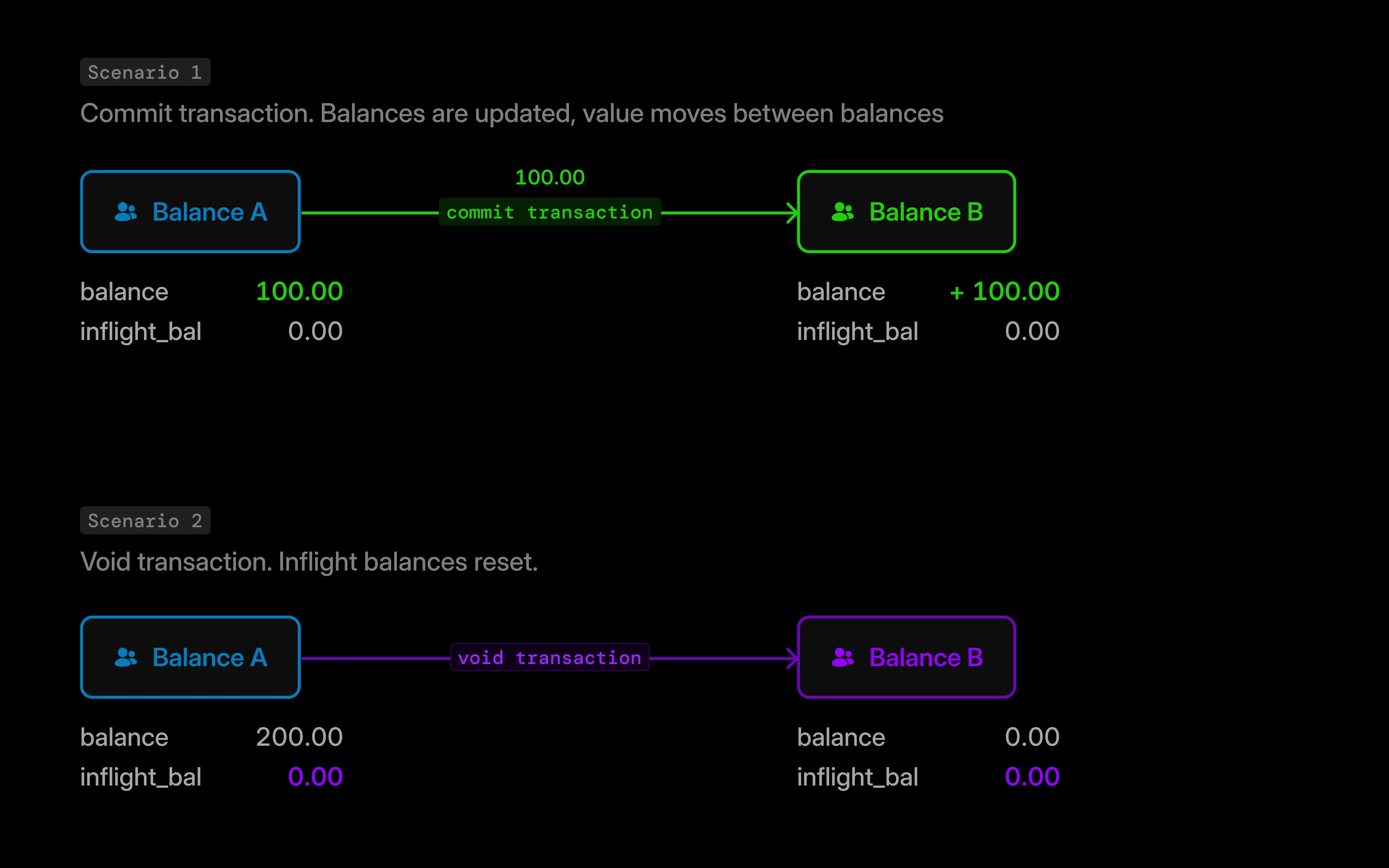 To commit or void an inflight transaction, call [Update inflight](/reference/update-inflight) with the inflight transaction ID and the desired status.
```text Update inflight theme={"system"}
PUT /transactions/inflight/{transaction_id}
```
Set `"status": "commit"` in the request body to commit the inflight transaction.
By default, Blnk queues the action for processing. If you want to skip the queue, add `"skip_queue": true` to apply the commit immediately in the same request.
```bash cURL wrap {5} theme={"system"}
curl -X PUT "http://YOUR_BLNK_INSTANCE_URL/transactions/inflight/{transaction_id}" \
-H "X-blnk-key: " \
-H "Content-Type: application/json" \
-d '{
"status": "commit",
"skip_queue": false
}'
```
```typescript TypeScript wrap {4} theme={"system"}
const response = await blnk.Transactions.updateStatus(
'{transaction_id}',
{
status: 'commit',
skip_queue: false,
},
);
```
```json 200 Queued {3,4} theme={"system"}
{
"transaction_id": "txn_6164573b-6cc8-45a4-ad2e-7b4ba6a60f7d",
"status": "INFLIGHT",
"queued": true
}
```
```json 200 Skipped queue {3,4} theme={"system"}
{
"transaction_id": "txn_a1b2c3d4-e5f6-7890-abcd-ef1234567890",
"status": "APPLIED",
"parent_transaction": "txn_6164573b-6cc8-45a4-ad2e-7b4ba6a60f7d"
}
```
Commit clears inflight balances and updates main balances. Continuing from [earlier example](/transactions/inflight/creating-inflight#inflight-balance-tracking), the \$100 inflight transaction from `balance_A` to `balance_B` after a full commit looks like this:
| `balance_id` | **Main balance** | **Inflight balance** | **Inflight credit** | **Inflight debit** |
| :----------- | :--------------- | :------------------- | :------------------ | :----------------- |
| `balance_A` | 100 | 0 | 0 | 0 |
| `balance_B` | 100 | 0 | 0 | 0 |
To commit part of the inflight transaction, set `precise_amount` to the amount you want to commit in its smallest unit. The rest stays `INFLIGHT` tracked by the inflight balance fields.
You can commit as many times as you like, but the total committed cannot exceed the original inflight amount.
For example, with a \$100 inflight transaction, you could commit \$30 three times (\$90 total); a fourth \$30 commit would fail because \$120 exceeds the original \$100 inflight amount.
```bash cURL wrap {6} theme={"system"}
curl -X PUT "http://YOUR_BLNK_INSTANCE_URL/transactions/inflight/{transaction_id}" \
-H "X-blnk-key: " \
-H "Content-Type: application/json" \
-d '{
"status": "commit",
"precise_amount": 4000,
"skip_queue": false
}'
```
```typescript TypeScript wrap {5} theme={"system"}
const response = await blnk.Transactions.updateStatus(
'{transaction_id}',
{
status: 'commit',
precise_amount: 4000,
skip_queue: false,
},
);
```
```json 200 Queued theme={"system"}
{
"transaction_id": "txn_6164573b-6cc8-45a4-ad2e-7b4ba6a60f7d",
"status": "INFLIGHT",
"queued": true
}
```
```json 200 Skipped queue {4} theme={"system"}
{
"transaction_id": "txn_b2c3d4e5-f6a7-8901-bcde-f23456789012",
"status": "APPLIED",
"amount": 40,
"parent_transaction": "txn_6164573b-6cc8-45a4-ad2e-7b4ba6a60f7d"
}
```
Continuing from the [earlier example](/transactions/inflight/creating-inflight#inflight-balance-tracking), a partial commit of \$40 from the \$100 inflight transaction leaves balances like this:
| `balance_id` | **Main balance** | **Inflight balance** | **Inflight credit** | **Inflight debit** |
| :----------- | :--------------- | :------------------- | :------------------ | :----------------- |
| `balance_A` | 160 | -60 | 0 | 60 |
| `balance_B` | 40 | 60 | 60 | 0 |
Void cancels whatever remains on the inflight transaction. If you partially committed first, void releases only the leftover - it does not take an `amount` field. Once voided, an inflight transaction cannot be committed again.
Set `"status": "void"` in the request body to cancel the inflight transaction.
By default, Blnk queues the action for processing. If you want to skip the queue, add `"skip_queue": true` to apply the void immediately in the same request.
```bash cURL wrap {5} theme={"system"}
curl -X PUT "http://YOUR_BLNK_INSTANCE_URL/transactions/inflight/{transaction_id}" \
-H "X-blnk-key: " \
-H "Content-Type: application/json" \
-d '{
"status": "void",
"skip_queue": false
}'
```
```typescript TypeScript wrap {4} theme={"system"}
const response = await blnk.Transactions.updateStatus(
'{transaction_id}',
{
status: 'void',
skip_queue: false,
},
);
```
```json 200 Queued {3,4} theme={"system"}
{
"transaction_id": "txn_6164573b-6cc8-45a4-ad2e-7b4ba6a60f7d",
"status": "INFLIGHT",
"queued": true
}
```
```json 200 Skipped queue {3,4} theme={"system"}
{
"transaction_id": "txn_c3d4e5f6-a7b8-9012-cdef-345678901234",
"status": "VOID",
"parent_transaction": "txn_6164573b-6cc8-45a4-ad2e-7b4ba6a60f7d"
}
```
Void resets inflight balances without changing settled main balances. Continuing from the [earlier example](/transactions/inflight/creating-inflight#inflight-balance-tracking), a full void on the \$100 inflight transaction leaves balances like this:
| `balance_id` | **Main balance** | **Inflight balance** | **Inflight credit** | **Inflight debit** |
| :----------- | :--------------- | :------------------- | :------------------ | :----------------- |
| `balance_A` | 200 | 0 | 0 | 0 |
| `balance_B` | 0 | 0 | 0 | 0 |
On the other hand, after a partial commit of \$40, voiding the remaining \$60 clears the leftover inflight amounts without reversing the \$40 already applied:
| `balance_id` | **Main balance** | **Inflight balance** | **Inflight credit** | **Inflight debit** |
| :----------- | :--------------- | :------------------- | :------------------ | :----------------- |
| `balance_A` | 160 | 0 | 0 | 0 |
| `balance_B` | 40 | 0 | 0 | 0 |
Blnk sends `transaction.applied` or `transaction.void` once a commit or void is finalized.
You can identify these events by matching the `QUEUED_PARENT_TRANSACTION` field in the `meta_data` of the child transaction with its original parent.
If the commit or void skipped the queue, match their `parent_transaction` against the inflight transaction ID directly.
```json transaction.applied expandable {2,4,5,14,19} theme={"system"}
{
"event": "transaction.applied",
"data": {
"transaction_id": "txn_e0f5ab98-bb87-4b09-aefe-839ddb11598b",
"parent_transaction": "txn_6164573b-6cc8-45a4-ad2e-7b4ba6a60f7d",
"precise_amount": 20000,
"amount": 200,
"precision": 100,
"source": "bln_7f91a1ae-6073-4b7a-952c-23abf94a6634",
"destination": "bln_59b83b9c-842c-427f-91eb-43cdeaf5c01a",
"reference": "ref_001adcfgf_q",
"currency": "GBP",
"description": "For vacation",
"status": "APPLIED",
"inflight": false,
"skip_queue": false,
"created_at": "2025-02-23T09:43:49.623494+01:00",
"meta_data": {
"QUEUED_PARENT_TRANSACTION": "txn_6164573b-6cc8-45a4-ad2e-7b4ba6a60f7d",
"inflight": true
}
}
}
```
You can also poll for the results with [Search](/search/db/filtering).
Filter for all `APPLIED` or `VOID` children where `meta_data.QUEUED_PARENT_TRANSACTION` matches the original inflight transaction's queued parent.
In the queued path, Blnk creates intermediate records for each commit and void. The original inflight's `QUEUED_PARENT_TRANSACTION` is copied to every child - that's your shared filter key.
Each child's `parent_transaction` points to its specific intermediate record (the queued commit or void itself), which is why those IDs differ.
```bash cURL wrap {8,9,13,14} theme={"system"}
curl -X POST "http://YOUR_BLNK_INSTANCE_URL/transactions/filter" \
-H "X-blnk-key: " \
-H "Content-Type: application/json" \
-d '{
"filters": [
{
"field": "meta_data.QUEUED_PARENT_TRANSACTION",
"operator": "eq",
"value": ""
},
{
"field": "status",
"operator": "in",
"values": ["APPLIED", "VOID"]
}
]
}'
```
```typescript TypeScript wrap theme={"system"}
const response = await blnk.Search.filter(
{
filters: [
{
field: 'meta_data.QUEUED_PARENT_TRANSACTION',
operator: 'eq',
value: '',
},
{
field: 'status',
operator: 'in',
values: ['APPLIED', 'VOID'],
},
],
},
'transactions',
);
```
```go Go wrap theme={"system"}
results, resp, err := client.Transaction.Filter(blnkgo.FilterParams{
Filters: []blnkgo.Filter{
{
Field: "meta_data.QUEUED_PARENT_TRANSACTION",
Operator: blnkgo.OpEqual,
Value: "",
},
{
Field: "status",
Operator: blnkgo.OpIn,
Values: []string{"APPLIED", "VOID"},
},
},
})
```
```json Response wrap expandable {19,39} theme={"system"}
{
"data": [
{
"transaction_id": "txn_b2c3d4e5-f6a7-8901-bcde-f23456789012",
"parent_transaction": "txn_d8f4a291-3e7c-41b6-a05d-9c2e71b48f6a",
"precise_amount": 4000,
"amount": 40,
"precision": 100,
"source": "bln_7f91a1ae-6073-4b7a-952c-23abf94a6634",
"destination": "bln_59b83b9c-842c-427f-91eb-43cdeaf5c01a",
"reference": "ref_a8c2f1d4-6b3e-4a91-9f2e-1d7c8e5b4a03_q",
"currency": "GBP",
"description": "For vacation",
"status": "APPLIED",
"inflight": false,
"skip_queue": false,
"created_at": "2025-02-23T09:44:12.183492+01:00",
"meta_data": {
"QUEUED_PARENT_TRANSACTION": "txn_6164573b-6cc8-45a4-ad2e-7b4ba6a60f7d",
"inflight": true
}
},
{
"transaction_id": "txn_c3d4e5f6-a7b8-9012-cdef-345678901234",
"parent_transaction": "txn_4a9c0e75-1b62-483f-8d31-7f6a25e903d4",
"precise_amount": 6000,
"amount": 60,
"precision": 100,
"source": "bln_7f91a1ae-6073-4b7a-952c-23abf94a6634",
"destination": "bln_59b83b9c-842c-427f-91eb-43cdeaf5c01a",
"reference": "ref_e7d61840-ecf7-45c1-a0b2-41687c7691f7_q",
"currency": "GBP",
"description": "For vacation",
"status": "VOID",
"inflight": false,
"skip_queue": false,
"created_at": "2025-02-23T09:45:03.332221+01:00",
"meta_data": {
"QUEUED_PARENT_TRANSACTION": "txn_6164573b-6cc8-45a4-ad2e-7b4ba6a60f7d",
"inflight": true
}
}
]
}
```
When you skip the queue, Blnk applies commits and voids synchronously. No intermediate queued records are created.
Both children share the same `parent_transaction`: the inflight transaction ID (txn\_6164573b-...). That becomes your filter key and the direct link to the inflight transaction.
No `QUEUED_PARENT_TRANSACTION` is present. Match outcomes on `parent_transaction` only.
```bash cURL wrap {8,9,13,14} theme={"system"}
curl -X POST "http://YOUR_BLNK_INSTANCE_URL/transactions/filter" \
-H "X-blnk-key: " \
-H "Content-Type: application/json" \
-d '{
"filters": [
{
"field": "parent_transaction",
"operator": "eq",
"value": ""
},
{
"field": "status",
"operator": "in",
"values": ["APPLIED", "VOID"]
}
]
}'
```
```typescript TypeScript wrap theme={"system"}
const response = await blnk.Search.filter(
{
filters: [
{
field: 'parent_transaction',
operator: 'eq',
value: '',
},
{
field: 'status',
operator: 'in',
values: ['APPLIED', 'VOID'],
},
],
},
'transactions',
);
```
```go Go wrap theme={"system"}
results, resp, err := client.Transaction.Filter(blnkgo.FilterParams{
Filters: []blnkgo.Filter{
{
Field: "parent_transaction",
Operator: blnkgo.OpEqual,
Value: "",
},
{
Field: "status",
Operator: blnkgo.OpIn,
Values: []string{"APPLIED", "VOID"},
},
},
})
```
```json Response wrap expandable {5,24} theme={"system"}
{
"data": [
{
"transaction_id": "txn_b2c3d4e5-f6a7-8901-bcde-f23456789012",
"parent_transaction": "txn_6164573b-6cc8-45a4-ad2e-7b4ba6a60f7d",
"precise_amount": 4000,
"amount": 40,
"precision": 100,
"source": "bln_7f91a1ae-6073-4b7a-952c-23abf94a6634",
"destination": "bln_59b83b9c-842c-427f-91eb-43cdeaf5c01a",
"reference": "ref_a8c2f1d4-6b3e-4a91-9f2e-1d7c8e5b4a03",
"currency": "GBP",
"description": "For vacation",
"status": "APPLIED",
"inflight": false,
"skip_queue": true,
"created_at": "2025-02-23T09:44:12.183492+01:00",
"meta_data": {
"inflight": true
}
},
{
"transaction_id": "txn_c3d4e5f6-a7b8-9012-cdef-345678901234",
"parent_transaction": "txn_6164573b-6cc8-45a4-ad2e-7b4ba6a60f7d",
"precise_amount": 6000,
"amount": 60,
"precision": 100,
"source": "bln_7f91a1ae-6073-4b7a-952c-23abf94a6634",
"destination": "bln_59b83b9c-842c-427f-91eb-43cdeaf5c01a",
"reference": "ref_e7d61840-ecf7-45c1-a0b2-41687c7691f7",
"currency": "GBP",
"description": "For vacation",
"status": "VOID",
"inflight": false,
"skip_queue": true,
"created_at": "2025-02-23T09:45:03.332221+01:00",
"meta_data": {
"inflight": true
}
}
]
}
```
***
## Schedule inflight commits
Available in version 0.14.1 and later.
When you create an inflight transaction, Blnk holds the balance immediately but only finalizes it when you manually send a commit or void request.
Use `inflight_commit_date` to schedule an automatic commit for a specific future time. This is useful when funds need to be reserved now but transferred later, e.g. holding a hotel deposit today and committing automatically on check-in day.
**Prerequisite:** Scheduled commits are processed through a background queue.
Before using `inflight_commit_date`, enable `BLNK_QUEUE_INFLIGHT_COMMIT` in your environment or `inflight_commit_queue` in `blnk.json`. See [Queue configuration](/advanced/configuration/queue#queue-settings).
```bash cURL wrap {13} theme={"system"}
curl -X POST "http://YOUR_BLNK_INSTANCE_URL/transactions" \
-H "X-blnk-key: " \
-H "Content-Type: application/json" \
-d '{
"precise_amount": 10000,
"precision": 100,
"reference": "ref_001adcfgf",
"currency": "USD",
"source": "bln_28edb3e5-c168-4127-a1c4-16274e7a28d3",
"destination": "bln_ebcd230f-6265-4d4a-a4ca-45974c47f746",
"description": "For vacation",
"inflight": true,
"inflight_commit_date": "2024-12-21T01:36:46+01:00"
}'
```
```typescript TypeScript wrap {10} theme={"system"}
const response = await blnk.Transactions.create({
precise_amount: 10000,
precision: 100,
reference: 'ref_001adcfgf',
currency: 'USD',
source: 'bln_28edb3e5-c168-4127-a1c4-16274e7a28d3',
destination: 'bln_ebcd230f-6265-4d4a-a4ca-45974c47f746',
description: 'For vacation',
inflight: true,
inflight_commit_date: '2024-12-21T01:36:46+01:00',
});
```
```go Go wrap {12} theme={"system"}
transaction, resp, err := client.Transaction.Create(blnkgo.CreateTransactionRequest{
ParentTransaction: blnkgo.ParentTransaction{
PreciseAmount: 10000,
Precision: 100,
Reference: "ref_001adcfgf",
Currency: "USD",
Source: "bln_28edb3e5-c168-4127-a1c4-16274e7a28d3",
Destination: "bln_ebcd230f-6265-4d4a-a4ca-45974c47f746",
Description: "For vacation",
},
Inflight: true,
InflightCommitDate: "2024-12-21T01:36:46+01:00",
})
```
Format `inflight_commit_date` as `YYYY-MM-DDTHH:MM:SS+00:00` (for example, `2024-04-22T15:28:03+00:00`), where `+00:00` is the timezone offset.
```json 201 Created wrap {3} theme={"system"}
{
"transaction_id": "txn_6164573b-6cc8-45a4-ad2e-7b4ba6a60f7d",
"status": "INFLIGHT",
"inflight": true,
"inflight_commit_date": "2024-12-21T01:36:46+01:00"
}
```
***
## Schedule inflight expiry
A transaction will always stay inflight until you commit it, void it, or it expires. Use `inflight_expiry_date` to cap how long funds can remain held.
If a transaction is still `INFLIGHT` when the expiry time passes, Blnk voids it automatically. Same outcome as a manual void. This creates a child record with `VOID` status and releases the held balance without affecting settled balances.
If you use both `inflight_commit_date` and `inflight_expiry_date`, set the commit time before the expiry. Otherwise Blnk will auto-void before the scheduled commit can run.
```bash cURL wrap {13} theme={"system"}
curl -X POST "http://YOUR_BLNK_INSTANCE_URL/transactions" \
-H "X-blnk-key: " \
-H "Content-Type: application/json" \
-d '{
"precise_amount": 10000,
"precision": 100,
"reference": "ref_001adcfgf",
"currency": "USD",
"source": "bln_28edb3e5-c168-4127-a1c4-16274e7a28d3",
"destination": "bln_ebcd230f-6265-4d4a-a4ca-45974c47f746",
"description": "For vacation",
"inflight": true,
"inflight_expiry_date": "2024-12-21T01:36:46+01:00"
}'
```
```typescript TypeScript wrap {10} theme={"system"}
const response = await blnk.Transactions.create({
precise_amount: 10000,
precision: 100,
reference: 'ref_001adcfgf',
currency: 'USD',
source: 'bln_28edb3e5-c168-4127-a1c4-16274e7a28d3',
destination: 'bln_ebcd230f-6265-4d4a-a4ca-45974c47f746',
description: 'For vacation',
inflight: true,
inflight_expiry_date: '2024-12-21T01:36:46+01:00',
});
```
```go Go wrap {12} theme={"system"}
transaction, resp, err := client.Transaction.Create(blnkgo.CreateTransactionRequest{
ParentTransaction: blnkgo.ParentTransaction{
PreciseAmount: 10000,
Precision: 100,
Reference: "ref_001adcfgf",
Currency: "USD",
Source: "bln_28edb3e5-c168-4127-a1c4-16274e7a28d3",
Destination: "bln_ebcd230f-6265-4d4a-a4ca-45974c47f746",
Description: "For vacation",
},
Inflight: true,
InflightExpiryDate: "2024-12-21T01:36:46+01:00",
})
```
```json 201 Created wrap {3} theme={"system"}
{
"transaction_id": "txn_6164573b-6cc8-45a4-ad2e-7b4ba6a60f7d",
"status": "INFLIGHT",
"inflight": true,
"inflight_expiry_date": "2024-12-21T01:36:46+01:00"
}
```
Format `inflight_expiry_date` as `YYYY-MM-DDTHH:MM:SS+00:00` (for example, `2024-04-22T15:28:03+00:00`), where `+00:00` is the timezone offset.
***
## Error handling
Structured errors are available from Blnk Core 0.15.0 and later.
[Update inflight](/reference/update-inflight) returns `400`, `404`, and `409` responses when a commit or void request fails validation or conflicts with the inflight transaction's current state.
On the default queued path, Blnk rejects duplicate commit or void requests before enqueueing a second job. With `skip_queue: true`, Blnk validates synchronously and returns errors immediately.
| Code | When it happens |
| :--------------------------- | :----------------------------------------------------------- |
| `GEN_CONFLICT` | Commit or void already queued for this inflight transaction. |
| `TXN_COMMIT_AMOUNT_EXCEEDED` | Partial commit exceeds remaining inflight amount. |
| `TXN_ALREADY_COMMITTED` | You try to void a fully committed inflight transaction. |
| `TXN_ALREADY_VOIDED` | You try to commit a voided inflight transaction. |
| `TXN_NOT_INFLIGHT` | Transaction is not `INFLIGHT`. |
| `TXN_INVALID_STATUS_ACTION` | `status` is not `commit` or `void`. |
| `TXN_NOT_FOUND` | Transaction ID does not exist. |
```json 409 Conflict wrap theme={"system"}
{
"error": "a commit or void is already queued for this transaction",
"error_detail": {
"code": "GEN_CONFLICT",
"message": "a commit or void is already queued for this transaction"
}
}
```
To resolve the error:
| Code | What to do |
| :--------------------------- | :-------------------------------------------------------------------------------------------------------------------------------------------------------- |
| `GEN_CONFLICT` | Wait for the queued job to finish, or [verify the outcome](/transactions/inflight/updating-inflight#verify-with-webhooks) before sending another request. |
| `TXN_COMMIT_AMOUNT_EXCEEDED` | Lower the partial commit `amount` to the remaining inflight amount, or commit the full remainder. |
| `TXN_ALREADY_COMMITTED` | Treat the inflight transaction as finished; do not void unless you need a [refund](/transactions/refunds). |
| `TXN_ALREADY_VOIDED` | Treat the inflight transaction as cancelled; do not commit. |
| `TXN_NOT_INFLIGHT` | Confirm you are using the original inflight transaction ID, not an `APPLIED` or `VOID` child. |
| `TXN_INVALID_STATUS_ACTION` | Set `status` to `commit` or `void`. |
| `TXN_NOT_FOUND` | Verify the transaction ID and that the inflight transaction was created successfully. |
See [API error codes](/advanced/error-codes) for the full catalogue. Request and response field details are on [Update inflight](/reference/update-inflight).
***
## Related docs
Record an inflight transaction.
Commit or void many inflight transactions at once.
Inflight ID rules for refunds.
Statuses from creation through completion.
***
## Need help?
We are very happy to help you make the most of Blnk, regardless of whether it is your first time or you are switching from another tool.
To ask questions or discuss issues, please [contact us](mailto:support@blnkfinance.com) or [join our Discord community](https://discord.gg/7WNv94zPpx).
Sign up and manage your ledger with our back-office dashboard. You can invite teammates to collaborate and manage your ledger operations directly from the dashboard.
To commit or void an inflight transaction, call [Update inflight](/reference/update-inflight) with the inflight transaction ID and the desired status.
```text Update inflight theme={"system"}
PUT /transactions/inflight/{transaction_id}
```
Set `"status": "commit"` in the request body to commit the inflight transaction.
By default, Blnk queues the action for processing. If you want to skip the queue, add `"skip_queue": true` to apply the commit immediately in the same request.
```bash cURL wrap {5} theme={"system"}
curl -X PUT "http://YOUR_BLNK_INSTANCE_URL/transactions/inflight/{transaction_id}" \
-H "X-blnk-key: " \
-H "Content-Type: application/json" \
-d '{
"status": "commit",
"skip_queue": false
}'
```
```typescript TypeScript wrap {4} theme={"system"}
const response = await blnk.Transactions.updateStatus(
'{transaction_id}',
{
status: 'commit',
skip_queue: false,
},
);
```
```json 200 Queued {3,4} theme={"system"}
{
"transaction_id": "txn_6164573b-6cc8-45a4-ad2e-7b4ba6a60f7d",
"status": "INFLIGHT",
"queued": true
}
```
```json 200 Skipped queue {3,4} theme={"system"}
{
"transaction_id": "txn_a1b2c3d4-e5f6-7890-abcd-ef1234567890",
"status": "APPLIED",
"parent_transaction": "txn_6164573b-6cc8-45a4-ad2e-7b4ba6a60f7d"
}
```
Commit clears inflight balances and updates main balances. Continuing from [earlier example](/transactions/inflight/creating-inflight#inflight-balance-tracking), the \$100 inflight transaction from `balance_A` to `balance_B` after a full commit looks like this:
| `balance_id` | **Main balance** | **Inflight balance** | **Inflight credit** | **Inflight debit** |
| :----------- | :--------------- | :------------------- | :------------------ | :----------------- |
| `balance_A` | 100 | 0 | 0 | 0 |
| `balance_B` | 100 | 0 | 0 | 0 |
To commit part of the inflight transaction, set `precise_amount` to the amount you want to commit in its smallest unit. The rest stays `INFLIGHT` tracked by the inflight balance fields.
You can commit as many times as you like, but the total committed cannot exceed the original inflight amount.
For example, with a \$100 inflight transaction, you could commit \$30 three times (\$90 total); a fourth \$30 commit would fail because \$120 exceeds the original \$100 inflight amount.
```bash cURL wrap {6} theme={"system"}
curl -X PUT "http://YOUR_BLNK_INSTANCE_URL/transactions/inflight/{transaction_id}" \
-H "X-blnk-key: " \
-H "Content-Type: application/json" \
-d '{
"status": "commit",
"precise_amount": 4000,
"skip_queue": false
}'
```
```typescript TypeScript wrap {5} theme={"system"}
const response = await blnk.Transactions.updateStatus(
'{transaction_id}',
{
status: 'commit',
precise_amount: 4000,
skip_queue: false,
},
);
```
```json 200 Queued theme={"system"}
{
"transaction_id": "txn_6164573b-6cc8-45a4-ad2e-7b4ba6a60f7d",
"status": "INFLIGHT",
"queued": true
}
```
```json 200 Skipped queue {4} theme={"system"}
{
"transaction_id": "txn_b2c3d4e5-f6a7-8901-bcde-f23456789012",
"status": "APPLIED",
"amount": 40,
"parent_transaction": "txn_6164573b-6cc8-45a4-ad2e-7b4ba6a60f7d"
}
```
Continuing from the [earlier example](/transactions/inflight/creating-inflight#inflight-balance-tracking), a partial commit of \$40 from the \$100 inflight transaction leaves balances like this:
| `balance_id` | **Main balance** | **Inflight balance** | **Inflight credit** | **Inflight debit** |
| :----------- | :--------------- | :------------------- | :------------------ | :----------------- |
| `balance_A` | 160 | -60 | 0 | 60 |
| `balance_B` | 40 | 60 | 60 | 0 |
Void cancels whatever remains on the inflight transaction. If you partially committed first, void releases only the leftover - it does not take an `amount` field. Once voided, an inflight transaction cannot be committed again.
Set `"status": "void"` in the request body to cancel the inflight transaction.
By default, Blnk queues the action for processing. If you want to skip the queue, add `"skip_queue": true` to apply the void immediately in the same request.
```bash cURL wrap {5} theme={"system"}
curl -X PUT "http://YOUR_BLNK_INSTANCE_URL/transactions/inflight/{transaction_id}" \
-H "X-blnk-key: " \
-H "Content-Type: application/json" \
-d '{
"status": "void",
"skip_queue": false
}'
```
```typescript TypeScript wrap {4} theme={"system"}
const response = await blnk.Transactions.updateStatus(
'{transaction_id}',
{
status: 'void',
skip_queue: false,
},
);
```
```json 200 Queued {3,4} theme={"system"}
{
"transaction_id": "txn_6164573b-6cc8-45a4-ad2e-7b4ba6a60f7d",
"status": "INFLIGHT",
"queued": true
}
```
```json 200 Skipped queue {3,4} theme={"system"}
{
"transaction_id": "txn_c3d4e5f6-a7b8-9012-cdef-345678901234",
"status": "VOID",
"parent_transaction": "txn_6164573b-6cc8-45a4-ad2e-7b4ba6a60f7d"
}
```
Void resets inflight balances without changing settled main balances. Continuing from the [earlier example](/transactions/inflight/creating-inflight#inflight-balance-tracking), a full void on the \$100 inflight transaction leaves balances like this:
| `balance_id` | **Main balance** | **Inflight balance** | **Inflight credit** | **Inflight debit** |
| :----------- | :--------------- | :------------------- | :------------------ | :----------------- |
| `balance_A` | 200 | 0 | 0 | 0 |
| `balance_B` | 0 | 0 | 0 | 0 |
On the other hand, after a partial commit of \$40, voiding the remaining \$60 clears the leftover inflight amounts without reversing the \$40 already applied:
| `balance_id` | **Main balance** | **Inflight balance** | **Inflight credit** | **Inflight debit** |
| :----------- | :--------------- | :------------------- | :------------------ | :----------------- |
| `balance_A` | 160 | 0 | 0 | 0 |
| `balance_B` | 40 | 0 | 0 | 0 |
Blnk sends `transaction.applied` or `transaction.void` once a commit or void is finalized.
You can identify these events by matching the `QUEUED_PARENT_TRANSACTION` field in the `meta_data` of the child transaction with its original parent.
If the commit or void skipped the queue, match their `parent_transaction` against the inflight transaction ID directly.
```json transaction.applied expandable {2,4,5,14,19} theme={"system"}
{
"event": "transaction.applied",
"data": {
"transaction_id": "txn_e0f5ab98-bb87-4b09-aefe-839ddb11598b",
"parent_transaction": "txn_6164573b-6cc8-45a4-ad2e-7b4ba6a60f7d",
"precise_amount": 20000,
"amount": 200,
"precision": 100,
"source": "bln_7f91a1ae-6073-4b7a-952c-23abf94a6634",
"destination": "bln_59b83b9c-842c-427f-91eb-43cdeaf5c01a",
"reference": "ref_001adcfgf_q",
"currency": "GBP",
"description": "For vacation",
"status": "APPLIED",
"inflight": false,
"skip_queue": false,
"created_at": "2025-02-23T09:43:49.623494+01:00",
"meta_data": {
"QUEUED_PARENT_TRANSACTION": "txn_6164573b-6cc8-45a4-ad2e-7b4ba6a60f7d",
"inflight": true
}
}
}
```
You can also poll for the results with [Search](/search/db/filtering).
Filter for all `APPLIED` or `VOID` children where `meta_data.QUEUED_PARENT_TRANSACTION` matches the original inflight transaction's queued parent.
In the queued path, Blnk creates intermediate records for each commit and void. The original inflight's `QUEUED_PARENT_TRANSACTION` is copied to every child - that's your shared filter key.
Each child's `parent_transaction` points to its specific intermediate record (the queued commit or void itself), which is why those IDs differ.
```bash cURL wrap {8,9,13,14} theme={"system"}
curl -X POST "http://YOUR_BLNK_INSTANCE_URL/transactions/filter" \
-H "X-blnk-key: " \
-H "Content-Type: application/json" \
-d '{
"filters": [
{
"field": "meta_data.QUEUED_PARENT_TRANSACTION",
"operator": "eq",
"value": ""
},
{
"field": "status",
"operator": "in",
"values": ["APPLIED", "VOID"]
}
]
}'
```
```typescript TypeScript wrap theme={"system"}
const response = await blnk.Search.filter(
{
filters: [
{
field: 'meta_data.QUEUED_PARENT_TRANSACTION',
operator: 'eq',
value: '',
},
{
field: 'status',
operator: 'in',
values: ['APPLIED', 'VOID'],
},
],
},
'transactions',
);
```
```go Go wrap theme={"system"}
results, resp, err := client.Transaction.Filter(blnkgo.FilterParams{
Filters: []blnkgo.Filter{
{
Field: "meta_data.QUEUED_PARENT_TRANSACTION",
Operator: blnkgo.OpEqual,
Value: "",
},
{
Field: "status",
Operator: blnkgo.OpIn,
Values: []string{"APPLIED", "VOID"},
},
},
})
```
```json Response wrap expandable {19,39} theme={"system"}
{
"data": [
{
"transaction_id": "txn_b2c3d4e5-f6a7-8901-bcde-f23456789012",
"parent_transaction": "txn_d8f4a291-3e7c-41b6-a05d-9c2e71b48f6a",
"precise_amount": 4000,
"amount": 40,
"precision": 100,
"source": "bln_7f91a1ae-6073-4b7a-952c-23abf94a6634",
"destination": "bln_59b83b9c-842c-427f-91eb-43cdeaf5c01a",
"reference": "ref_a8c2f1d4-6b3e-4a91-9f2e-1d7c8e5b4a03_q",
"currency": "GBP",
"description": "For vacation",
"status": "APPLIED",
"inflight": false,
"skip_queue": false,
"created_at": "2025-02-23T09:44:12.183492+01:00",
"meta_data": {
"QUEUED_PARENT_TRANSACTION": "txn_6164573b-6cc8-45a4-ad2e-7b4ba6a60f7d",
"inflight": true
}
},
{
"transaction_id": "txn_c3d4e5f6-a7b8-9012-cdef-345678901234",
"parent_transaction": "txn_4a9c0e75-1b62-483f-8d31-7f6a25e903d4",
"precise_amount": 6000,
"amount": 60,
"precision": 100,
"source": "bln_7f91a1ae-6073-4b7a-952c-23abf94a6634",
"destination": "bln_59b83b9c-842c-427f-91eb-43cdeaf5c01a",
"reference": "ref_e7d61840-ecf7-45c1-a0b2-41687c7691f7_q",
"currency": "GBP",
"description": "For vacation",
"status": "VOID",
"inflight": false,
"skip_queue": false,
"created_at": "2025-02-23T09:45:03.332221+01:00",
"meta_data": {
"QUEUED_PARENT_TRANSACTION": "txn_6164573b-6cc8-45a4-ad2e-7b4ba6a60f7d",
"inflight": true
}
}
]
}
```
When you skip the queue, Blnk applies commits and voids synchronously. No intermediate queued records are created.
Both children share the same `parent_transaction`: the inflight transaction ID (txn\_6164573b-...). That becomes your filter key and the direct link to the inflight transaction.
No `QUEUED_PARENT_TRANSACTION` is present. Match outcomes on `parent_transaction` only.
```bash cURL wrap {8,9,13,14} theme={"system"}
curl -X POST "http://YOUR_BLNK_INSTANCE_URL/transactions/filter" \
-H "X-blnk-key: " \
-H "Content-Type: application/json" \
-d '{
"filters": [
{
"field": "parent_transaction",
"operator": "eq",
"value": ""
},
{
"field": "status",
"operator": "in",
"values": ["APPLIED", "VOID"]
}
]
}'
```
```typescript TypeScript wrap theme={"system"}
const response = await blnk.Search.filter(
{
filters: [
{
field: 'parent_transaction',
operator: 'eq',
value: '',
},
{
field: 'status',
operator: 'in',
values: ['APPLIED', 'VOID'],
},
],
},
'transactions',
);
```
```go Go wrap theme={"system"}
results, resp, err := client.Transaction.Filter(blnkgo.FilterParams{
Filters: []blnkgo.Filter{
{
Field: "parent_transaction",
Operator: blnkgo.OpEqual,
Value: "",
},
{
Field: "status",
Operator: blnkgo.OpIn,
Values: []string{"APPLIED", "VOID"},
},
},
})
```
```json Response wrap expandable {5,24} theme={"system"}
{
"data": [
{
"transaction_id": "txn_b2c3d4e5-f6a7-8901-bcde-f23456789012",
"parent_transaction": "txn_6164573b-6cc8-45a4-ad2e-7b4ba6a60f7d",
"precise_amount": 4000,
"amount": 40,
"precision": 100,
"source": "bln_7f91a1ae-6073-4b7a-952c-23abf94a6634",
"destination": "bln_59b83b9c-842c-427f-91eb-43cdeaf5c01a",
"reference": "ref_a8c2f1d4-6b3e-4a91-9f2e-1d7c8e5b4a03",
"currency": "GBP",
"description": "For vacation",
"status": "APPLIED",
"inflight": false,
"skip_queue": true,
"created_at": "2025-02-23T09:44:12.183492+01:00",
"meta_data": {
"inflight": true
}
},
{
"transaction_id": "txn_c3d4e5f6-a7b8-9012-cdef-345678901234",
"parent_transaction": "txn_6164573b-6cc8-45a4-ad2e-7b4ba6a60f7d",
"precise_amount": 6000,
"amount": 60,
"precision": 100,
"source": "bln_7f91a1ae-6073-4b7a-952c-23abf94a6634",
"destination": "bln_59b83b9c-842c-427f-91eb-43cdeaf5c01a",
"reference": "ref_e7d61840-ecf7-45c1-a0b2-41687c7691f7",
"currency": "GBP",
"description": "For vacation",
"status": "VOID",
"inflight": false,
"skip_queue": true,
"created_at": "2025-02-23T09:45:03.332221+01:00",
"meta_data": {
"inflight": true
}
}
]
}
```
***
## Schedule inflight commits
Available in version 0.14.1 and later.
When you create an inflight transaction, Blnk holds the balance immediately but only finalizes it when you manually send a commit or void request.
Use `inflight_commit_date` to schedule an automatic commit for a specific future time. This is useful when funds need to be reserved now but transferred later, e.g. holding a hotel deposit today and committing automatically on check-in day.
**Prerequisite:** Scheduled commits are processed through a background queue.
Before using `inflight_commit_date`, enable `BLNK_QUEUE_INFLIGHT_COMMIT` in your environment or `inflight_commit_queue` in `blnk.json`. See [Queue configuration](/advanced/configuration/queue#queue-settings).
```bash cURL wrap {13} theme={"system"}
curl -X POST "http://YOUR_BLNK_INSTANCE_URL/transactions" \
-H "X-blnk-key: " \
-H "Content-Type: application/json" \
-d '{
"precise_amount": 10000,
"precision": 100,
"reference": "ref_001adcfgf",
"currency": "USD",
"source": "bln_28edb3e5-c168-4127-a1c4-16274e7a28d3",
"destination": "bln_ebcd230f-6265-4d4a-a4ca-45974c47f746",
"description": "For vacation",
"inflight": true,
"inflight_commit_date": "2024-12-21T01:36:46+01:00"
}'
```
```typescript TypeScript wrap {10} theme={"system"}
const response = await blnk.Transactions.create({
precise_amount: 10000,
precision: 100,
reference: 'ref_001adcfgf',
currency: 'USD',
source: 'bln_28edb3e5-c168-4127-a1c4-16274e7a28d3',
destination: 'bln_ebcd230f-6265-4d4a-a4ca-45974c47f746',
description: 'For vacation',
inflight: true,
inflight_commit_date: '2024-12-21T01:36:46+01:00',
});
```
```go Go wrap {12} theme={"system"}
transaction, resp, err := client.Transaction.Create(blnkgo.CreateTransactionRequest{
ParentTransaction: blnkgo.ParentTransaction{
PreciseAmount: 10000,
Precision: 100,
Reference: "ref_001adcfgf",
Currency: "USD",
Source: "bln_28edb3e5-c168-4127-a1c4-16274e7a28d3",
Destination: "bln_ebcd230f-6265-4d4a-a4ca-45974c47f746",
Description: "For vacation",
},
Inflight: true,
InflightCommitDate: "2024-12-21T01:36:46+01:00",
})
```
Format `inflight_commit_date` as `YYYY-MM-DDTHH:MM:SS+00:00` (for example, `2024-04-22T15:28:03+00:00`), where `+00:00` is the timezone offset.
```json 201 Created wrap {3} theme={"system"}
{
"transaction_id": "txn_6164573b-6cc8-45a4-ad2e-7b4ba6a60f7d",
"status": "INFLIGHT",
"inflight": true,
"inflight_commit_date": "2024-12-21T01:36:46+01:00"
}
```
***
## Schedule inflight expiry
A transaction will always stay inflight until you commit it, void it, or it expires. Use `inflight_expiry_date` to cap how long funds can remain held.
If a transaction is still `INFLIGHT` when the expiry time passes, Blnk voids it automatically. Same outcome as a manual void. This creates a child record with `VOID` status and releases the held balance without affecting settled balances.
If you use both `inflight_commit_date` and `inflight_expiry_date`, set the commit time before the expiry. Otherwise Blnk will auto-void before the scheduled commit can run.
```bash cURL wrap {13} theme={"system"}
curl -X POST "http://YOUR_BLNK_INSTANCE_URL/transactions" \
-H "X-blnk-key: " \
-H "Content-Type: application/json" \
-d '{
"precise_amount": 10000,
"precision": 100,
"reference": "ref_001adcfgf",
"currency": "USD",
"source": "bln_28edb3e5-c168-4127-a1c4-16274e7a28d3",
"destination": "bln_ebcd230f-6265-4d4a-a4ca-45974c47f746",
"description": "For vacation",
"inflight": true,
"inflight_expiry_date": "2024-12-21T01:36:46+01:00"
}'
```
```typescript TypeScript wrap {10} theme={"system"}
const response = await blnk.Transactions.create({
precise_amount: 10000,
precision: 100,
reference: 'ref_001adcfgf',
currency: 'USD',
source: 'bln_28edb3e5-c168-4127-a1c4-16274e7a28d3',
destination: 'bln_ebcd230f-6265-4d4a-a4ca-45974c47f746',
description: 'For vacation',
inflight: true,
inflight_expiry_date: '2024-12-21T01:36:46+01:00',
});
```
```go Go wrap {12} theme={"system"}
transaction, resp, err := client.Transaction.Create(blnkgo.CreateTransactionRequest{
ParentTransaction: blnkgo.ParentTransaction{
PreciseAmount: 10000,
Precision: 100,
Reference: "ref_001adcfgf",
Currency: "USD",
Source: "bln_28edb3e5-c168-4127-a1c4-16274e7a28d3",
Destination: "bln_ebcd230f-6265-4d4a-a4ca-45974c47f746",
Description: "For vacation",
},
Inflight: true,
InflightExpiryDate: "2024-12-21T01:36:46+01:00",
})
```
```json 201 Created wrap {3} theme={"system"}
{
"transaction_id": "txn_6164573b-6cc8-45a4-ad2e-7b4ba6a60f7d",
"status": "INFLIGHT",
"inflight": true,
"inflight_expiry_date": "2024-12-21T01:36:46+01:00"
}
```
Format `inflight_expiry_date` as `YYYY-MM-DDTHH:MM:SS+00:00` (for example, `2024-04-22T15:28:03+00:00`), where `+00:00` is the timezone offset.
***
## Error handling
Structured errors are available from Blnk Core 0.15.0 and later.
[Update inflight](/reference/update-inflight) returns `400`, `404`, and `409` responses when a commit or void request fails validation or conflicts with the inflight transaction's current state.
On the default queued path, Blnk rejects duplicate commit or void requests before enqueueing a second job. With `skip_queue: true`, Blnk validates synchronously and returns errors immediately.
| Code | When it happens |
| :--------------------------- | :----------------------------------------------------------- |
| `GEN_CONFLICT` | Commit or void already queued for this inflight transaction. |
| `TXN_COMMIT_AMOUNT_EXCEEDED` | Partial commit exceeds remaining inflight amount. |
| `TXN_ALREADY_COMMITTED` | You try to void a fully committed inflight transaction. |
| `TXN_ALREADY_VOIDED` | You try to commit a voided inflight transaction. |
| `TXN_NOT_INFLIGHT` | Transaction is not `INFLIGHT`. |
| `TXN_INVALID_STATUS_ACTION` | `status` is not `commit` or `void`. |
| `TXN_NOT_FOUND` | Transaction ID does not exist. |
```json 409 Conflict wrap theme={"system"}
{
"error": "a commit or void is already queued for this transaction",
"error_detail": {
"code": "GEN_CONFLICT",
"message": "a commit or void is already queued for this transaction"
}
}
```
To resolve the error:
| Code | What to do |
| :--------------------------- | :-------------------------------------------------------------------------------------------------------------------------------------------------------- |
| `GEN_CONFLICT` | Wait for the queued job to finish, or [verify the outcome](/transactions/inflight/updating-inflight#verify-with-webhooks) before sending another request. |
| `TXN_COMMIT_AMOUNT_EXCEEDED` | Lower the partial commit `amount` to the remaining inflight amount, or commit the full remainder. |
| `TXN_ALREADY_COMMITTED` | Treat the inflight transaction as finished; do not void unless you need a [refund](/transactions/refunds). |
| `TXN_ALREADY_VOIDED` | Treat the inflight transaction as cancelled; do not commit. |
| `TXN_NOT_INFLIGHT` | Confirm you are using the original inflight transaction ID, not an `APPLIED` or `VOID` child. |
| `TXN_INVALID_STATUS_ACTION` | Set `status` to `commit` or `void`. |
| `TXN_NOT_FOUND` | Verify the transaction ID and that the inflight transaction was created successfully. |
See [API error codes](/advanced/error-codes) for the full catalogue. Request and response field details are on [Update inflight](/reference/update-inflight).
***
## Related docs
Record an inflight transaction.
Commit or void many inflight transactions at once.
Inflight ID rules for refunds.
Statuses from creation through completion.
***
## Need help?
We are very happy to help you make the most of Blnk, regardless of whether it is your first time or you are switching from another tool.
To ask questions or discuss issues, please [contact us](mailto:support@blnkfinance.com) or [join our Discord community](https://discord.gg/7WNv94zPpx).
Sign up and manage your ledger with our back-office dashboard. You can invite teammates to collaborate and manage your ledger operations directly from the dashboard.