> ## Documentation Index
> Fetch the complete documentation index at: https://docs.blnkfinance.com/llms.txt
> Use this file to discover all available pages before exploring further.
# Create Inflight Transactions
> Record an inflight transaction and understand how pending amounts affect balances.
export const CtaCallout = props => {
const {title, buttonLabel, href, trackingEvent, buttonTarget, rel = "noopener noreferrer", children} = props;
const handleCtaClick = () => {
if (typeof window === "undefined" || !trackingEvent) {
return;
}
try {
window.dispatchEvent(new CustomEvent("blnk:docs-cta", {
detail: {
name: trackingEvent,
href
}
}));
} catch {}
try {
window.posthog?.capture?.(trackingEvent, {
href
});
} catch {}
const gaPayload = {
cta_href: href
};
try {
window.gtag?.("event", trackingEvent, gaPayload);
} catch {}
try {
window.dataLayer = window.dataLayer || [];
window.dataLayer.push({
event: trackingEvent,
...gaPayload
});
} catch {}
};
const isExternal = typeof href === "string" && (/^https?:\/\//i).test(href);
const target = buttonTarget ?? (isExternal ? "_blank" : undefined);
const linkRel = isExternal ? rel : undefined;
return ;
};
Available in version 0.6.0 and later.
An inflight transaction reserves funds until you commit or void it. When you set `inflight: true`, Blnk tracks pending amounts in separate inflight balance fields while your settled balances stay unchanged.
Use inflight when you need authorization, verification, or external confirmation before applying a transfer.
Blnk, by default, includes inflight debit amounts (money reserved to be deducted from the source balance) when checking available funds on the source balance (`balance - inflight_debit_balance`). See [Managing insufficient funds](/transactions/introduction#managing-insufficient-funds).
***
## Use cases
Useful applications for `inflight` include:
* **KYC limits:** Hold deposits inflight until the user's KYC tier is updated.
* **[Escrow](/resources/examples/escrow):** Show users an amount being held without making it spendable.
* **Card payouts:** Hold funds until the payment processor authorizes the charge.
* **External payouts:** Hold funds while a provider processes the payout; commit or void based on the outcome.
***
## Create an inflight transaction
Set `inflight: true` on a standard [Create transaction](/reference/create-transaction) request:
```bash cURL wrap {12} theme={"system"}
curl -X POST "http://YOUR_BLNK_INSTANCE_URL/transactions" \
-H "X-blnk-key: " \
-H "Content-Type: application/json" \
-d '{
"precise_amount": 10000,
"precision": 100,
"reference": "ref_001adcfgf",
"currency": "USD",
"source": "bln_28edb3e5-c168-4127-a1c4-16274e7a28d3",
"destination": "bln_ebcd230f-6265-4d4a-a4ca-45974c47f746",
"description": "For vacation",
"inflight": true
}'
```
```typescript TypeScript wrap {9} theme={"system"}
const response = await blnk.Transactions.create({
precise_amount: 10000,
precision: 100,
reference: 'ref_001adcfgf',
currency: 'USD',
source: 'bln_28edb3e5-c168-4127-a1c4-16274e7a28d3',
destination: 'bln_ebcd230f-6265-4d4a-a4ca-45974c47f746',
description: 'For vacation',
inflight: true,
});
```
```go Go wrap {11} theme={"system"}
transaction, resp, err := client.Transaction.Create(blnkgo.CreateTransactionRequest{
ParentTransaction: blnkgo.ParentTransaction{
PreciseAmount: 10000,
Reference: "ref_001adcfgf",
Currency: "USD",
Precision: 100,
Source: "bln_28edb3e5-c168-4127-a1c4-16274e7a28d3",
Destination: "bln_ebcd230f-6265-4d4a-a4ca-45974c47f746",
Description: "For vacation",
},
Inflight: true,
})
```
```json 201 Created wrap {4,5} theme={"system"}
{
"amount": 100,
"transaction_id": "txn_6164573b-6cc8-45a4-ad2e-7b4ba6a60f7d",
"status": "INFLIGHT",
"inflight": true,
"created_at": "2024-12-21T01:36:46.997063436Z"
}
```
With the default queue enabled, Blnk first records the transaction as `QUEUED`, then moves it to `INFLIGHT` when the worker processes it. See [Transaction lifecycle](/transactions/transaction-lifecycle).
Blnk tracks pending inflight amounts with three fields on each balance. For the full list of balance parameters, see [Balance parameters](/balances/introduction).
```text wrap theme={"system"}
inflight_credit_balance: Pending credits awaiting processing
inflight_debit_balance: Pending debits awaiting processing
inflight_balance: inflight (credit - debit)
```
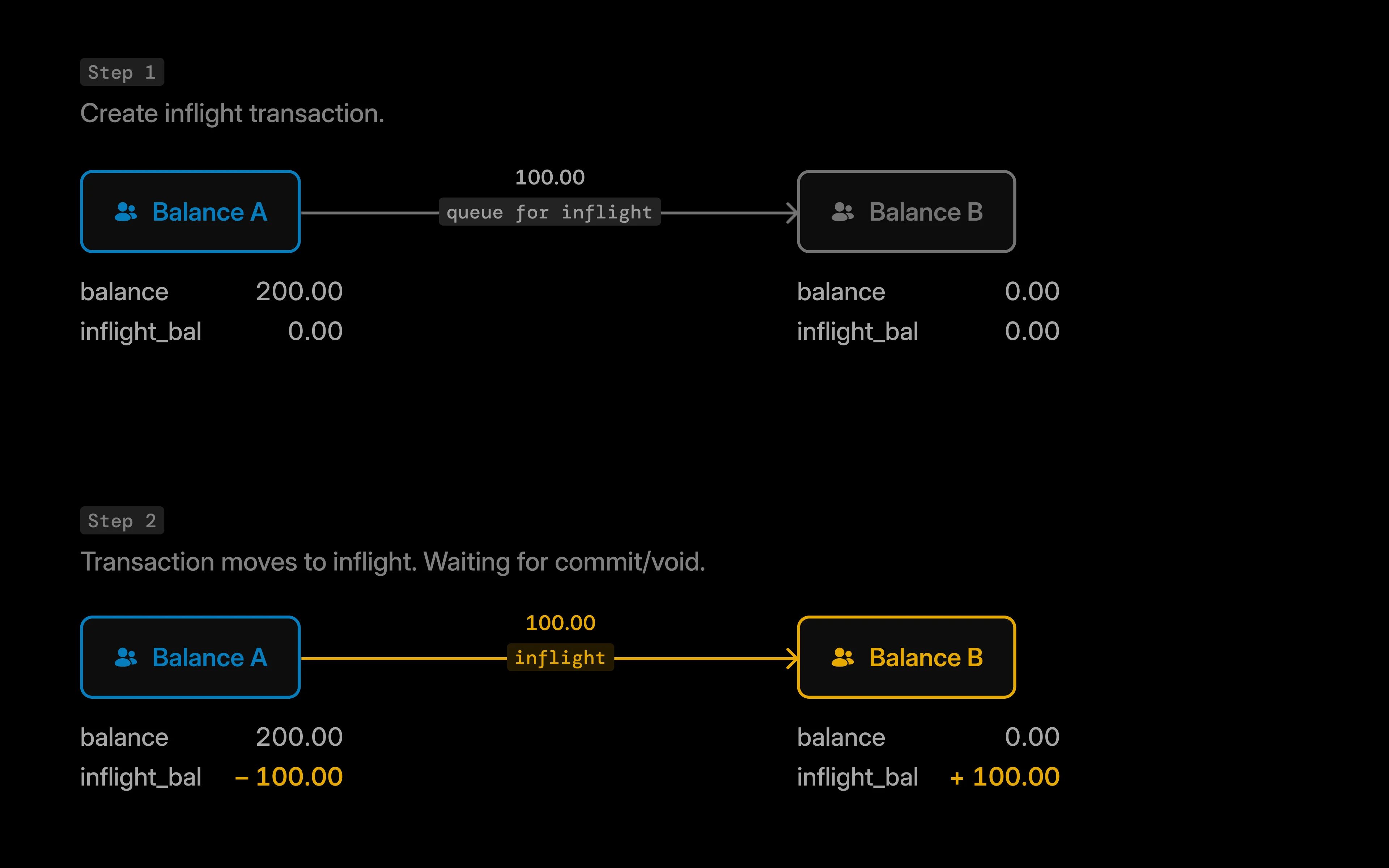 **For example:** consider an inflight transaction where \$100 is transferred from `balance_A` to `balance_B`:
```text wrap theme={"system"}
Initial State:
balance_A: $200 available funds
balance_B: $0 available funds
Transaction Amount: $100
```
| `balance_id` | **Main balance** | **Inflight balance** | **Inflight credit** | **Inflight debit** |
| :----------- | :--------------- | :------------------- | :------------------ | :----------------- |
| `balance_A` | 200 | -100 | 0 | 100 |
| `balance_B` | 0 | 100 | 100 | 0 |
In this scenario:
* `balance_A` shows a negative inflight balance (-100) because funds are pending outflow.
* `balance_B` shows a positive inflight balance (100) because funds are pending inflow.
The main balances remain unchanged until you commit or void the inflight transaction.
Commit, void, or verify your inflight transaction.
***
## Error handling
Structured errors are available from Blnk Core 0.15.0 and later.
Create transaction returns `400` when the request body fails validation before Blnk records an inflight transaction.
| Code | When it happens |
| :---------------------- | :--------------------------------------------------------------------------------------- |
| `TXN_VALIDATION_ERROR` | Required fields are missing or invalid (for example both `amount` and `precise_amount`). |
| `GEN_MALFORMED_REQUEST` | The JSON body is malformed or exceeds the request size limit. |
```json 400 Bad Request wrap theme={"system"}
{
"error_detail": {
"code": "TXN_VALIDATION_ERROR",
"message": "amount: cannot be blank."
},
"errors": "amount: cannot be blank."
}
```
To resolve the error:
| Code | What to do |
| :---------------------- | :------------------------------------------------------------------------------------------------------- |
| `TXN_VALIDATION_ERROR` | Fix the field named in the error message. See [Create transaction](/reference/create-transaction). |
| `GEN_MALFORMED_REQUEST` | Check JSON syntax and request size limits in [Server security](/advanced/configuration/server-security). |
When the source balance has insufficient funds, Blnk records a `REJECTED` transaction instead of returning an HTTP error. See [Managing insufficient funds](/transactions/introduction#managing-insufficient-funds).
Commit and void errors are covered in [Commit & void inflight - Error handling](/transactions/inflight/updating-inflight#error-handling). See [API error codes](/advanced/error-codes) for the full catalogue.
***
## Related docs
Commit, void, and verify inflight transactions.
Commit or void many inflight transactions at once.
Inflight across multiple sources or destinations.
Statuses from creation through completion.
***
## Need help?
We are very happy to help you make the most of Blnk, regardless of whether it is your first time or you are switching from another tool.
To ask questions or discuss issues, please [contact us](mailto:support@blnkfinance.com) or [join our Discord community](https://discord.gg/7WNv94zPpx).
Sign up and manage your ledger with our back-office dashboard. You can invite teammates to collaborate and manage your ledger operations directly from the dashboard.
**For example:** consider an inflight transaction where \$100 is transferred from `balance_A` to `balance_B`:
```text wrap theme={"system"}
Initial State:
balance_A: $200 available funds
balance_B: $0 available funds
Transaction Amount: $100
```
| `balance_id` | **Main balance** | **Inflight balance** | **Inflight credit** | **Inflight debit** |
| :----------- | :--------------- | :------------------- | :------------------ | :----------------- |
| `balance_A` | 200 | -100 | 0 | 100 |
| `balance_B` | 0 | 100 | 100 | 0 |
In this scenario:
* `balance_A` shows a negative inflight balance (-100) because funds are pending outflow.
* `balance_B` shows a positive inflight balance (100) because funds are pending inflow.
The main balances remain unchanged until you commit or void the inflight transaction.
Commit, void, or verify your inflight transaction.
***
## Error handling
Structured errors are available from Blnk Core 0.15.0 and later.
Create transaction returns `400` when the request body fails validation before Blnk records an inflight transaction.
| Code | When it happens |
| :---------------------- | :--------------------------------------------------------------------------------------- |
| `TXN_VALIDATION_ERROR` | Required fields are missing or invalid (for example both `amount` and `precise_amount`). |
| `GEN_MALFORMED_REQUEST` | The JSON body is malformed or exceeds the request size limit. |
```json 400 Bad Request wrap theme={"system"}
{
"error_detail": {
"code": "TXN_VALIDATION_ERROR",
"message": "amount: cannot be blank."
},
"errors": "amount: cannot be blank."
}
```
To resolve the error:
| Code | What to do |
| :---------------------- | :------------------------------------------------------------------------------------------------------- |
| `TXN_VALIDATION_ERROR` | Fix the field named in the error message. See [Create transaction](/reference/create-transaction). |
| `GEN_MALFORMED_REQUEST` | Check JSON syntax and request size limits in [Server security](/advanced/configuration/server-security). |
When the source balance has insufficient funds, Blnk records a `REJECTED` transaction instead of returning an HTTP error. See [Managing insufficient funds](/transactions/introduction#managing-insufficient-funds).
Commit and void errors are covered in [Commit & void inflight - Error handling](/transactions/inflight/updating-inflight#error-handling). See [API error codes](/advanced/error-codes) for the full catalogue.
***
## Related docs
Commit, void, and verify inflight transactions.
Commit or void many inflight transactions at once.
Inflight across multiple sources or destinations.
Statuses from creation through completion.
***
## Need help?
We are very happy to help you make the most of Blnk, regardless of whether it is your first time or you are switching from another tool.
To ask questions or discuss issues, please [contact us](mailto:support@blnkfinance.com) or [join our Discord community](https://discord.gg/7WNv94zPpx).
Sign up and manage your ledger with our back-office dashboard. You can invite teammates to collaborate and manage your ledger operations directly from the dashboard.