> ## Documentation Index
> Fetch the complete documentation index at: https://docs.blnkfinance.com/llms.txt
> Use this file to discover all available pages before exploring further.
# Transaction integrity and hashing
> How Blnk uses per-row hashes and an optional global hash chain to keep transaction history tamper-evident.
export const CtaCallout = props => {
const {title, buttonLabel, href, trackingEvent, buttonTarget, rel = "noopener noreferrer", children} = props;
const handleCtaClick = () => {
if (typeof window === "undefined" || !trackingEvent) {
return;
}
try {
window.dispatchEvent(new CustomEvent("blnk:docs-cta", {
detail: {
name: trackingEvent,
href
}
}));
} catch {}
try {
window.posthog?.capture?.(trackingEvent, {
href
});
} catch {}
const gaPayload = {
cta_href: href
};
try {
window.gtag?.("event", trackingEvent, gaPayload);
} catch {}
try {
window.dataLayer = window.dataLayer || [];
window.dataLayer.push({
event: trackingEvent,
...gaPayload
});
} catch {}
};
const isExternal = typeof href === "string" && (/^https?:\/\//i).test(href);
const target = buttonTarget ?? (isExternal ? "_blank" : undefined);
const linkRel = isExternal ? rel : undefined;
return ;
};
Blnk makes your transaction history tamper-evident through hashing.
Every transaction gets a fingerprint you can check on its own; optionally, your full transaction history can also be sealed into one ordered chain you verify on demand.
| Layer | What it protects | Where you see it | When it's on |
| :-------------------- | :------------------------------------- | :--------------------------------------- | :---------------------------- |
| **Per-row `hash`** | A single transaction's core details | Transaction API responses (`hash` field) | Always |
| **Global hash chain** | Your full transaction history in order | Verify with `blnk verify-chain` | Optional, disabled by default |
The global hash chain is available in Blnk Core **0.15.0** and later. It is **disabled by default**.
***
## Why hashing matters
Transaction records are the audit trail of your ledger. If amount, balance, currency, status, or reference changes after recording, your balances and reports can no longer be trusted.
Blnk uses hashing to make that history tamper-evident:
1. Per-row hash - fingerprints important fields on each transaction.
2. Global hash chain - links sealed transactions together in order.
3. `blnk verify-chain` - replays the chain and reports the first broken link if protected data changed.
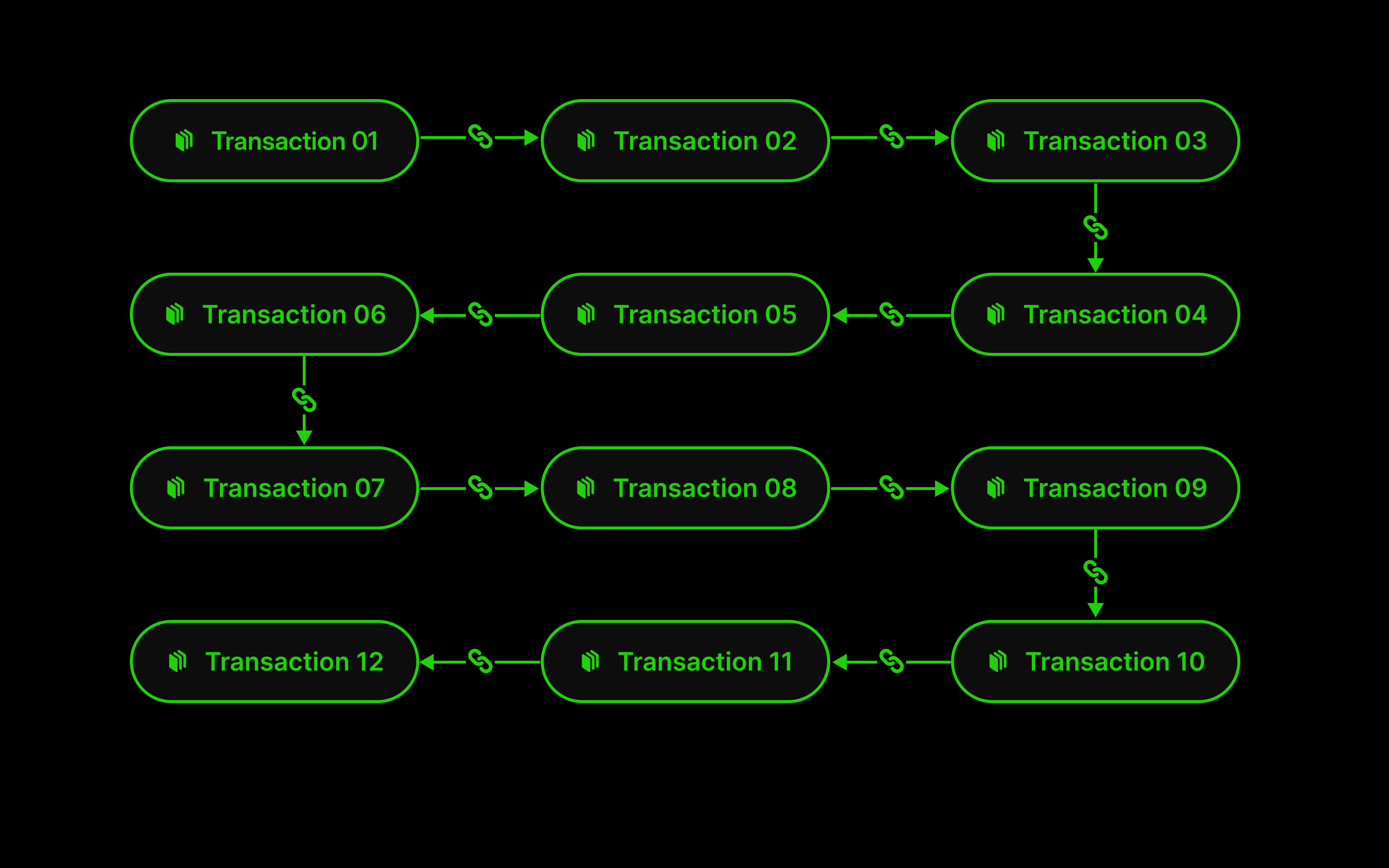 Hashing does not replace database security, backups, access controls, or audit logs. It gives operators a way to verify that ledger history still matches what Blnk originally sealed.
***
## Quick start
Set on the `server` service, then restart.
```bash blnk.env theme={"system"}
BLNK_TRANSACTION_HASHCHAIN_ENABLED=true
```
```json blnk.json theme={"system"}
{
"transaction": {
"hash_chain": {
"enabled": true
}
}
}
```
See [Hash chain settings](/advanced/configuration/transactions#hash-chain-settings) for all options.
Existing transaction rows are sealed automatically. New ones seal after the trailing delay, `default: 30s`.
To verify the chain, run in the same directory as your `docker-compose.yaml`:
```bash theme={"system"}
docker compose run --rm server blnk verify-chain
```
Exit code `0` means the chain is intact.
```text Success wrap theme={"system"}
chain verified: 153 transactions sealed, head 18526b69d80e7c0b200da69cfc0f9a4e661a55c724b4f984ebf4ebd9b32e92f9 at seq 153
```
`verify-chain` is a Core CLI command, not an HTTP API. The one-off container uses the same Postgres connection and config as your server.
Track backlog and sealing delay over time through [Monitoring in Blnk](/advanced/monitoring). When the hash chain is enabled, these gauges appear on the metrics endpoint:
| Metric | Description |
| :----------------------- | :---------------------------------------------- |
| `blnk_chain_backlog` | Transactions not yet sealed into the hash chain |
| `blnk_chain_head_seq` | Sequence number of the hash-chain head |
| `blnk_chain_lag_seconds` | Seconds since the hash chain last advanced |
See [Metrics reference](/advanced/metrics-reference) for attribute details and other Core metrics.
***
## Per-row hash
Every transaction in Blnk gets a `hash` - a SHA-256 fingerprint built from five fields. If any of them change after recording, the fingerprint no longer matches.
Blnk concatenates these values in order, hashes the string with SHA-256, and returns the hex digest as `hash`: `amount`, `reference`, `currency`, `source`, `destination`.
The per-row hash uses `amount` (the display float), not `precise_amount`. Fields such as `description`, `status`, and `meta_data` are not included.
Compare the `hash` from when you first recorded a transaction with the hash on a later fetch to confirm those fingerprinted fields are unchanged. Built-in integrity verification is handled by the global hash chain and `blnk verify-chain`.
***
## Global hash chain
When you enable the hash chain, transaction rows are linked in order. Each seal depends on the previous one, so your full history acts as one tamper-evident record.
Hashing does not replace database security, backups, access controls, or audit logs. It gives operators a way to verify that ledger history still matches what Blnk originally sealed.
***
## Quick start
Set on the `server` service, then restart.
```bash blnk.env theme={"system"}
BLNK_TRANSACTION_HASHCHAIN_ENABLED=true
```
```json blnk.json theme={"system"}
{
"transaction": {
"hash_chain": {
"enabled": true
}
}
}
```
See [Hash chain settings](/advanced/configuration/transactions#hash-chain-settings) for all options.
Existing transaction rows are sealed automatically. New ones seal after the trailing delay, `default: 30s`.
To verify the chain, run in the same directory as your `docker-compose.yaml`:
```bash theme={"system"}
docker compose run --rm server blnk verify-chain
```
Exit code `0` means the chain is intact.
```text Success wrap theme={"system"}
chain verified: 153 transactions sealed, head 18526b69d80e7c0b200da69cfc0f9a4e661a55c724b4f984ebf4ebd9b32e92f9 at seq 153
```
`verify-chain` is a Core CLI command, not an HTTP API. The one-off container uses the same Postgres connection and config as your server.
Track backlog and sealing delay over time through [Monitoring in Blnk](/advanced/monitoring). When the hash chain is enabled, these gauges appear on the metrics endpoint:
| Metric | Description |
| :----------------------- | :---------------------------------------------- |
| `blnk_chain_backlog` | Transactions not yet sealed into the hash chain |
| `blnk_chain_head_seq` | Sequence number of the hash-chain head |
| `blnk_chain_lag_seconds` | Seconds since the hash chain last advanced |
See [Metrics reference](/advanced/metrics-reference) for attribute details and other Core metrics.
***
## Per-row hash
Every transaction in Blnk gets a `hash` - a SHA-256 fingerprint built from five fields. If any of them change after recording, the fingerprint no longer matches.
Blnk concatenates these values in order, hashes the string with SHA-256, and returns the hex digest as `hash`: `amount`, `reference`, `currency`, `source`, `destination`.
The per-row hash uses `amount` (the display float), not `precise_amount`. Fields such as `description`, `status`, and `meta_data` are not included.
Compare the `hash` from when you first recorded a transaction with the hash on a later fetch to confirm those fingerprinted fields are unchanged. Built-in integrity verification is handled by the global hash chain and `blnk verify-chain`.
***
## Global hash chain
When you enable the hash chain, transaction rows are linked in order. Each seal depends on the previous one, so your full history acts as one tamper-evident record.
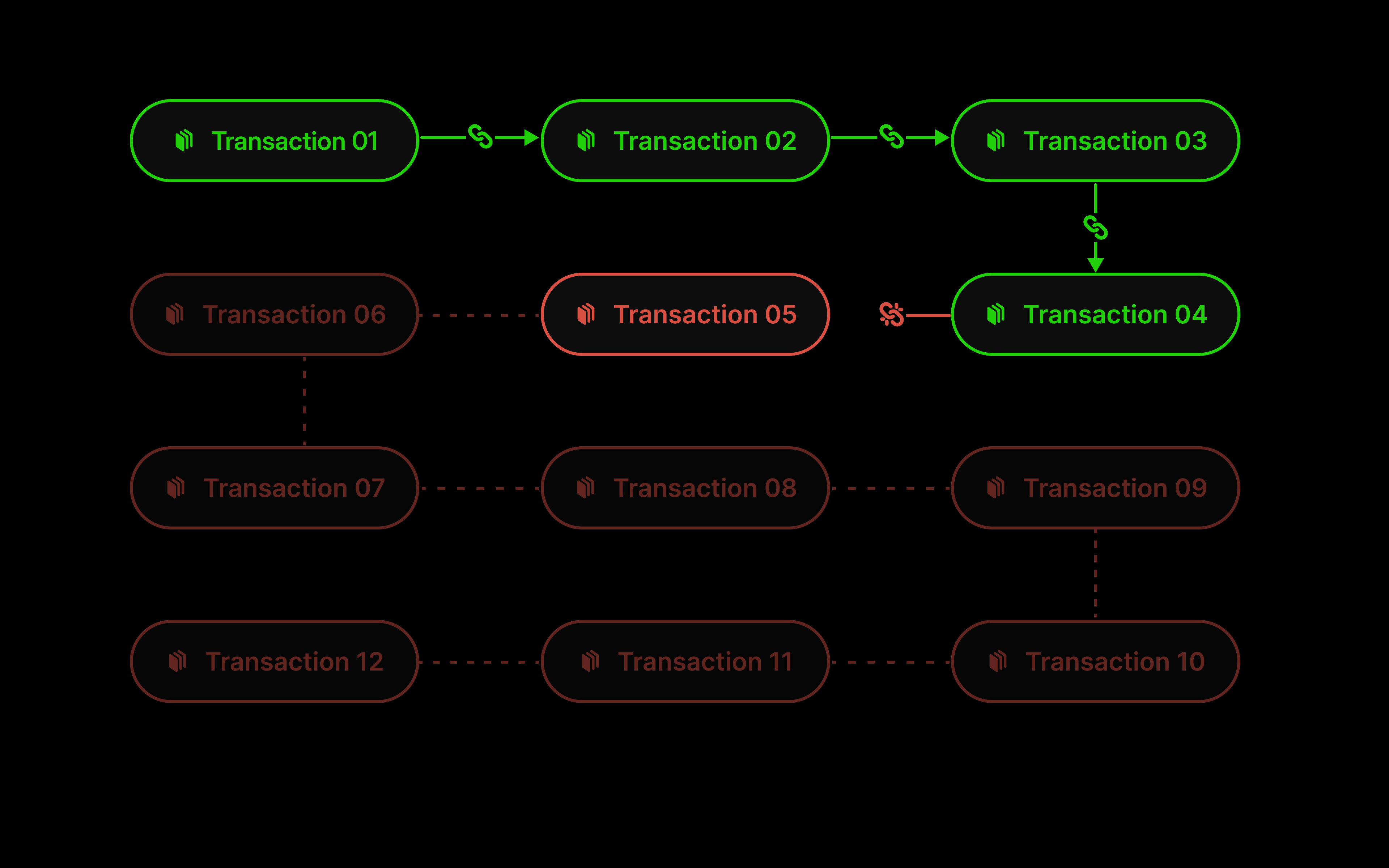 This is stronger than checking rows independently because every sealed transaction depends on the previous chain head. If a transaction is changed, removed, or reordered, verification fails where the history breaks.
1. Existing transactions seal automatically when you turn the chain on.
2. New transactions seal after a short trailing delay so recent writes can finish.
3. The chain includes all statuses: queued, inflight, applied, voided, rejected, and refund.
The chain checks these fields: `transaction_id`, `source`, `destination`, `amount`, `precise_amount`, `currency`, `status`, `reference`, `created_at`. Change any after sealing and verification fails.
Fields such as `description` and `meta_data` are not integrity-protected by the chain. Changing them does not fail verification. Protected transaction fields are also guarded by the database immutability trigger.
Chain seals are not returned in transaction API or [search](/search/typesense/introduction) responses. Check integrity with `blnk verify-chain`, not by reading a response field.
***
## Verification
`blnk verify-chain` tells you whether your full sealed history is intact or where it broke.
Exit code `0` means the chain passed; any other exit code means it failed.
| Result | What it means |
| :------- | :----------------------------------------------------------------------------------------- |
| **Pass** | The full transaction history is intact. Output states how many transactions are sealed. |
| **Fail** | History was tampered with or broken. Output names the position where verification stopped. |
When verification passes, output looks like this:
```text Success wrap theme={"system"}
chain verified: 153 transactions sealed, head 18526b69d80e7c0b200da69cfc0f9a4e661a55c724b4f984ebf4ebd9b32e92f9 at seq 153
```
Verification fails when one of these conditions is true:
| Condition | What happened |
| :---------------------- | :------------------------------------------------------------ |
| Protected field changed | A sealed transaction detail was altered after sealing |
| Chain link altered | A seal in the ordered chain no longer matches its transaction |
| Order disrupted | Transactions are no longer in the expected sequence |
The output looks like this:
```text Failure wrap theme={"system"}
chain BROKEN at seq 6 (txn txn_c1dfaf42-93c1-4371-8918-4d3d6ed2d2be): non-contiguous chain_seq: expected 5, got 6
```
***
## Related docs
Full config and env vars.
Chain backlog, head sequence, and lag gauges.
Immutability and recording basics.
## Need help?
We are very happy to help you make the most of Blnk, regardless of whether it is your first time or you are switching from another tool.
To ask questions or discuss issues, please [contact us](mailto:support@blnkfinance.com) or [join our Discord community](https://discord.gg/7WNv94zPpx).
Sign up and manage your ledger with our back-office dashboard. You can invite teammates to collaborate and manage your ledger operations directly from the dashboard.
This is stronger than checking rows independently because every sealed transaction depends on the previous chain head. If a transaction is changed, removed, or reordered, verification fails where the history breaks.
1. Existing transactions seal automatically when you turn the chain on.
2. New transactions seal after a short trailing delay so recent writes can finish.
3. The chain includes all statuses: queued, inflight, applied, voided, rejected, and refund.
The chain checks these fields: `transaction_id`, `source`, `destination`, `amount`, `precise_amount`, `currency`, `status`, `reference`, `created_at`. Change any after sealing and verification fails.
Fields such as `description` and `meta_data` are not integrity-protected by the chain. Changing them does not fail verification. Protected transaction fields are also guarded by the database immutability trigger.
Chain seals are not returned in transaction API or [search](/search/typesense/introduction) responses. Check integrity with `blnk verify-chain`, not by reading a response field.
***
## Verification
`blnk verify-chain` tells you whether your full sealed history is intact or where it broke.
Exit code `0` means the chain passed; any other exit code means it failed.
| Result | What it means |
| :------- | :----------------------------------------------------------------------------------------- |
| **Pass** | The full transaction history is intact. Output states how many transactions are sealed. |
| **Fail** | History was tampered with or broken. Output names the position where verification stopped. |
When verification passes, output looks like this:
```text Success wrap theme={"system"}
chain verified: 153 transactions sealed, head 18526b69d80e7c0b200da69cfc0f9a4e661a55c724b4f984ebf4ebd9b32e92f9 at seq 153
```
Verification fails when one of these conditions is true:
| Condition | What happened |
| :---------------------- | :------------------------------------------------------------ |
| Protected field changed | A sealed transaction detail was altered after sealing |
| Chain link altered | A seal in the ordered chain no longer matches its transaction |
| Order disrupted | Transactions are no longer in the expected sequence |
The output looks like this:
```text Failure wrap theme={"system"}
chain BROKEN at seq 6 (txn txn_c1dfaf42-93c1-4371-8918-4d3d6ed2d2be): non-contiguous chain_seq: expected 5, got 6
```
***
## Related docs
Full config and env vars.
Chain backlog, head sequence, and lag gauges.
Immutability and recording basics.
## Need help?
We are very happy to help you make the most of Blnk, regardless of whether it is your first time or you are switching from another tool.
To ask questions or discuss issues, please [contact us](mailto:support@blnkfinance.com) or [join our Discord community](https://discord.gg/7WNv94zPpx).
Sign up and manage your ledger with our back-office dashboard. You can invite teammates to collaborate and manage your ledger operations directly from the dashboard.