> ## Documentation Index
> Fetch the complete documentation index at: https://docs.blnkfinance.com/llms.txt
> Use this file to discover all available pages before exploring further.

# Quick Start

> Install the TypeScript SDK and create your first transaction.

export const CtaCallout = props => {
  const {title, buttonLabel, href, trackingEvent, buttonTarget, rel = "noopener noreferrer", children} = props;
  const handleCtaClick = () => {
    if (typeof window === "undefined" || !trackingEvent) {
      return;
    }
    try {
      window.dispatchEvent(new CustomEvent("blnk:docs-cta", {
        detail: {
          name: trackingEvent,
          href
        }
      }));
    } catch {}
    try {
      window.posthog?.capture?.(trackingEvent, {
        href
      });
    } catch {}
    const gaPayload = {
      cta_href: href
    };
    try {
      window.gtag?.("event", trackingEvent, gaPayload);
    } catch {}
    try {
      window.dataLayer = window.dataLayer || [];
      window.dataLayer.push({
        event: trackingEvent,
        ...gaPayload
      });
    } catch {}
  };
  const isExternal = typeof href === "string" && (/^https?:\/\//i).test(href);
  const target = buttonTarget ?? (isExternal ? "_blank" : undefined);
  const linkRel = isExternal ? rel : undefined;
  return <section className="cta-callout not-prose relative my-8 w-full min-w-0 overflow-hidden rounded-xl border border-zinc-200 p-5 dark:border-white/10">
      <div className="cta-callout-noise" aria-hidden="true" />
      <div className="cta-callout-layout">
        {title ? <div className="cta-callout-title-row">
            <svg xmlns="http://www.w3.org/2000/svg" viewBox="0 0 28 28" width="14" height="14" className="cta-callout-icon shrink-0 text-zinc-800 dark:text-zinc-200" aria-hidden="true">
              <g fill="none" fillRule="nonzero">
                <path d="M28 0v28H0V0h28ZM14.691833333333335 27.134333333333334l-0.012833333333333334 0.0023333333333333335 -0.08283333333333333 0.04083333333333334 -0.023333333333333334 0.004666666666666667 -0.016333333333333335 -0.004666666666666667 -0.08283333333333333 -0.04083333333333334c-0.011666666666666667 -0.004666666666666667 -0.022166666666666668 -0.0011666666666666668 -0.028000000000000004 0.005833333333333334l-0.004666666666666667 0.011666666666666667 -0.019833333333333335 0.49933333333333335 0.005833333333333334 0.023333333333333334 0.011666666666666667 0.015166666666666667 0.12133333333333333 0.08633333333333333 0.0175 0.004666666666666667 0.014000000000000002 -0.004666666666666667 0.12133333333333333 -0.08633333333333333 0.014000000000000002 -0.018666666666666668 0.004666666666666667 -0.019833333333333335 -0.019833333333333335 -0.4981666666666667c-0.0023333333333333335 -0.011666666666666667 -0.0105 -0.019833333333333335 -0.019833333333333335 -0.021Zm0.3091666666666667 -0.13183333333333336 -0.015166666666666667 0.0023333333333333335 -0.21583333333333335 0.1085 -0.011666666666666667 0.011666666666666667 -0.0035000000000000005 0.012833333333333334 0.021 0.5016666666666667 0.005833333333333334 0.014000000000000002 0.009333333333333334 0.008166666666666668 0.23450000000000004 0.1085c0.014000000000000002 0.004666666666666667 0.026833333333333334 0 0.03383333333333334 -0.009333333333333334l0.004666666666666667 -0.016333333333333335 -0.03966666666666667 -0.7163333333333334c-0.0035000000000000005 -0.014000000000000002 -0.011666666666666667 -0.023333333333333334 -0.023333333333333334 -0.025666666666666667Zm-0.8341666666666667 0.0023333333333333335a0.026833333333333334 0.026833333333334334 0 0 0 -0.0315 0.007000000000000001l-0.007000000000000001 0.016333333333333335 -0.03966666666666667 0.7163333333333334c0 0.014000000000000002 0.008166666666666668 0.023333333333333334 0.019833333333333335 0.028000000000000004l0.0175 -0.0023333333333333335 0.23450000000000004 -0.1085 0.011666666666666667 -0.009333333333333334 0.004666666666666667 -0.012833333333333334 0.019833333333333335 -0.5016666666666667 -0.0035000000000000005 -0.014000000000000002 -0.011666666666666667 -0.011666666666666667 -0.21466666666666667 -0.10733333333333334Z" strokeWidth="1.1667" />
                <path fill="currentColor" d="M14 2.916666666666667A1.75 1.75 0 0 1 15.750000000000002 4.666666666666667v6.302333333333334L21.207666666666668 7.816666666666667a1.75 1.75 0 0 1 1.75 3.031L17.5 14l5.457666666666667 3.151166666666667a1.75 1.75 0 0 1 -1.75 3.031l-5.457666666666667 -3.1500000000000004V23.333333333333336a1.75 1.75 0 0 1 -3.5 0v-6.302333333333334L6.792333333333334 20.183333333333337a1.75 1.75 0 1 1 -1.75 -3.031L10.5 14 5.042333333333334 10.848833333333333a1.75 1.75 0 0 1 1.75 -3.031l5.457666666666667 3.1500000000000004V4.666666666666667A1.75 1.75 0 0 1 14 2.916666666666667Z" strokeWidth="1.1667" />
              </g>
            </svg>
            <p className="cta-callout-title min-w-0 font-semibold text-zinc-800 dark:text-zinc-200">
              {title}
            </p>
          </div> : null}
        <div className={`cta-callout-body text-sm leading-normal text-zinc-800 dark:text-zinc-200${title ? " cta-callout-body--indented" : ""}`}>
          {children}
        </div>
        <a href={href} target={target} rel={linkRel} onClick={handleCtaClick} data-docs-cta={trackingEvent || undefined} className="cta-callout-button inline-flex items-center justify-center gap-1 rounded-full bg-white px-3 py-1.5 text-sm font-semibold transition hover:bg-zinc-100 focus-visible:outline focus-visible:outline-2 focus-visible:outline-offset-2 focus-visible:outline-white/50 dark:bg-white dark:hover:bg-zinc-200">
          {buttonLabel}
          <span className="cta-callout-button-arrow" aria-hidden="true">
            →
          </span>
        </a>
      </div>
    </section>;
};

This guide walks you through installing the Blnk TypeScript SDK, initializing the client, and creating your first ledger resource.

By the end, you'll have a working connection to Blnk and be ready to build financial products from your TypeScript or JavaScript application.

<Steps>
  <Step title="Install the SDK">
    Install the SDK in your project. v1.2.0 and later require Node.js 18 or later.

    ```bash wrap theme={"system"}
    npm install @blnkfinance/blnk-typescript
    ```
  </Step>

  <Step title="Create a sample script">
    Create an `index.js` file as shown below to create your first transaction with the SDK.

    <Note>
      Make sure you have a running Blnk Core instance. Set the URL and API key as environment variables in your project.
    </Note>

    ```javascript index.js wrap theme={"system"}
    const { BlnkInit } = require('@blnkfinance/blnk-typescript');

    const blnk = BlnkInit(process.env.BLNK_API_KEY ?? '', {
      baseUrl: process.env.BLNK_BASE_URL ?? 'http://localhost:5001',
    });

    async function main() {
      const response = await blnk.Transactions.create({
        precise_amount: 100000,
        reference: 'first_txn_001',
        currency: 'USD',
        precision: 100,
        source: '@FundingPool',
        destination: '@MyBalance',
        description: 'My first Blnk transaction',
        allow_overdraft: true,
      });

      if (response.status !== 201 || !response.data) {
        throw new Error(response.message);
      }

      console.log(JSON.stringify(response.data, null, 2));
    }

    main();
    ```
  </Step>

  <Step title="Execute the script">
    Run the file.

    ```bash wrap theme={"system"}
    node index.js
    ```

    You should get the following response:

    ```json 201 Created wrap expandable theme={"system"}
    {
      "amount": 1000,
      "rate": 0,
      "precision": 100,
      "precise_amount": 100000,
      "transaction_id": "txn_8d2ce2f0-0d75-4a91-9d43-2ad2c2e6b9ad",
      "parent_transaction": "",
      "source": "bln_f344b673-e855-4bda-b769-3e94a02c1941",
      "destination": "bln_d5cbde84-d20a-485b-8ce8-6677d782c3a1",
      "reference": "first_txn_001",
      "currency": "USD",
      "description": "My first Blnk transaction",
      "status": "QUEUED",
      "hash": "0b9c25fb5b00d6c71cb4ca87026bf6dc316e63353d3330deb588bd0b3d74dcc0",
      "allow_overdraft": true,
      "inflight": false,
      "created_at": "2024-11-26T09:33:35.265582042Z",
      "scheduled_for": "0001-01-01T00:00:00Z",
      "inflight_expiry_date": "0001-01-01T00:00:00Z",
      "inflight_commit_date": "0001-01-01T00:00:00Z"
    }
    ```
  </Step>

  <Step title="View the transaction">
    Confirm the transaction landed in your ledger.

    <Tabs>
      <Tab title="Blnk Cloud">
        1. Open **Transactions** in the sidebar.
        2. Find your transaction by reference (`first_txn_001`) or by the `transaction_id` from the script output.
        3. Click the row to open the details and verify the amount, status, source, and destination.
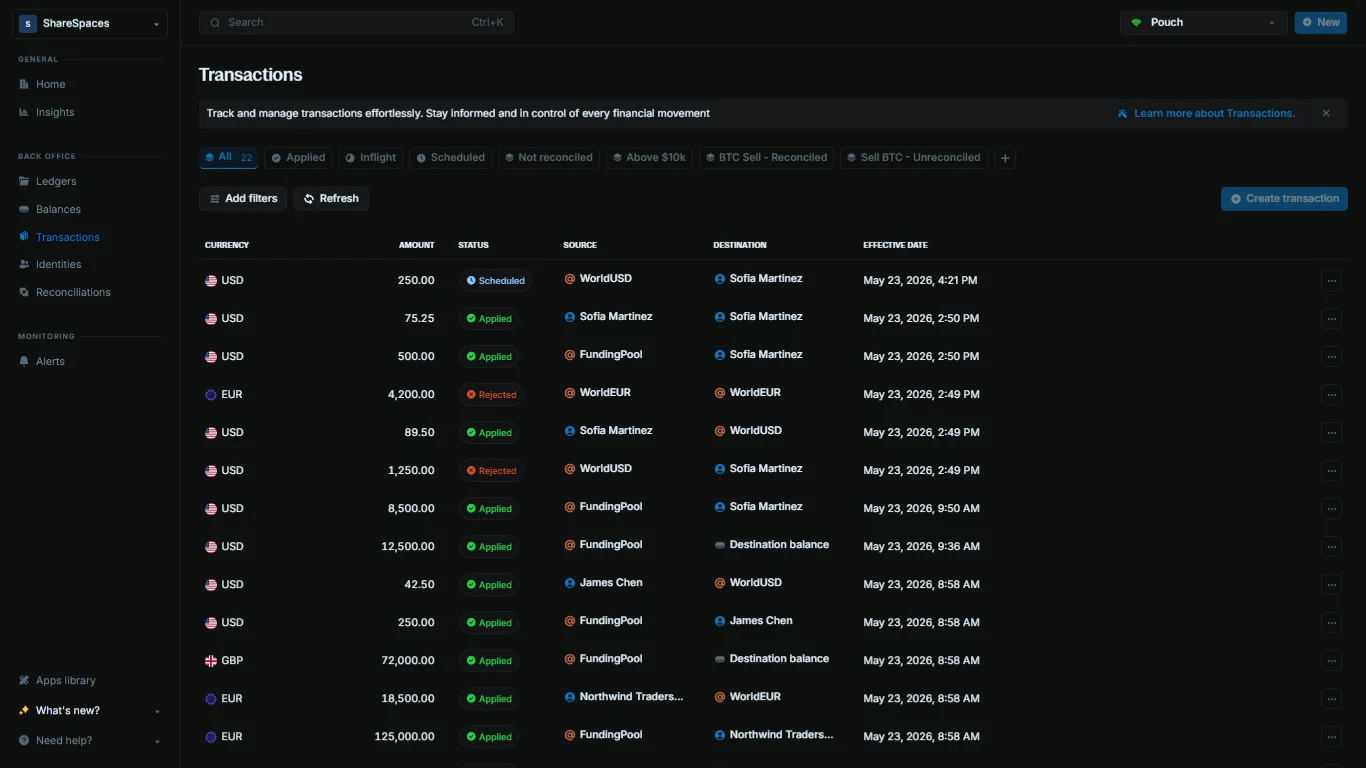
        <Frame caption="The Transactions table shows every transaction synced from your Core instance.">
          <img src="https://mintcdn.com/blnk/V1zKD8N18ifO090g/cloud/img/transactions/transactions-table.png?fit=max&auto=format&n=V1zKD8N18ifO090g&q=85&s=64fe833e81988b573fb46f14fecdf315" alt="Blnk Cloud Transactions table with reference, amount, status, source, and destination columns" className="rounded-lg" width="1366" height="768" data-path="cloud/img/transactions/transactions-table.png" />
        </Frame>

        <Info>
          If the transaction is missing, click **Refresh** on the table to pull the latest data from Core.
        </Info>
      </Tab>

      <Tab title="CLI">
        Fetch the transaction by ID:

        ```bash wrap theme={"system"}
        blnk transactions list --id txn_8d2ce2f0-0d75-4a91-9d43-2ad2c2e6b9ad
        ```

        Replace the transaction ID with the value printed by your script.
      </Tab>
    </Tabs>
  </Step>
</Steps>

***

## Related docs

<CardGroup cols={2}>
  <Card title="Using the SDK" icon="code" href="/sdks/typescript/start/using-the-sdk">
    Authentication, timeouts, retries, and logging.
  </Card>

  <Card title="Error handling" icon="triangle-alert" href="/sdks/typescript/start/error-handling">
    ApiResponse checks and Core error bodies.
  </Card>

  <Card title="Changelog" icon="scroll-text" href="/changelog/blnk-ts">
    TypeScript SDK releases and version history.
  </Card>
</CardGroup>

***

## Need help?

We are very happy to help you make the most of Blnk, regardless of whether it is your first time or you are switching from another tool.

To ask questions or discuss issues, please [contact us](mailto:support@blnkfinance.com) or [join our Discord community](https://discord.gg/7WNv94zPpx).

<CtaCallout title="Connect your ledger to Blnk Cloud" href="https://cloud.blnkfinance.com/auth/sign-up?utm_source=blnk_docs&utm_medium=documentation&utm_campaign=need-help" buttonLabel="Open Blnk Cloud" trackingEvent="clicked_cloud_signup">
  Sign up and manage your ledger with our back-office dashboard. You can invite teammates to collaborate and manage your ledger operations directly from the dashboard.
</CtaCallout>
