> ## Documentation Index
> Fetch the complete documentation index at: https://docs.blnkfinance.com/llms.txt
> Use this file to discover all available pages before exploring further.

# Build with LLMs

> Use AI to integrate Blnk. Install Skills so your coding agent designs money movement and ships recommended Core code.

export const RelatedTopics = ({title = "Related topics", items = []}) => {
  if (!items.length) {
    return null;
  }
  return <nav className="related-topics not-prose mt-20 mb-10 flex flex-col" aria-label={title}>
      <p className="related-topics-heading m-0 border-b border-zinc-200 pb-3 text-sm font-medium text-zinc-500 dark:border-white/10 dark:text-zinc-400">
        {title}
      </p>
      <ul className="related-topics-list m-0 mt-3 flex list-none flex-col gap-0.5 p-0">
        {items.map(item => {
    const isExternal = typeof item.href === "string" && (/^https?:\/\//i).test(item.href);
    return <li key={item.href} className="m-0 p-0">
              <a href={item.href} target={isExternal ? "_blank" : undefined} rel={isExternal ? "noopener noreferrer" : undefined} className="related-topics-link group inline-flex items-center gap-2 text-sm font-semibold text-zinc-700 no-underline transition-colors dark:text-zinc-300">
                <svg xmlns="http://www.w3.org/2000/svg" viewBox="0 0 24 24" width="16" height="16" fill="none" stroke="currentColor" strokeWidth="2" strokeLinecap="round" strokeLinejoin="round" className="related-topics-icon shrink-0 text-zinc-400 dark:text-zinc-500" aria-hidden="true">
                  <path d="M15 2H6a2 2 0 0 0-2 2v16a2 2 0 0 0 2 2h12a2 2 0 0 0 2-2V7Z" />
                  <path d="M14 2v4a2 2 0 0 0 2 2h4" />
                  <path d="M10 9H8" />
                  <path d="M16 13H8" />
                  <path d="M16 17H8" />
                </svg>
                <span className="relative top-px transition-colors group-hover:text-[#DD7B1B]">
                  {item.title}
                </span>
              </a>
            </li>;
  })}
      </ul>
    </nav>;
};

export const CtaCallout = props => {
  const {title, buttonLabel, href, trackingEvent, buttonTarget, rel = "noopener noreferrer", children} = props;
  const handleCtaClick = () => {
    if (typeof window === "undefined" || !trackingEvent) {
      return;
    }
    try {
      window.dispatchEvent(new CustomEvent("blnk:docs-cta", {
        detail: {
          name: trackingEvent,
          href
        }
      }));
    } catch {}
    try {
      window.posthog?.capture?.(trackingEvent, {
        href
      });
    } catch {}
    const gaPayload = {
      cta_href: href
    };
    try {
      window.gtag?.("event", trackingEvent, gaPayload);
    } catch {}
    try {
      window.dataLayer = window.dataLayer || [];
      window.dataLayer.push({
        event: trackingEvent,
        ...gaPayload
      });
    } catch {}
  };
  const isExternal = typeof href === "string" && (/^https?:\/\//i).test(href);
  const target = buttonTarget ?? (isExternal ? "_blank" : undefined);
  const linkRel = isExternal ? rel : undefined;
  return <section className="cta-callout not-prose relative my-8 w-full min-w-0 overflow-hidden rounded-xl border border-zinc-200 p-5 dark:border-white/10">
      <div className="cta-callout-noise" aria-hidden="true" />
      <div className="cta-callout-layout">
        {title ? <div className="cta-callout-title-row">
            <svg xmlns="http://www.w3.org/2000/svg" viewBox="0 0 28 28" width="14" height="14" className="cta-callout-icon shrink-0 text-zinc-800 dark:text-zinc-200" aria-hidden="true">
              <g fill="none" fillRule="nonzero">
                <path d="M28 0v28H0V0h28ZM14.691833333333335 27.134333333333334l-0.012833333333333334 0.0023333333333333335 -0.08283333333333333 0.04083333333333334 -0.023333333333333334 0.004666666666666667 -0.016333333333333335 -0.004666666666666667 -0.08283333333333333 -0.04083333333333334c-0.011666666666666667 -0.004666666666666667 -0.022166666666666668 -0.0011666666666666668 -0.028000000000000004 0.005833333333333334l-0.004666666666666667 0.011666666666666667 -0.019833333333333335 0.49933333333333335 0.005833333333333334 0.023333333333333334 0.011666666666666667 0.015166666666666667 0.12133333333333333 0.08633333333333333 0.0175 0.004666666666666667 0.014000000000000002 -0.004666666666666667 0.12133333333333333 -0.08633333333333333 0.014000000000000002 -0.018666666666666668 0.004666666666666667 -0.019833333333333335 -0.019833333333333335 -0.4981666666666667c-0.0023333333333333335 -0.011666666666666667 -0.0105 -0.019833333333333335 -0.019833333333333335 -0.021Zm0.3091666666666667 -0.13183333333333336 -0.015166666666666667 0.0023333333333333335 -0.21583333333333335 0.1085 -0.011666666666666667 0.011666666666666667 -0.0035000000000000005 0.012833333333333334 0.021 0.5016666666666667 0.005833333333333334 0.014000000000000002 0.009333333333333334 0.008166666666666668 0.23450000000000004 0.1085c0.014000000000000002 0.004666666666666667 0.026833333333333334 0 0.03383333333333334 -0.009333333333333334l0.004666666666666667 -0.016333333333333335 -0.03966666666666667 -0.7163333333333334c-0.0035000000000000005 -0.014000000000000002 -0.011666666666666667 -0.023333333333333334 -0.023333333333333334 -0.025666666666666667Zm-0.8341666666666667 0.0023333333333333335a0.026833333333333334 0.026833333333334334 0 0 0 -0.0315 0.007000000000000001l-0.007000000000000001 0.016333333333333335 -0.03966666666666667 0.7163333333333334c0 0.014000000000000002 0.008166666666666668 0.023333333333333334 0.019833333333333335 0.028000000000000004l0.0175 -0.0023333333333333335 0.23450000000000004 -0.1085 0.011666666666666667 -0.009333333333333334 0.004666666666666667 -0.012833333333333334 0.019833333333333335 -0.5016666666666667 -0.0035000000000000005 -0.014000000000000002 -0.011666666666666667 -0.011666666666666667 -0.21466666666666667 -0.10733333333333334Z" strokeWidth="1.1667" />
                <path fill="currentColor" d="M14 2.916666666666667A1.75 1.75 0 0 1 15.750000000000002 4.666666666666667v6.302333333333334L21.207666666666668 7.816666666666667a1.75 1.75 0 0 1 1.75 3.031L17.5 14l5.457666666666667 3.151166666666667a1.75 1.75 0 0 1 -1.75 3.031l-5.457666666666667 -3.1500000000000004V23.333333333333336a1.75 1.75 0 0 1 -3.5 0v-6.302333333333334L6.792333333333334 20.183333333333337a1.75 1.75 0 1 1 -1.75 -3.031L10.5 14 5.042333333333334 10.848833333333333a1.75 1.75 0 0 1 1.75 -3.031l5.457666666666667 3.1500000000000004V4.666666666666667A1.75 1.75 0 0 1 14 2.916666666666667Z" strokeWidth="1.1667" />
              </g>
            </svg>
            <p className="cta-callout-title min-w-0 font-semibold text-zinc-800 dark:text-zinc-200">
              {title}
            </p>
          </div> : null}
        <div className={`cta-callout-body text-sm leading-normal text-zinc-800 dark:text-zinc-200${title ? " cta-callout-body--indented" : ""}`}>
          {children}
        </div>
        <a href={href} target={target} rel={linkRel} onClick={handleCtaClick} data-docs-cta={trackingEvent || undefined} className="cta-callout-button inline-flex items-center justify-center gap-1 rounded-full bg-white px-3 py-1.5 text-sm font-semibold transition hover:bg-zinc-100 focus-visible:outline focus-visible:outline-2 focus-visible:outline-offset-2 focus-visible:outline-white/50 dark:bg-white dark:hover:bg-zinc-200">
          {buttonLabel}
          <span className="cta-callout-button-arrow" aria-hidden="true">
            →
          </span>
        </a>
      </div>
    </section>;
};

Use AI to integrate Blnk into your product.

Install **Skills** so your coding agents design money movement, architecture, and code the recommended way instead of improvising or guessing.

<CtaCallout title="Get dedicated Pro Support" href="https://blnkfinance.com/contact/us?utm_source=blnk_docs&utm_medium=documentation&utm_campaign=home%2Fllms" buttonLabel="Get Pro Support" trackingEvent="clicked_pro_support">
  Pair your coding agent with expert guidance so you implement Blnk the right way for your product, with confidence in the architecture and money flows you ship.
</CtaCallout>

***

## Installing Skills

<Steps>
  <Step title="Add Skills">
    From your project (or any directory where you use the LLM), run:

    ```bash Install Blnk skills wrap theme={"system"}
    npx skills add https://docs.blnkfinance.com
    ```

    The CLI detects tools such as Cursor and Claude Code, and installs the skills for you. Confirm when prompted if you want them on more than one tool.
  </Step>

  <Step title="Confirm they loaded">
    To use the skill, start with `/blnk` and ask any question. That is the root entry point; it routes to the other Blnk skills for architecture, money movement, and implementation.
  </Step>

  <Step title="Connect the Docs MCP">
    To improve the LLM's knowledge base with live Docs lookup, connect the Docs MCP in your LLM tool:

    ```text MCP endpoint theme={"system"}
    https://docs.blnkfinance.com/mcp
    ```
  </Step>
</Steps>

***

## Try it: build a simple wallet

Open a chat in your project and run through these steps.

<Steps>
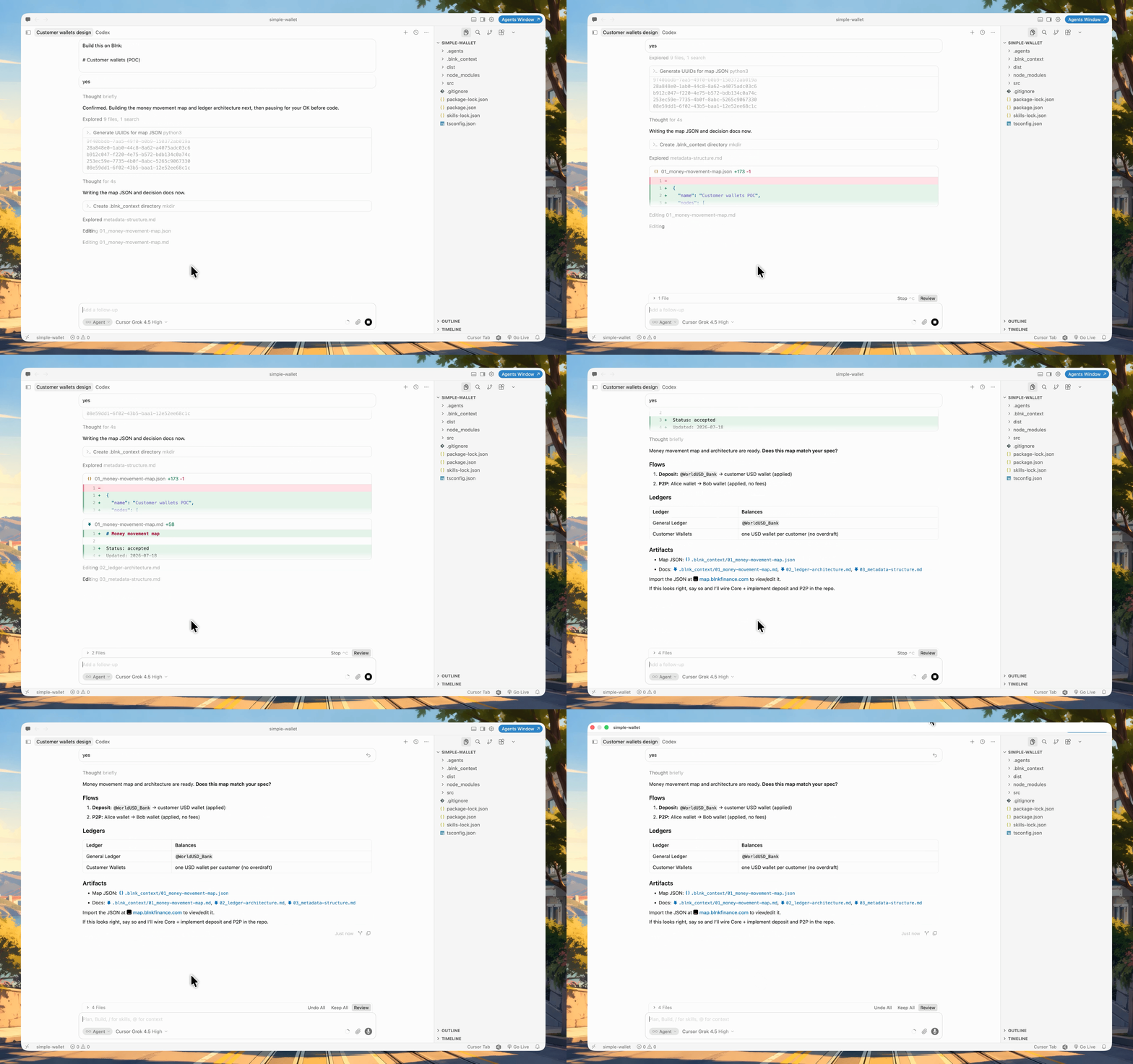
  <Step title="Share this sample spec">
    Paste:

    ```text Sample wallet spec wrap theme={"system"}
    /blnk

    Build this on Blnk:

    # Customer wallets (POC)

    - Each customer gets a USD wallet
    - Deposit from a bank into the wallet
    - Transfer between two customers

    Design the money movement first, then implement it in this repo.
    ```

    <Frame>
      <img src="https://mintcdn.com/blnk/NMenB6seSHQ4D6IY/gifs/llms/01_sample-spec.gif?s=ba087b397629852fe02cdfd20416649f" alt="Pasting the sample wallet spec into a coding agent chat" width="1724" height="1080" data-path="gifs/llms/01_sample-spec.gif" />
    </Frame>
  </Step>

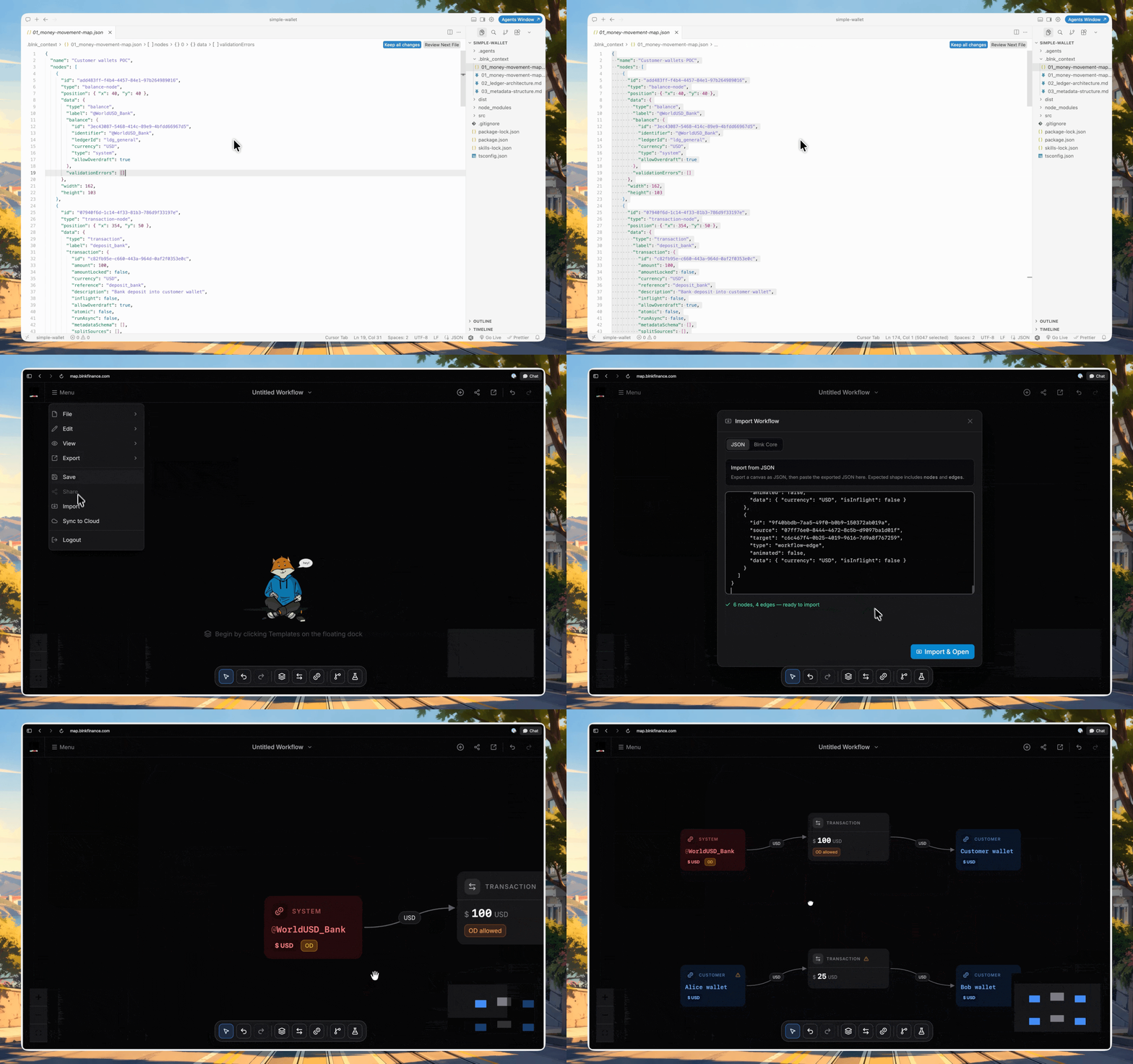
  <Step title="Let the agent create the map">
    The agent designs the money movement map, posts maps-tool JSON in chat, and saves it under `.blnk_context/`.

    <Frame>
      <img src="https://mintcdn.com/blnk/NMenB6seSHQ4D6IY/gifs/llms/02_create-map.gif?s=8a635af166b7bba9ab520b7a043717c1" alt="Coding agent creating the money movement map and saving maps-tool JSON" width="3444" height="2160" data-path="gifs/llms/02_create-map.gif" />
    </Frame>
  </Step>

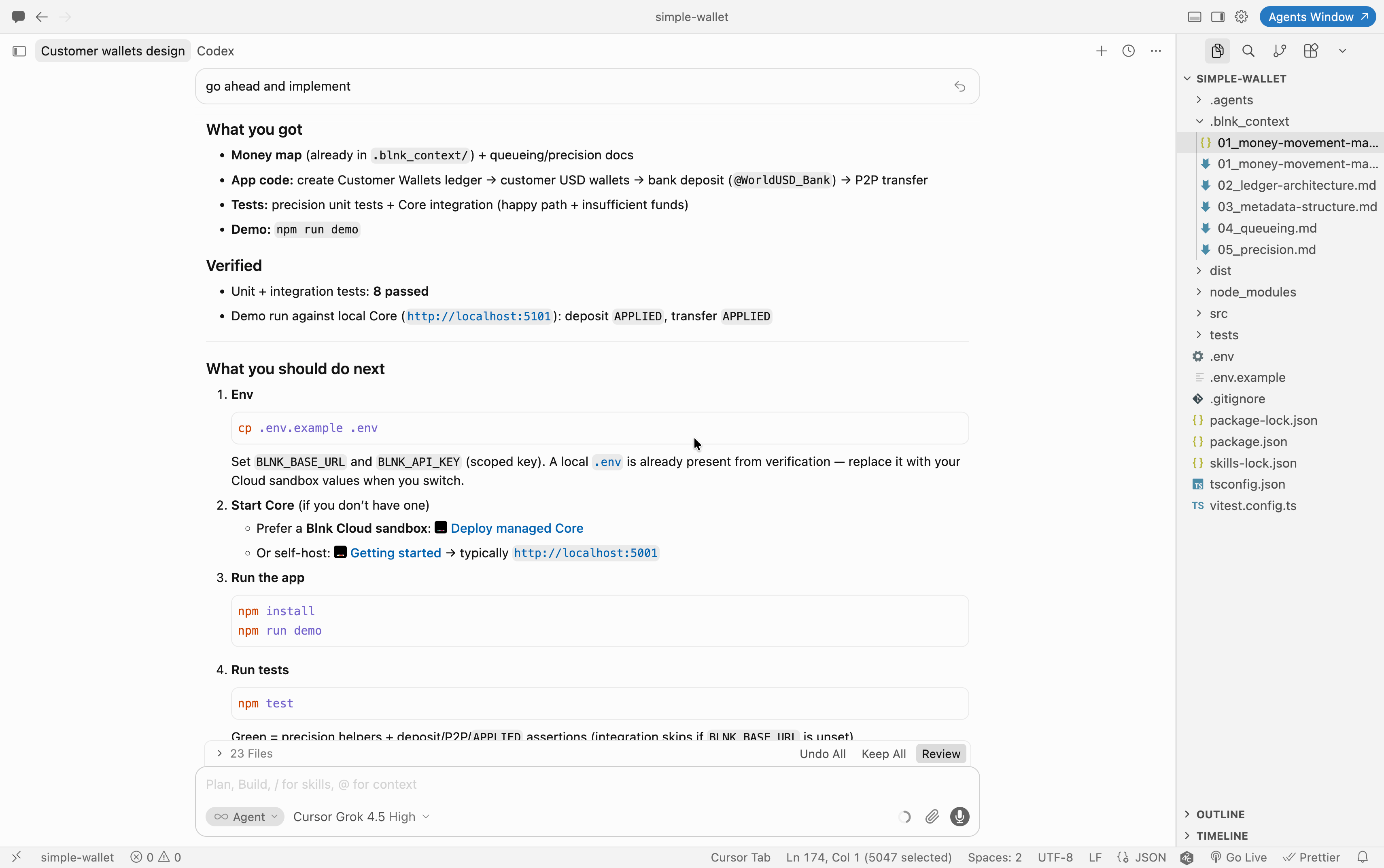
  <Step title="Review the map">
    To view it:

    1. Open [map.blnkfinance.com](https://map.blnkfinance.com).
    2. Click **Menu → Import**.
    3. Paste the JSON and load it.

    If anything is wrong, say so in chat and wait for an updated JSON. When it matches, continue.

    <Frame>
      <img src="https://mintcdn.com/blnk/NMenB6seSHQ4D6IY/gifs/llms/03_review-map.gif?s=be04d85c1d3838a4ba76dd8e1b4ec1a6" alt="Importing maps-tool JSON into map.blnkfinance.com to review the money movement map" width="1400" height="878" data-path="gifs/llms/03_review-map.gif" />
    </Frame>
  </Step>

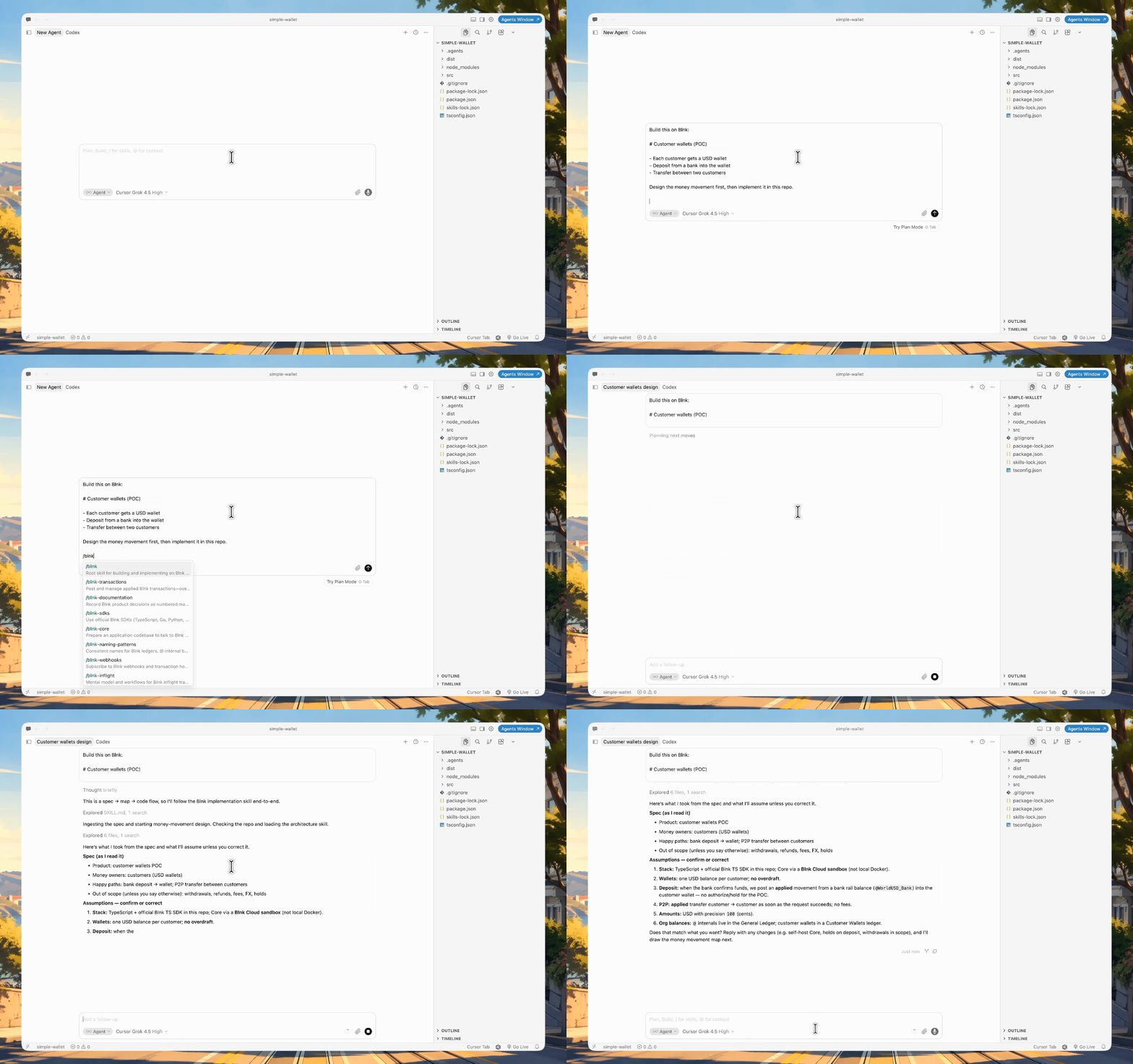
  <Step title="Ask it to implement">
    If all looks good, ask the agent to implement it the map:

    <Frame>
      <img src="https://mintcdn.com/blnk/NMenB6seSHQ4D6IY/images/home/04_llm_implement-code.png?fit=max&auto=format&n=NMenB6seSHQ4D6IY&q=85&s=2c088a925777ba72abeee62dd9298269" alt="Coding agent handoff after implementing the wallet app with map, code, tests, and next steps" width="3420" height="2146" data-path="images/home/04_llm_implement-code.png" />
    </Frame>
  </Step>

  <Step title="Start the app">
    Once done, you can start your app and should have a running wallet flow against Blnk.
  </Step>
</Steps>

***

## Need help?

We are very happy to help you make the most of Blnk, regardless of whether it is your first time or you are switching from another tool.

To ask questions or discuss issues, please [contact us](mailto:support@blnkfinance.com) or [join our Discord community](https://discord.gg/7WNv94zPpx).

<CtaCallout title="Connect your ledger to Blnk Cloud" href="https://cloud.blnkfinance.com/auth/sign-up?utm_source=blnk_docs&utm_medium=documentation&utm_campaign=need-help" buttonLabel="Open Blnk Cloud" trackingEvent="clicked_cloud_signup">
  Sign up and manage your ledger with our back-office dashboard. You can invite teammates to collaborate and manage your ledger operations directly from the dashboard.
</CtaCallout>

<RelatedTopics
  items={[
{ title: "Quick start", href: "/home/install" },
{ title: "Double-entry", href: "/guides/double-entry" },
{ title: "SDKs", href: "/home/sdks" },
{ title: "Cloud MCP", href: "/cloud/integrations/mcp" },
]}
/>