> ## Documentation Index
> Fetch the complete documentation index at: https://docs.blnkfinance.com/llms.txt
> Use this file to discover all available pages before exploring further.

# Getting Started with Blnk Core

> The developer-first toolkit for building compliant financial products.

export const CtaCallout = props => {
  const {title, buttonLabel, href, trackingEvent, buttonTarget, rel = "noopener noreferrer", children} = props;
  const handleCtaClick = () => {
    if (typeof window === "undefined" || !trackingEvent) {
      return;
    }
    try {
      window.dispatchEvent(new CustomEvent("blnk:docs-cta", {
        detail: {
          name: trackingEvent,
          href
        }
      }));
    } catch {}
    try {
      window.posthog?.capture?.(trackingEvent, {
        href
      });
    } catch {}
    const gaPayload = {
      cta_href: href
    };
    try {
      window.gtag?.("event", trackingEvent, gaPayload);
    } catch {}
    try {
      window.dataLayer = window.dataLayer || [];
      window.dataLayer.push({
        event: trackingEvent,
        ...gaPayload
      });
    } catch {}
  };
  const isExternal = typeof href === "string" && (/^https?:\/\//i).test(href);
  const target = buttonTarget ?? (isExternal ? "_blank" : undefined);
  const linkRel = isExternal ? rel : undefined;
  return <section className="cta-callout not-prose relative my-8 w-full min-w-0 overflow-hidden rounded-xl border border-zinc-200 p-5 dark:border-white/10">
      <div className="cta-callout-noise" aria-hidden="true" />
      <div className="cta-callout-layout">
        {title ? <div className="cta-callout-title-row">
            <svg xmlns="http://www.w3.org/2000/svg" viewBox="0 0 28 28" width="14" height="14" className="cta-callout-icon shrink-0 text-zinc-800 dark:text-zinc-200" aria-hidden="true">
              <g fill="none" fillRule="nonzero">
                <path d="M28 0v28H0V0h28ZM14.691833333333335 27.134333333333334l-0.012833333333333334 0.0023333333333333335 -0.08283333333333333 0.04083333333333334 -0.023333333333333334 0.004666666666666667 -0.016333333333333335 -0.004666666666666667 -0.08283333333333333 -0.04083333333333334c-0.011666666666666667 -0.004666666666666667 -0.022166666666666668 -0.0011666666666666668 -0.028000000000000004 0.005833333333333334l-0.004666666666666667 0.011666666666666667 -0.019833333333333335 0.49933333333333335 0.005833333333333334 0.023333333333333334 0.011666666666666667 0.015166666666666667 0.12133333333333333 0.08633333333333333 0.0175 0.004666666666666667 0.014000000000000002 -0.004666666666666667 0.12133333333333333 -0.08633333333333333 0.014000000000000002 -0.018666666666666668 0.004666666666666667 -0.019833333333333335 -0.019833333333333335 -0.4981666666666667c-0.0023333333333333335 -0.011666666666666667 -0.0105 -0.019833333333333335 -0.019833333333333335 -0.021Zm0.3091666666666667 -0.13183333333333336 -0.015166666666666667 0.0023333333333333335 -0.21583333333333335 0.1085 -0.011666666666666667 0.011666666666666667 -0.0035000000000000005 0.012833333333333334 0.021 0.5016666666666667 0.005833333333333334 0.014000000000000002 0.009333333333333334 0.008166666666666668 0.23450000000000004 0.1085c0.014000000000000002 0.004666666666666667 0.026833333333333334 0 0.03383333333333334 -0.009333333333333334l0.004666666666666667 -0.016333333333333335 -0.03966666666666667 -0.7163333333333334c-0.0035000000000000005 -0.014000000000000002 -0.011666666666666667 -0.023333333333333334 -0.023333333333333334 -0.025666666666666667Zm-0.8341666666666667 0.0023333333333333335a0.026833333333333334 0.026833333333334334 0 0 0 -0.0315 0.007000000000000001l-0.007000000000000001 0.016333333333333335 -0.03966666666666667 0.7163333333333334c0 0.014000000000000002 0.008166666666666668 0.023333333333333334 0.019833333333333335 0.028000000000000004l0.0175 -0.0023333333333333335 0.23450000000000004 -0.1085 0.011666666666666667 -0.009333333333333334 0.004666666666666667 -0.012833333333333334 0.019833333333333335 -0.5016666666666667 -0.0035000000000000005 -0.014000000000000002 -0.011666666666666667 -0.011666666666666667 -0.21466666666666667 -0.10733333333333334Z" strokeWidth="1.1667" />
                <path fill="currentColor" d="M14 2.916666666666667A1.75 1.75 0 0 1 15.750000000000002 4.666666666666667v6.302333333333334L21.207666666666668 7.816666666666667a1.75 1.75 0 0 1 1.75 3.031L17.5 14l5.457666666666667 3.151166666666667a1.75 1.75 0 0 1 -1.75 3.031l-5.457666666666667 -3.1500000000000004V23.333333333333336a1.75 1.75 0 0 1 -3.5 0v-6.302333333333334L6.792333333333334 20.183333333333337a1.75 1.75 0 1 1 -1.75 -3.031L10.5 14 5.042333333333334 10.848833333333333a1.75 1.75 0 0 1 1.75 -3.031l5.457666666666667 3.1500000000000004V4.666666666666667A1.75 1.75 0 0 1 14 2.916666666666667Z" strokeWidth="1.1667" />
              </g>
            </svg>
            <p className="cta-callout-title min-w-0 font-semibold text-zinc-800 dark:text-zinc-200">
              {title}
            </p>
          </div> : null}
        <div className={`cta-callout-body text-sm leading-normal text-zinc-800 dark:text-zinc-200${title ? " cta-callout-body--indented" : ""}`}>
          {children}
        </div>
        <a href={href} target={target} rel={linkRel} onClick={handleCtaClick} data-docs-cta={trackingEvent || undefined} className="cta-callout-button inline-flex items-center justify-center gap-1 rounded-full bg-white px-3 py-1.5 text-sm font-semibold transition hover:bg-zinc-100 focus-visible:outline focus-visible:outline-2 focus-visible:outline-offset-2 focus-visible:outline-white/50 dark:bg-white dark:hover:bg-zinc-200">
          {buttonLabel}
          <span className="cta-callout-button-arrow" aria-hidden="true">
            →
          </span>
        </a>
      </div>
    </section>;
};

This is your guide to getting started with Blnk, pronounced as `/blank/`.

If you are new to Blnk or [open-source fintech developer tools](https://blnkfinance.com/?utm_source=blnk_docs\&utm_medium=documentation\&utm_campaign=home%2Finstall), this is where you should start.

{/* utm_campaign: home-install */}

<CtaCallout title="Need help with your product?" href="https://blnkfinance.com/contact/us?utm_source=blnk_docs&utm_medium=documentation&utm_campaign=home%2Finstall" buttonLabel="Speak with us" trackingEvent="clicked_pro_support">
  Get dedicated support for architecture reviews, integration planning, ledger workflows, and production deployment.
</CtaCallout>

***

## 1: Installation Guide

<Tabs>
  <Tab title="Self-hosted" icon="server">
    Manually install Blnk on your own infrastructure. This option requires Docker and Docker Compose.

    <Steps titleSize="h3">
      <Step title="Install prerequisites">
        Make sure you have [Docker](https://www.docker.com/) and [Compose](https://docs.docker.com/compose/) installed and running on your machine.
      </Step>

      <Step title="Clone the repository">
        Clone the Blnk repository into your machine:

        ```bash bash theme={"system"}
        git clone https://github.com/blnkfinance/blnk && cd blnk
        ```
      </Step>

      <Step title="Create configuration file">
        Create a configuration file, `blnk.json`:

        ```bash bash theme={"system"}
        touch blnk.json
        ```
      </Step>

      <Step title="Configure Blnk">
        Copy and save the following configuration:

        ```json blnk.json theme={"system"}
        {
          "project_name": "Blnk",
          "data_source": {
            "dns": "postgres://postgres:password@postgres:5432/blnk?sslmode=disable"
          },
          "redis": {
            "dns": "redis:6379"
          },
          "typesense": {
            "dns": "http://typesense:8108"
          },
          "server": {
            "port": "5001"
          }
        }
        ```
      </Step>

      <Step title="Start Blnk server">
        Start your Blnk server with Docker compose:

        ```bash bash theme={"system"}
        docker compose up
        ```

        <Check>
          Your Blnk server is now running! You can verify it's working by visiting `http://localhost:5001` in your browser.
        </Check>
      </Step>
    </Steps>
  </Tab>

  <Tab title="Managed hosting" icon="cloud">
    Get started quickly with Blnk's managed cloud hosting. No infrastructure setup required-just sign up and start building.

    <Steps titleSize="h3">
      <Step title="Sign up to Blnk Cloud">
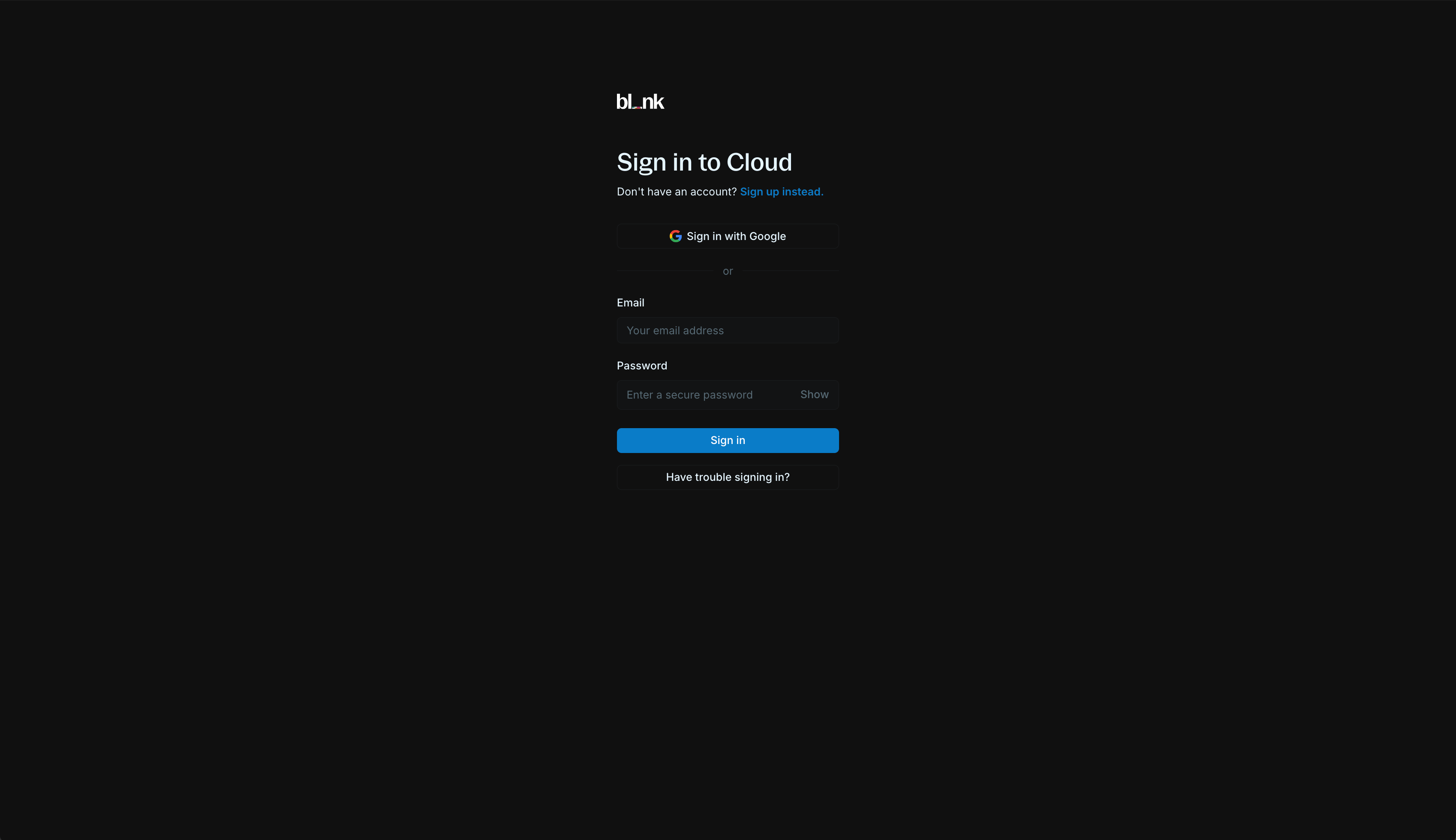
        If you don't have a Blnk Cloud account yet, sign up at [cloud.blnkfinance.com](https://cloud.blnkfinance.com/?utm_source=blnk_docs\&utm_medium=documentation\&utm_campaign=home%2Finstall) to create your workspace.

        <img src="https://mintcdn.com/blnk/uvTYMgSU3UZmOa2s/images/home/signup-login.png?fit=max&auto=format&n=uvTYMgSU3UZmOa2s&q=85&s=4c6623f75d47f7085a5b768f6758fc38" alt="Sign up to Blnk Cloud" width="3396" height="1960" data-path="images/home/signup-login.png" />
      </Step>

      <Step title="Create an instance on Cloud">
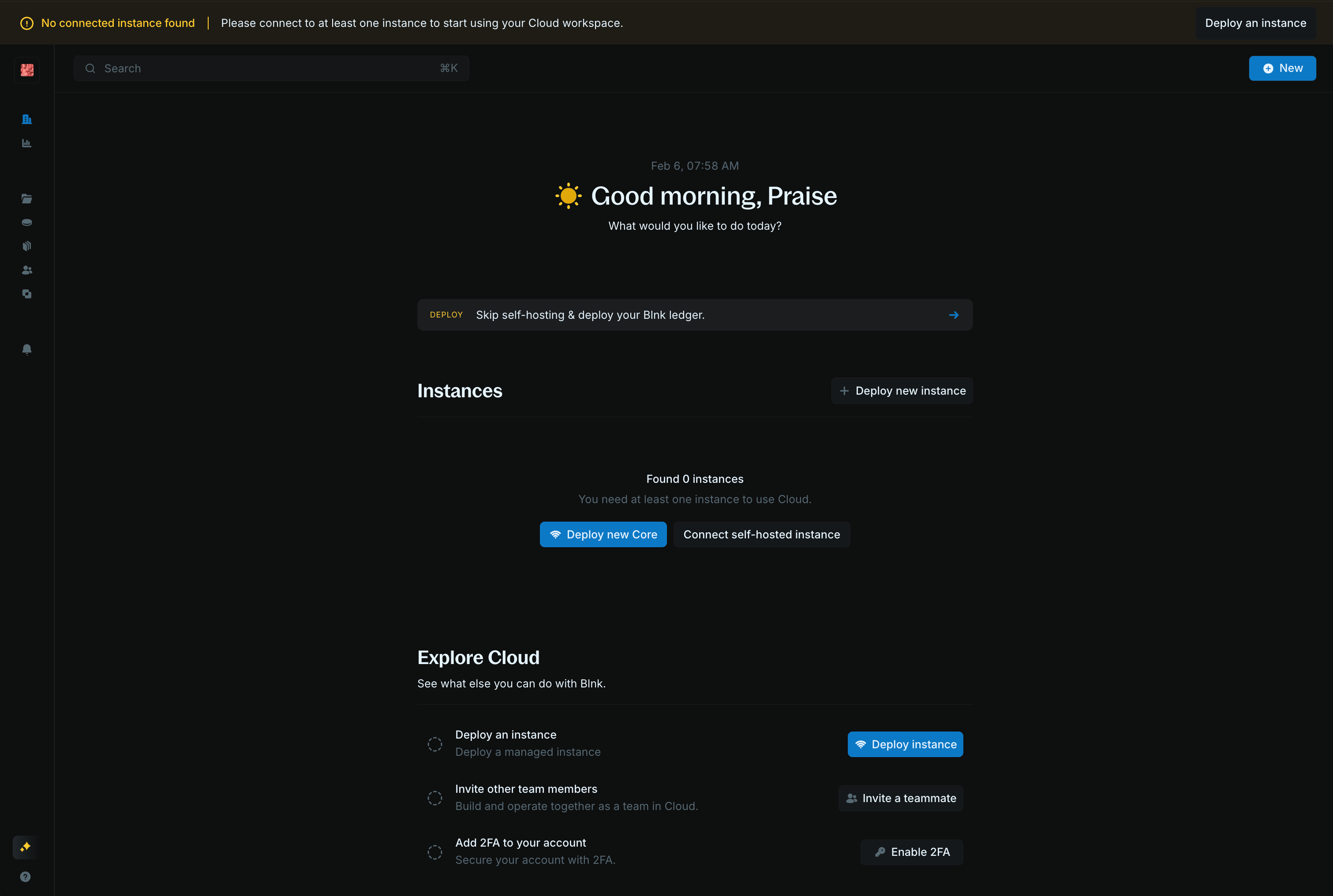
        On the homepage, click on **Deploy new Core**.

        <img src="https://mintcdn.com/blnk/uvTYMgSU3UZmOa2s/images/home/cloud-home.png?fit=max&auto=format&n=uvTYMgSU3UZmOa2s&q=85&s=8cd4dee4325381a87c76aa057cd8f0c2" alt="Settings > Instances page showing the Connect new instance button" data-og-width="3022" width="3022" data-og-height="2032" height="2032" data-path="images/home/cloud-home.png" data-optimize="true" data-opv="3" srcset="https://mintcdn.com/blnk/uvTYMgSU3UZmOa2s/images/home/cloud-home.png?w=280&fit=max&auto=format&n=uvTYMgSU3UZmOa2s&q=85&s=a41ec7afb3a856da256fc225d9fbbb2f 280w, https://mintcdn.com/blnk/uvTYMgSU3UZmOa2s/images/home/cloud-home.png?w=560&fit=max&auto=format&n=uvTYMgSU3UZmOa2s&q=85&s=910b92884aee7a8275806585f5d2dd04 560w, https://mintcdn.com/blnk/uvTYMgSU3UZmOa2s/images/home/cloud-home.png?w=840&fit=max&auto=format&n=uvTYMgSU3UZmOa2s&q=85&s=f1cba755ecd44abf809f6922a196cbd4 840w, https://mintcdn.com/blnk/uvTYMgSU3UZmOa2s/images/home/cloud-home.png?w=1100&fit=max&auto=format&n=uvTYMgSU3UZmOa2s&q=85&s=71ad065a87a9b1c0f553f19ac1b45a67 1100w, https://mintcdn.com/blnk/uvTYMgSU3UZmOa2s/images/home/cloud-home.png?w=1650&fit=max&auto=format&n=uvTYMgSU3UZmOa2s&q=85&s=dec50e8be74d5b40fd8dda07fb45b5c8 1650w, https://mintcdn.com/blnk/uvTYMgSU3UZmOa2s/images/home/cloud-home.png?w=2500&fit=max&auto=format&n=uvTYMgSU3UZmOa2s&q=85&s=80d85d80979953b564fa0f5ad3cf392c 2500w" />
      </Step>

      <Step title="Provide instance details">
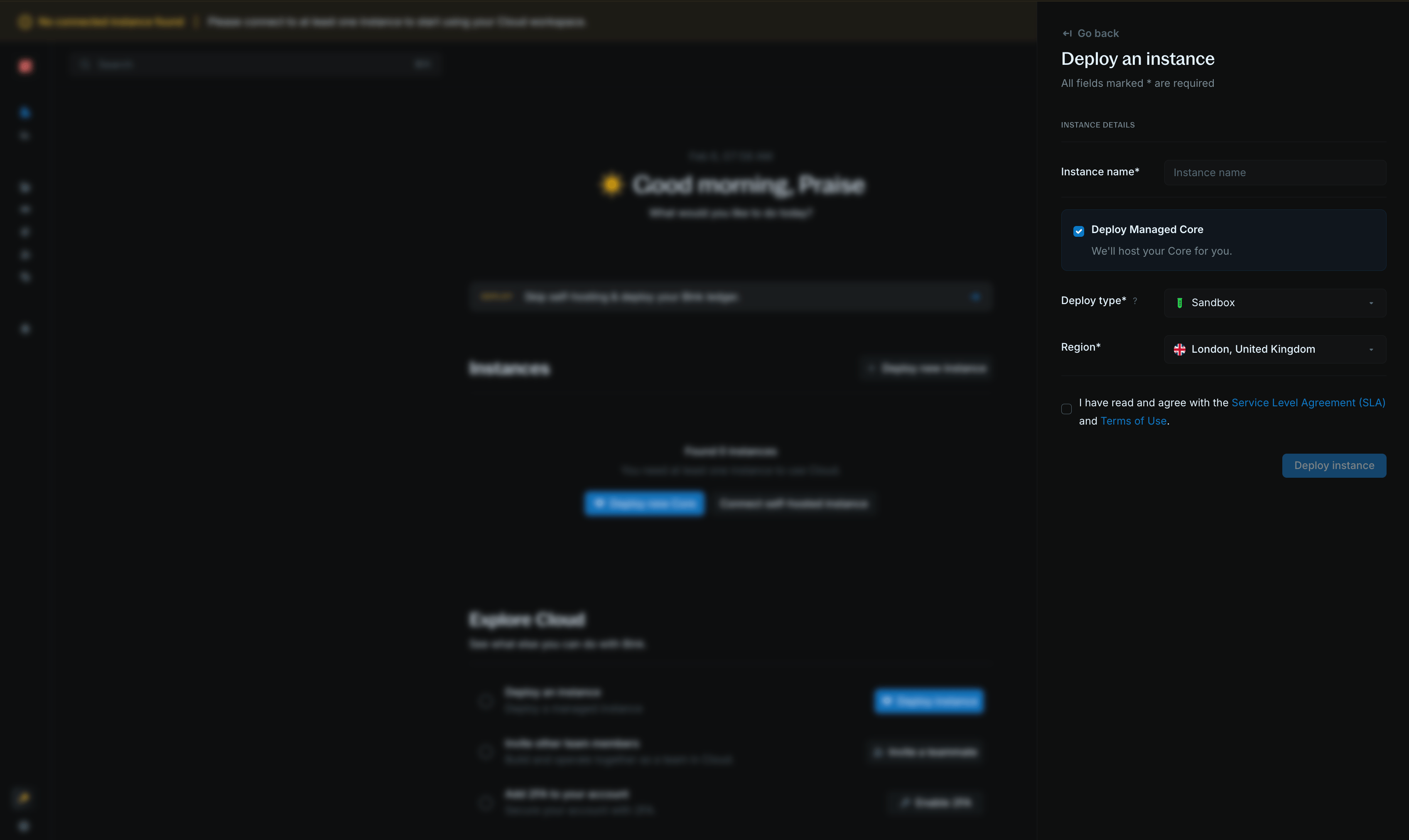
        Choose a descriptive name for your instance (e.g., "Production", "Staging"). Next, click on **Deploy managed Core**.

        <img src="https://mintcdn.com/blnk/uvTYMgSU3UZmOa2s/images/home/managed-instance-form.png?fit=max&auto=format&n=uvTYMgSU3UZmOa2s&q=85&s=83fd5c152bc2effb592c2a2cb72a4f19" alt="Instance creation form with Deploy managed Core option" width="3392" height="2022" data-path="images/home/managed-instance-form.png" />
      </Step>

      <Step title="Verify connection">
        It takes about 7-10 minutes to deploy your instance and get it ready for use.

        When it is ready, the connection status is updated to **Connected** and you can start using your instance.

        <Check>
          Your Blnk instance is now running! View the instance details to get your Core URL and secret key for making requests via the Core API.
        </Check>
      </Step>
    </Steps>
  </Tab>
</Tabs>

***

## 2: Create your first transaction

Now that Blnk is running, let's create your first transaction. Blnk uses the [double entry principle](/guides/double-entry) to record transactions, which means every transaction must have a source and destination.

<CodeGroup>
  ```bash cURL wrap theme={"system"}
  curl -X POST 'http://localhost:5001/transactions' \
    -H 'X-blnk-key: <api-key>' \
    -H 'Content-Type: application/json' \
    -d '{
      "precise_amount": 100000,
      "reference": "first_transaction_001",
      "currency": "USD",
      "precision": 100,
      "source": "@FundingPool",
      "destination": "@MyBalance",
      "description": "My first Blnk transaction",
      "allow_overdraft": true,
      "meta_data": {}
    }'
  ```

  ```typescript TypeScript wrap theme={"system"}
  const response = await blnk.Transactions.create({
    precise_amount: 100000,
    reference: 'first_transaction_001',
    currency: 'USD',
    precision: 100,
    source: '@FundingPool',
    destination: '@MyBalance',
    description: 'My first Blnk transaction',
    allow_overdraft: true,
    meta_data: {},
  });
  ```

  ```go Go wrap theme={"system"}
  transaction, resp, err := client.Transaction.Create(blnkgo.CreateTransactionRequest{
    ParentTransaction: blnkgo.ParentTransaction{
      PreciseAmount: 100000,
      Reference:   "first_transaction_001",
      Currency:    "USD",
      Precision:   100,
      Source:      "@FundingPool",
      Destination: "@MyBalance",
      Description: "My first Blnk transaction",
    },
    AllowOverdraft: true,
  })
  ```
</CodeGroup>

```json Response theme={"system"}
{
  "id": "txn_6164573b-6cc8-45a4-ad2e-7b4ba6a60f7d",
  "source": "@FundingPool",
  "destination": "@MyBalance",
  "reference": "first_transaction_001",
  "amount": 1000,
  "precision": 100,
  "precise_amount": 100000,
  "currency": "USD",
  "description": "My first Blnk transaction",
  "allow_overdraft": true,
  "status": "QUEUED",
  "created_at": "2024-12-21T01:36:46.997063436Z",
  "meta_data": {}
}
```

<Check>
  Congratulations! You've successfully created your first transaction in Blnk.
</Check>

Finally, let's view our balances to confirm that the transaction was recorded:

<CodeGroup>
  ```bash cURL wrap theme={"system"}
  curl -X GET 'http://localhost:5001/balances' \
    -H 'X-blnk-key: <api-key>'
  ```
</CodeGroup>

```json Response expandable theme={"system"}
[
  {
    "balance": -1000,
    "version": 1,
    "inflight_balance": 0,
    "credit_balance": 0,
    "inflight_credit_balance": 0,
    "debit_balance": 1000,
    "inflight_debit_balance": 0,
    "queued_credit_balance": 0,
    "queued_debit_balance": 0,
    "ledger_id": "ldg_073f7ffe-9dfd-42ce-aa50-d1dca1788adc",
    "identity_id": "",
    "balance_id": "bln_ebcd230f-6265-4d4a-a4ca-45974c47f746",
    "indicator": "@FundingPool",
    "currency": "USD",
    "created_at": "2024-12-21T01:36:46.997063436Z",
    "meta_data": null
  },
  {
    "balance": 1000,
    "version": 1,
    "inflight_balance": 0,
    "credit_balance": 1000,
    "inflight_credit_balance": 0,
    "debit_balance": 0,
    "inflight_debit_balance": 0,
    "queued_credit_balance": 0,
    "queued_debit_balance": 0,
    "ledger_id": "ldg_073f7ffe-9dfd-42ce-aa50-d1dca1788adc",
    "identity_id": "",
    "balance_id": "bln_a1b2c3d4-e5f6-7890-abcd-ef1234567890",
    "indicator": "@MyBalance",
    "currency": "USD",
    "created_at": "2024-12-21T01:36:46.997063436Z",
    "meta_data": null
  }
]
```

<Note>
  Balance fields are integers in minor units. Blnk Core does not return `precision` on balance responses. Use the same `precision` you pass on transactions for each currency (for example, `100` for USD) to convert integers to display amounts: `display_amount = balance / precision`.
</Note>

This will return a list of all balances in your system. You should see the `@FundingPool` balance (which will be negative since it funded the transaction) and the `@MyBalance` balance (which will show the amount we transferred).

***

## 3: View your ledger (optional)

See your new balances and transaction in your [Blnk Cloud dashboard](https://cloud.blnkfinance.com/?utm_source=blnk_docs\&utm_medium=documentation\&utm_campaign=home%2Finstall).

<iframe className="w-full aspect-video rounded-xl" src="https://www.youtube.com/embed/lRY2U0Sxakc" title="View Your Ledger on Blnk Cloud | Blnk Developer Docs" allow="accelerometer; autoplay; clipboard-write; encrypted-media; gyroscope; picture-in-picture" allowFullScreen />

<Tip> To learn more about navigating your ledger, see our [Blnk Cloud guide.](https://guide.cloud.blnkfinance.com/?utm_source=blnk_docs\&utm_medium=documentation\&utm_campaign=home%2Finstall) </Tip>

> You've successfully completed the Blnk getting started guide! You now have a working Blnk instance with your first transaction recorded.

***

## Key concepts

Now that you're set up, start with these key concepts to build your application:

<CardGroup cols={2}>
  <Card title="Ledgers" icon="book-open" href="/ledgers/introduction">
    Organize ledgers for your application.
  </Card>

  <Card title="Balances" icon="wallet" href="/balances/introduction">
    Wallets, accounts, and stores of value.
  </Card>

  <Card title="Transactions" icon="arrow-left-right" href="/transactions/introduction">
    Record and move money between balances.
  </Card>

  <Card title="Identities" icon="user" href="/identities/introduction">
    Link people and entities to balances.
  </Card>
</CardGroup>

<Note>
  Using TypeScript? See the [TypeScript SDK quick start](/sdks/typescript). Using Go? See the [Go SDK quick start](/sdks/go).
</Note>