> ## Documentation Index
> Fetch the complete documentation index at: https://docs.blnkfinance.com/llms.txt
> Use this file to discover all available pages before exploring further.
# Cloud API reference
> Browse Blnk Cloud REST endpoints for OAuth authentication, Proxy, Data, Filters, Alerts, and MCP integrations.
export const CtaCallout = props => {
const {title, buttonLabel, href, trackingEvent, buttonTarget, rel = "noopener noreferrer", children} = props;
const handleCtaClick = () => {
if (typeof window === "undefined" || !trackingEvent) {
return;
}
try {
window.dispatchEvent(new CustomEvent("blnk:docs-cta", {
detail: {
name: trackingEvent,
href
}
}));
} catch {}
try {
window.posthog?.capture?.(trackingEvent, {
href
});
} catch {}
const gaPayload = {
cta_href: href
};
try {
window.gtag?.("event", trackingEvent, gaPayload);
} catch {}
try {
window.dataLayer = window.dataLayer || [];
window.dataLayer.push({
event: trackingEvent,
...gaPayload
});
} catch {}
};
const isExternal = typeof href === "string" && (/^https?:\/\//i).test(href);
const target = buttonTarget ?? (isExternal ? "_blank" : undefined);
const linkRel = isExternal ? rel : undefined;
return ;
};
Cloud APIs let you interact with your Blnk Core instances through Blnk Cloud.
They sit on top of Core and add capabilities that are difficult or costly to manage on your own, such as centralized authentication, audit logs, alerts, and workspace controls.
You can use Cloud APIs to:
1. **Access multiple Core instances** through a single endpoint
2. **Authenticate requests** using OAuth 2.0 or API keys
3. **Track activity** with comprehensive audit logs
4. **Monitor operations** with real-time alerts
5. **Apply advanced filters** when querying data
6. **Connect AI assistants** through the MCP server
### How Cloud APIs work
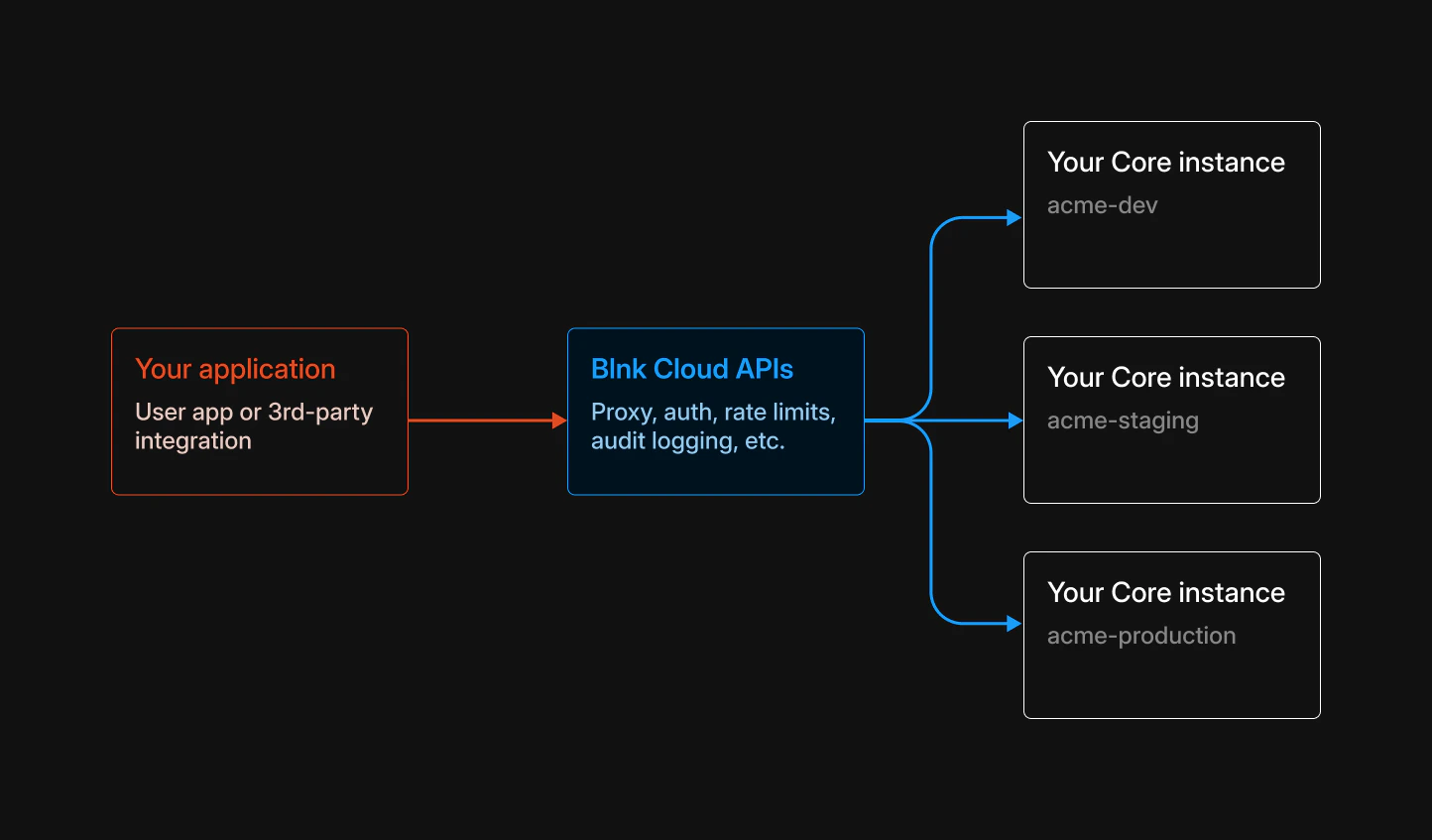
Cloud APIs act as an intelligent layer between your application and your Blnk Core instances:
 **Important to note:**
If you're self-hosting Cloud under the Production License, set the base URL to: `https://ENTERPRISE_PUBLIC_URL`.
When you make a request:
1. Your app authenticates with Blnk Cloud using an access token or an API key.
2. Blnk Cloud validates the request and logs it for audit purposes.
3. Your request is processed in your workspace.
4. If it's a **proxy request** (`/proxy/*`):
* It's forwarded to the correct Core instance using `instance_id`.
* The Core instance processes the request and returns the response.
* Blnk Cloud returns the response to your app.
5. If it's a **data request** (`/data/*`):
* Blnk Cloud queries the instance database directly and returns the results.
6. If it's a **filter request** (`POST /{resource}/filter`):
* Blnk Cloud queries the instance database directly using the JSON filter body and returns the results.
7. For other direct requests (alerts, MCP), Blnk Cloud processes the request and returns the response to your app.
***
## Endpoint groups
Create and update Core resources.
Read instance data via GET filters.
Filtered reads via POST JSON bodies.
***
## What Cloud APIs add to Core
While Blnk Core provides all the ledger operations, Cloud APIs extend it with premium add-on features:
1. **OAuth authentication:** Secure, token-based authentication with scoped permissions for different operations.
2. **Audit logging:** Track every action in your system with detailed audit logs for compliance and debugging.
3. **Advanced filters:** Query your data with powerful operators like `_between`, `_in`, `_like`, and more.
4. `Real-time alerts:` Set up alerts to notify you when specific conditions are met in your ledger.
5. **Workspace management:** Organize teams, manage permissions, and control access across your organization.
6. **Multiple instances:** Access multiple Core instances through a single API endpoint using `instance_id`.
***
## Direct Core access vs. Cloud APIs
You can access your Blnk Core instance directly without using Cloud APIs.
When doing so, Core continues to handle all ledger operations, but Cloud-specific capabilities are not available. This includes audit logs, alerts, OAuth authentication, advanced filtering, and workspace management.
| Feature | Direct Core Access | Through Cloud APIs |
| ---------------------- | ------------------ | ------------------ |
| Ledger operations | ✅ | ✅ |
| Balance management | ✅ | ✅ |
| Transaction processing | ✅ | ✅ |
| OAuth authentication | ❌ | ✅ |
| Audit logging | ❌ | ✅ |
| Triggering alerts | ❌ | ✅ |
| Advanced filtering | ❌ | ✅ |
***
## Need help?
We are very happy to help you make the most of Blnk, regardless of whether it is your first time or you are switching from another tool.
To ask questions or discuss issues, please [contact us](mailto:support@blnkfinance.com) or [join our Discord community](https://discord.gg/7WNv94zPpx).
Get dedicated support for architecture reviews, integration planning, ledger workflows, and production deployment.
**Important to note:**
If you're self-hosting Cloud under the Production License, set the base URL to: `https://ENTERPRISE_PUBLIC_URL`.
When you make a request:
1. Your app authenticates with Blnk Cloud using an access token or an API key.
2. Blnk Cloud validates the request and logs it for audit purposes.
3. Your request is processed in your workspace.
4. If it's a **proxy request** (`/proxy/*`):
* It's forwarded to the correct Core instance using `instance_id`.
* The Core instance processes the request and returns the response.
* Blnk Cloud returns the response to your app.
5. If it's a **data request** (`/data/*`):
* Blnk Cloud queries the instance database directly and returns the results.
6. If it's a **filter request** (`POST /{resource}/filter`):
* Blnk Cloud queries the instance database directly using the JSON filter body and returns the results.
7. For other direct requests (alerts, MCP), Blnk Cloud processes the request and returns the response to your app.
***
## Endpoint groups
Create and update Core resources.
Read instance data via GET filters.
Filtered reads via POST JSON bodies.
***
## What Cloud APIs add to Core
While Blnk Core provides all the ledger operations, Cloud APIs extend it with premium add-on features:
1. **OAuth authentication:** Secure, token-based authentication with scoped permissions for different operations.
2. **Audit logging:** Track every action in your system with detailed audit logs for compliance and debugging.
3. **Advanced filters:** Query your data with powerful operators like `_between`, `_in`, `_like`, and more.
4. `Real-time alerts:` Set up alerts to notify you when specific conditions are met in your ledger.
5. **Workspace management:** Organize teams, manage permissions, and control access across your organization.
6. **Multiple instances:** Access multiple Core instances through a single API endpoint using `instance_id`.
***
## Direct Core access vs. Cloud APIs
You can access your Blnk Core instance directly without using Cloud APIs.
When doing so, Core continues to handle all ledger operations, but Cloud-specific capabilities are not available. This includes audit logs, alerts, OAuth authentication, advanced filtering, and workspace management.
| Feature | Direct Core Access | Through Cloud APIs |
| ---------------------- | ------------------ | ------------------ |
| Ledger operations | ✅ | ✅ |
| Balance management | ✅ | ✅ |
| Transaction processing | ✅ | ✅ |
| OAuth authentication | ❌ | ✅ |
| Audit logging | ❌ | ✅ |
| Triggering alerts | ❌ | ✅ |
| Advanced filtering | ❌ | ✅ |
***
## Need help?
We are very happy to help you make the most of Blnk, regardless of whether it is your first time or you are switching from another tool.
To ask questions or discuss issues, please [contact us](mailto:support@blnkfinance.com) or [join our Discord community](https://discord.gg/7WNv94zPpx).
Get dedicated support for architecture reviews, integration planning, ledger workflows, and production deployment.