> ## Documentation Index
> Fetch the complete documentation index at: https://docs.blnkfinance.com/llms.txt
> Use this file to discover all available pages before exploring further.
# Making Requests
> Send API requests to a Blnk Core instance through the Blnk Cloud proxy.
export const CtaCallout = props => {
const {title, buttonLabel, href, trackingEvent, buttonTarget, rel = "noopener noreferrer", children} = props;
const handleCtaClick = () => {
if (typeof window === "undefined" || !trackingEvent) {
return;
}
try {
window.dispatchEvent(new CustomEvent("blnk:docs-cta", {
detail: {
name: trackingEvent,
href
}
}));
} catch {}
try {
window.posthog?.capture?.(trackingEvent, {
href
});
} catch {}
const gaPayload = {
cta_href: href
};
try {
window.gtag?.("event", trackingEvent, gaPayload);
} catch {}
try {
window.dataLayer = window.dataLayer || [];
window.dataLayer.push({
event: trackingEvent,
...gaPayload
});
} catch {}
};
const isExternal = typeof href === "string" && (/^https?:\/\//i).test(href);
const target = buttonTarget ?? (isExternal ? "_blank" : undefined);
const linkRel = isExternal ? rel : undefined;
return ;
};
The Cloud Proxy lets your app send HTTP requests to a Blnk Core instance through Blnk Cloud, instead of connecting to Core directly.
Blnk Cloud:
* authenticates your request
* uses `instance_id` to determine which Core instance to target
* forwards the request to that instance
* returns the Core response back to your app
### How it works
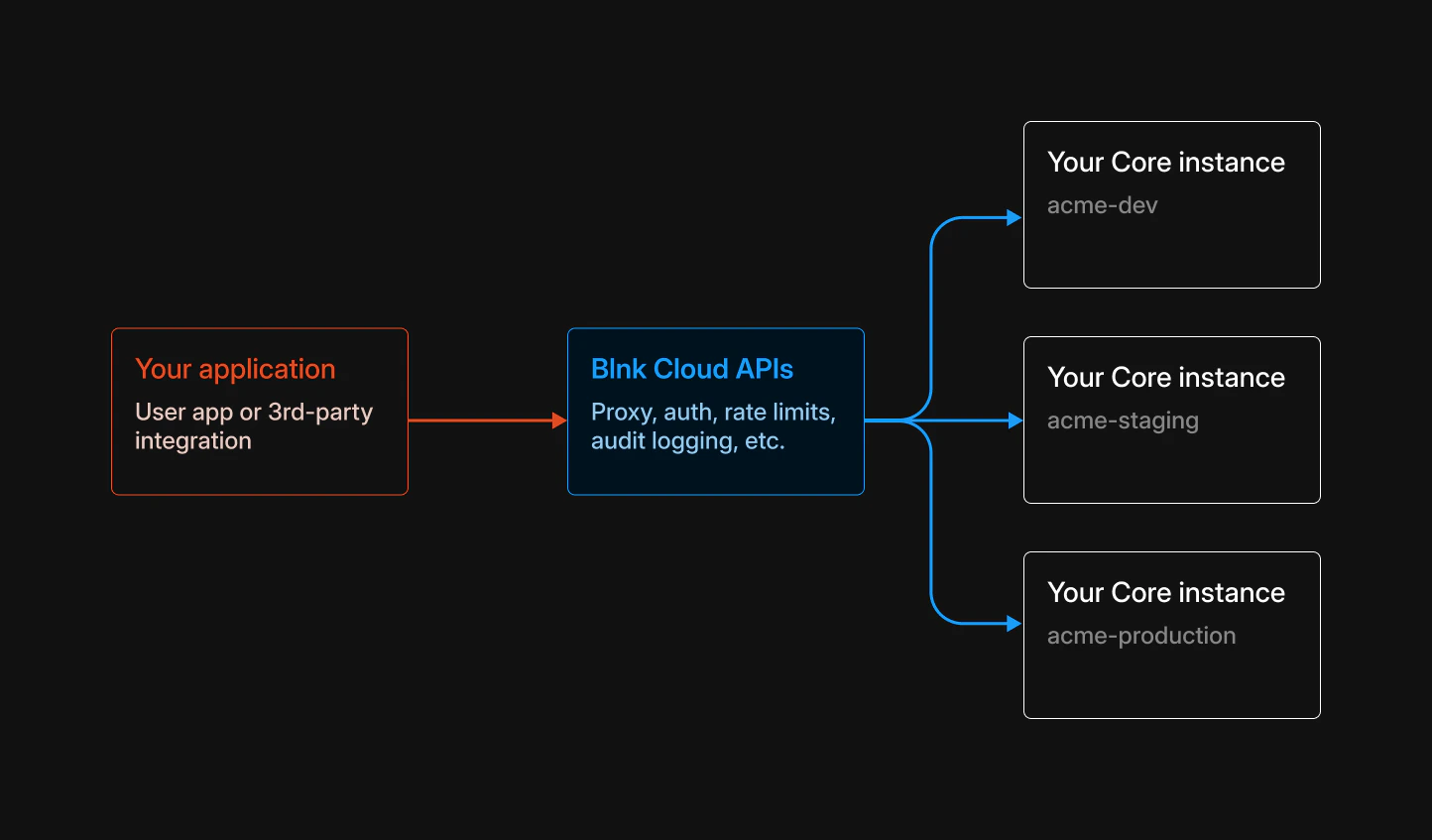 * Your app makes requests to Blnk Cloud, using a single base URL.
* You authenticate using an access token. Ensure that your OAuth key includes the `proxy:write` or (or `*`) scope to create or update resources.
* You include an `instance_id` so Cloud knows which Core instance to route the request to.
* Cloud forwards the request to the specified Core instance.
### URL structure
Instead of calling Blnk Core directly:
```bash wrap theme={"system"}
https://YOUR_CORE_INSTANCE_URL/ledgers
```
You call the Cloud Proxy and pass the `instance ID`:
```bash theme={"system"}
proxy_url:
https://api.cloud.blnkfinance.com/proxy/ledgers?instance_id=YOUR_INSTANCE_ID
headers:
Authorization: Bearer YOUR_ACCESS_TOKEN
Content-Type: application/json
```
Read our OAuth docs to [get the access token here](/cloud/auth/oauth#get-an-access-token).
***
## Create your first set of records
Here is a minimal flow that matches how Blnk is used in practice:
1. `Create a ledger` (for example, named after your app).
2. `Create two balances` in that ledger.
3. `Create a transaction` from one balance to the other.
Create a ledger named after your app to group your balances:
```bash cURL wrap theme={"system"}
curl -X POST "https://api.cloud.blnkfinance.com/proxy/ledgers?instance_id=YOUR_INSTANCE_ID" \
-H "Authorization: Bearer blnk_at_YOUR_ACCESS_TOKEN" \
-H "Content-Type: application/json" \
-d '{
"name": "MyApp Integration Ledger",
"meta_data": {
"description": "Ledger for integration test " all test balances live here"
}
}'
```
```json Response wrap theme={"system"}
{
"ledger_id": "ldg_073f7ffe-9dfd-42ce-aa50-d1dca1788adc",
"name": "MyApp Integration Ledger",
"created_at": "2024-02-20T05:28:03.558281542Z",
"meta_data": {
"description": "Ledger for integration test " all test balances and transactions live here"
}
}
```
Save the returned `ledger_id` " you will use it when creating balances.
Create two USD balances in that ledger:
```bash cURL theme={"system"}
curl -X POST "https://api.cloud.blnkfinance.com/proxy/balances?instance_id=YOUR_INSTANCE_ID" \
-H "Authorization: Bearer blnk_at_YOUR_ACCESS_TOKEN" \
-H "Content-Type: application/json" \
-d '{
"ledger_id": "ldg_073f7ffe-9dfd-42ce-aa50-d1dca1788adc",
"currency": "USD"
}'
```
```json Response theme={"system"}
{
"balance": 0,
"inflight_balance": 0,
"credit_balance": 0,
"inflight_credit_balance": 0,
"debit_balance": 0,
"inflight_debit_balance": 0,
"ledger_id": "ldg_073f7ffe-9dfd-42ce-aa50-d1dca1788adc",
"identity_id": "",
"balance_id": "bln_5ce86029-3c2e-4e2a-aae2-7fb931ca4c4f",
"currency": "USD",
"created_at": "2024-11-26T08:36:36.238244338Z",
"meta_data": null
}
```
Run the same request again to create a second balance (you will get a different `balance_id`).
Save both **`balance_id`** values " you will use them as `source` and `destination` in Step 3.
Move money from Balance A (source) to Balance B (destination):
```bash cURL wrap theme={"system"}
curl -X POST "https://api.cloud.blnkfinance.com/proxy/transactions?instance_id=YOUR_INSTANCE_ID" \
-H "Authorization: Bearer blnk_at_YOUR_ACCESS_TOKEN" \
-H "Content-Type: application/json" \
-d '{
"amount": 100.50,
"currency": "USD",
"precision": 100,
"reference": "ref_myApp-integration-test-001",
"source": "bln_5ce86029-3c2e-4e2a-aae2-7fb931ca4c4f",
"destination": "bln_ANOTHER_BALANCE_ID_FROM_STEP_2",
"description": "Integration test: transfer from Balance A to Balance B",
"allow_overdraft": true
}'
```
```json Response theme={"system"}
{
"amount": 100.50,
"rate": 0,
"precision": 100,
"precise_amount": 10050,
"transaction_id": "txn_c4e70eb8-e4d6-4e04-a2e2-92a43b969e0c",
"parent_transaction": "",
"source": "bln_5ce86029-3c2e-4e2a-aae2-7fb931ca4c4f",
"destination": "bln_ANOTHER_BALANCE_ID_FROM_STEP_2",
"reference": "ref_myApp-integration-test-001",
"currency": "USD",
"description": "Integration test: transfer from Balance A to Balance B",
"status": "QUEUED",
"hash": "hash_...",
"allow_overdraft": true,
"inflight": false,
"created_at": "2024-11-26T08:40:00.000000000Z",
"scheduled_for": "0001-01-01T00:00:00Z",
"inflight_expiry_date": "0001-01-01T00:00:00Z"
}
```
If the transaction returns `status=QUEUED`, Core applies it asynchronously. To verify the final state, fetch the transaction (and updated balances) via the [Data API](/cloud/proxy/data-api).
***
## Working with metadata
Ledgers, balances, transactions, and identities all support **metadata** (`meta_data`) " custom key"value data you attach for enrichment, tagging, or integration, e.g. `customer_id`, `channel`, `region`, `approval_status`.
Use a single top-level key (for example, your app name) under `meta_data` so your enrichment does not clash with user-defined or other apps' metadata:
```json theme={"system"}
{
"meta_data": {
"myApp": {
"channel": "web",
"customer_id": "cust_abc123"
}
}
}
```
Call the following URL to enrich metadata:
```bash wrap theme={"system"}
POST https://api.cloud.blnkfinance.com/proxy//metadata?instance_id=
```
* ``: The ID of the resource you want to update (for example, a `ledger_id`, `balance_id`, `transaction_id`, or `identity_id`).
Each call updates the resource's `meta_data`:
* If a key already exists, the value you send overwrites it.
* If a key does not exist, it is added.
Use the tabs below to see example metadata updates for each resource type:
Update metadata on a ledger, e.g. `project_owner`, `description`, etc.
```bash cURL wrap theme={"system"}
curl -X POST "https://api.cloud.blnkfinance.com/proxy/ldg_073f7ffe-9dfd-42ce-aa50-d1dca1788adc/metadata?instance_id=YOUR_INSTANCE_ID" \
-H "Authorization: Bearer blnk_at_YOUR_ACCESS_TOKEN" \
-H "Content-Type: application/json" \
-d '{
"meta_data": {
"myApp": {
"project_owner": "Acme LLC",
"description": "All test balances and transactions for MyApp"
}
}
}'
```
Update metadata on a balance, e.g. `account_type`, `customer_segment`, `region`, `approval_status`, etc.
```bash cURL wrap theme={"system"}
curl -X POST "https://api.cloud.blnkfinance.com/proxy/bln_5ce86029-3c2e-4e2a-aae2-7fb931ca4c4f/metadata?instance_id=YOUR_INSTANCE_ID" \
-H "Authorization: Bearer blnk_at_YOUR_ACCESS_TOKEN" \
-H "Content-Type: application/json" \
-d '{
"meta_data": {
"myApp": {
"account_type": "savings",
"segment": "retail"
}
}
}'
```
Update metadata on a single transaction, e.g. `channel`, `recipient`, `risk_score`, `destination_country`, etc.
```bash cURL wrap theme={"system"}
curl -X POST "https://api.cloud.blnkfinance.com/proxy/txn_c4e70eb8-e4d6-4e04-a2e2-92a43b969e0c/metadata?instance_id=YOUR_INSTANCE_ID" \
-H "Authorization: Bearer blnk_at_YOUR_ACCESS_TOKEN" \
-H "Content-Type: application/json" \
-d '{
"meta_data": {
"myApp": {
"channel": "web",
"customer_id": "cust_abc123",
"approval_status": "approved"
}
}
}'
```
Update metadata on an identity, such as segment and KYC status.
```bash cURL wrap theme={"system"}
curl -X POST "https://api.cloud.blnkfinance.com/proxy/idt_3b63c8da-af29-4cc3-ad38-df17d87456e6/metadata?instance_id=YOUR_INSTANCE_ID" \
-H "Authorization: Bearer blnk_at_YOUR_ACCESS_TOKEN" \
-H "Content-Type: application/json" \
-d '{
"meta_data": {
"myApp": {
"segment": "premium",
"kyc_status": "verified",
"source": "onboarding_flow"
}
}
}'
```
For all metadata update calls:
* **Status:** `200 OK`
* **Body:** The resource's updated `meta_data` object. Example:
```json Success theme={"system"}
{
"meta_data": {
"myApp": {
"channel": "web",
"customer_id": "cust_abc123",
"approval_status": "approved"
}
}
}
```
***
## See all available endpoints
For the complete list of Proxy API routes, see the [Proxy API reference](/cloud/reference/proxy-api).
To see request and response shapes for individual operations, use the [Blnk Core API reference](https://docs.blnkfinance.com/reference).
Use the Core docs to determine the request path, HTTP method, and body. Then send the same request through Blnk Cloud via the Cloud Proxy base URL, `Authorization` header and the `instance_id` query parameter, as shown earlier on this page.
***
We help you build custom apps for your use case or get help building your own from scratch.
* Your app makes requests to Blnk Cloud, using a single base URL.
* You authenticate using an access token. Ensure that your OAuth key includes the `proxy:write` or (or `*`) scope to create or update resources.
* You include an `instance_id` so Cloud knows which Core instance to route the request to.
* Cloud forwards the request to the specified Core instance.
### URL structure
Instead of calling Blnk Core directly:
```bash wrap theme={"system"}
https://YOUR_CORE_INSTANCE_URL/ledgers
```
You call the Cloud Proxy and pass the `instance ID`:
```bash theme={"system"}
proxy_url:
https://api.cloud.blnkfinance.com/proxy/ledgers?instance_id=YOUR_INSTANCE_ID
headers:
Authorization: Bearer YOUR_ACCESS_TOKEN
Content-Type: application/json
```
Read our OAuth docs to [get the access token here](/cloud/auth/oauth#get-an-access-token).
***
## Create your first set of records
Here is a minimal flow that matches how Blnk is used in practice:
1. `Create a ledger` (for example, named after your app).
2. `Create two balances` in that ledger.
3. `Create a transaction` from one balance to the other.
Create a ledger named after your app to group your balances:
```bash cURL wrap theme={"system"}
curl -X POST "https://api.cloud.blnkfinance.com/proxy/ledgers?instance_id=YOUR_INSTANCE_ID" \
-H "Authorization: Bearer blnk_at_YOUR_ACCESS_TOKEN" \
-H "Content-Type: application/json" \
-d '{
"name": "MyApp Integration Ledger",
"meta_data": {
"description": "Ledger for integration test " all test balances live here"
}
}'
```
```json Response wrap theme={"system"}
{
"ledger_id": "ldg_073f7ffe-9dfd-42ce-aa50-d1dca1788adc",
"name": "MyApp Integration Ledger",
"created_at": "2024-02-20T05:28:03.558281542Z",
"meta_data": {
"description": "Ledger for integration test " all test balances and transactions live here"
}
}
```
Save the returned `ledger_id` " you will use it when creating balances.
Create two USD balances in that ledger:
```bash cURL theme={"system"}
curl -X POST "https://api.cloud.blnkfinance.com/proxy/balances?instance_id=YOUR_INSTANCE_ID" \
-H "Authorization: Bearer blnk_at_YOUR_ACCESS_TOKEN" \
-H "Content-Type: application/json" \
-d '{
"ledger_id": "ldg_073f7ffe-9dfd-42ce-aa50-d1dca1788adc",
"currency": "USD"
}'
```
```json Response theme={"system"}
{
"balance": 0,
"inflight_balance": 0,
"credit_balance": 0,
"inflight_credit_balance": 0,
"debit_balance": 0,
"inflight_debit_balance": 0,
"ledger_id": "ldg_073f7ffe-9dfd-42ce-aa50-d1dca1788adc",
"identity_id": "",
"balance_id": "bln_5ce86029-3c2e-4e2a-aae2-7fb931ca4c4f",
"currency": "USD",
"created_at": "2024-11-26T08:36:36.238244338Z",
"meta_data": null
}
```
Run the same request again to create a second balance (you will get a different `balance_id`).
Save both **`balance_id`** values " you will use them as `source` and `destination` in Step 3.
Move money from Balance A (source) to Balance B (destination):
```bash cURL wrap theme={"system"}
curl -X POST "https://api.cloud.blnkfinance.com/proxy/transactions?instance_id=YOUR_INSTANCE_ID" \
-H "Authorization: Bearer blnk_at_YOUR_ACCESS_TOKEN" \
-H "Content-Type: application/json" \
-d '{
"amount": 100.50,
"currency": "USD",
"precision": 100,
"reference": "ref_myApp-integration-test-001",
"source": "bln_5ce86029-3c2e-4e2a-aae2-7fb931ca4c4f",
"destination": "bln_ANOTHER_BALANCE_ID_FROM_STEP_2",
"description": "Integration test: transfer from Balance A to Balance B",
"allow_overdraft": true
}'
```
```json Response theme={"system"}
{
"amount": 100.50,
"rate": 0,
"precision": 100,
"precise_amount": 10050,
"transaction_id": "txn_c4e70eb8-e4d6-4e04-a2e2-92a43b969e0c",
"parent_transaction": "",
"source": "bln_5ce86029-3c2e-4e2a-aae2-7fb931ca4c4f",
"destination": "bln_ANOTHER_BALANCE_ID_FROM_STEP_2",
"reference": "ref_myApp-integration-test-001",
"currency": "USD",
"description": "Integration test: transfer from Balance A to Balance B",
"status": "QUEUED",
"hash": "hash_...",
"allow_overdraft": true,
"inflight": false,
"created_at": "2024-11-26T08:40:00.000000000Z",
"scheduled_for": "0001-01-01T00:00:00Z",
"inflight_expiry_date": "0001-01-01T00:00:00Z"
}
```
If the transaction returns `status=QUEUED`, Core applies it asynchronously. To verify the final state, fetch the transaction (and updated balances) via the [Data API](/cloud/proxy/data-api).
***
## Working with metadata
Ledgers, balances, transactions, and identities all support **metadata** (`meta_data`) " custom key"value data you attach for enrichment, tagging, or integration, e.g. `customer_id`, `channel`, `region`, `approval_status`.
Use a single top-level key (for example, your app name) under `meta_data` so your enrichment does not clash with user-defined or other apps' metadata:
```json theme={"system"}
{
"meta_data": {
"myApp": {
"channel": "web",
"customer_id": "cust_abc123"
}
}
}
```
Call the following URL to enrich metadata:
```bash wrap theme={"system"}
POST https://api.cloud.blnkfinance.com/proxy//metadata?instance_id=
```
* ``: The ID of the resource you want to update (for example, a `ledger_id`, `balance_id`, `transaction_id`, or `identity_id`).
Each call updates the resource's `meta_data`:
* If a key already exists, the value you send overwrites it.
* If a key does not exist, it is added.
Use the tabs below to see example metadata updates for each resource type:
Update metadata on a ledger, e.g. `project_owner`, `description`, etc.
```bash cURL wrap theme={"system"}
curl -X POST "https://api.cloud.blnkfinance.com/proxy/ldg_073f7ffe-9dfd-42ce-aa50-d1dca1788adc/metadata?instance_id=YOUR_INSTANCE_ID" \
-H "Authorization: Bearer blnk_at_YOUR_ACCESS_TOKEN" \
-H "Content-Type: application/json" \
-d '{
"meta_data": {
"myApp": {
"project_owner": "Acme LLC",
"description": "All test balances and transactions for MyApp"
}
}
}'
```
Update metadata on a balance, e.g. `account_type`, `customer_segment`, `region`, `approval_status`, etc.
```bash cURL wrap theme={"system"}
curl -X POST "https://api.cloud.blnkfinance.com/proxy/bln_5ce86029-3c2e-4e2a-aae2-7fb931ca4c4f/metadata?instance_id=YOUR_INSTANCE_ID" \
-H "Authorization: Bearer blnk_at_YOUR_ACCESS_TOKEN" \
-H "Content-Type: application/json" \
-d '{
"meta_data": {
"myApp": {
"account_type": "savings",
"segment": "retail"
}
}
}'
```
Update metadata on a single transaction, e.g. `channel`, `recipient`, `risk_score`, `destination_country`, etc.
```bash cURL wrap theme={"system"}
curl -X POST "https://api.cloud.blnkfinance.com/proxy/txn_c4e70eb8-e4d6-4e04-a2e2-92a43b969e0c/metadata?instance_id=YOUR_INSTANCE_ID" \
-H "Authorization: Bearer blnk_at_YOUR_ACCESS_TOKEN" \
-H "Content-Type: application/json" \
-d '{
"meta_data": {
"myApp": {
"channel": "web",
"customer_id": "cust_abc123",
"approval_status": "approved"
}
}
}'
```
Update metadata on an identity, such as segment and KYC status.
```bash cURL wrap theme={"system"}
curl -X POST "https://api.cloud.blnkfinance.com/proxy/idt_3b63c8da-af29-4cc3-ad38-df17d87456e6/metadata?instance_id=YOUR_INSTANCE_ID" \
-H "Authorization: Bearer blnk_at_YOUR_ACCESS_TOKEN" \
-H "Content-Type: application/json" \
-d '{
"meta_data": {
"myApp": {
"segment": "premium",
"kyc_status": "verified",
"source": "onboarding_flow"
}
}
}'
```
For all metadata update calls:
* **Status:** `200 OK`
* **Body:** The resource's updated `meta_data` object. Example:
```json Success theme={"system"}
{
"meta_data": {
"myApp": {
"channel": "web",
"customer_id": "cust_abc123",
"approval_status": "approved"
}
}
}
```
***
## See all available endpoints
For the complete list of Proxy API routes, see the [Proxy API reference](/cloud/reference/proxy-api).
To see request and response shapes for individual operations, use the [Blnk Core API reference](https://docs.blnkfinance.com/reference).
Use the Core docs to determine the request path, HTTP method, and body. Then send the same request through Blnk Cloud via the Cloud Proxy base URL, `Authorization` header and the `instance_id` query parameter, as shown earlier on this page.
***
We help you build custom apps for your use case or get help building your own from scratch.