> ## Documentation Index
> Fetch the complete documentation index at: https://docs.blnkfinance.com/llms.txt
> Use this file to discover all available pages before exploring further.

# Cloud Integrations

> Connect apps, scripts, AI assistants, and third-party systems to Blnk Cloud and your Core instances.

export const CtaCallout = props => {
  const {title, buttonLabel, href, trackingEvent, buttonTarget, rel = "noopener noreferrer", children} = props;
  const handleCtaClick = () => {
    if (typeof window === "undefined" || !trackingEvent) {
      return;
    }
    try {
      window.dispatchEvent(new CustomEvent("blnk:docs-cta", {
        detail: {
          name: trackingEvent,
          href
        }
      }));
    } catch {}
    try {
      window.posthog?.capture?.(trackingEvent, {
        href
      });
    } catch {}
    const gaPayload = {
      cta_href: href
    };
    try {
      window.gtag?.("event", trackingEvent, gaPayload);
    } catch {}
    try {
      window.dataLayer = window.dataLayer || [];
      window.dataLayer.push({
        event: trackingEvent,
        ...gaPayload
      });
    } catch {}
  };
  const isExternal = typeof href === "string" && (/^https?:\/\//i).test(href);
  const target = buttonTarget ?? (isExternal ? "_blank" : undefined);
  const linkRel = isExternal ? rel : undefined;
  return <section className="cta-callout not-prose relative my-8 w-full min-w-0 overflow-hidden rounded-xl border border-zinc-200 p-5 dark:border-white/10">
      <div className="cta-callout-noise" aria-hidden="true" />
      <div className="cta-callout-layout">
        {title ? <div className="cta-callout-title-row">
            <svg xmlns="http://www.w3.org/2000/svg" viewBox="0 0 28 28" width="14" height="14" className="cta-callout-icon shrink-0 text-zinc-800 dark:text-zinc-200" aria-hidden="true">
              <g fill="none" fillRule="nonzero">
                <path d="M28 0v28H0V0h28ZM14.691833333333335 27.134333333333334l-0.012833333333333334 0.0023333333333333335 -0.08283333333333333 0.04083333333333334 -0.023333333333333334 0.004666666666666667 -0.016333333333333335 -0.004666666666666667 -0.08283333333333333 -0.04083333333333334c-0.011666666666666667 -0.004666666666666667 -0.022166666666666668 -0.0011666666666666668 -0.028000000000000004 0.005833333333333334l-0.004666666666666667 0.011666666666666667 -0.019833333333333335 0.49933333333333335 0.005833333333333334 0.023333333333333334 0.011666666666666667 0.015166666666666667 0.12133333333333333 0.08633333333333333 0.0175 0.004666666666666667 0.014000000000000002 -0.004666666666666667 0.12133333333333333 -0.08633333333333333 0.014000000000000002 -0.018666666666666668 0.004666666666666667 -0.019833333333333335 -0.019833333333333335 -0.4981666666666667c-0.0023333333333333335 -0.011666666666666667 -0.0105 -0.019833333333333335 -0.019833333333333335 -0.021Zm0.3091666666666667 -0.13183333333333336 -0.015166666666666667 0.0023333333333333335 -0.21583333333333335 0.1085 -0.011666666666666667 0.011666666666666667 -0.0035000000000000005 0.012833333333333334 0.021 0.5016666666666667 0.005833333333333334 0.014000000000000002 0.009333333333333334 0.008166666666666668 0.23450000000000004 0.1085c0.014000000000000002 0.004666666666666667 0.026833333333333334 0 0.03383333333333334 -0.009333333333333334l0.004666666666666667 -0.016333333333333335 -0.03966666666666667 -0.7163333333333334c-0.0035000000000000005 -0.014000000000000002 -0.011666666666666667 -0.023333333333333334 -0.023333333333333334 -0.025666666666666667Zm-0.8341666666666667 0.0023333333333333335a0.026833333333333334 0.026833333333334334 0 0 0 -0.0315 0.007000000000000001l-0.007000000000000001 0.016333333333333335 -0.03966666666666667 0.7163333333333334c0 0.014000000000000002 0.008166666666666668 0.023333333333333334 0.019833333333333335 0.028000000000000004l0.0175 -0.0023333333333333335 0.23450000000000004 -0.1085 0.011666666666666667 -0.009333333333333334 0.004666666666666667 -0.012833333333333334 0.019833333333333335 -0.5016666666666667 -0.0035000000000000005 -0.014000000000000002 -0.011666666666666667 -0.011666666666666667 -0.21466666666666667 -0.10733333333333334Z" strokeWidth="1.1667" />
                <path fill="currentColor" d="M14 2.916666666666667A1.75 1.75 0 0 1 15.750000000000002 4.666666666666667v6.302333333333334L21.207666666666668 7.816666666666667a1.75 1.75 0 0 1 1.75 3.031L17.5 14l5.457666666666667 3.151166666666667a1.75 1.75 0 0 1 -1.75 3.031l-5.457666666666667 -3.1500000000000004V23.333333333333336a1.75 1.75 0 0 1 -3.5 0v-6.302333333333334L6.792333333333334 20.183333333333337a1.75 1.75 0 1 1 -1.75 -3.031L10.5 14 5.042333333333334 10.848833333333333a1.75 1.75 0 0 1 1.75 -3.031l5.457666666666667 3.1500000000000004V4.666666666666667A1.75 1.75 0 0 1 14 2.916666666666667Z" strokeWidth="1.1667" />
              </g>
            </svg>
            <p className="cta-callout-title min-w-0 font-semibold text-zinc-800 dark:text-zinc-200">
              {title}
            </p>
          </div> : null}
        <div className={`cta-callout-body text-sm leading-normal text-zinc-800 dark:text-zinc-200${title ? " cta-callout-body--indented" : ""}`}>
          {children}
        </div>
        <a href={href} target={target} rel={linkRel} onClick={handleCtaClick} data-docs-cta={trackingEvent || undefined} className="cta-callout-button inline-flex items-center justify-center gap-1 rounded-full bg-white px-3 py-1.5 text-sm font-semibold transition hover:bg-zinc-100 focus-visible:outline focus-visible:outline-2 focus-visible:outline-offset-2 focus-visible:outline-white/50 dark:bg-white dark:hover:bg-zinc-200">
          {buttonLabel}
          <span className="cta-callout-button-arrow" aria-hidden="true">
            →
          </span>
        </a>
      </div>
    </section>;
};

Integrations are how you connect Blnk Cloud to software outside the dashboard: your own services, automation scripts, AI assistants, and partner applications.

Use this section to choose the right authentication method and API surface, then follow the linked guides for setup and examples.

***

## How integrations work

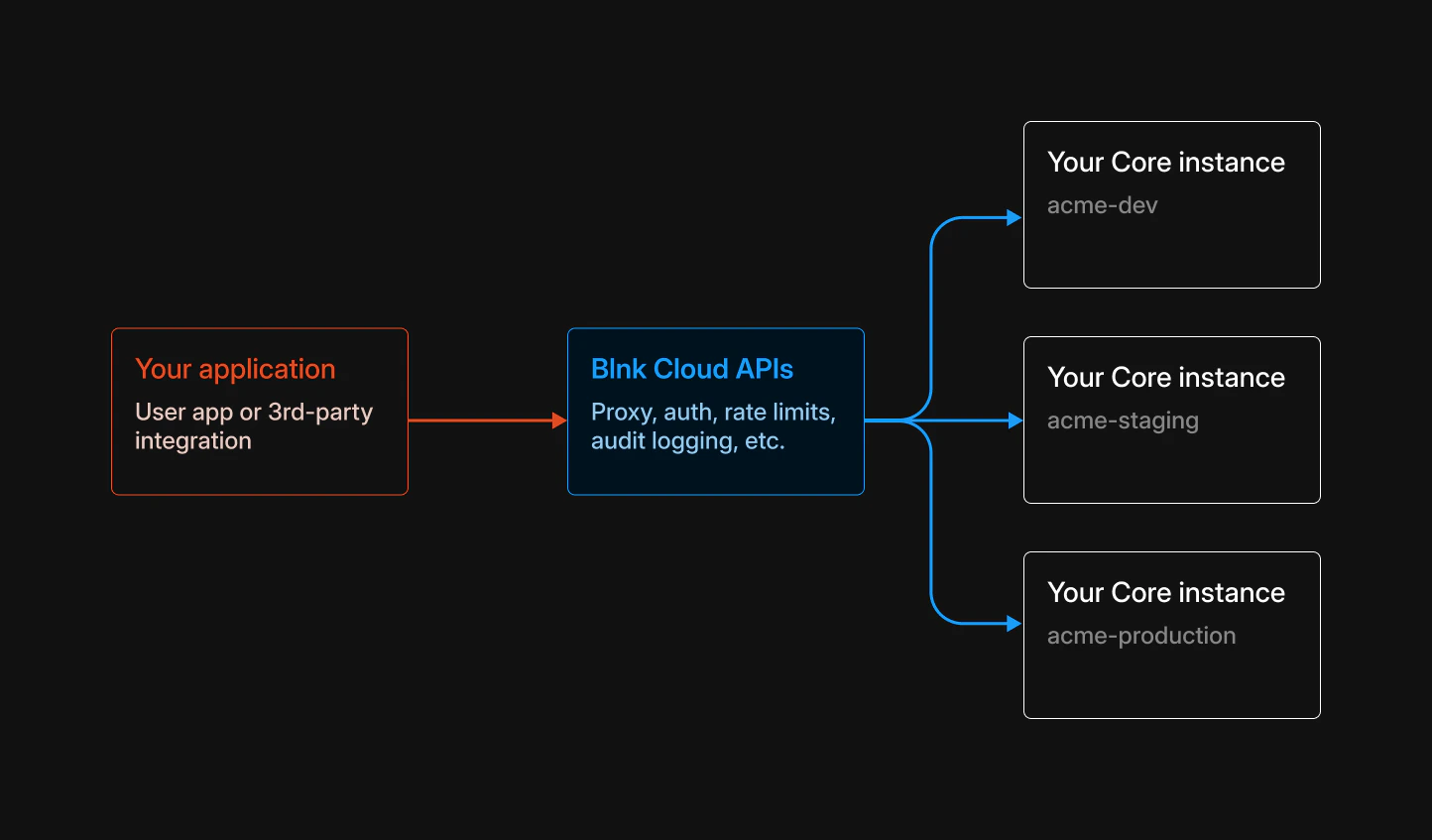
Your client authenticates with Blnk Cloud. Cloud validates the request, routes it to the correct Core instance using `instance_id`, and returns the response.

AI tools using MCP follow the same path: your assistant talks to Cloud, not directly to Core.
<img src="https://mintcdn.com/blnk/JB9Zhph4DjE0VsHT/cloud/img/auth/cloud-api.png?fit=max&auto=format&n=JB9Zhph4DjE0VsHT&q=85&s=abe94c638d609e87bfbec7a1f27580ba" alt="Diagram showing a client authenticating with Blnk Cloud, which forwards requests to a Blnk Core instance" className="rounded-lg" width="1444" height="847" data-path="cloud/img/auth/cloud-api.png" />

<Note>
  If you self-host Blnk Cloud under a production license, use your deployment's public URL as the API base instead of `https://api.cloud.blnkfinance.com`. See [License configuration](/cloud/license/configuration).
</Note>

***

## Choose an integration

Pick the path that matches how you connect: credentials for authentication, then the API or protocol for the work you need to do.

<CardGroup cols={2}>
  <Card title="API keys" icon="key" href="/cloud/auth/api-keys">
    Server-side Cloud API credentials.
  </Card>

  <Card title="OAuth" icon="lock" href="/cloud/auth/oauth">
    Third-party and user-delegated access.
  </Card>

  <Card title="MCP" icon="cpu" href="/cloud/integrations/mcp">
    AI assistants on your ledger data.
  </Card>

  <Card title="Proxy API" icon="arrow-left-right" href="/cloud/proxy/proxy-api">
    Create and update Core resources.
  </Card>

  <Card title="Data API" icon="database" href="/cloud/proxy/data-api">
    Read instance data via GET.
  </Card>

  <Card title="Filters API" icon="list-filter" href="/cloud/proxy/filters-api">
    Advanced reads with JSON filters.
  </Card>

  <Card title="Alerts API" icon="bell" href="/cloud/home/alerts-api">
    Programmatic alert management.
  </Card>
</CardGroup>

<Tip>
  Need endpoint paths, request shapes, and response fields? Browse the [Cloud API reference](/cloud/reference/overview) for full REST documentation.
</Tip>

***

## Related guides

<CardGroup cols={2}>
  <Card title="Custom Apps" icon="layout-dashboard" href="/cloud/apps/overview">
    Ledger-aware workflows inside Blnk Cloud.
  </Card>

  <Card title="Alerts" icon="bell" href="/cloud/alerts/overview">
    Flag and manage alerts from the dashboard.
  </Card>
</CardGroup>

***

## Need help?

We are very happy to help you make the most of Blnk, regardless of whether it is your first time or you are switching from another tool.

To ask questions or discuss issues, please [contact us](mailto:support@blnkfinance.com) or [join our Discord community](https://discord.gg/7WNv94zPpx).

<CtaCallout title="Need help with your product?" href="https://blnkfinance.com/contact/us?utm_source=blnk_docs&utm_medium=documentation&utm_campaign=home%2Finstall" buttonLabel="Speak with us" trackingEvent="clicked_pro_support">
  Get dedicated support for architecture reviews, integration planning, ledger workflows, and production deployment.
</CtaCallout>
