> ## Documentation Index
> Fetch the complete documentation index at: https://docs.blnkfinance.com/llms.txt
> Use this file to discover all available pages before exploring further.
# Migrate your instance in or out of Blnk Cloud
> Learn how to migrate your data from a self-hosted Core instance to Blnk's hosted Core using PostgreSQL database migration tools. Or migrate your data from Blnk Cloud to a self-hosted Core instance.
export const CtaCallout = props => {
const {title, buttonLabel, href, trackingEvent, buttonTarget, rel = "noopener noreferrer", children} = props;
const handleCtaClick = () => {
if (typeof window === "undefined" || !trackingEvent) {
return;
}
try {
window.dispatchEvent(new CustomEvent("blnk:docs-cta", {
detail: {
name: trackingEvent,
href
}
}));
} catch {}
try {
window.posthog?.capture?.(trackingEvent, {
href
});
} catch {}
const gaPayload = {
cta_href: href
};
try {
window.gtag?.("event", trackingEvent, gaPayload);
} catch {}
try {
window.dataLayer = window.dataLayer || [];
window.dataLayer.push({
event: trackingEvent,
...gaPayload
});
} catch {}
};
const isExternal = typeof href === "string" && (/^https?:\/\//i).test(href);
const target = buttonTarget ?? (isExternal ? "_blank" : undefined);
const linkRel = isExternal ? rel : undefined;
return ;
};
Migration helps teams looking to migrate from their self-hosted instance to Blnk Cloud (or vice versa). This gives teams access to automated backups, IP whitelisting, improved Core performance, etc that only Cloud offers.
With Blnk Cloud, you can do two kinds of migration:
* **Import into deployment:** bring data from an external PostgreSQL database into Blnk Cloud
* **Export from deployment:** send data from Blnk Cloud to an external PostgreSQL database
***
## Prerequisites
You need to ensure the following are online before to run a successful migration to Blnk Cloud:
* An active running deployment on Blnk Cloud. If you don't have one yet, See [Managed instances](/cloud/instances/deploy).
* Full connection URL of your external/self-hosted Postgres DB e.g.
```
postgresql://user:pass@host:5432/dbname?sslmode=require
```
***
## How to run a migration
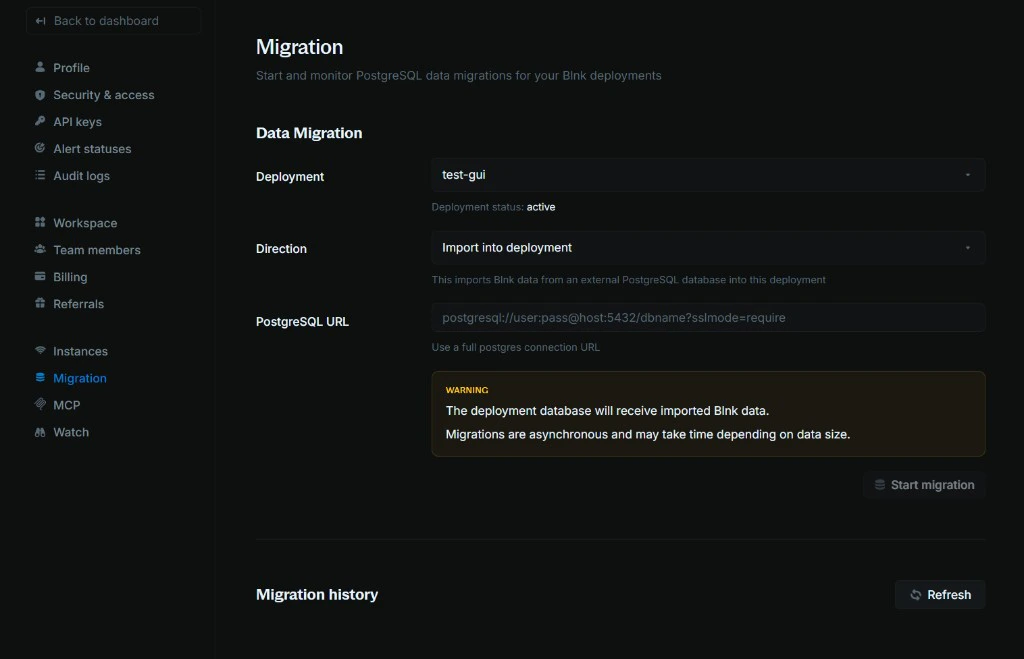 1. Go to `Settings > Migration`
2. Select your deployment
3. Choose a direction:
* Import into deployment
* Export from deployment
4. Paste your PostgreSQL URL
5. Click `Start migration` and confirm
6. Avoid making changes to your data during migration (to prevent conflicts)
After you confirm, Blnk runs the migration asynchronously and updates **Migration history** as it progresses (for example, `pending > running > succeeded/failed`).
***
## After the migration
On your Cloud workspace:
1. Confirm that ledgers, balances, transactions, and identities look correct in the dashboard or your usual tools.
2. Compare record counts or spot-check key data against the source database.
3. Test your workflows on the new deployment to confirm that everything works great, before switching to production.
## Need help?
We are very happy to help you make the most of Blnk, regardless of whether it is your first time or you are switching from another tool.
To ask questions or discuss issues, please [contact us](mailto:support@blnkfinance.com) or [join our Discord community](https://discord.gg/7WNv94zPpx).
Get dedicated support for architecture reviews, integration planning, ledger workflows, and production deployment.
1. Go to `Settings > Migration`
2. Select your deployment
3. Choose a direction:
* Import into deployment
* Export from deployment
4. Paste your PostgreSQL URL
5. Click `Start migration` and confirm
6. Avoid making changes to your data during migration (to prevent conflicts)
After you confirm, Blnk runs the migration asynchronously and updates **Migration history** as it progresses (for example, `pending > running > succeeded/failed`).
***
## After the migration
On your Cloud workspace:
1. Confirm that ledgers, balances, transactions, and identities look correct in the dashboard or your usual tools.
2. Compare record counts or spot-check key data against the source database.
3. Test your workflows on the new deployment to confirm that everything works great, before switching to production.
## Need help?
We are very happy to help you make the most of Blnk, regardless of whether it is your first time or you are switching from another tool.
To ask questions or discuss issues, please [contact us](mailto:support@blnkfinance.com) or [join our Discord community](https://discord.gg/7WNv94zPpx).
Get dedicated support for architecture reviews, integration planning, ledger workflows, and production deployment.