> ## Documentation Index
> Fetch the complete documentation index at: https://docs.blnkfinance.com/llms.txt
> Use this file to discover all available pages before exploring further.

# Managed Instances

> Learn how to deploy a managed Core instance on Cloud.

export const CtaCallout = props => {
  const {title, buttonLabel, href, trackingEvent, buttonTarget, rel = "noopener noreferrer", children} = props;
  const handleCtaClick = () => {
    if (typeof window === "undefined" || !trackingEvent) {
      return;
    }
    try {
      window.dispatchEvent(new CustomEvent("blnk:docs-cta", {
        detail: {
          name: trackingEvent,
          href
        }
      }));
    } catch {}
    try {
      window.posthog?.capture?.(trackingEvent, {
        href
      });
    } catch {}
    const gaPayload = {
      cta_href: href
    };
    try {
      window.gtag?.("event", trackingEvent, gaPayload);
    } catch {}
    try {
      window.dataLayer = window.dataLayer || [];
      window.dataLayer.push({
        event: trackingEvent,
        ...gaPayload
      });
    } catch {}
  };
  const isExternal = typeof href === "string" && (/^https?:\/\//i).test(href);
  const target = buttonTarget ?? (isExternal ? "_blank" : undefined);
  const linkRel = isExternal ? rel : undefined;
  return <section className="cta-callout not-prose relative my-8 w-full min-w-0 overflow-hidden rounded-xl border border-zinc-200 p-5 dark:border-white/10">
      <div className="cta-callout-noise" aria-hidden="true" />
      <div className="cta-callout-layout">
        {title ? <div className="cta-callout-title-row">
            <svg xmlns="http://www.w3.org/2000/svg" viewBox="0 0 28 28" width="14" height="14" className="cta-callout-icon shrink-0 text-zinc-800 dark:text-zinc-200" aria-hidden="true">
              <g fill="none" fillRule="nonzero">
                <path d="M28 0v28H0V0h28ZM14.691833333333335 27.134333333333334l-0.012833333333333334 0.0023333333333333335 -0.08283333333333333 0.04083333333333334 -0.023333333333333334 0.004666666666666667 -0.016333333333333335 -0.004666666666666667 -0.08283333333333333 -0.04083333333333334c-0.011666666666666667 -0.004666666666666667 -0.022166666666666668 -0.0011666666666666668 -0.028000000000000004 0.005833333333333334l-0.004666666666666667 0.011666666666666667 -0.019833333333333335 0.49933333333333335 0.005833333333333334 0.023333333333333334 0.011666666666666667 0.015166666666666667 0.12133333333333333 0.08633333333333333 0.0175 0.004666666666666667 0.014000000000000002 -0.004666666666666667 0.12133333333333333 -0.08633333333333333 0.014000000000000002 -0.018666666666666668 0.004666666666666667 -0.019833333333333335 -0.019833333333333335 -0.4981666666666667c-0.0023333333333333335 -0.011666666666666667 -0.0105 -0.019833333333333335 -0.019833333333333335 -0.021Zm0.3091666666666667 -0.13183333333333336 -0.015166666666666667 0.0023333333333333335 -0.21583333333333335 0.1085 -0.011666666666666667 0.011666666666666667 -0.0035000000000000005 0.012833333333333334 0.021 0.5016666666666667 0.005833333333333334 0.014000000000000002 0.009333333333333334 0.008166666666666668 0.23450000000000004 0.1085c0.014000000000000002 0.004666666666666667 0.026833333333333334 0 0.03383333333333334 -0.009333333333333334l0.004666666666666667 -0.016333333333333335 -0.03966666666666667 -0.7163333333333334c-0.0035000000000000005 -0.014000000000000002 -0.011666666666666667 -0.023333333333333334 -0.023333333333333334 -0.025666666666666667Zm-0.8341666666666667 0.0023333333333333335a0.026833333333333334 0.026833333333334334 0 0 0 -0.0315 0.007000000000000001l-0.007000000000000001 0.016333333333333335 -0.03966666666666667 0.7163333333333334c0 0.014000000000000002 0.008166666666666668 0.023333333333333334 0.019833333333333335 0.028000000000000004l0.0175 -0.0023333333333333335 0.23450000000000004 -0.1085 0.011666666666666667 -0.009333333333333334 0.004666666666666667 -0.012833333333333334 0.019833333333333335 -0.5016666666666667 -0.0035000000000000005 -0.014000000000000002 -0.011666666666666667 -0.011666666666666667 -0.21466666666666667 -0.10733333333333334Z" strokeWidth="1.1667" />
                <path fill="currentColor" d="M14 2.916666666666667A1.75 1.75 0 0 1 15.750000000000002 4.666666666666667v6.302333333333334L21.207666666666668 7.816666666666667a1.75 1.75 0 0 1 1.75 3.031L17.5 14l5.457666666666667 3.151166666666667a1.75 1.75 0 0 1 -1.75 3.031l-5.457666666666667 -3.1500000000000004V23.333333333333336a1.75 1.75 0 0 1 -3.5 0v-6.302333333333334L6.792333333333334 20.183333333333337a1.75 1.75 0 1 1 -1.75 -3.031L10.5 14 5.042333333333334 10.848833333333333a1.75 1.75 0 0 1 1.75 -3.031l5.457666666666667 3.1500000000000004V4.666666666666667A1.75 1.75 0 0 1 14 2.916666666666667Z" strokeWidth="1.1667" />
              </g>
            </svg>
            <p className="cta-callout-title min-w-0 font-semibold text-zinc-800 dark:text-zinc-200">
              {title}
            </p>
          </div> : null}
        <div className={`cta-callout-body text-sm leading-normal text-zinc-800 dark:text-zinc-200${title ? " cta-callout-body--indented" : ""}`}>
          {children}
        </div>
        <a href={href} target={target} rel={linkRel} onClick={handleCtaClick} data-docs-cta={trackingEvent || undefined} className="cta-callout-button inline-flex items-center justify-center gap-1 rounded-full bg-white px-3 py-1.5 text-sm font-semibold transition hover:bg-zinc-100 focus-visible:outline focus-visible:outline-2 focus-visible:outline-offset-2 focus-visible:outline-white/50 dark:bg-white dark:hover:bg-zinc-200">
          {buttonLabel}
          <span className="cta-callout-button-arrow" aria-hidden="true">
            →
          </span>
        </a>
      </div>
    </section>;
};

Blnk Cloud requires a running Blnk Core instance to work. You can [host your own Core instance](/cloud/instances/create) or deploy a managed Core instance from Blnk.

For managed instance, Blnk takes care of the deployment and maintenance of your Core instance, and automatically connects it to your Blnk Cloud workspace.

***

## Deployment types

Blnk offers two deployment types for your managed Core instance:

1. **Sandbox:** Best for staging and testing environments.
2. **Production:** Best for production workloads and live applications.

***

## Deploy a managed core instance

<Steps>
  <Step title="Create an instance on Cloud">
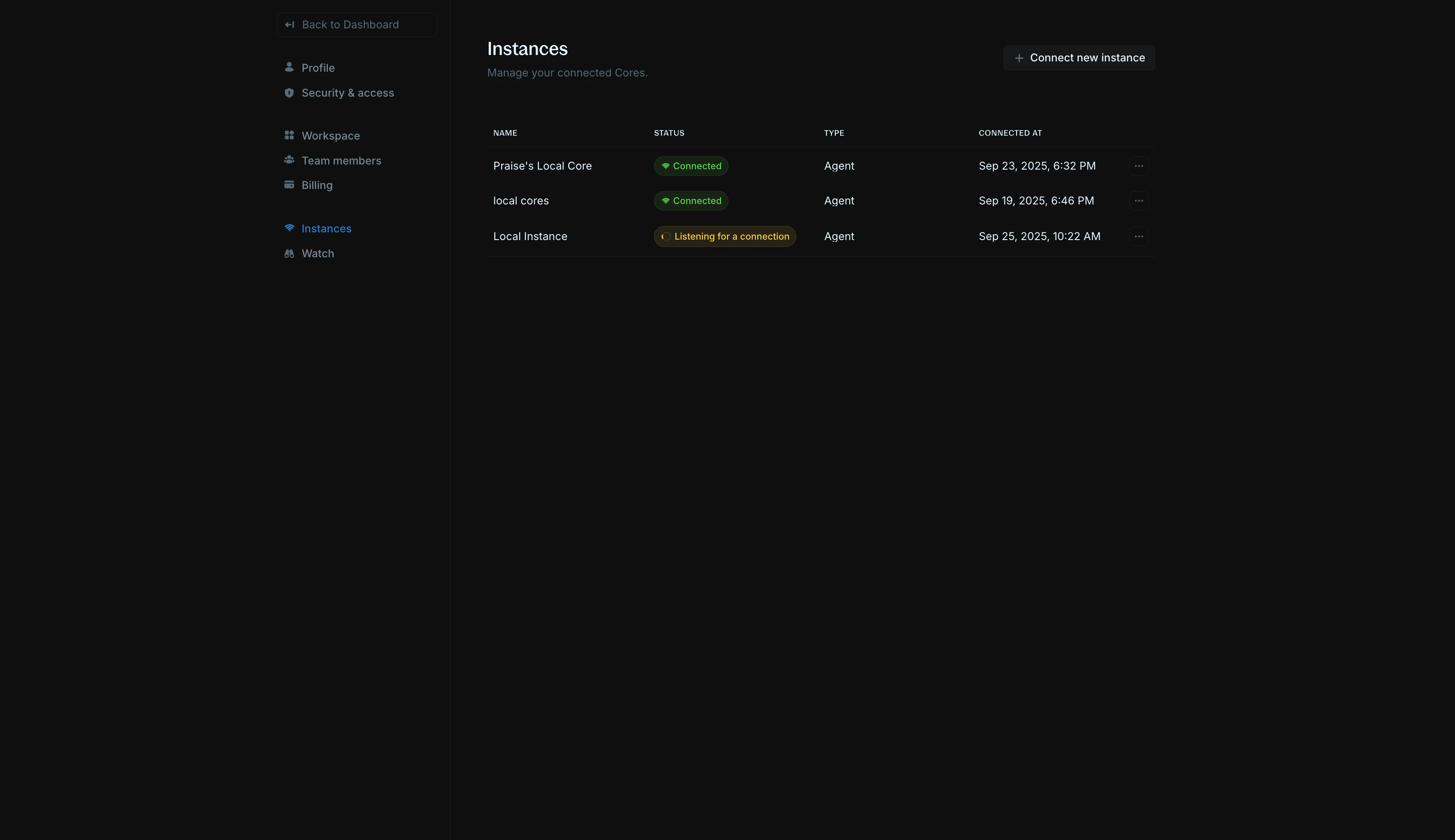
    1. In your Blnk Cloud workspace, go to `Settings > Instances`;
    2. Click `Connect new instance`;
    3. You'll see the instance creation form.
    <img src="https://mintcdn.com/blnk/JB9Zhph4DjE0VsHT/cloud/img/instances/instance-settings-page.png?fit=max&auto=format&n=JB9Zhph4DjE0VsHT&q=85&s=6ca0eca6cd799e25dc331987cc4eec90" alt="Settings > Instances page showing the Connect new instance button" className="rounded-lg" data-og-width="3388" width="3388" data-og-height="1956" height="1956" data-path="cloud/img/instances/instance-settings-page.png" data-optimize="true" data-opv="3" srcset="https://mintcdn.com/blnk/JB9Zhph4DjE0VsHT/cloud/img/instances/instance-settings-page.png?w=280&fit=max&auto=format&n=JB9Zhph4DjE0VsHT&q=85&s=bda2a89a2f40248b5cdb3d681b3f9b52 280w, https://mintcdn.com/blnk/JB9Zhph4DjE0VsHT/cloud/img/instances/instance-settings-page.png?w=560&fit=max&auto=format&n=JB9Zhph4DjE0VsHT&q=85&s=9bb41299d4a4e28f3c52cb99a975dfe4 560w, https://mintcdn.com/blnk/JB9Zhph4DjE0VsHT/cloud/img/instances/instance-settings-page.png?w=840&fit=max&auto=format&n=JB9Zhph4DjE0VsHT&q=85&s=49c09c38bc6482a24a17f2cba6e60f97 840w, https://mintcdn.com/blnk/JB9Zhph4DjE0VsHT/cloud/img/instances/instance-settings-page.png?w=1100&fit=max&auto=format&n=JB9Zhph4DjE0VsHT&q=85&s=45ee7743bd664dfad5216f5fe21670b0 1100w, https://mintcdn.com/blnk/JB9Zhph4DjE0VsHT/cloud/img/instances/instance-settings-page.png?w=1650&fit=max&auto=format&n=JB9Zhph4DjE0VsHT&q=85&s=02cd7d548a84e5b23bf3839244c5bffc 1650w, https://mintcdn.com/blnk/JB9Zhph4DjE0VsHT/cloud/img/instances/instance-settings-page.png?w=2500&fit=max&auto=format&n=JB9Zhph4DjE0VsHT&q=85&s=fa65736dd452440e33336b16cbba5d37 2500w" />
  </Step>

  <Step title="Provide instance details">
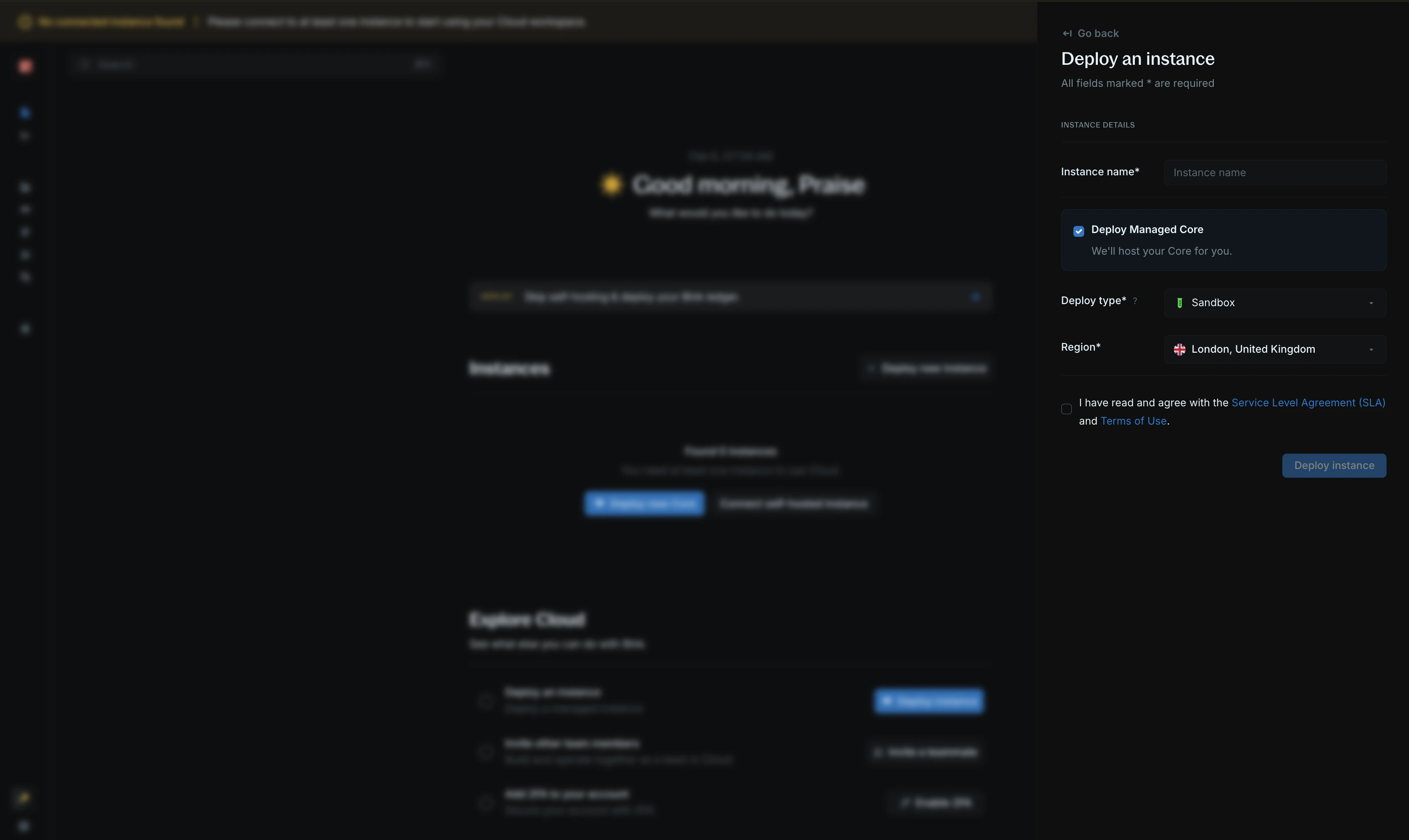
    Choose a descriptive name for your instance (e.g., "Production", "Staging"). Next, click on `Deploy managed Core.`
    <img src="https://mintcdn.com/blnk/JB9Zhph4DjE0VsHT/cloud/img/instances/managed-instance-form.png?fit=max&auto=format&n=JB9Zhph4DjE0VsHT&q=85&s=8919753cea65c35bc9f7c546e6037d40" alt="Instance creation form with Deploy managed Core option" className="rounded-lg" width="3392" height="2022" data-path="cloud/img/instances/managed-instance-form.png" />
  </Step>

  <Step title="Configure your managed Core">
    1. Select your [deployment type](#deployment-types).
    2. Select what region you want to deploy your instance to.
    3. Confirm that you agree with our SLA and terms of use.
    4. Click on `Deploy instance.`
  </Step>

  <Step title="Verify connection">
    It takes about 7 - 10 minutes to deploy your instance and get it ready for use.

    When it is ready, the connection status is updated to **Connected** and you can start using your instance.

    View the instance details to get your Core URL and secret key for making requests via the Core API.
  </Step>
</Steps>

***

## Direct DB access

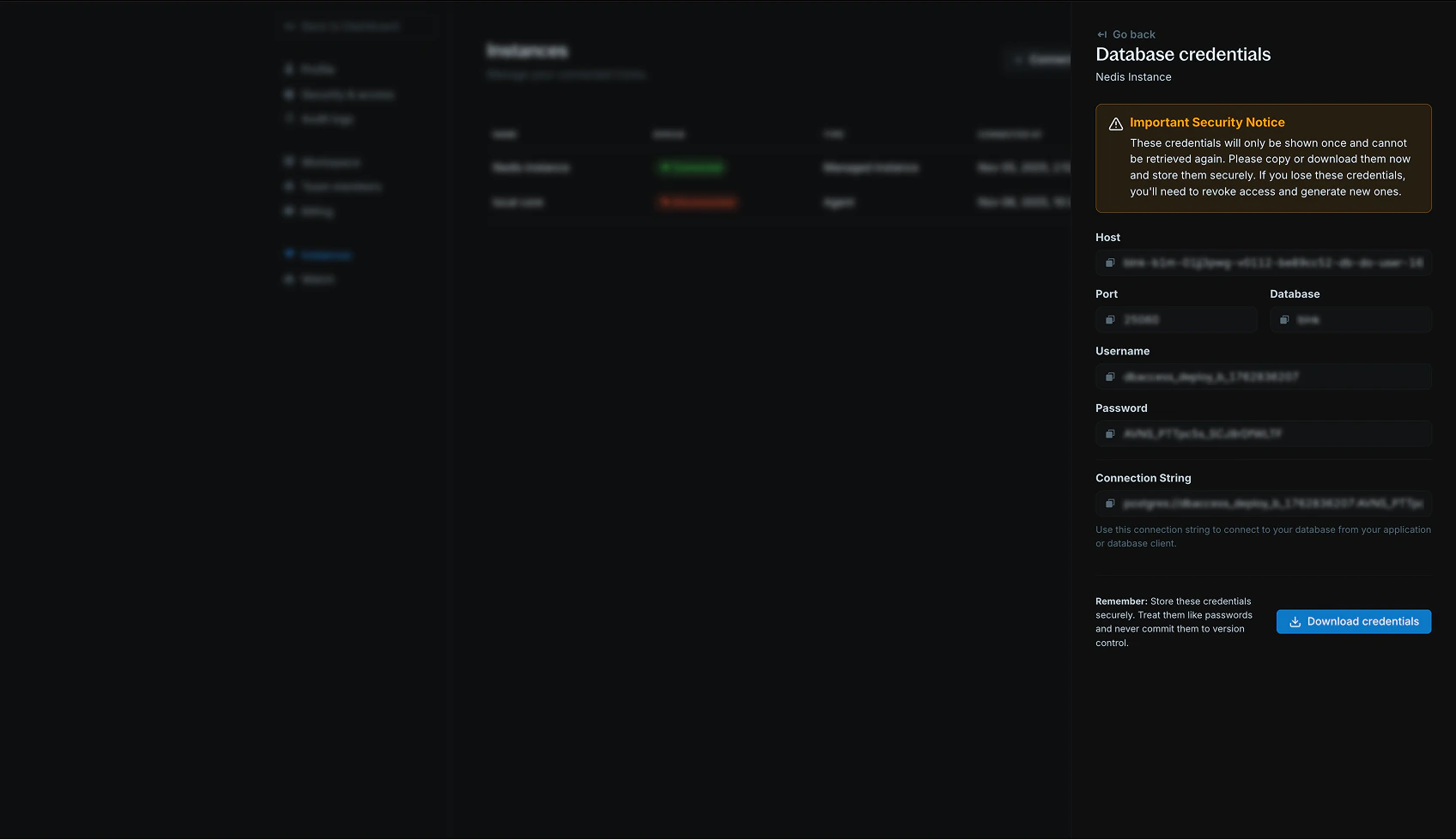
You can generate secure database credentials to connect analytics tools, perform backups, or export data directly from your managed instance.

<Info>
  Before generating DB credentials, you must [whitelist your IP address](/cloud/instances/whitelist) to ensure secure access to your instance database.
</Info>

<Warning>
  Make sure to keep this credentials safe. If compromised, you can revoke access from your Cloud dashboard and generate a new one.
</Warning>

<img src="https://mintcdn.com/blnk/JB9Zhph4DjE0VsHT/cloud/img/instances/direct-db-access.png?fit=max&auto=format&n=JB9Zhph4DjE0VsHT&q=85&s=460a4e11e03b162efd9f83d91e5a455f" alt="Generate direct DB access to your instance" className="rounded-lg" width="1696" height="979" data-path="cloud/img/instances/direct-db-access.png" />

***

## FAQs

<AccordionGroup>
  <Accordion title="I created a transaction, but it's not showing up in my workspace.">
    Records may take a few seconds to show up in your workspace. Please refresh and check again.
  </Accordion>

  <Accordion title="Can I export my data out of Blnk Deploy?">
    Yes. You can migrate from Blnk Deploy to your own infrastructure or connect your own analytics/backup tools. Only admins can generate secure credentials to access or download data.
  </Accordion>
</AccordionGroup>

***

## Need help?

We are very happy to help you make the most of Blnk, regardless of whether it is your first time or you are switching from another tool.

To ask questions or discuss issues, please [contact us](mailto:support@blnkfinance.com) or [join our Discord community](https://discord.gg/7WNv94zPpx).

<CtaCallout title="Need help with your product?" href="https://blnkfinance.com/contact/us?utm_source=blnk_docs&utm_medium=documentation&utm_campaign=home%2Finstall" buttonLabel="Speak with us" trackingEvent="clicked_pro_support">
  Get dedicated support for architecture reviews, integration planning, ledger workflows, and production deployment.
</CtaCallout>
