> ## Documentation Index
> Fetch the complete documentation index at: https://docs.blnkfinance.com/llms.txt
> Use this file to discover all available pages before exploring further.
# Branching
> Learn how to create branch instances from your main instance with point-in-time restore.
export const CtaCallout = props => {
const {title, buttonLabel, href, trackingEvent, buttonTarget, rel = "noopener noreferrer", children} = props;
const handleCtaClick = () => {
if (typeof window === "undefined" || !trackingEvent) {
return;
}
try {
window.dispatchEvent(new CustomEvent("blnk:docs-cta", {
detail: {
name: trackingEvent,
href
}
}));
} catch {}
try {
window.posthog?.capture?.(trackingEvent, {
href
});
} catch {}
const gaPayload = {
cta_href: href
};
try {
window.gtag?.("event", trackingEvent, gaPayload);
} catch {}
try {
window.dataLayer = window.dataLayer || [];
window.dataLayer.push({
event: trackingEvent,
...gaPayload
});
} catch {}
};
const isExternal = typeof href === "string" && (/^https?:\/\//i).test(href);
const target = buttonTarget ?? (isExternal ? "_blank" : undefined);
const linkRel = isExternal ? rel : undefined;
return ;
};
Branching allows you to create isolated copies of your existing instances. This is useful for testing, staging environments, or creating data snapshots without affecting your main instance.
When you branch an instance, the new instance comes prefilled with data from the parent instance at a specific point in time.
***
## Branch an instance
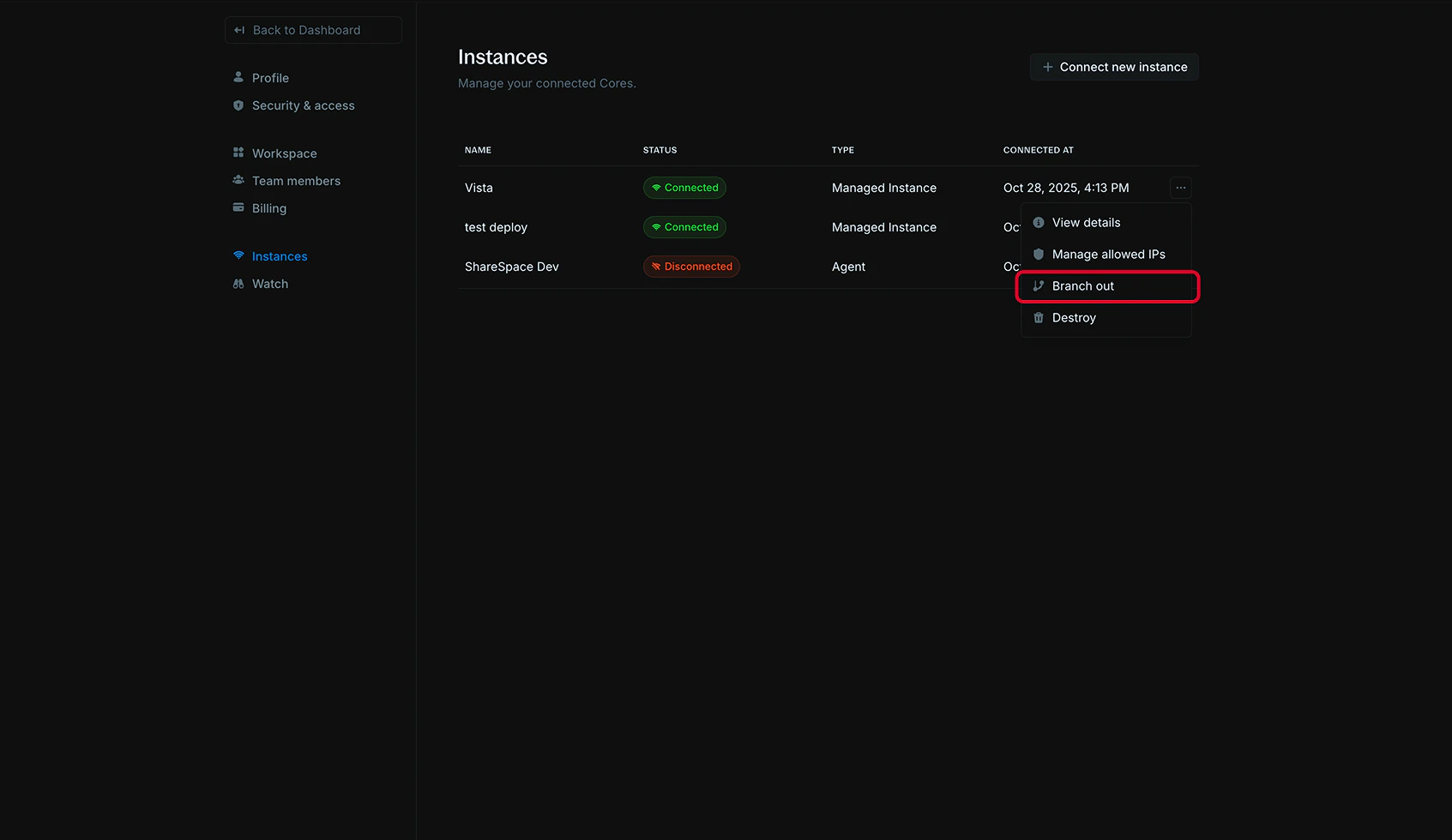
1. In your Blnk Cloud workspace, go to `Settings > Instances`;
2. Find the instance you want to branch from;
3. Click the actions menu (three dots) next to the instance;
4. Click `Branch out`.
 1. Enter a descriptive **Instance name** for your branch (e.g., "Production - Test", "Staging - Feature X");
2. Optionally, select a `Restore point` to create the branch from a specific point in time:
* Use the date picker to select a date (up to 7 days back);
* Use the time picker to select the exact time.
1. Enter a descriptive **Instance name** for your branch (e.g., "Production - Test", "Staging - Feature X");
2. Optionally, select a `Restore point` to create the branch from a specific point in time:
* Use the date picker to select a date (up to 7 days back);
* Use the time picker to select the exact time.
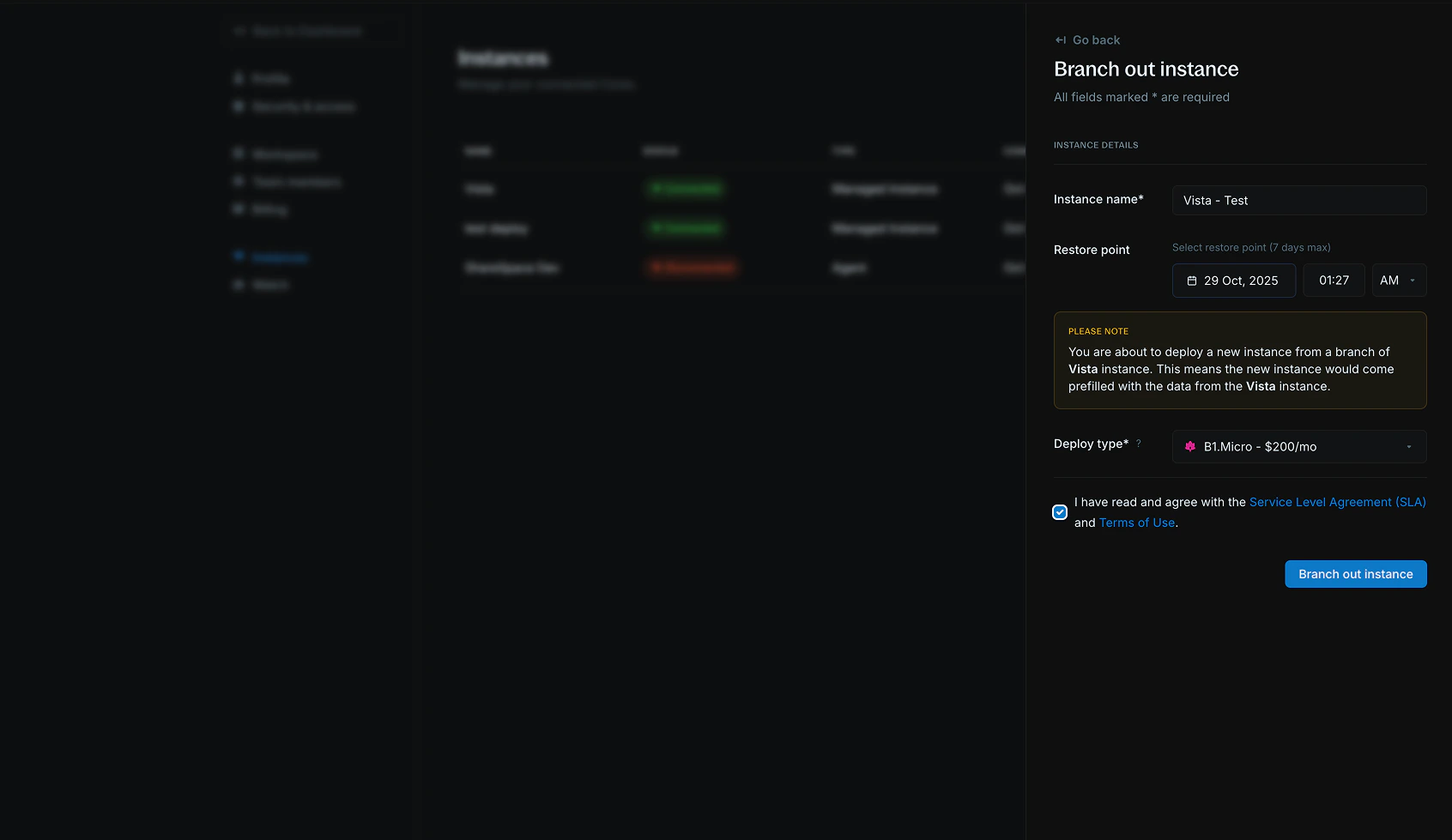 If you don't select a restore point, the branch will be created with the current data from the parent instance.
1. Select the `Deploy type` for your branch instance;
2. Click `Branch out instance`.
It takes about 7-10 minutes to create your branch instance. When ready, the connection status updates to `Connected` and you can start using your branched instance.
The new instance will appear in your `Settings > Instances` list with the name you provided.
Branch instances are billed separately from your main instance. Make sure to destroy unused branches to avoid unnecessary charges.
***
## Use cases
Branching is useful for a variety of scenarios where you need isolated copies of your instance data:
* `Test product launches in isolation:` Create a branch to test new features or product launches without affecting your main instance.
* **Run reconciliation:** Use branches to perform reconciliation processes on historical data without impacting live operations.
* `Create copies for other teams:` Share isolated instances with different teams for development, testing, or analysis purposes.
* **Run insights & analytics:** Generate reports and analytics on historical data without affecting your production environment.
* `Compliance auditing:` Create branches for compliance reviews and audits on historical data states.
* **Performance testing:** Run load tests and performance analysis on isolated copies of your production data.
* **Data migration validation:** Test data migration scripts and processes before applying them to production.
***
## Need help?
We are very happy to help you make the most of Blnk, regardless of whether it is your first time or you are switching from another tool.
To ask questions or discuss issues, please [contact us](mailto:support@blnkfinance.com) or [join our Discord community](https://discord.gg/7WNv94zPpx).
Get dedicated support for architecture reviews, integration planning, ledger workflows, and production deployment.
If you don't select a restore point, the branch will be created with the current data from the parent instance.
1. Select the `Deploy type` for your branch instance;
2. Click `Branch out instance`.
It takes about 7-10 minutes to create your branch instance. When ready, the connection status updates to `Connected` and you can start using your branched instance.
The new instance will appear in your `Settings > Instances` list with the name you provided.
Branch instances are billed separately from your main instance. Make sure to destroy unused branches to avoid unnecessary charges.
***
## Use cases
Branching is useful for a variety of scenarios where you need isolated copies of your instance data:
* `Test product launches in isolation:` Create a branch to test new features or product launches without affecting your main instance.
* **Run reconciliation:** Use branches to perform reconciliation processes on historical data without impacting live operations.
* `Create copies for other teams:` Share isolated instances with different teams for development, testing, or analysis purposes.
* **Run insights & analytics:** Generate reports and analytics on historical data without affecting your production environment.
* `Compliance auditing:` Create branches for compliance reviews and audits on historical data states.
* **Performance testing:** Run load tests and performance analysis on isolated copies of your production data.
* **Data migration validation:** Test data migration scripts and processes before applying them to production.
***
## Need help?
We are very happy to help you make the most of Blnk, regardless of whether it is your first time or you are switching from another tool.
To ask questions or discuss issues, please [contact us](mailto:support@blnkfinance.com) or [join our Discord community](https://discord.gg/7WNv94zPpx).
Get dedicated support for architecture reviews, integration planning, ledger workflows, and production deployment.