> ## Documentation Index
> Fetch the complete documentation index at: https://docs.blnkfinance.com/llms.txt
> Use this file to discover all available pages before exploring further.
# Balance Details
> See how to navigate the balances details page.
export const CtaCallout = props => {
const {title, buttonLabel, href, trackingEvent, buttonTarget, rel = "noopener noreferrer", children} = props;
const handleCtaClick = () => {
if (typeof window === "undefined" || !trackingEvent) {
return;
}
try {
window.dispatchEvent(new CustomEvent("blnk:docs-cta", {
detail: {
name: trackingEvent,
href
}
}));
} catch {}
try {
window.posthog?.capture?.(trackingEvent, {
href
});
} catch {}
const gaPayload = {
cta_href: href
};
try {
window.gtag?.("event", trackingEvent, gaPayload);
} catch {}
try {
window.dataLayer = window.dataLayer || [];
window.dataLayer.push({
event: trackingEvent,
...gaPayload
});
} catch {}
};
const isExternal = typeof href === "string" && (/^https?:\/\//i).test(href);
const target = buttonTarget ?? (isExternal ? "_blank" : undefined);
const linkRel = isExternal ? rel : undefined;
return ;
};
The Balance details page gives you a complete view of a balance - including its amount, currency, owner, health, and all related activity.
## Summary section
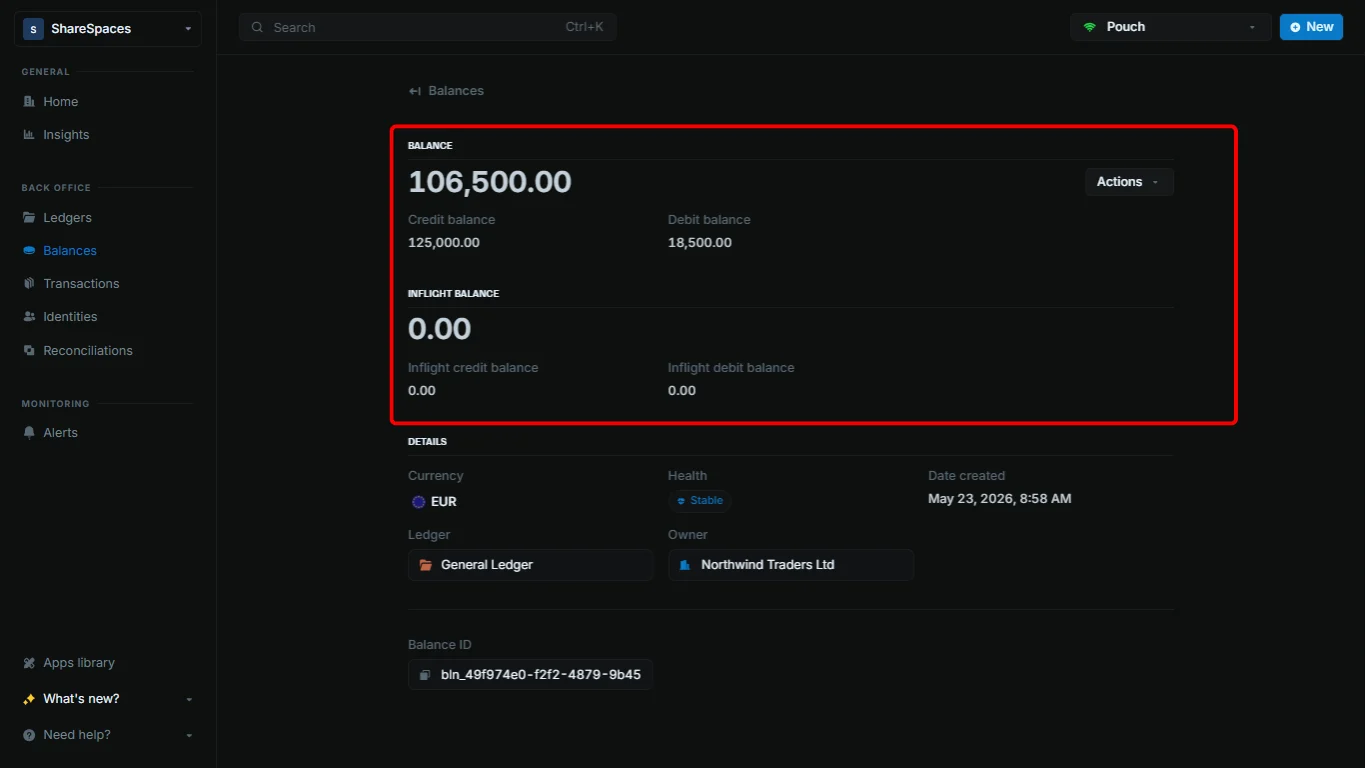
At the top, you'll see your balances:
 | Balance fields | Description |
| :---------------------- | :---------------------------------------------------------------- |
| Balance | The current amount held by your balance. |
| Credit balance | The total amount that has been added to your balance. |
| Debit balance | The total amount that has been deducted from your balance. |
| Inflight balance | The net amount waiting to be added or deducted from your balance. |
| Inflight credit balance | The amount waiting to be added to your balance. |
| Inflight debit balance | The amount waiting to be deducted from your balance. |
Next, you can view other key details like:
| Details | Description |
| :----------- | :----------------------------------------------------------------------------------- |
| Currency | The currency of the balance. |
| Health | The health of the balance. |
| Ledger | The ledger the balance belongs to. |
| Owner | The identity the balance is linked to or its indicator if it is an internal balance. |
| Date created | The date and time the balance was created. |
| Balance ID | The unique identifier for the balance. |
***
## Transaction section
You can view all transactions performed on the balance. We display the last 10 transactions by default. To view more, click `View all transactions` to open the full table.
| Balance fields | Description |
| :---------------------- | :---------------------------------------------------------------- |
| Balance | The current amount held by your balance. |
| Credit balance | The total amount that has been added to your balance. |
| Debit balance | The total amount that has been deducted from your balance. |
| Inflight balance | The net amount waiting to be added or deducted from your balance. |
| Inflight credit balance | The amount waiting to be added to your balance. |
| Inflight debit balance | The amount waiting to be deducted from your balance. |
Next, you can view other key details like:
| Details | Description |
| :----------- | :----------------------------------------------------------------------------------- |
| Currency | The currency of the balance. |
| Health | The health of the balance. |
| Ledger | The ledger the balance belongs to. |
| Owner | The identity the balance is linked to or its indicator if it is an internal balance. |
| Date created | The date and time the balance was created. |
| Balance ID | The unique identifier for the balance. |
***
## Transaction section
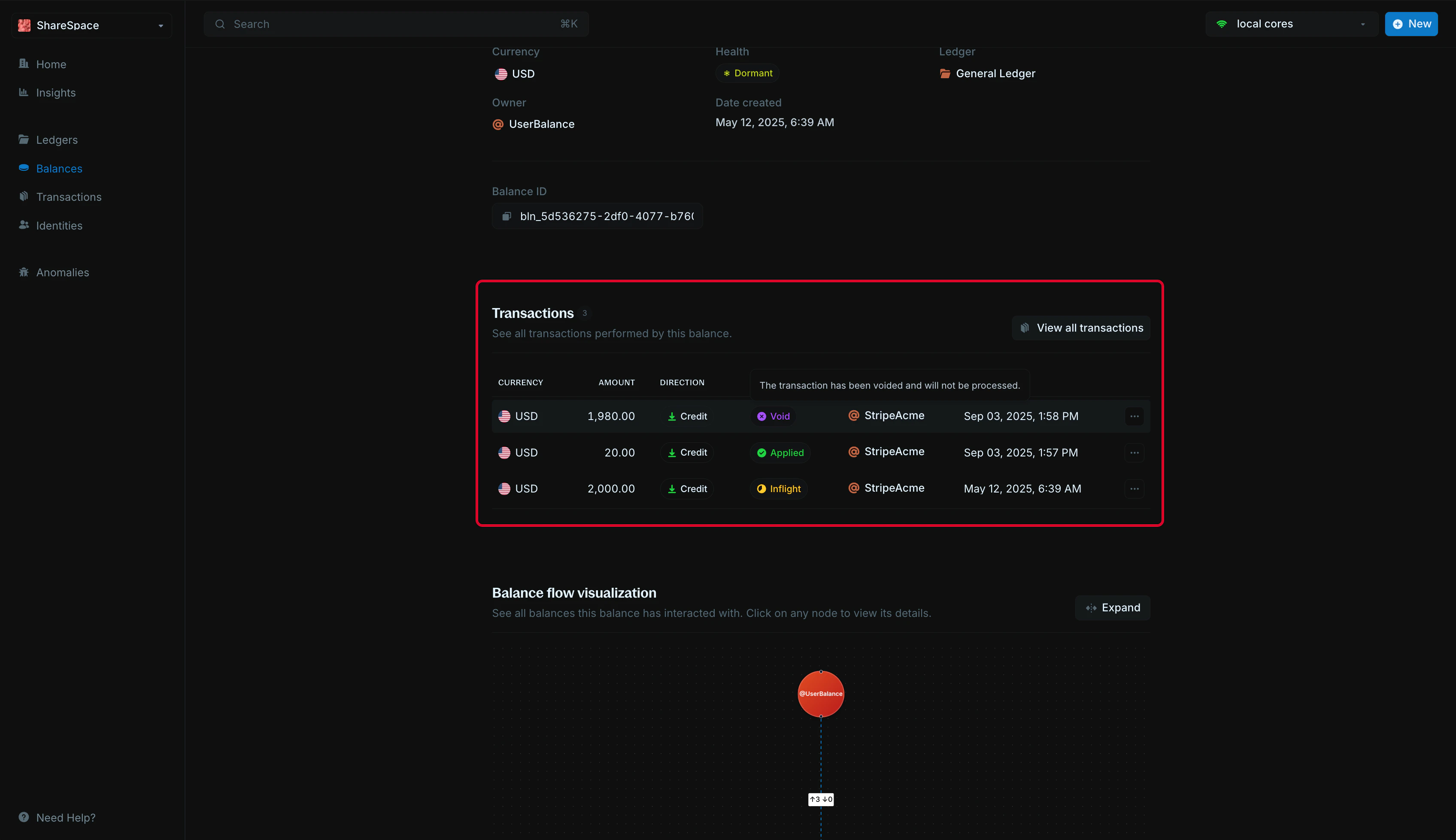
You can view all transactions performed on the balance. We display the last 10 transactions by default. To view more, click `View all transactions` to open the full table.
 | Columns | Description |
| :------------- | :-------------------------------------------------------------------------------------------------------------- |
| Currency | The currency of the transaction. Recommended to be same as the balance's currency |
| Amount | The amount of the transaction. |
| Direction | `Credit` if the transaction is adding to the balance, `Debit` if the transaction is deducting from the balance. |
| Status | The status of the transaction. |
| Counterparty | The respective source or destination of the transaction. |
| Effective date | When the transaction happened. |
***
## Balance flow visualization
This graph helps you understand how money moves in and out of the balance. Each node represents another balance it has interacted with.
| Columns | Description |
| :------------- | :-------------------------------------------------------------------------------------------------------------- |
| Currency | The currency of the transaction. Recommended to be same as the balance's currency |
| Amount | The amount of the transaction. |
| Direction | `Credit` if the transaction is adding to the balance, `Debit` if the transaction is deducting from the balance. |
| Status | The status of the transaction. |
| Counterparty | The respective source or destination of the transaction. |
| Effective date | When the transaction happened. |
***
## Balance flow visualization
This graph helps you understand how money moves in and out of the balance. Each node represents another balance it has interacted with.
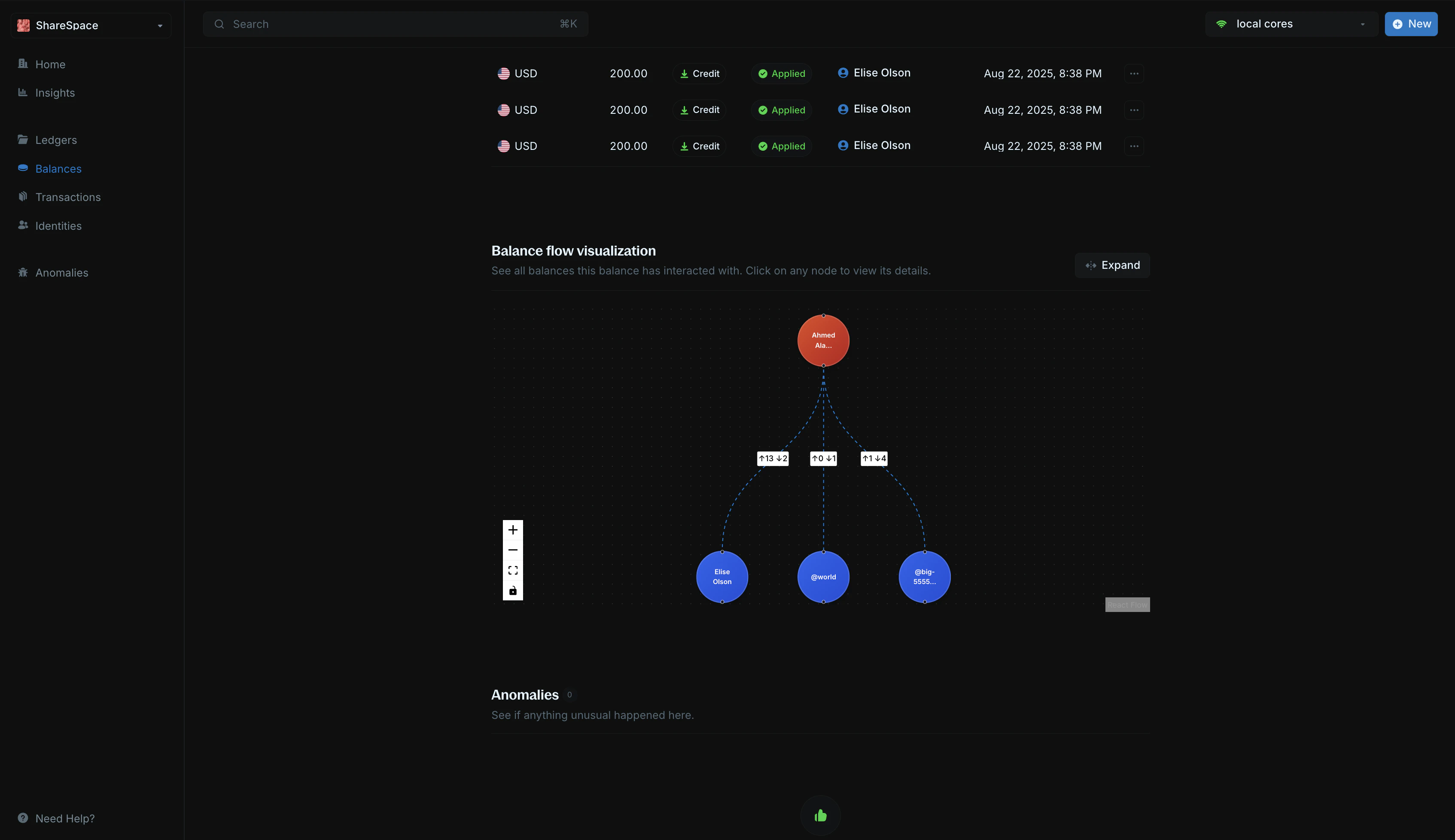 You can click on any node to view its details and expand the network.
***
## Metadata
The metadata section allows you to add custom information to your balance. You can store additional details, tags, or any other data that helps you organize and manage your balances.
### Edit metadata
To edit metadata:
You can click on any node to view its details and expand the network.
***
## Metadata
The metadata section allows you to add custom information to your balance. You can store additional details, tags, or any other data that helps you organize and manage your balances.
### Edit metadata
To edit metadata:
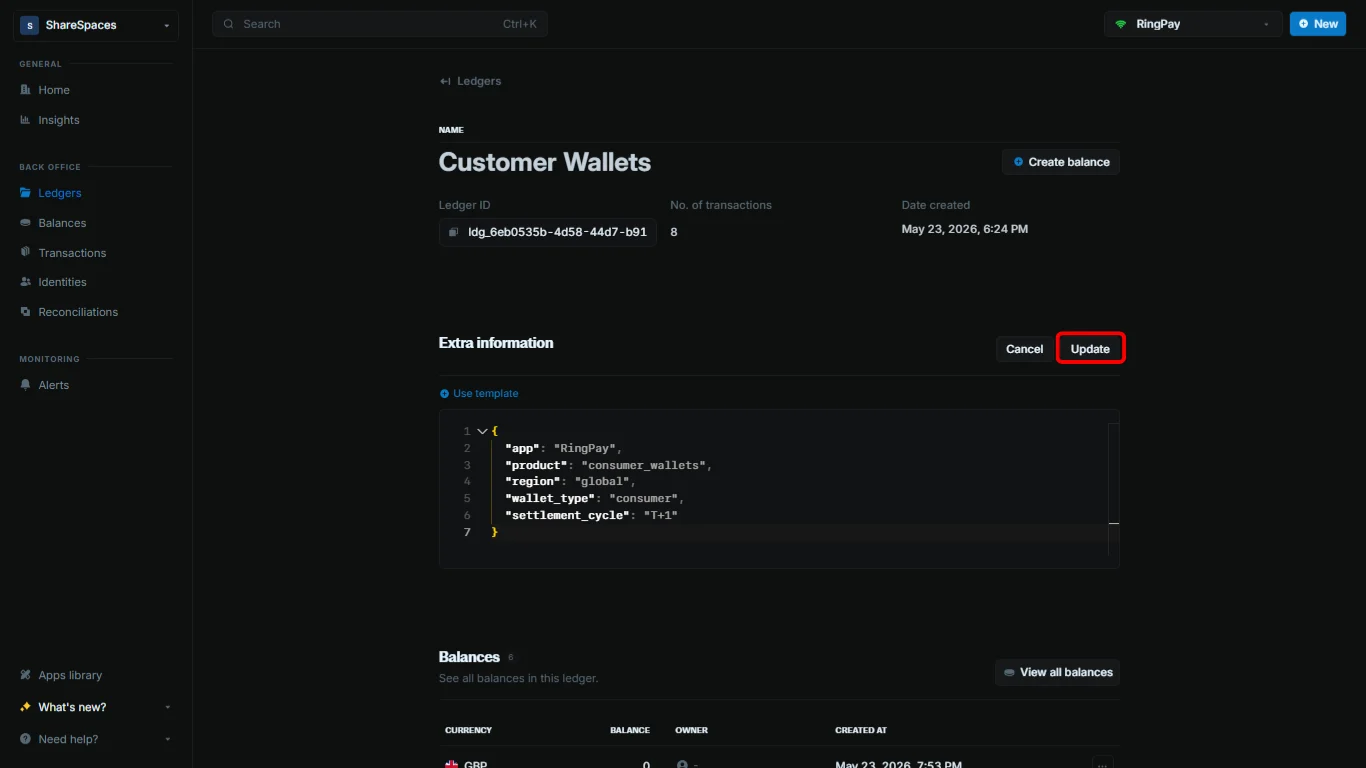
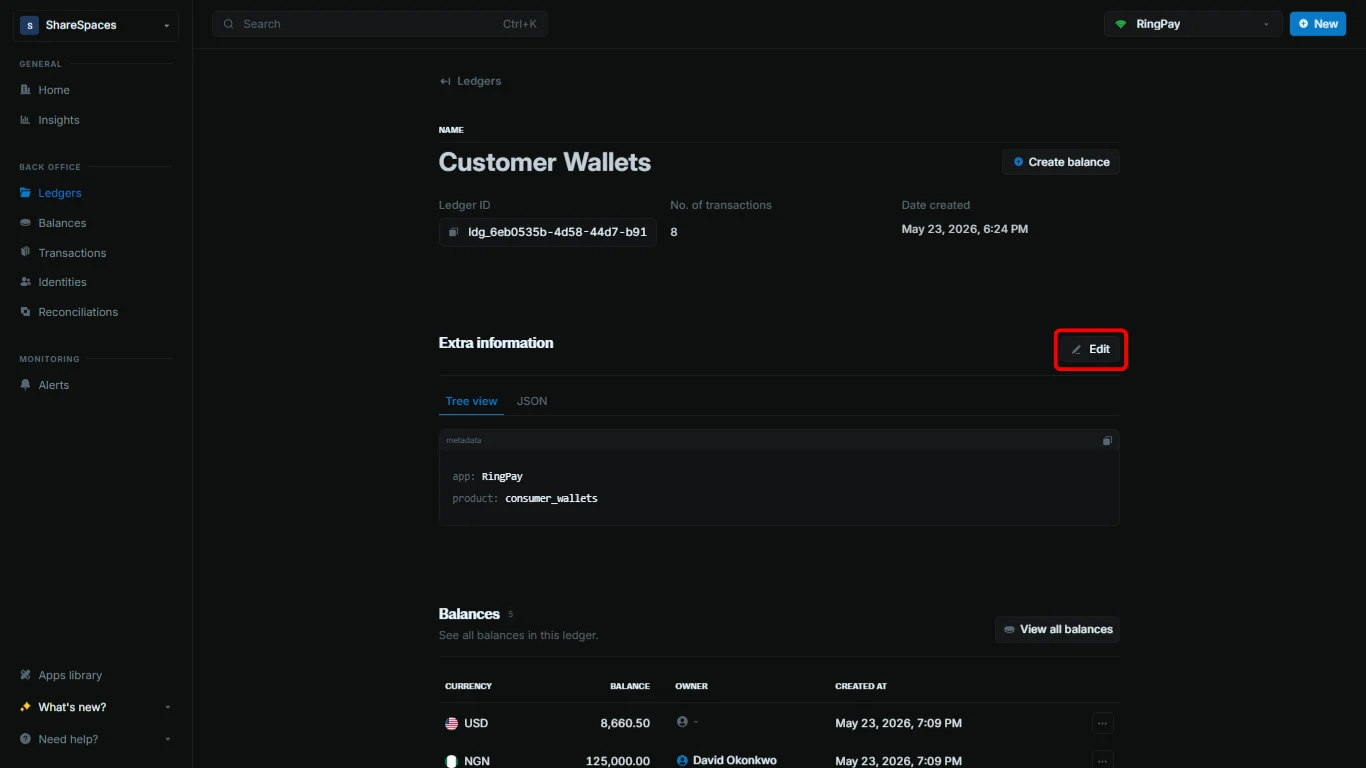 1. Navigate to the `Additional information` section.
2. Click the `Add` or `Edit` button at the top right of the section.
3. Use the code editor to add new metadata or update existing metadata.
4. Click `Update` to apply your changes.
1. Navigate to the `Additional information` section.
2. Click the `Add` or `Edit` button at the top right of the section.
3. Use the code editor to add new metadata or update existing metadata.
4. Click `Update` to apply your changes.
 When updating metadata, any fields you don't include in your update will remain unchanged. Blnk adds your new values to the existing metadata instead of deleting them. To remove a value, set it to an empty string.
***
## Need help?
We are very happy to help you make the most of Blnk, regardless of whether it is your first time or you are switching from another tool.
To ask questions or discuss issues, please [contact us](mailto:support@blnkfinance.com) or [join our Discord community](https://discord.gg/7WNv94zPpx).
Get dedicated support for architecture reviews, integration planning, ledger workflows, and production deployment.
When updating metadata, any fields you don't include in your update will remain unchanged. Blnk adds your new values to the existing metadata instead of deleting them. To remove a value, set it to an empty string.
***
## Need help?
We are very happy to help you make the most of Blnk, regardless of whether it is your first time or you are switching from another tool.
To ask questions or discuss issues, please [contact us](mailto:support@blnkfinance.com) or [join our Discord community](https://discord.gg/7WNv94zPpx).
Get dedicated support for architecture reviews, integration planning, ledger workflows, and production deployment.