> ## Documentation Index
> Fetch the complete documentation index at: https://docs.blnkfinance.com/llms.txt
> Use this file to discover all available pages before exploring further.

# Queue Monitoring

> Configure and use the queue monitoring port for Blnk server metrics.

export const CtaCallout = props => {
  const {title, buttonLabel, href, trackingEvent, buttonTarget, rel = "noopener noreferrer", children} = props;
  const handleCtaClick = () => {
    if (typeof window === "undefined" || !trackingEvent) {
      return;
    }
    try {
      window.dispatchEvent(new CustomEvent("blnk:docs-cta", {
        detail: {
          name: trackingEvent,
          href
        }
      }));
    } catch {}
    try {
      window.posthog?.capture?.(trackingEvent, {
        href
      });
    } catch {}
    const gaPayload = {
      cta_href: href
    };
    try {
      window.gtag?.("event", trackingEvent, gaPayload);
    } catch {}
    try {
      window.dataLayer = window.dataLayer || [];
      window.dataLayer.push({
        event: trackingEvent,
        ...gaPayload
      });
    } catch {}
  };
  const isExternal = typeof href === "string" && (/^https?:\/\//i).test(href);
  const target = buttonTarget ?? (isExternal ? "_blank" : undefined);
  const linkRel = isExternal ? rel : undefined;
  return <section className="cta-callout not-prose relative my-8 w-full min-w-0 overflow-hidden rounded-xl border border-zinc-200 p-5 dark:border-white/10">
      <div className="cta-callout-noise" aria-hidden="true" />
      <div className="cta-callout-layout">
        {title ? <div className="cta-callout-title-row">
            <svg xmlns="http://www.w3.org/2000/svg" viewBox="0 0 28 28" width="14" height="14" className="cta-callout-icon shrink-0 text-zinc-800 dark:text-zinc-200" aria-hidden="true">
              <g fill="none" fillRule="nonzero">
                <path d="M28 0v28H0V0h28ZM14.691833333333335 27.134333333333334l-0.012833333333333334 0.0023333333333333335 -0.08283333333333333 0.04083333333333334 -0.023333333333333334 0.004666666666666667 -0.016333333333333335 -0.004666666666666667 -0.08283333333333333 -0.04083333333333334c-0.011666666666666667 -0.004666666666666667 -0.022166666666666668 -0.0011666666666666668 -0.028000000000000004 0.005833333333333334l-0.004666666666666667 0.011666666666666667 -0.019833333333333335 0.49933333333333335 0.005833333333333334 0.023333333333333334 0.011666666666666667 0.015166666666666667 0.12133333333333333 0.08633333333333333 0.0175 0.004666666666666667 0.014000000000000002 -0.004666666666666667 0.12133333333333333 -0.08633333333333333 0.014000000000000002 -0.018666666666666668 0.004666666666666667 -0.019833333333333335 -0.019833333333333335 -0.4981666666666667c-0.0023333333333333335 -0.011666666666666667 -0.0105 -0.019833333333333335 -0.019833333333333335 -0.021Zm0.3091666666666667 -0.13183333333333336 -0.015166666666666667 0.0023333333333333335 -0.21583333333333335 0.1085 -0.011666666666666667 0.011666666666666667 -0.0035000000000000005 0.012833333333333334 0.021 0.5016666666666667 0.005833333333333334 0.014000000000000002 0.009333333333333334 0.008166666666666668 0.23450000000000004 0.1085c0.014000000000000002 0.004666666666666667 0.026833333333333334 0 0.03383333333333334 -0.009333333333333334l0.004666666666666667 -0.016333333333333335 -0.03966666666666667 -0.7163333333333334c-0.0035000000000000005 -0.014000000000000002 -0.011666666666666667 -0.023333333333333334 -0.023333333333333334 -0.025666666666666667Zm-0.8341666666666667 0.0023333333333333335a0.026833333333333334 0.026833333333334334 0 0 0 -0.0315 0.007000000000000001l-0.007000000000000001 0.016333333333333335 -0.03966666666666667 0.7163333333333334c0 0.014000000000000002 0.008166666666666668 0.023333333333333334 0.019833333333333335 0.028000000000000004l0.0175 -0.0023333333333333335 0.23450000000000004 -0.1085 0.011666666666666667 -0.009333333333333334 0.004666666666666667 -0.012833333333333334 0.019833333333333335 -0.5016666666666667 -0.0035000000000000005 -0.014000000000000002 -0.011666666666666667 -0.011666666666666667 -0.21466666666666667 -0.10733333333333334Z" strokeWidth="1.1667" />
                <path fill="currentColor" d="M14 2.916666666666667A1.75 1.75 0 0 1 15.750000000000002 4.666666666666667v6.302333333333334L21.207666666666668 7.816666666666667a1.75 1.75 0 0 1 1.75 3.031L17.5 14l5.457666666666667 3.151166666666667a1.75 1.75 0 0 1 -1.75 3.031l-5.457666666666667 -3.1500000000000004V23.333333333333336a1.75 1.75 0 0 1 -3.5 0v-6.302333333333334L6.792333333333334 20.183333333333337a1.75 1.75 0 1 1 -1.75 -3.031L10.5 14 5.042333333333334 10.848833333333333a1.75 1.75 0 0 1 1.75 -3.031l5.457666666666667 3.1500000000000004V4.666666666666667A1.75 1.75 0 0 1 14 2.916666666666667Z" strokeWidth="1.1667" />
              </g>
            </svg>
            <p className="cta-callout-title min-w-0 font-semibold text-zinc-800 dark:text-zinc-200">
              {title}
            </p>
          </div> : null}
        <div className={`cta-callout-body text-sm leading-normal text-zinc-800 dark:text-zinc-200${title ? " cta-callout-body--indented" : ""}`}>
          {children}
        </div>
        <a href={href} target={target} rel={linkRel} onClick={handleCtaClick} data-docs-cta={trackingEvent || undefined} className="cta-callout-button inline-flex items-center justify-center gap-1 rounded-full bg-white px-3 py-1.5 text-sm font-semibold transition hover:bg-zinc-100 focus-visible:outline focus-visible:outline-2 focus-visible:outline-offset-2 focus-visible:outline-white/50 dark:bg-white dark:hover:bg-zinc-200">
          {buttonLabel}
          <span className="cta-callout-button-arrow" aria-hidden="true">
            →
          </span>
        </a>
      </div>
    </section>;
};

<Info>Available in version 0.10.3 and later.</Info>

The **queue monitoring port** allows you to expose internal queue metrics and monitoring endpoints for your Blnk server. This is useful for operational dashboards, health checks, and integration with monitoring tools (such as Prometheus, Grafana, or custom dashboards).

### Example configuration

```json blnk.json theme={"system"}
{
  "queue": {
    "monitoring_port": "5004"
  }
}
```

* **Environment variable:** `BLNK_QUEUE_MONITORING_PORT`
* **Dashboard URL:** Visit `http://localhost:5004/monitoring` in your browser to access the real-time monitoring dashboard.

***

## Web Dashboard

The dashboard provides a visual overview of your queue system:
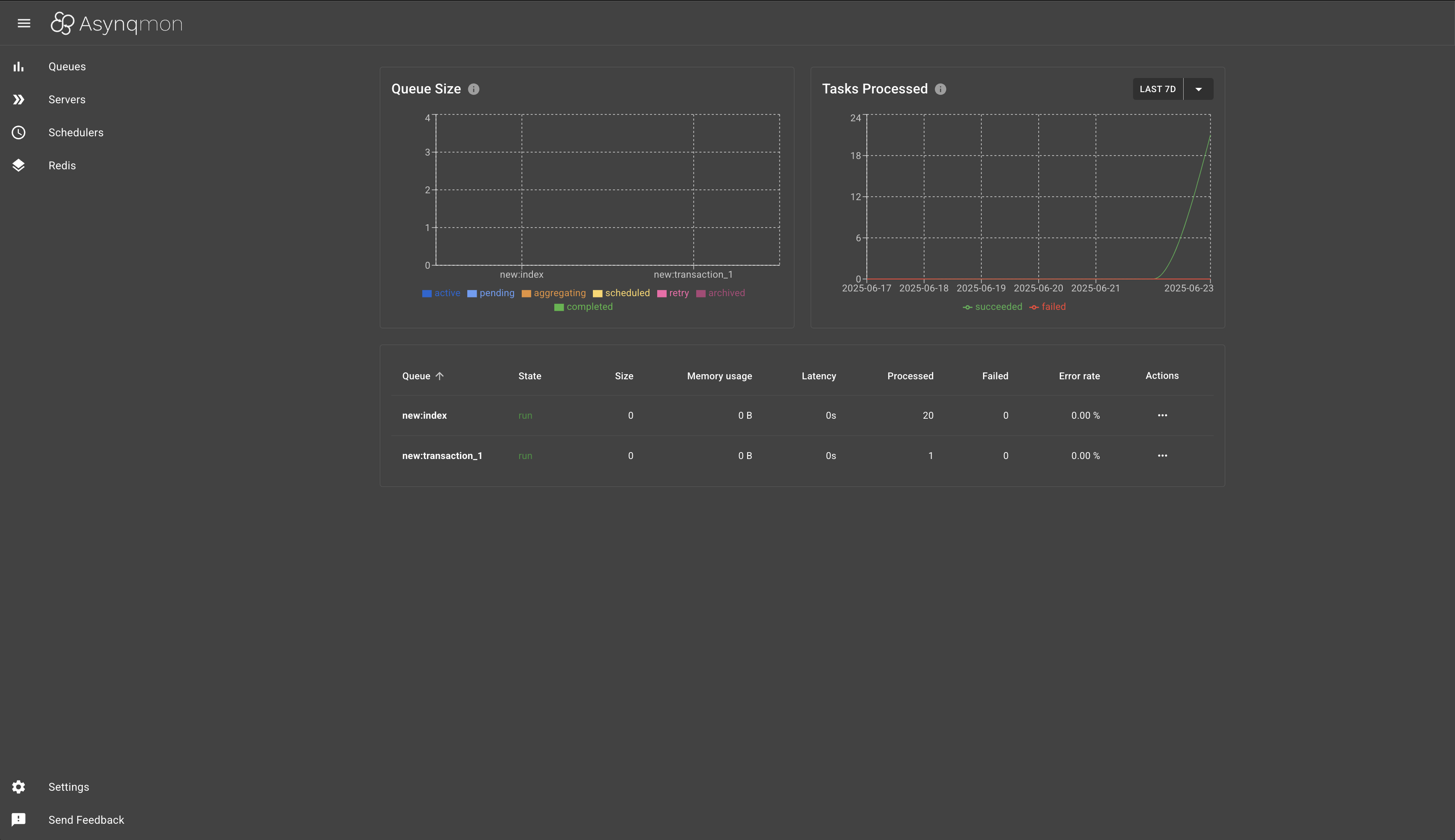
<Frame caption="Queue Monitoring Dashboard">
  <img src="https://mintcdn.com/blnk/dat3WexQx5twNo5Q/images/queue-monitoring-dashboard.png?fit=max&auto=format&n=dat3WexQx5twNo5Q&q=85&s=a30e5faaf7cfca1ed4093d665bab2dfb" alt="Queue Monitoring Dashboard" width="3394" height="1960" data-path="images/queue-monitoring-dashboard.png" />
</Frame>

| Feature         | Description                                                                                                                                |
| :-------------- | :----------------------------------------------------------------------------------------------------------------------------------------- |
| Queue Size      | Visualizes the number of tasks in each queue, broken down by status (active, pending, aggregating, scheduled, retry, archived, completed). |
| Tasks Processed | Shows a graph of succeeded and failed tasks over time.                                                                                     |
| Queue Table     | Lists all queues with their current state, size, memory usage, latency, processed/failed counts, and error rates.                          |
| Actions         | Provides controls for queue management and inspection.                                                                                     |

This dashboard helps operators and developers monitor queue activity, track performance, and troubleshoot issues visually.

## Need help?

We are very happy to help you make the most of Blnk, regardless of whether it is your first time or you are switching from another tool.

To ask questions or discuss issues, please [contact us](mailto:support@blnkfinance.com) or [join our Discord community](https://discord.gg/7WNv94zPpx).

<CtaCallout title="Connect your ledger to Blnk Cloud" href="https://cloud.blnkfinance.com/auth/sign-up?utm_source=blnk_docs&utm_medium=documentation&utm_campaign=need-help" buttonLabel="Open Blnk Cloud" trackingEvent="clicked_cloud_signup">
  Sign up and manage your ledger with our back-office dashboard. You can invite teammates to collaborate and manage your ledger operations directly from the dashboard.
</CtaCallout>
